
1.Overview
The Roku Select Series HD TV provides a streamlined entertainment experience. This 32-inch 720p HD television integrates the Roku operating system for easy access to streaming content, live TV, and various applications. It features a voice remote for convenient control and includes technologies like Bluetooth Headphone Mode and Dolby Audio for enhanced sound.
Nøglefunktioner
- Seamless Streaming: Fast Wi-Fi and quick app launches for immediate entertainment access.
- Extensive Content: Access to thousands of streaming apps, free movies, shows, and live TV channels.
- Tilpasset startskærm: Organize apps and content for personalized viewing.
- Automatiske softwareopdateringer: Ensures access to the latest features and applications.
- Smart Home Integration: Compatible with Roku Voice, Siri, Alexa, and Google Assistant for voice control. Supports Apple AirPlay for content sharing.
- Clear HD Picture: 720p HD resolution with Roku Smart Picture technology for optimized visuals.
- Stemmefjernbetjening: Search, play, and control streaming with voice commands.
- Forbedret lyd: Designed for clear speech and louder sound with Dolby Audio technology.
- Bluetooth Headphone Mode: Private listening with wireless headphones.

Image: Roku 32-inch Select Series HD Smart TV with included remote control.
2. Hvad er der i æsken
Bekræft, at alle komponenter er til stede, før du fortsætter med opsætningen.
- Roku Select Series 32" HD TV
- Stands and screws
- Roku Voice Remote with batteries (2 AAA)
- Strømkabel
- Brugervejledning (dette dokument)

Image: Contents of the Roku Select Series TV packaging.
3. Opsætning
3.1 Udpakning
Tag forsigtigt tv'et og alt tilbehør ud af emballagen. Gem emballagen til senere transport eller service.
3.2 Montering af stativet
- Placer tv-skærmen med nedad på en blød, ren overflade for at forhindre ridser.
- Juster tv-standerne med skruehullerne i bunden af tv'et.
- Fastgør stativerne med de medfølgende skruer. Sørg for, at de er spændt godt fast.
3.3 Tilslutning af eksterne enheder
Tilslut dine enheder til de relevante porte på bagsiden af tv'et.
- HDMI: Connect up to three HDMI devices (e.g., cable box, gaming console, Blu-ray player) to the HDMI ports.
- USB: Use the USB port for media playback or connecting compatible accessories.
- Optisk (S/PDIF): Til tilslutning til et eksternt lydsystem.
- Strømkabel: Tilslut strømkablet til tv'et og derefter til en stikkontakt.
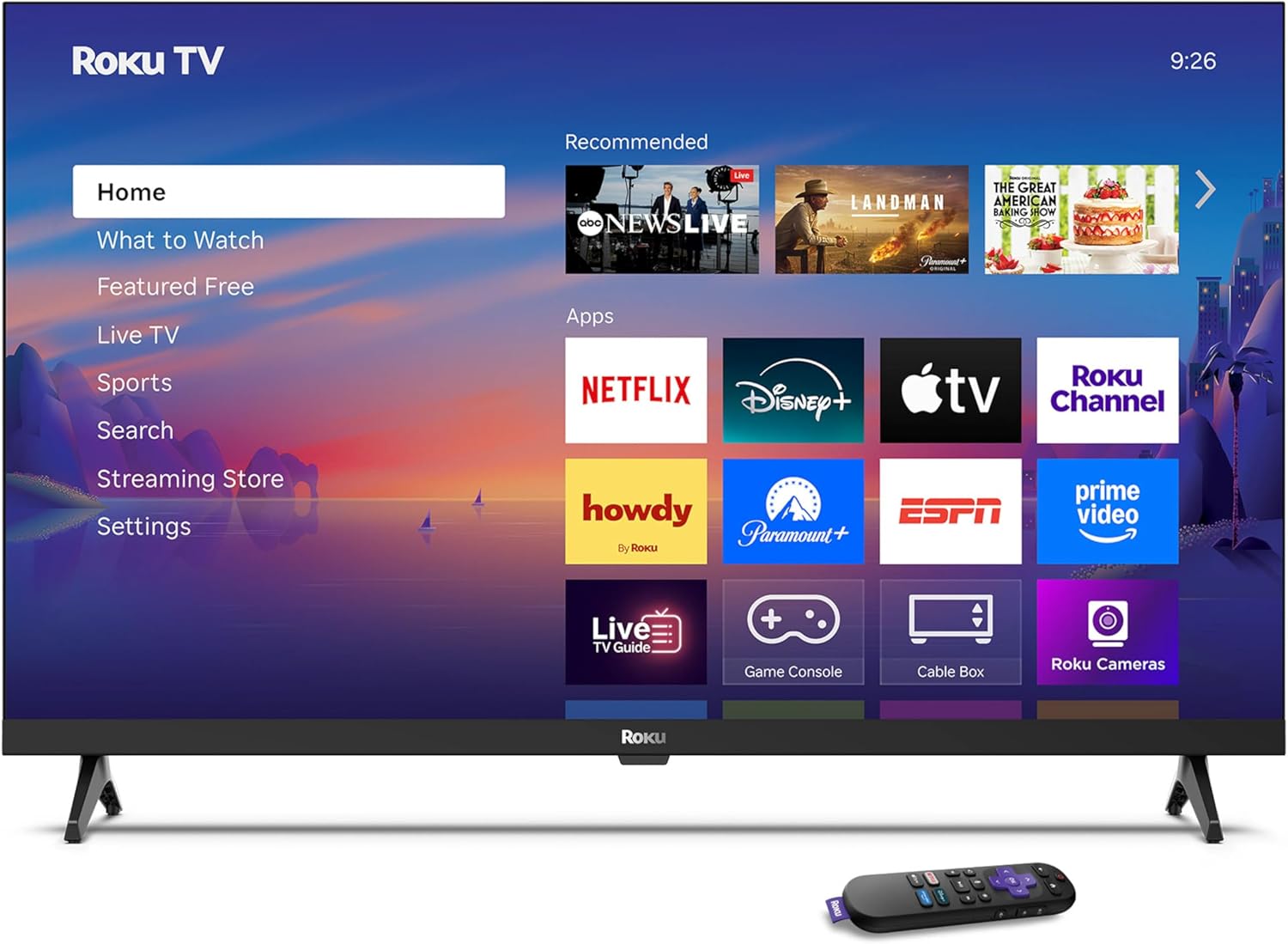
Image: Rear panel connections including HDMI, USB, and optical ports.
3.4 Første opstart og netværksforbindelse
- Plug in the TV and press the power button on the remote or TV.
- Følg instruktionerne på skærmen for at vælge dit sprog og oprette forbindelse til dit Wi-Fi-netværk.
- Activate your Roku account or create a new one.
Video: En overview of the Roku TV operating system, demonstrating its user interface and features. This video is provided by Roku, Inc.
4. Betjeningsvejledning
4.1 Brug af stemmefjernbetjeningen
The Roku Voice Remote allows for intuitive control of your TV and streaming content.
- Stemmesøgning: Press and hold the voice button and speak your command to search for content, launch apps, or control playback.
- Navigation: Brug retningsknappen til at navigere gennem menuer og vælge elementer.
- App-genveje: Dedikerede knapper giver hurtig adgang til populære streamingtjenester.

Image: Features of the Roku Voice Remote, highlighting voice control and shortcut buttons.
4.2 Navigering på startskærmen
The Roku Home Screen provides access to all your installed apps, inputs, and settings.
- Hjem: Returns you to the main home screen.
- Hvad skal du se: Discover recommended content.
- Live tv: Access free live television channels.
- Streamingbutik: Browse and add new streaming channels.
- Indstillinger: Adjust TV and system preferences.

Image: The Roku TV home screen interface.
4.3 Adjusting Picture and Sound Settings
Tilpas din viewlytteoplevelsen via indstillingsmenuen.
- Billedtilstand: Select from predefined modes like Standard, Vivid, Sports, or Movie. Roku Smart Picture automatically optimizes settings.
- Lydtilstand: Vælg lyd profiles or enable features like Night Mode for reduced volume fluctuations.
- Bluetooth Headphone Mode: Pair your wireless headphones for private audio.

Image: Picture mode settings on the Roku TV.

Image: Bluetooth Headphone Mode in use.

Image: Dolby Audio technology for clear sound.
5. Vedligeholdelse
5.1 Rengøring af skærmen
For at rengøre tv-skærmen skal du forsigtigt tørre den af med en blød, tør og fnugfri klud. Tør den forsigtigt af med en blød, tør og fnugfri klud, hvis du har genstridige pletter.ampRengør kluden med vand eller en skærmsikker rengøringsopløsning. Undgå at bruge skrappe kemikalier eller slibende materialer.
5.2 Softwareopdateringer
Dit Roku TV modtager automatisk softwareopdateringer, når det er forbundet til internettet. Disse opdateringer giver nye funktioner, forbedret ydeevne og fejlrettelser. Sørg for, at dit TV forbliver forbundet til internettet for optimal ydeevne.
6. Fejlfinding
If you encounter issues with your Roku TV, refer to the following common solutions:
- Ingen strøm: Sørg for, at strømkablet er korrekt tilsluttet både tv'et og en fungerende stikkontakt. Prøv en anden stikkontakt.
- Intet billede/lyd: Verify that the correct input source is selected. Check all cable connections (HDMI, audio). Restart the TV by unplugging it for 30 seconds and plugging it back in.
- Fjernbetjeningen virker ikke: Replace the AAA batteries in the remote. Ensure there are no obstructions between the remote and the TV. For voice remote issues, re-pair the remote if necessary (refer to Roku support for specific steps).
- Problemer med netværksforbindelse: Restart your Wi-Fi router and modem. Go to the TV's settings menu, then Network, and try reconnecting to your Wi-Fi network.
- App Not Loading/Crashing: Try restarting the app. If the issue persists, remove the app from the home screen, restart the TV, and then re-add the app from the Streaming Store.
7. Specifikationer
| Feature | Detalje |
|---|---|
| Skærmstørrelse | 32 tommer |
| Displayteknologi | LED |
| Opløsning | 720p |
| Opdateringshastighed | 60 Hz |
| Særlige funktioner | Bluetooth Headphone Mode, Dolby Audio, Voice Remote |
| Forbindelsesteknologi | Bluetooth, WiFi |
| Total HDMI-porte | 3 |
| Samlet USB-porte | 1 |
| Lydindgang | HDMI |
| Operativsystem | Roku OS |
| Monteringstype | Bordmontering, vægmontering |
| VESA-monteringsstandard | 200 x 200 mm |
| Produktmål (D x B x H) | 7" D x 28.3" B x 18.3" H |
| Varens vægt | 7.5 pund |
| Modelnummer | 32R2D5 |
| UPC | 829610008974 |
8. Garantioplysninger
8.1 Begrænset garanti
Roku warrants the hardware against defects in materials and workmanship under normal use for a period of one (1) year from the date of purchase ("Warranty Period"). If Roku determines that the device’s hardware is defective during the Warranty Period, Roku’s sole obligation, and your exclusive remedy, will be to either repair or replace the unit with either a new or rebuilt device, at its option. This warranty applies if the product is used in accordance with the provided documentation.
8.2 Returneringspolitik
You may return a device for any reason:
- Within thirty (30) days from the date of purchase from Roku.
- Within the applicable return period if purchased from an authorized reseller or distributor.
Additional details regarding product returns can be found on the Roku support site.
9. Support
For further assistance, troubleshooting guides, and frequently asked questions, please visit the official Roku support webwebsted: