
1. Introduktion
This manual provides detailed instructions for the setup, operation, and maintenance of your HISTTON H4-T Industrial Mini PC. Please read this manual thoroughly before using the device to ensure proper functionality and safety.
2. Sikkerhedsoplysninger
- Sørg for, at strømforsyningen voltage matcher enhedskravene.
- Udsæt ikke enheden for fugt, ekstreme temperaturer eller direkte sollys.
- Undgå at blokere ventilationsåbninger.
- Forsøg ikke at åbne eller reparere enheden selv. Kontakt kvalificeret servicepersonale.
- Hold enheden væk fra stærke magnetiske felter.
3. Pakkens indhold
Bekræft at alle varer er til stede i pakken:
- 1 x HISTTON Mini PC
- 1 x strømadapter
- 1 x Brugermanual (dette dokument)
- 1 x HDMI kabel
- Screws (for mounting/storage installation)
- WiFi antenner
- VESA Mount (if included with specific models)
- SATA Cable (for 2.5-inch drive installation)

4. Produktet er slutview
The HISTTON H4-T Mini PC is a compact, fanless industrial computer designed for various applications requiring stable performance and extensive connectivity. It features an Intel Core i7-10710U processor and supports multiple display outputs.
4.1 For- og bagpaneler

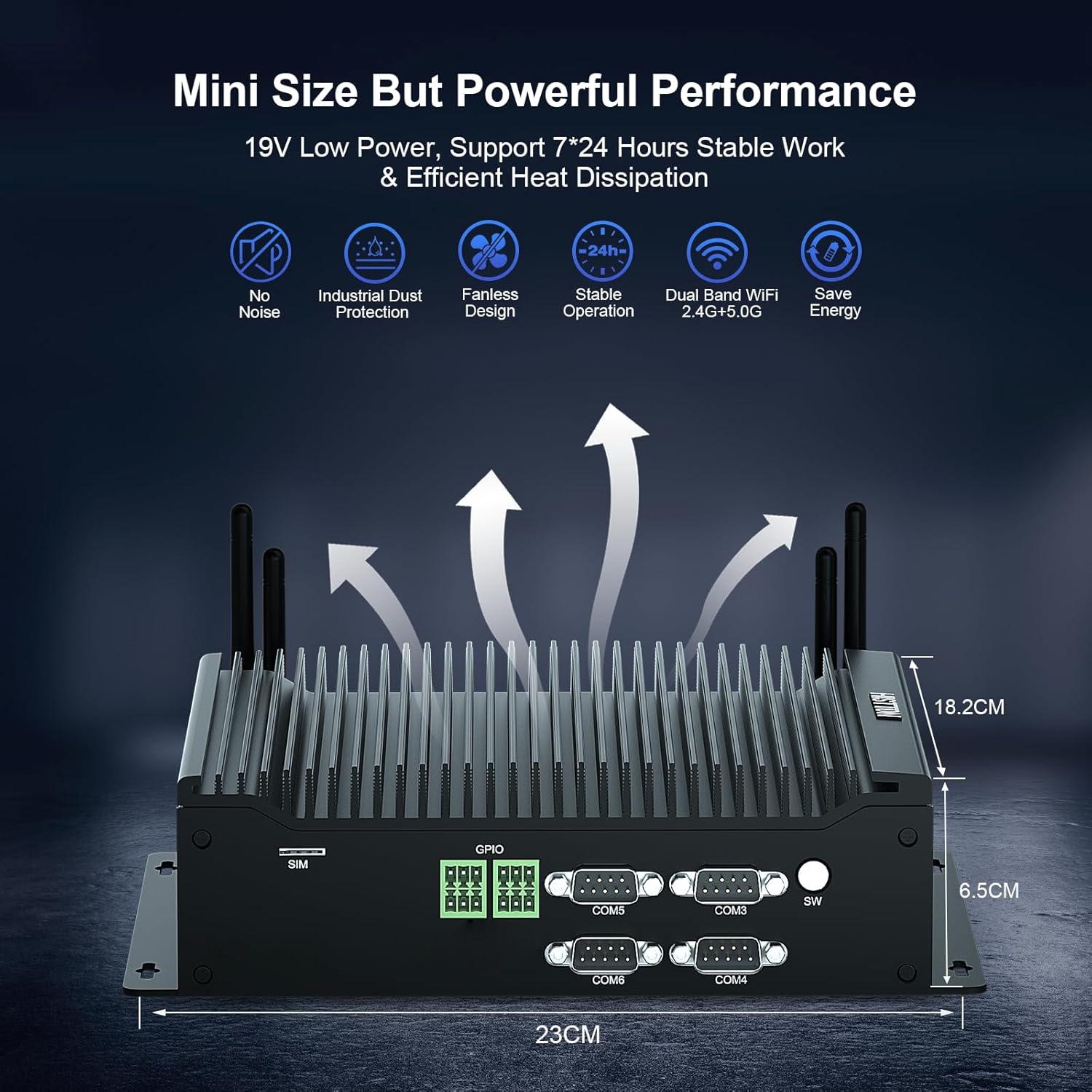
The device features a comprehensive set of ports for various industrial and general computing needs. These include multiple USB ports, LAN ports, COM ports, and video outputs.
4.2 Nøglefunktioner
- Processor: Intel Core i7-10710U (10th Gen) with up to 4.70 GHz turbo frequency.
- Grafik: Intel UHD Graphics for 10th Gen Processors, supporting 4K resolution.
- Hukommelse: Dual DDR4 SO-DIMM slots, expandable up to 64GB.
- Opbevaring: M.2 2280 NVME PCIe 3.0x4 / SATA 3 SSD slot and a 2.5-inch SATA HDD/SSD bay.
- Display output: HD, DisplayPort (DP), and Type-C for triple 4K display support.
- Netværk: 2 x RJ45 Intel I210/211 Gigabit LAN, Dual-band WiFi 5 (2.4G+5.0G), Bluetooth 4.2.
- Forbindelse: 4 x USB 3.0, 4 x USB 2.0, 6 x DB9pin COM ports (configurable for RS232/RS422/RS485), 2 x 6pin GPIO, 1 x SIM card slot.
- Køling: Fanless design for silent operation and industrial dust protection.
- Operativsystem: Pre-installed Windows 11 Pro (64-bit, activated) with support for Ubuntu.


5. Opsætningsvejledning
5.1 Tilslutning af eksterne enheder
- Tilslut skærm: Use the provided HDMI cable or a DisplayPort/Type-C cable to connect your monitor(s) to the Mini PC. The device supports up to three 4K displays simultaneously.
- Tilslut tastatur og mus: Plug your USB keyboard and mouse into any available USB ports (USB 2.0 or USB 3.0).
- Tilslut netværk: For a wired connection, connect an Ethernet cable to one of the RJ45 LAN ports. For wireless, attach the included WiFi antennas to the designated ports.
- Tilslut lyd: If using external speakers or headphones, connect them to the SPK (speaker) port. A microphone can be connected to the MIC port.

5.2 Tænd
- Tilslut strømadapter: Plug the power adapter into the DC 19V 5A input port on the Mini PC, then plug the adapter into a power outlet.
- Power knap: Press the power button located on the front panel to turn on the Mini PC.
- The system will boot into Windows 11 Pro. Follow the on-screen instructions for initial setup if prompted.
6. Betjeningsvejledning
6.1 Operating System
Your HISTTON H4-T Mini PC comes with Windows 11 Pro (64-bit) pre-installed and activated. It also supports other operating systems like Ubuntu, allowing for flexible deployment in various environments.
- Windows 11 Pro: Utilize standard Windows features for productivity, multimedia, and internet browsing.
- Ubuntu Support: For users preferring Linux-based systems, the hardware is compatible with Ubuntu installations. Refer to Ubuntu's official documentation for installation procedures.
6.2 Netværksforbindelse
- Kablet LAN: The two Gigabit Ethernet ports provide stable and high-speed wired network access.
- Wireless (WiFi & Bluetooth): The dual-band WiFi 5 (2.4G+5.0G) and Bluetooth 4.2 modules enable wireless internet access and connection to Bluetooth peripherals. Ensure antennas are securely attached for optimal performance.

6.3 Industrielle funktioner
The H4-T is designed for industrial applications, offering robust connectivity:
- COM-porte: Six DB9pin COM ports support RS232, with four of them configurable for RS422/RS485, suitable for connecting industrial control devices.
- GPIO: Two 6pin GPIO interfaces provide programmable input/output capabilities for custom applications.
- SIM-kortplads: Supports 4G/5G modules (module not included by default) for mobile network connectivity in remote locations.
7. Vedligeholdelse
The fanless design of the HISTTON H4-T Mini PC significantly reduces maintenance requirements by eliminating moving parts and minimizing dust accumulation. However, regular care is still recommended.
- Rensning: Periodically wipe the exterior of the Mini PC with a soft, dry cloth. Avoid using liquid cleaners or solvents.
- Softwareopdateringer: Hold dit operativsystem og dine drivere opdaterede for at sikre optimal ydeevne og sikkerhed.
- Miljøforhold: Ensure the device is operated within recommended temperature and humidity ranges to prolong its lifespan.
- Udvidelse af opbevaring: If installing additional storage (2.5-inch HDD/SSD or M.2 SSD), ensure the device is powered off and disconnected from power. Follow proper anti-static procedures.
8. Fejlfinding
If you encounter issues with your HISTTON H4-T Mini PC, refer to the following common problems and solutions:
| Problem | Mulig årsag | Løsning |
|---|---|---|
| No power / Device does not turn on | Power adapter not connected or faulty; Power outlet issue; Power button not pressed correctly. | Ensure power adapter is securely connected to both the PC and a working power outlet. Try a different outlet. Press the power button firmly. |
| Ingen visning på skærmen | Display cable loose or faulty; Incorrect input selected on monitor; Monitor off or faulty. | Check display cable connections. Ensure monitor is on and set to the correct input source (HDMI, DP, Type-C). Test with a different monitor or cable if possible. |
| Ingen internetforbindelse (kablet) | Ethernet cable loose or faulty; Router/modem issue; Network driver issue. | Verify Ethernet cable is securely connected. Restart your router/modem. Check network adapter status in OS. |
| Ingen internetforbindelse (trådløs) | WiFi antennas not connected; WiFi disabled; Incorrect WiFi password; Router issue. | Ensure WiFi antennas are attached. Check WiFi settings in OS. Verify WiFi password. Restart your router. |
| Peripherals (USB devices) not working | Loose connection; Driver issue; Faulty peripheral. | Try a different USB port. Reinstall or update drivers for the peripheral. Test the peripheral on another computer. |
9. Specifikationer
| Feature | Detalje |
|---|---|
| Modelnavn | H4-T |
| Processor | Intel Core i7-10710U (10th Gen), 6 Cores, 12 Threads, 12M Cache, up to 4.70 GHz |
| Grafik coprocessor | Intel UHD-grafik til 10. generations Intel-processorer |
| VÆDDER | 32GB DDR4 SO-DIMM (Expandable up to 64GB) |
| Harddisk | 512GB M.2 NVMe SSD (Supports M.2 2280 NVME PCIe 3.0x4 / SATA 3 SSD and 2.5 inch SATA HDD/SSD) |
| Operativsystem | Windows 11 Pro (64-bit, activated), Supports Ubuntu |
| Display output | HD, DisplayPort (DP), Type-C (Supports Triple 4K Display) |
| LAN | 2 x RJ45 Intel I210/211 Gigabit LAN |
| Trådløs forbindelse | Dual-band WiFi 5 (2.4G+5.0G), Bluetooth 4.2 |
| USB-porte | 4 x USB 3.0, 4 x USB 2.0 |
| COM -porte | 6 x DB9pin (2 x RS232, 4 x RS422/RS485 configurable) |
| Andre grænseflader | 2 x 6pin GPIO, 1 x SIM card slot, 1 x SPK, 1 x MIC |
| Strømforsyning | DC19V 5A |
| Strømforbrug | 15W-20W |
| Køling | Fanless Design |
| Dimensioner (LxBxH) | 9.06 x 7.17 x 2.56 tommer (23 x 18.2 x 6.5 cm) |
| Varens vægt | 6.38 pund (ca. 2.9 kg) |
10. Garantioplysninger
HISTTON products are covered by a standard manufacturer's warranty. Please refer to the warranty card included with your product or visit the official HISTTON webwebstedet for detaljerede garantivilkår og -betingelser. Gem din købsbevis til garantikrav.
11. Kundesupport
For technical assistance, troubleshooting, or any questions regarding your HISTTON H4-T Mini PC, please contact HISTTON customer support. Contact information can typically be found on the official HISTTON webwebstedet eller på emballagematerialerne.
Online ressourcer: For additional support and driver downloads, visit the official HISTTON webwebsted.