
1. Produktet er slutview
The ZWP GYKQ-78 is a direct replacement remote control designed for a range of Pioneer Diamante Air Conditioner models. This remote offers full functionality without the need for complex programming, providing a convenient solution for controlling your air conditioning unit.

Image 1.1: The ZWP GYKQ-78 replacement remote control, showcasing its ergonomic design and clear button layout.
Nøglefunktioner:
- Ingen programmering påkrævet: Klar til brug direkte efter batteriinstallation.
- Holdbar konstruktion: Made from high-quality, wear-resistant ABS material for long-lasting use.
- Ergonomisk design: Behagelig at holde og betjene.
- Bred kompatibilitet: Compatible with numerous Pioneer Diamante Air Conditioner models.
Compatible Air Conditioner Models:
- WYT020GLHI22M2
- WYT012GLFI19RL
- WYT009ALFI19RL
- WYT009GLFI19RL
- WYT012ALFI19RL
- WYT018GLFI19RL
- WYT024GLFI19RL
- WYT036GLFI19RL
- WYT009ALFI22RL
- WYT009GLFI22RL
- WYT024GLFI22RL
- WYT012GLFI22RL
- WYT012ALFI22RL
- WYT030GLHI22M3
2. Opsætning og batteriinstallation
The ZWP GYKQ-78 remote control requires two AAA batteries (not included) for operation. No programming or pairing is necessary; simply install the batteries, and the remote is ready for use.
- Åbn batterirummet: Find batteridækslet på bagsiden af fjernbetjeningen. Skub dækslet nedad, eller tryk på låsen, og løft det op for at åbne.
- Indsæt batterier: Insert two new AAA batteries into the compartment, ensuring the positive (+) and negative (-) terminals align correctly with the markings inside the compartment.
- Luk batterirummet: Sæt batteridækslet på igen ved at skubbe det tilbage på plads, indtil det klikker sikkert.

Image 2.1: Illustration showing the battery compartment and the requirement for two AAA batteries (not included).
Important: Ensure correct battery polarity. Remove batteries if the remote will not be used for an extended period to prevent leakage.
3. Betjeningsvejledning
This section details the functions of the buttons on your ZWP GYKQ-78 remote control. The remote features an LED luminous display for clear visibility, even in low light conditions.

Image 3.1: The remote control's LED luminous display, which ensures buttons and screen are clearly visible without needing external light.
3.1 Knapfunktioner
| Knap | Fungere |
|---|---|
| MAGT () | Tænder eller slukker klimaanlægget. |
| MODE | Cycles through operating modes: Cool, Heat, Dry, Fan, Auto, Sleep, ECO. |
| TEMP () | Justerer den ønskede temperaturindstilling. |
| TURBO | Activates or deactivates the Turbo function for rapid cooling or heating. |
| FAN | Justerer ventilatorhastigheden (Lav, Mellem, Høj, Auto). |
| SWING | Styrer den vertikale lamelsvingningfunktion. |
| STUM | Mutes or unmutes the air conditioner's operational sounds. |
| ØKO | Activates or deactivates the energy-saving ECO mode. |
| TIMER | Indstiller ON/OFF-timeren for klimaanlægget. |
| SOVE | Activates or deactivates the Sleep mode for comfortable nighttime operation. |
| JEG FØLER | Activates the "I Feel" function, which senses the temperature at the remote's location. |
| VISE | Turns the air conditioner's display ON or OFF. |
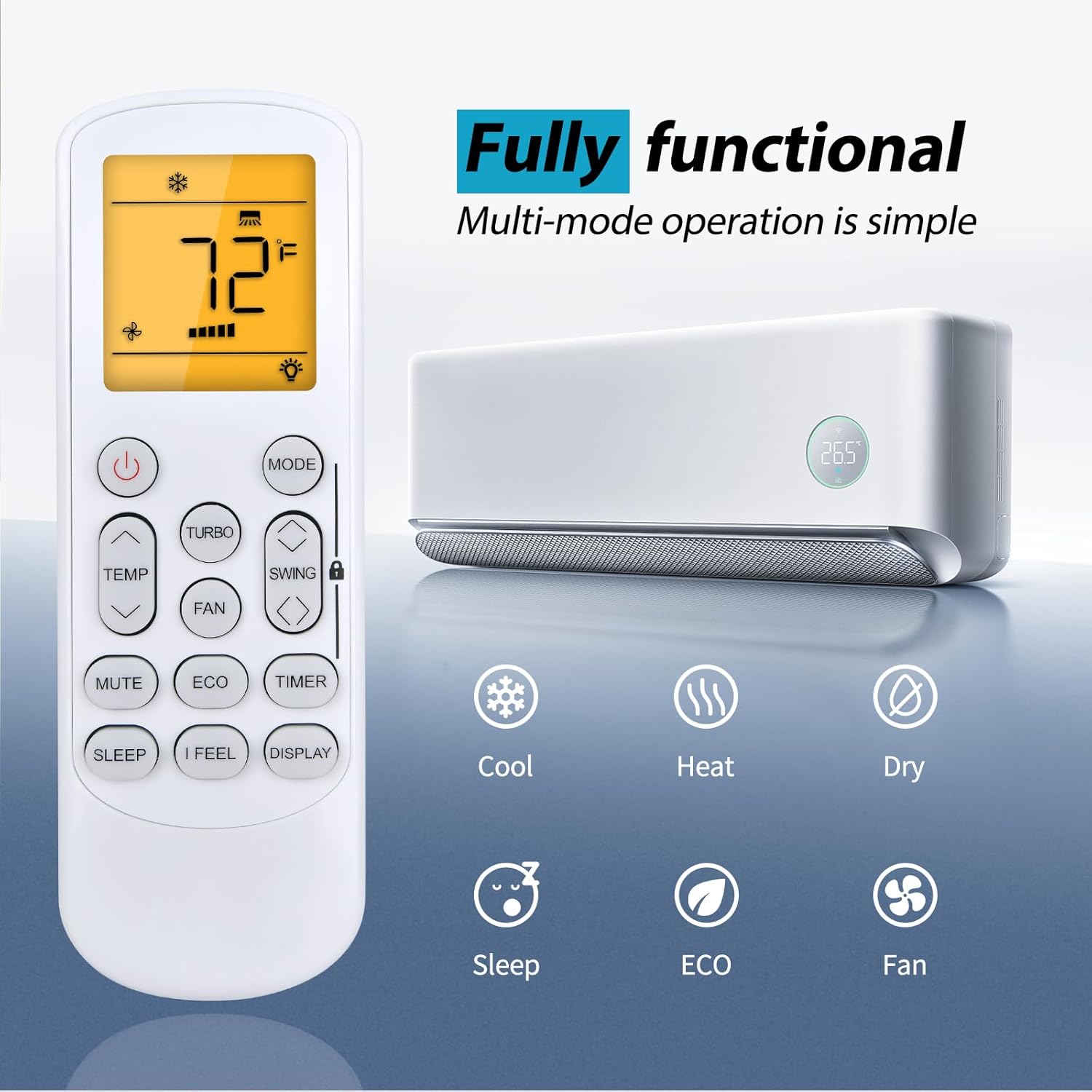
Image 3.2: The remote control displaying various functional modes such as Cool, Heat, Dry, Sleep, ECO, and Fan.
3.2 Fjernbetjeningens rækkevidde
The ZWP GYKQ-78 remote control is designed for sensitive and precise control from a distance. It operates effectively up to 40 feet (approximately 12 meters) with a 180-degree multi-angle range, allowing flexible control within your room.

Image 3.3: Illustration demonstrating the remote control's effective operating range of up to 40 feet and 180-degree angle.
4. Vedligeholdelse
To ensure the longevity and optimal performance of your ZWP GYKQ-78 remote control, follow these maintenance guidelines:
- Rensning: Tør fjernbetjeningen af med en blød, tør klud. Brug ikke flydende rengøringsmidler, slibende materialer eller kemiske opløsningsmidler, da disse kan beskadige overfladen eller de indvendige komponenter.
- Udskiftning af batteri: Replace batteries promptly when the remote's performance degrades or the display becomes dim. Always replace both batteries at the same time with new ones of the same type (AAA).
- Opbevaring: If the remote control will not be used for an extended period (e.g., more than one month), remove the batteries to prevent potential leakage and damage to the remote. Store the remote in a cool, dry place away from direct sunlight and extreme temperatures.
- Undgå fald og stød: Protect the remote from physical shocks, as internal components can be sensitive to damage from drops.
5. Fejlfinding
If you encounter issues with your ZWP GYKQ-78 remote control, refer to the following common troubleshooting steps:
- Fjernbetjeningen reagerer ikke:
- Kontroller, om batterierne er isat korrekt med den korrekte polaritet (+/-).
- Udskift gamle batterier med nye AAA-batterier.
- Sørg for, at der ikke er nogen forhindringer mellem fjernbetjeningen og klimaanlæggets modtager.
- Confirm you are within the effective operating range (up to 40 feet).
- Skærmen er svag eller blank:
- Dette indikerer normalt lav batteristrøm. Udskift batterierne.
- Air Conditioner Not Responding to Specific Functions:
- Ensure the remote is pointed directly at the air conditioner.
- Some functions may be specific to certain air conditioner models or operating modes. Refer to your air conditioner's manual for specific feature compatibility.
5.1 Advanced Reset Functions (Refer to original AC manual for full details)
The back of the remote control may contain small text indicating advanced reset or pairing functions. These are typically for specific air conditioner models or diagnostic purposes. For the GYKQ-78, the following combinations are noted:
- Presser "FAN" and "MUTE" together for over 3 seconds.
- Presser "SWING" and "SWING" together for over 3 seconds.
- Presser "SLEEP" and "DISPLAY" together for over 3 seconds.
Note: These combinations are for reference. Consult your specific Pioneer Diamante Air Conditioner user manual for detailed instructions on their use and potential effects.

Billede 5.1: Bagside view of the remote control, showing product dimensions and small text detailing advanced button combinations for specific functions or resets.
6. Specifikationer
| Feature | Detalje |
|---|---|
| Modelnummer | GYKQ-78 |
| Mærke | ZWP |
| Kompatible enheder | Pioneer Diamante Air Conditioners (various models) |
| Strømkilde | 2 x AAA batterier (medfølger ikke) |
| Farve | Sort |
| Speciel funktion | Ergonomisk design |
| Maks. antal understøttede enheder | 1 |
| Varens vægt | 2.24 ounce (ca. 63.5 gram) |
| Pakkedimensioner | 6.8 x 2.2 x 1.1 tommer (ca. 17.3 x 5.6 x 2.8 cm) |
7. Garanti og support
For any questions or concerns regarding your ZWP GYKQ-78 replacement remote control, please contact the seller directly. While specific warranty details are not provided in this manual, the manufacturer aims to ensure customer satisfaction.
If you experience any issues, please reach out to the seller before leaving feedback. They are committed to assisting you with resolution.