
Indledning
This manual provides detailed instructions for the setup, operation, and maintenance of your Edifier S300 Hi-Fi Tabletop Speaker. Please read this manual thoroughly before using the product to ensure proper functionality and to maximize your listening experience. Keep this manual for future reference.

The Edifier S300 Hi-Fi Tabletop Speaker, showcasing its elegant black walnut finish and front grille.
Vigtige sikkerhedsinstruktioner
- Læs disse instruktioner omhyggeligt.
- Gem disse instruktioner til fremtidig reference.
- Overhold alle advarsler.
- Følg alle instruktioner.
- Brug ikke dette apparat i nærheden af vand.
- Rengør kun med en tør klud.
- Bloker ikke ventilationsåbninger. Installer i overensstemmelse med producentens anvisninger.
- Må ikke installeres i nærheden af varmekilder såsom radiatorer, varmeapparater, komfurer eller andre apparater (inklusive ampløftere), der producerer varme.
- Beskyt netledningen mod at blive trådt på eller klemt, især ved stik, stikkontakter og det sted, hvor de kommer ud af apparatet.
- Brug kun tilbehør/tilbehør specificeret af producenten.
- Træk stikket ud af dette apparat under tordenvejr, eller når det ikke skal bruges i længere perioder.
- Overlad al service til kvalificeret servicepersonale. Service er påkrævet, når apparatet er blevet beskadiget på nogen måde, såsom strømforsyningsledning eller stik er beskadiget, væske er blevet spildt, eller genstande er faldet ind i apparatet, apparatet har været udsat for regn eller fugt, ikke fungerer normalt , eller er blevet droppet.
Hvad er der i æsken
Ved udpakning skal du kontrollere, at alle nedenstående varer er til stede og i god stand:
- S300 Speaker × 1
- Strømkabel × 1
- USB-kabel × 1
- 3.5mm-to-3.5mm Audio Cable × 1
- Fjernbetjening × 1
- AAA Batteri × 2
- Hurtig startguide × 1
- Vigtige sikkerhedsinstruktioner × 1
En overview of all items included in the Edifier S300 package.
Produkt overview
Kontrol og indikatorer på frontpanelet
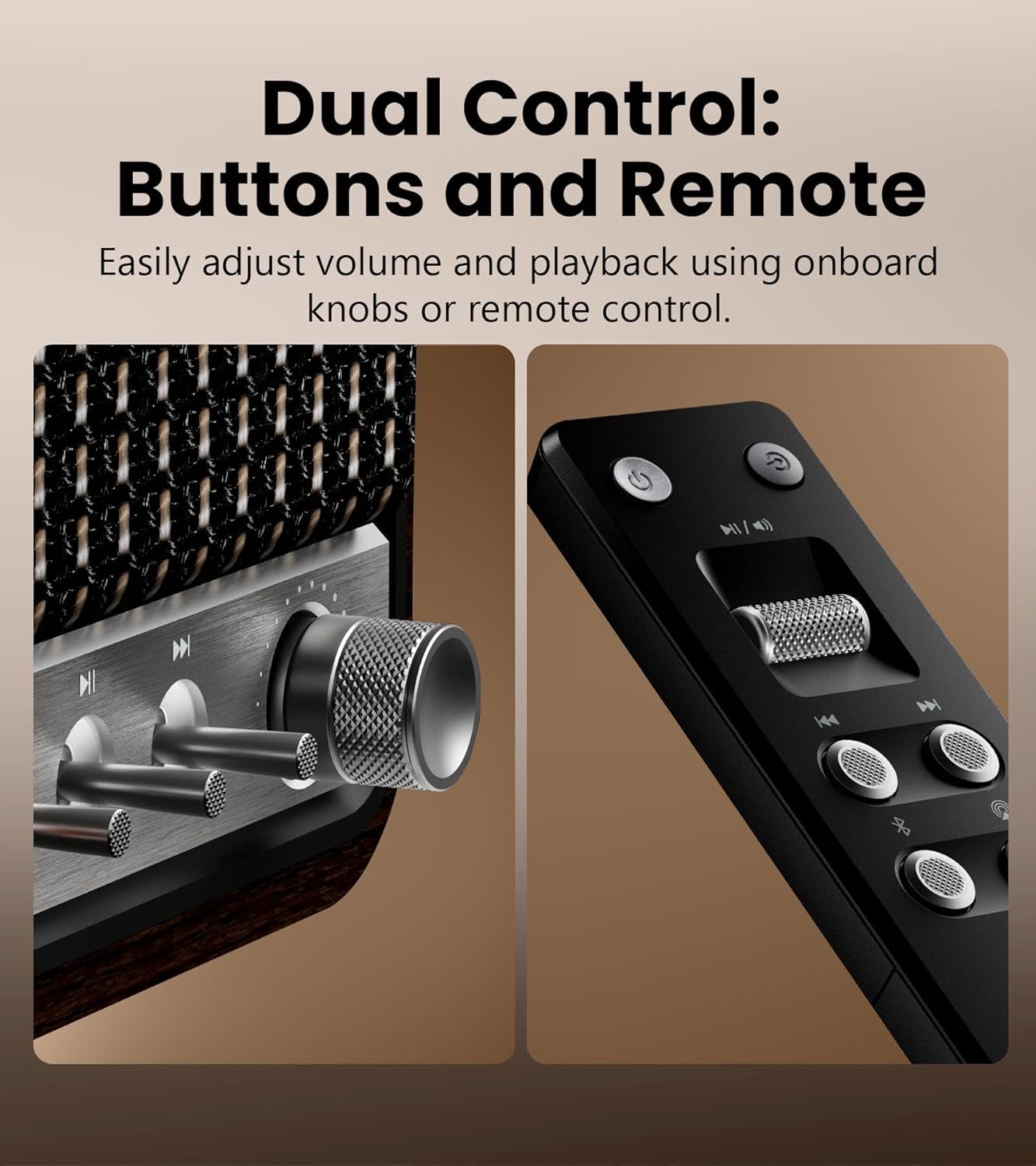
Detaljeret view of the speaker's control knobs and the included remote control.
- Volume/Input Selector Knob: Rotate to adjust volume. Press to cycle through input sources (Bluetooth, AirPlay, USB-C, AUX).
- Afspilningskontroller: Buttons for Play/Pause, Previous Track, Next Track (functionality varies by input source).
- Statusindikatorlys: Displays current input mode and connection status.
Bagpaneltilslutninger

The rear panel of the Edifier S300, highlighting its various connectivity options.
- USB-C-indgang: For connecting to computers or other USB-C audio sources.
- AUX-indgang: Standard 3.5mm audio jack for connecting to analog audio devices.
- Strømindgang: Tilslut det medfølgende strømkabel her.
Opsætning
Højttalerplacering
For optimal sound performance, place the Edifier S300 on a stable, flat surface. Ensure there is adequate space around the speaker for proper ventilation. Placing the speaker near a wall can enhance bass response, but avoid placing it directly in a corner, which might lead to boomy or unclear bass.

The dimensions of the Edifier S300 speaker, useful for placement planning.
Strømtilslutning
- Tilslut strømkablet til strømindgangen på bagsiden af højttaleren.
- Sæt den anden ende af strømkablet i en stikkontakt.
- The speaker will power on automatically or can be turned on using the power button on the remote control.
Betjeningsvejledning
Valg af inputkilde
The S300 supports multiple audio input sources. You can switch between them using the volume/input selector knob on the front panel or the dedicated input buttons on the remote control.
- Bluetooth: Til trådløs lydstreaming fra kompatible enheder.
- Air Play 2: For seamless multi-room audio and lossless streaming from Apple devices.
- USB-C: For direct digital audio connection to computers or other USB-C sources.
- AUX: For connecting traditional analog audio devices using a 3.5mm cable.
Bluetooth-parring

The Edifier S300 supports dual Bluetooth device pairing for convenient switching.
- Select Bluetooth input on the speaker. The status indicator will flash, indicating pairing mode.
- On your device (smartphone, tablet, computer), enable Bluetooth and search for "EDIFIER S300".
- Select "EDIFIER S300" to pair. Once connected, the indicator light will become solid.
- The S300 supports LDAC for high-resolution wireless audio on compatible Android 8.0+ devices.
- It also supports multi-device pairing, allowing two devices to be connected simultaneously.
AirPlay 2 Setup (for Apple Devices)

AirPlay 2 enables seamless multi-room audio and lossless streaming across your home.
- Ensure your S300 speaker is connected to the same Wi-Fi network as your Apple device.
- On your iOS device, open Control Center, tap the AirPlay icon, and select "EDIFIER S300".
- For multi-room audio, select multiple AirPlay 2 compatible speakers from the AirPlay menu.
- For stereo pairing, use the EDIFIER Home App to configure two S300 speakers as left and right channels.
Using the EDIFIER Home App
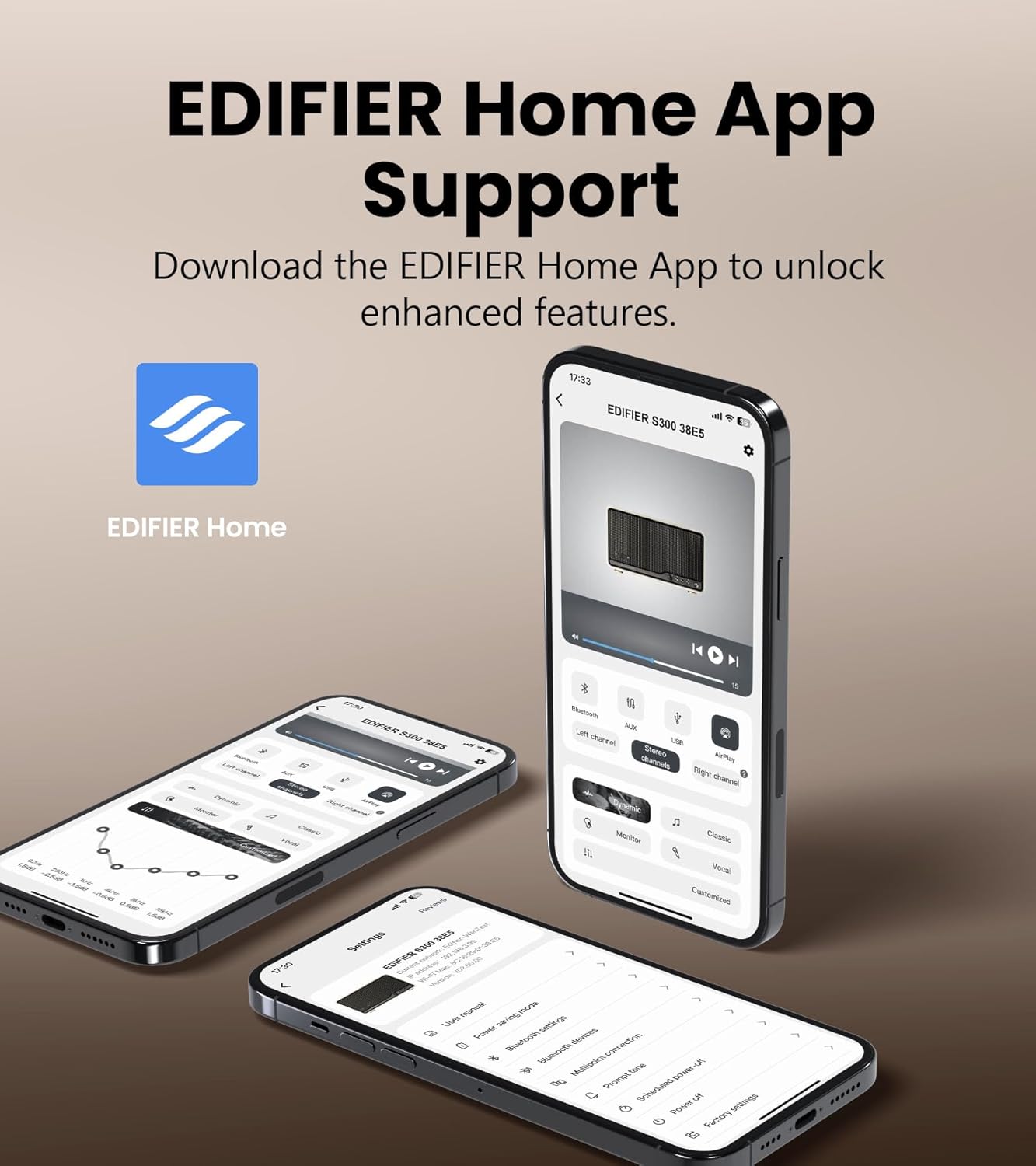
The EDIFIER Home App provides enhanced control and features for your S300 speaker.
Download the EDIFIER Home App from your device's app store to unlock enhanced features and control options for your S300 speaker. The app allows you to:
- Connect your speaker to a Wi-Fi network.
- Switch between input sources effortlessly.
- Control playback with ease.
- Customize sound effects to suit your preferences.
- Access the digital user manual anytime.
Opretholdelse
- Rensning: Use a soft, dry cloth to clean the speaker's surface. Do not use liquid cleaners or aerosol sprays.
- Ventilation: Sørg for, at ventilationsåbningerne ikke er blokeret for at forhindre overophedning.
- Opbevaring: If storing the speaker for an extended period, unplug it from the power outlet and store it in a cool, dry place.
Fejlfinding
| Problem | Mulig årsag | Løsning |
|---|---|---|
| Ingen lyd | Power not connected; incorrect input source selected; volume too low. | Ensure power cable is securely plugged in. Select the correct input source. Increase volume. |
| Bluetooth-forbindelse mislykkes | Højttaler ikke i parringstilstand; enhed for langt væk; interferens | Sørg for, at højttaleren er i Bluetooth-parringstilstand. Flyt enheden tættere på højttaleren. Undgå forhindringer. Prøv at parre igen. |
| AirPlay 2 connection issues | Speaker and device on different Wi-Fi networks; network instability. | Verify both speaker and Apple device are on the same Wi-Fi network. Restart router and speaker. |
| Forvrænget lyd | Volume too high; audio source quality is poor. | Reduce volume. Check audio source quality. |
Specifikationer

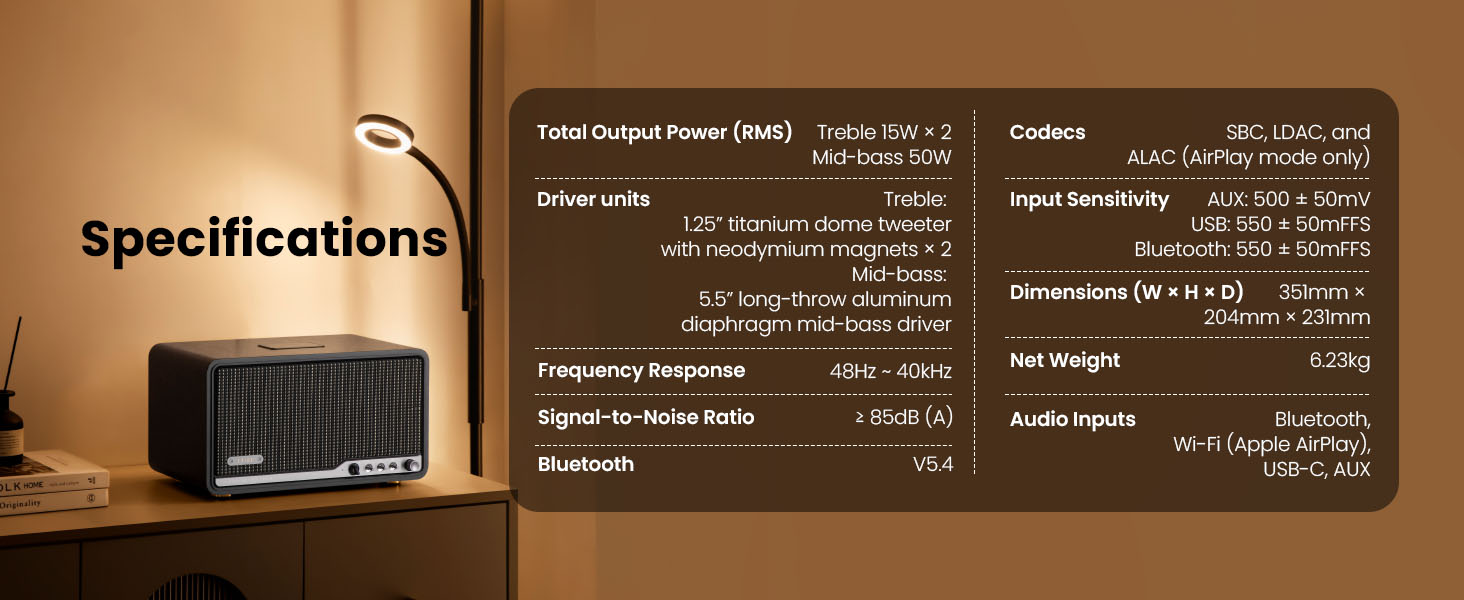
Detailed technical specifications of the Edifier S300 speaker.
| Feature | Detalje |
|---|---|
| Samlet udgangseffekt (RMS) | Treble 15W × 2, Mid-bass 50W |
| Driver enheder | 1.25" titanium dome tweeter with neodymium magnets × 2, 5.5" long-throw aluminum diaphragm mid-bass driver |
| Frekvensrespons | 48Hz ~ 40kHz |
| Signal-støjforhold | ≥ 85dB (A) |
| Bluetooth version | V5.4 |
| Codecs | SBC, LDAC, and ALAC (AirPlay mode only) |
| Indgangsfølsomhed | AUX: 500 ± 50mV, USB: 550 ± 50mFFS, Bluetooth: 550 ± 50mFFS |
| Dimensioner (B × H × D) | 351 mm × 204 mm × 231 mm (13.82" × 8.03" × 9.09") |
| Nettovægt | 6.23 kg (13.73 lbs) |
| Lydindgange | Bluetooth, Wi-Fi (Apple AirPlay), USB-C, AUX |
Garanti og support
Edifier products are designed and manufactured to the highest quality standards. For information regarding warranty coverage, please refer to the warranty card included in your product packaging or visit the official Edifier webwebsted.
For teknisk support, hjælp til fejlfinding eller serviceforespørgsler, kontakt venligst Edifiers kundesupport via deres officielle webwebstedet eller kontaktoplysningerne i din produktdokumentation.
Officiel redaktør Webwebsted: www.edifier.com