
Vigtige sikkerhedsoplysninger
Please read all safety instructions before using this product to ensure proper and safe operation.
- Udsæt ikke ørepropperne eller opladningsetuiet for ekstreme temperaturer.
- Undgå at tabe enheden eller bruge for meget kraft på den.
- Opbevares utilgængeligt for børn og kæledyr.
- Use only a 5V adapter to charge the charging case to prevent battery damage.
- Do not use the earbuds in the bath or while swimming.
Pakkens indhold
Bekræft at alle varer er til stede i din pakke:
- ZIUTY A1 Wireless Earbuds (x1 pair)
- Portable Charging Case (x1)
- USB-C opladningskabel (x1)
- Eartips (pre-installed size M, plus 2 extra pairs in sizes S & L)
- Brugervejledning (dette dokument)
Produkt overview
Familiarize yourself with the components of your ZIUTY A1 Wireless Earbuds.
Øretelefoner og opladningsetui
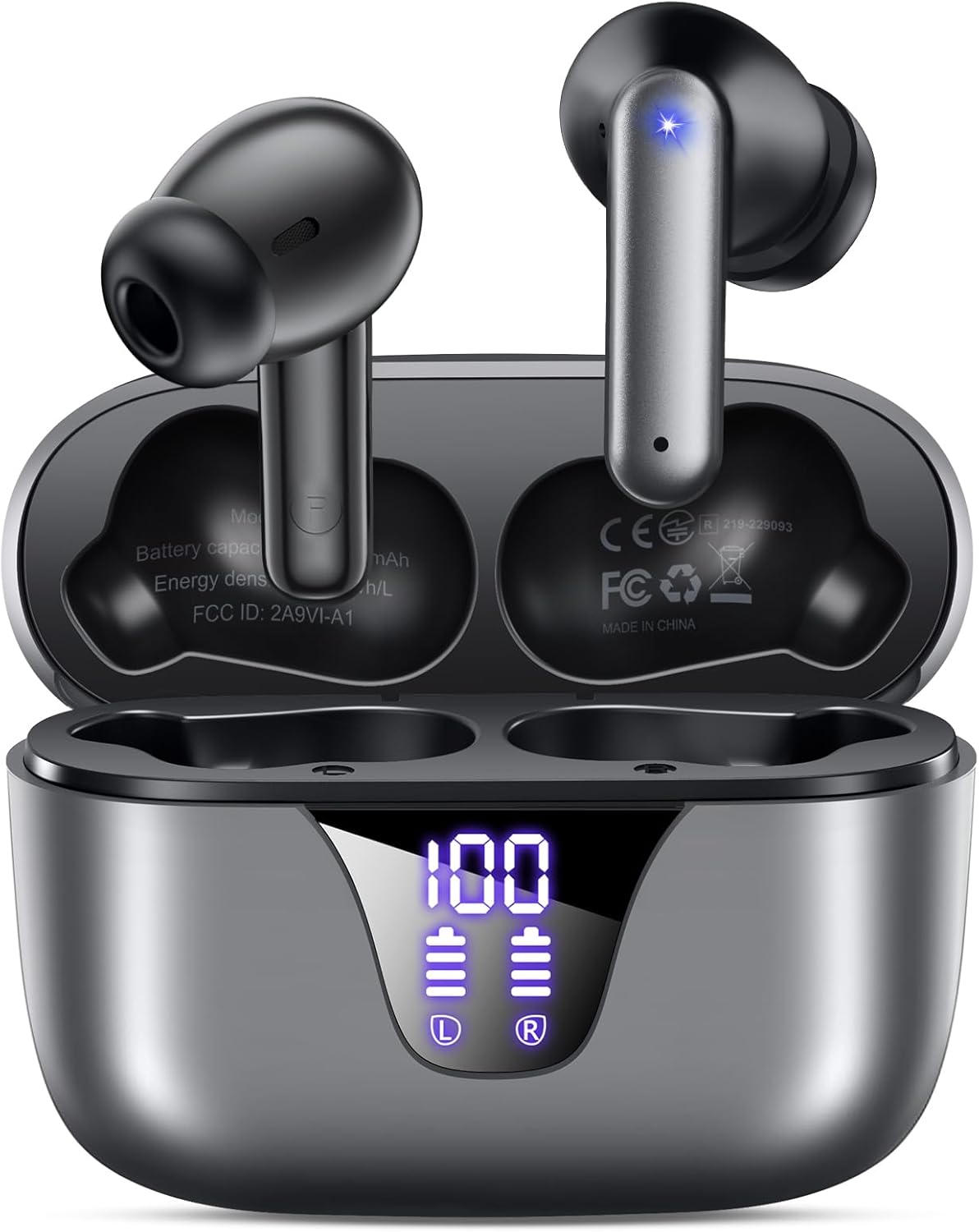
Image: ZIUTY A1 Wireless Earbuds shown inside their open charging case. The case features an LED digital display indicating battery levels for both the case and individual earbuds.
LED-strømskærm

Image: Close-up of the ZIUTY A1 charging case's LED display, showing '100' for the case battery and individual battery icons for the left (L) and right (R) earbuds.
The charging case features an LED digital display that shows the exact remaining power percentage (0-100%) for the case and individual battery levels for each earbud.
Opsætning
1. Opladning af øretelefoner og etuiet
Oplad ørepropperne og opladningsetuiet helt inden første brug.
- Placer ørepropperne i opladningsetuiet. Sørg for, at de sidder korrekt i deres respektive holdere (V for venstre, H for højre).
- Connect the USB-C charging cable to the charging port on the case and the other end to a 5V USB power adapter (not included).
- The LED display on the case will show the charging status. A full charge typically takes approximately 2 hours.

Image: ZIUTY A1 earbuds resting in their charging case, with the LED display showing battery levels.

Image: Diagram illustrating how to connect the USB-C cable to the charging case and a 5V power adapter for charging.
2. Sådan tager du ørepropperne på
For optimal sound quality and comfort, select the correct ear tip size and ensure a secure fit.
- Choose the ear tips (S, M, L) that provide the best seal and comfort for your ears.
- Insert the earbuds into your ears, gently twisting them to find a snug and stable position.
- The ergonomic semi-in-ear design is intended for a comfortable fit during various activities.

Image: Diagram showing the ergonomic design of the earbuds and the three available ear tip sizes (S, M, L) for a customized fit.

Image: Step-by-step visual guide on how to correctly insert and adjust the earbuds for a secure fit.
3. Parring med en Bluetooth-enhed
Ørepropperne går automatisk i parringstilstand, når de tages ud af opladningsetuiet.
- Åbn opladningsetuiet, og fjern begge ørepropper. De tænder automatisk og forsøger at parre med hinanden.
- Aktiver Bluetooth på din enhed (smartphone, tablet, bærbar computer), og søg efter tilgængelige enheder.
- Select "A1" from the list of found devices.
- Når der er oprettet forbindelse, hører du en bekræftelseslyd, og ørepropperne er klar til brug.
- Ørepropperne genopretter automatisk forbindelsen til den sidst parrede enhed, når de tages ud af etuiet.

Image: Illustration showing the ZIUTY A1 earbuds connecting via Bluetooth 5.3 to a smartphone, indicating a stable and fast connection.

Image: Diagram demonstrating the one-step auto-pairing process when the earbuds are removed from the charging case.
Betjeningsvejledning
Tryk på kontrolelementer
The ZIUTY A1 earbuds feature intuitive touch controls for managing audio playback and calls.

Image: Diagram illustrating the touch control area on the earbuds and various functions like Play/Pause, Voice Assistant, Answer/Hang up, Previous/Next Track, and Volume adjustment.

Image: A more detailed visual guide to the touch controls, showing specific tap and hold gestures for different commands.
| Handling | Fungere |
|---|---|
| Enkelt tryk (V/H) | Afspil/pause musik, besvar/afslut opkald |
| Dobbelttryk (L) | Forrige spor |
| Dobbelttryk (R) | Næste spor |
| Tredobbelt tryk (V/H) | Aktivér stemmeassistent (Siri, Google Assistant) |
| Press and Hold (L) | Lydstyrke ned |
| Press and Hold (R) | Lydstyrke op |
| Press and Hold (L/R) during incoming call | Afvis opkald |
Foretage og modtage opkald
Use the touch controls to manage your phone calls:
- Besvar/afslut opkald: Tryk enkeltvis på en af øretelefonerne.
- Afvis opkald: Tryk og hold på en af øretelefonerne under et indgående opkald.

Image: Illustration showing a user interacting with a voice assistant (Siri) via the earbuds for clear call support.
Stemmeassistent
Activate your device's voice assistant by triple-tapping either earbud. This allows you to issue commands such as making calls or checking information hands-free.
Opretholdelse
Rensning
Regelmæssig rengøring hjælper med at opretholde optimal ydeevne og hygiejne.
- Clean the charging contacts on both the earbuds and inside the charging case with a dry cotton swab or alcohol pad.
- Gently clean the mesh of the ear tips to remove any dust or earwax that might affect sound volume.
- Wipe the exterior of the earbuds and case with a soft, dry cloth.

Image: Visual guide demonstrating how to clean the earbud charging contacts and ear tip mesh to resolve potential volume or charging issues.
Opbevaring
Når ørepropperne ikke er i brug, skal de opbevares i deres opladningsetui for at beskytte dem og sikre, at de forbliver opladede.
Fejlfinding
If you encounter issues with your ZIUTY A1 earbuds, refer to the following common solutions:
- Ørepropper parrer sig ikke med hinanden: Place both earbuds back into the charging case, close the lid, wait a few seconds, then open the lid and remove them again. They should automatically pair.
- Øretelefoner opretter ikke forbindelse til enheden: Ensure Bluetooth is enabled on your device and the earbuds are in pairing mode. Forget the device from your Bluetooth list and attempt to re-pair.
- Ingen lyd eller lav lydstyrke: Check the volume levels on both your device and the earbuds. Ensure the ear tips are clean and properly seated in your ears. Refer to the cleaning instructions in the Maintenance section.
- Opladningsproblemer: Ensure the charging cable is securely connected and the power adapter is 5V. Clean the charging contacts on both the earbuds and the case.
- Utilsigtet aktivering af berøringskontrol: When adjusting the earbuds in your ear, grasp them by the sides to avoid touching the control area.
Specifikationer
Key technical specifications for the ZIUTY A1 Wireless Earbuds:
| Feature | Specifikation |
|---|---|
| Modelnavn | A1 |
| Forbindelsesteknologi | Trådløs (Bluetooth 5.3) |
| Bluetooth rækkevidde | Op til 15 meter (49 fod) |
| Øretelefon batterilevetid | Op til 8 timer |
| Samlet spilletid (med etui) | Op til 50 timer |
| Opladningsetui Batterikapacitet | 500 mAh |
| Opladningstid | Cirka 2 timer |
| Audio driver størrelse | 14.5 mm dynamisk driver |
| Frekvensområde | 20 Hz - 20,000 Hz |
| Vandmodstandsniveau | IPX7 (vandtæt) |
| Kontroltype | Tryk på kontrol |
| Earbud vægt | Approximately 0.14 oz (3.9g) per earbud |
| Inkluderede komponenter | Earbuds, Charging Case, USB-C Cable, Eartips, User Manual |
Garanti og support
Garantioplysninger
ZIUTY provides an 18-month battery promise for this product. This warranty covers defects in materials and workmanship under normal use.
Kundesupport
For any questions, technical assistance, or warranty claims, please contact ZIUTY customer service. Refer to the product packaging or the official ZIUTY webwebstedet for aktuelle kontaktoplysninger.