
Vigtige sikkerhedsinstruktioner
Please read and understand all instructions before assembling, installing, or operating this product. Failure to follow these instructions may result in electric shock, fire, or serious personal injury.
- Sørg for, at strømforsyningen er afbrudt før installation eller vedligeholdelse.
- This fan is designed for outdoor use in covered areas such as patios, gazebos, porches, pergolas, and canopies.
- Brug ikke blæseren med en beskadiget ledning eller stik.
- Hold hænder, hår og tøj væk fra ventilatorens bevægelige dele.
- Brug ikke denne blæser med nogen solid-state hastighedsregulator.
- Kontakt en kvalificeret elektriker, hvis du er usikker på ledningsføring eller installation.
Produkt overview
The Fanbulous 24-inch outdoor ceiling fan with light is designed to provide comfort and illumination in various outdoor settings. It features a weatherproof design, multiple speed settings, adjustable light color temperature, and convenient control options.
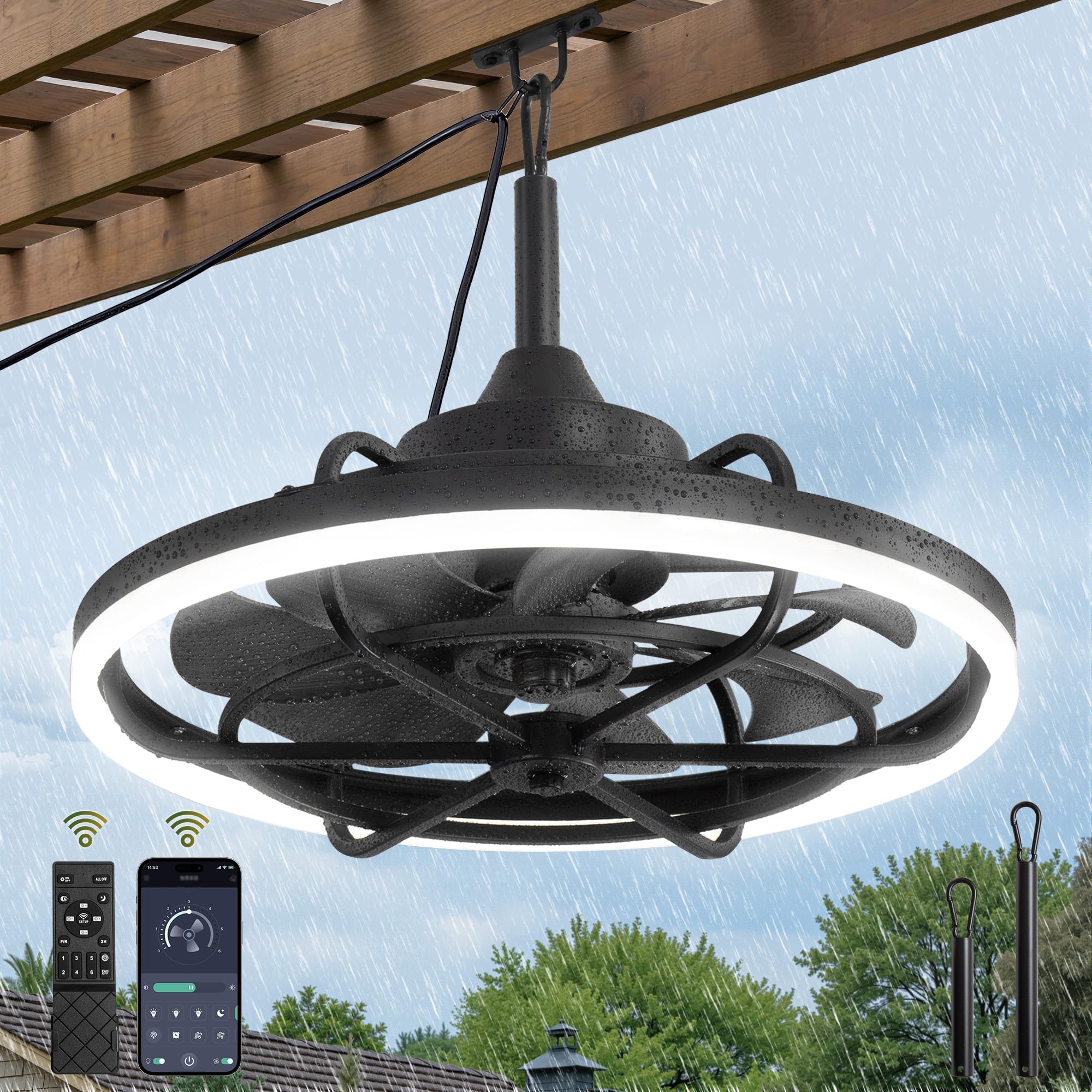
Image: Fanbulous 24-inch Outdoor Ceiling Fan with Light, showcasing its design suitable for outdoor patios.
Nøglefunktioner:
- Fjernbetjening og app-styring: Adjust settings via included remote or dedicated mobile app (Bluetooth required).
- 6 blæserhastigheder: Customize airflow for optimal comfort.
- 3CCT Dimmable LED Light: Choose from 3000K (warm), 4500K (neutral), or 6500K (cool) light, with brightness adjustable from 10% to 100% (max 2030 lumens).
- Vejrbestandigt design: IP65 waterproof rating, suitable for wet outdoor locations.
- Vendbar DC-motor: Forward mode for cooling in summer, reverse mode for air circulation in winter.
- Hukommelsesfunktion: Retains last light brightness, color temperature, wind speed, and fan steering settings.
- 2-Hour Sleep Timer: Convenient automatic shut-off option.
- Mobile Hook Installation: Portable hanging design with a 16.5-foot power cord for flexible placement.
Pakkens indhold
Kontroller, at alle komponenter er til stede, før installationen påbegyndes:
- Fanbulous Outdoor Ceiling Fan Unit
- Fjernbetjening
- Hanging Rods (8.5-inch and 12-inch options)
- Monteringsudstyr (skruer, ankre)
- Brugermanual
Specifikationer
| Feature | Specifikation |
|---|---|
| Mærke | Fanbulous |
| Modelnummer | FB-24SMART (XX24) |
| Størrelse | 24 Inch (24"D x 24"W x 21.14"H) |
| Farve | Sort |
| Strømkilde | AC/DC (Plug-in) |
| Wattage | 48 watt |
| Antal hastigheder | 6 |
| Kontrolmetode | Fjernbetjening, app (Bluetooth) |
| Motortype | DC-motor (reversibel) |
| IP-vurdering | IP65 (vejrbestandig) |
| Materiale | Metal (Housing), ABS (Blades) |
| Ledningslængde | 16.5 fod |
| Lys farvetemperatur | 3000K, 4500K, 6500K |
| Lysstrøm | Max 2030 lumen |
Installation
The Fanbulous outdoor ceiling fan features a modular design for simple installation. Follow these steps for proper setup:
- Trin 1: Installer monteringsbeslag
Use appropriate screws to drive the mounting bracket into the ceiling or overhead structure. Ensure the structure can support the fan's weight. - Step 2: Prepare Downrod
Install the coupling cover onto the chosen downrod (8.5-inch or 12-inch). - Step 3: Attach Downrod to Fan
Insert the downrod pin into the fan's yoke and tighten the screws securely. - Step 4: Hang Fan Unit
Carefully suspend the fan unit onto the installed mounting bracket. - Step 5: Adjust Coupling Cover
Move the coupling cover downwards to conceal the mounting hardware. - Step 6: Secure Power Cord
Hang the 16.5-foot power cord on the hook provided, ensuring it is routed safely and not under tension. Plug the fan into a suitable outdoor-rated power outlet.

Image: Visual guide illustrating the six simple steps for installing the Fanbulous outdoor ceiling fan.
Betjeningsvejledning
Your Fanbulous outdoor ceiling fan can be controlled using the included remote control or a dedicated mobile application.
Remote Control & App Control:
The fan offers both a physical remote and a mobile app for convenient control. The app requires a Bluetooth connection to your device.

Image: Depicts the remote control and the mobile app interface, highlighting various control functions.
To download the mobile application, scan the QR code provided in the product packaging or visit: http://www.jasonghost.com/fanlamppro/
Lysfunktioner:
- Lys til/fra: Toggle the light using the dedicated button on the remote or app.
- Color Temperature (CCT) Change: Cycle through 3000K (warm), 4500K (neutral), and 6500K (cool) settings.
- Justering af lysstyrke: Dim the light from 10% to 100% to suit your preference.

Image: Illustrates the fan's ability to change between three color temperatures (3000K, 4500K, 6500K) and its dimmable brightness range.
Indstillinger for blæserhastighed:
The fan offers 6 adjustable speeds. Use the speed buttons on the remote or the slider in the app to select your desired airflow level.
- Niveau 1-2: Soft, comfortable wind.
- Niveau 3-4: Medium, natural wind.
- Niveau 5-6: High, cooling wind.
Vendbar DC-motor:
The fan's DC motor allows for reversible blade rotation, optimizing air circulation for different seasons.
- Sommertilstand (fremadgående rotation): Bladene roterer mod uret og presser luften nedad for at skabe en kølende brise.
- Vintertilstand (omvendt rotation): Blades rotate clockwise, drawing air upwards to circulate warm air evenly throughout the space.

Image: Demonstrates the reversible DC motor, showing forward rotation for summer cooling and reverse rotation for winter air circulation.
Timer funktion:
Activate the 2-hour sleep timer via the remote or app to automatically turn off the fan after two hours.

Image: Highlights the 2-hour timer setting and the quiet operation of the DC motor.
Hukommelsesfunktion:
The fan is equipped with a memory function. After setting your preferred light brightness, color temperature, wind speed, and fan steering, turn off the fan for at least 10 seconds. The fan will recall these settings when powered on again.
Officiel produktvideo:
Video: An official product video from Fanbulous demonstrating the features and functionality of the outdoor ceiling fan with light. This video showcases the fan's weatherproof design, light settings, and remote control capabilities.
Opretholdelse
Regular maintenance helps ensure the longevity and optimal performance of your Fanbulous outdoor ceiling fan.
- Rensning: Afbryd strømmen før rengøring. Brug en blød, tør klud.amp cloth to wipe down the fan blades and housing. Do not use abrasive cleaners or solvents.
- Inspektion: Kontrollér regelmæssigt alle forbindelser og monteringsudstyr for at sikre, at de er sikre.
- Udendørs eksponering: While weatherproof, prolonged exposure to extreme weather conditions may affect the fan's appearance over time.
Fejlfinding
| Problem | Mulig årsag | Løsning |
|---|---|---|
| Ventilatoren tænder ikke | No power supply; Remote battery low; Fan not properly plugged in. | Check power outlet and connections. Replace remote batteries. Ensure the fan is securely plugged in. |
| Lys virker ikke | Light function off; Power issue. | Ensure light is turned on via remote/app. Check power supply. |
| Fjernbetjening/app svarer ikke | Remote battery low; App not paired; Bluetooth off. | Replace remote batteries. Ensure Bluetooth is enabled on your device. Re-pair the app with the fan if necessary (refer to app instructions). |
| Ventilatoren laver usædvanlig lyd | Loose screws; Obstruction. | Check and tighten all mounting screws. Ensure nothing is obstructing the fan blades. |
Garanti og support
Fanbulous provides a 2 års garanti for this product, covering defects in materials and workmanship under normal use. For any questions, concerns, or warranty claims, please contact Fanbulous customer service. Our dedicated team is ready to assist you.
Gem venligst din købsbevis til garantiservice.