
1. Introduktion
This manual provides essential information for the safe installation, operation, and maintenance of your TOMZN TOB9-VAP 63A 1P+N WiFi Smart Switch Energy Meter. This device is a miniature circuit breaker (MCB) with integrated energy metering (Kwh, Voltage, Amperage, Wattage), monitoring, and timer relay functions, compatible with TUYA Smartlife applications. It is designed to protect electrical circuits from overloads and short circuits while offering smart control and energy consumption insights.
2. Sikkerhedsoplysninger
ADVARSEL: Risiko for elektrisk stød.
- Installation og vedligeholdelse må kun udføres af kvalificeret personale.
- Afbryd altid strømmen ved hovedafbryderen, før du installerer eller servicerer enheden.
- Sørg for, at alle ledningsforbindelser er sikre og overholder lokale el-forskrifter.
- Brug ikke enheden, hvis den ser ud til at være beskadiget.
- This device is designed for indoor use in dry environments unless otherwise specified for specific outdoor enclosures.
- The device is rated for 1P+N (Single Phase + Neutral) systems. Ensure correct polarity during installation.
3. Produktet er slutview
The TOMZN TOB9-VAP is a versatile smart circuit breaker offering protection and advanced monitoring capabilities.
3.1. Nøglefunktioner
- Overbelastnings- og kortslutningsbeskyttelse: Prevents damage caused by excessive current.
- Energy Metering (Kwh, V, A, W): Monitors real-time and historical energy consumption.
- WiFi-forbindelse: Remote control and monitoring via smartphone app.
- Timer Relay Function: Schedule on/off times for connected loads.
- VA Protection: Justerbar Voltage og Amperage protection settings.
- TUYA Smartlife Compatible: Integrates with popular smart home platforms.
- Holdbar konstruktion: Made with high-quality insulating, flame-retardant, and UV-resistant materials.
- Sikre forbindelser: Screw-type terminals for stable electrical connections.
3.2. Komponenter og indikatorer

Figure 1: TOMZN TOB9-VAP WiFi Smart Switch Energy Meter (Metering VA Protection, 1-63A Adjustable). This image shows the device with its input (Power) and output (Load) terminals, WiFi indicator, CE mark, signal light, and the main power button. The display indicates 'Metering VA protection In: 1-63A'.

Figure 2: TOMZN TOB9-63M WiFi Smart Switch Energy Meter (Metering). This variant includes energy metering capabilities (kW·h, W, V, A) but may not have the adjustable VA protection of the TOB9-VAP.
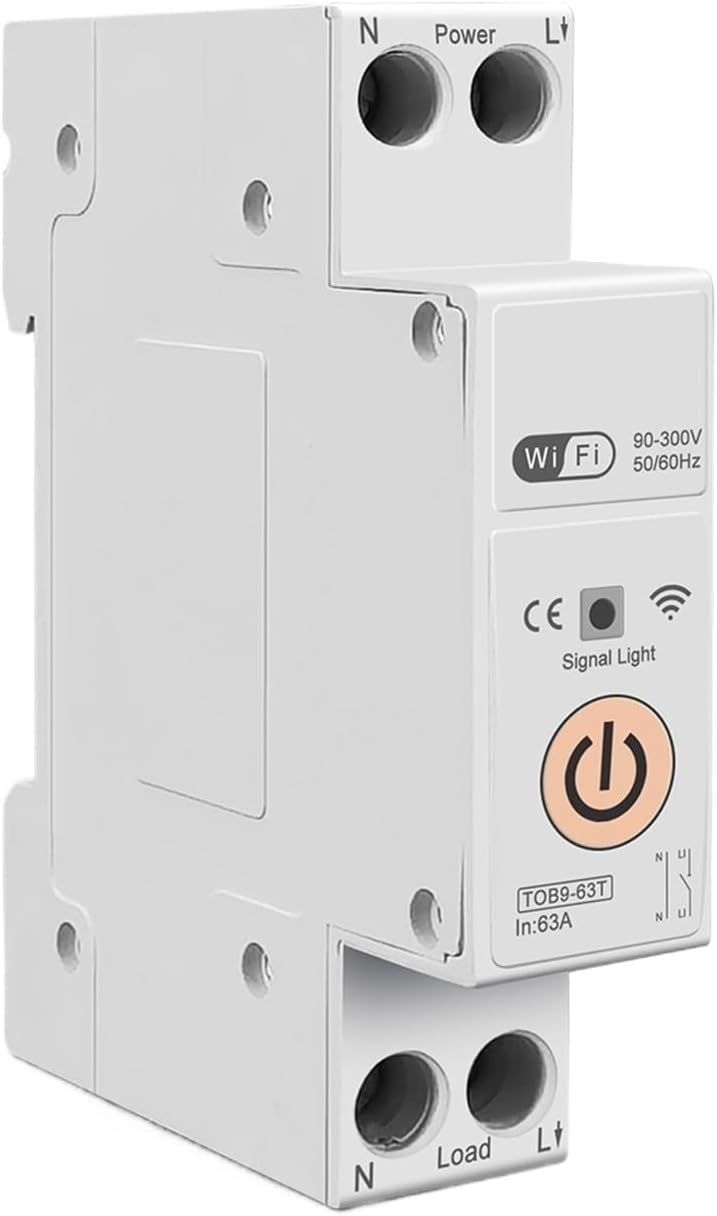
Figure 3: TOMZN TOB9-63T WiFi Smart Switch (No Metering). This basic variant provides WiFi control and circuit protection without energy metering functions.
- Power Terminals (N, L): Input connections for neutral and live wires.
- Load Terminals (N, L): Output connections for neutral and live wires to the load.
- WiFi-indikator: Viser status for WiFi-forbindelsen.
- Signallys: Angiver enhedens status.
- Hovedstrømknap: Manual ON/OFF control for the circuit breaker.
- Display (TOB9-VAP/TOB9-63M): Shows real-time energy data (Kwh, W, V, A) and protection settings.
4. Opsætning
4.1. Installation og ledningsføring
- Strømafbrydelse: Before starting, ensure the main power supply to the installation area is completely disconnected.
- Montering: Mount the TOB9-VAP on a standard DIN rail within an appropriate electrical enclosure.
- Indgangsledning: Connect the incoming neutral wire to the 'N' terminal under 'Power' and the incoming live wire to the 'L' terminal under 'Power'. Ensure secure screw-type connections.
- Udgangsledning: Connect the neutral wire to your load to the 'N' terminal under 'Load' and the live wire to your load to the 'L' terminal under 'Load'.
- Verifikation: Dobbelttjek alle forbindelser for tæthed og korrekt polaritet.
- Gendan strøm: Once installation is complete and verified, restore power to the main circuit.
4.2. App Pairing (TUYA Smartlife)
- Download app: Download the 'TUYA Smart' or 'Smart Life' app from your smartphone's app store.
- Registrer/Log ind: Opret en konto eller log ind på din eksisterende konto.
- Tilføj enhed: In the app, tap '+' to add a new device. Select 'Electrical' > 'Circuit Breaker (Wi-Fi)'.
- Parringstilstand: Ensure the TOB9-VAP's WiFi indicator is blinking rapidly. If not, press and hold the main power button for 5-10 seconds until it blinks rapidly to enter pairing mode.
- Opret forbindelse til WiFi: Follow the in-app instructions to connect the device to your 2.4GHz WiFi network. (5GHz networks are not supported).
- Omdøbning af enhed: Once paired, you can rename the device for easy identification in the app.
5. Betjeningsvejledning
5.1. Manuel betjening
- Tænd/sluk: Press the main power button on the device to manually switch the circuit breaker ON or OFF.
5.2. App-kontrol og -overvågning
- Fjernbetjening TIL/FRA: Use the TUYA Smartlife app to remotely switch the circuit breaker ON or OFF.
- Energiovervågning: View real-time and historical data for Kwh consumption, current (A), voltage (V) og effekt (W) direkte i appen.
- Timer/Schedule: Set up schedules or countdown timers for automatic ON/OFF operations.
- VA Protection Settings: Juster overvolumentage, under-bindtage, over-current, and over-power protection thresholds within the app. The device will automatically trip if these thresholds are exceeded.
- Sceneautomatisering: Integrate the device into smart scenes with other TUYA-compatible devices.
6. Vedligeholdelse
- Regelmæssig inspektion: Periodically inspect the device and its wiring for any signs of damage, loose connections, or overheating.
- Rensning: Clean the exterior of the device with a dry, soft cloth. Do not use liquid cleaners or solvents.
- Firmwareopdateringer: Check the TUYA Smartlife app for any available firmware updates to ensure optimal performance and security.
- Professionelt tjek: For any internal issues or complex repairs, consult a qualified electrician.
7. Fejlfinding
| Problem | Mulig årsag | Løsning |
|---|---|---|
| Enheden tænder ikke. | Ingen strømforsyning; løse ledninger; intern fejl. | Check main power supply. Verify all wiring connections. If problem persists, contact support. |
| WiFi indicator not blinking/connecting. | Incorrect pairing mode; weak WiFi signal; 5GHz network. | Ensure device is in rapid blinking pairing mode. Move device closer to router. Ensure router is 2.4GHz. |
| Enheden slår ofte fra. | Overload/short circuit; incorrect VA protection settings. | Reduce load on the circuit. Check for short circuits. Adjust VA protection thresholds in the app if necessary. |
| Unøjagtige energiaflæsninger. | Forkert ledningsføring; enhedfejl. | Verify wiring connections. If problem persists, contact support. |
8. Specifikationer
| Feature | Detalje |
|---|---|
| Model | TOB9-VAP |
| Nominel strøm | 1-63A (Justerbar) |
| Nominel voltage | 90-300V AC |
| Frekvens | 50/60Hz |
| polakker | 1P+N |
| Forbindelse | Wi-Fi (kun 2.4 GHz) |
| Appkompatibilitet | TUYA Smart / Smart Life |
| Beskyttelsesfunktioner | Overload, Short Circuit, Over-Voltage, Under-bindtage, Over-Current, Over-Power |
| Pakkedimensioner | 0.39 x 0.39 x 0.39 tommer |
| Varens vægt | 3.53 ounce |
| Fabrikant | Generic (TOMZN) |
| Varemodelnummer | JCZWUUZZB-DFE767306BB9FC909ED20C115B9 |
9. Garanti og support
For garantioplysninger, teknisk support eller serviceforespørgsler henvises til den dokumentation, der fulgte med dit køb, eller kontakt sælgeren direkte. Behold din købskvittering som købsbevis.