
SOBATTY AV-302
SOBATTY AV-302 5.1 Channel 8K Ultra HD Home Theater Receiver User Manual
Model: AV-302
1. Introduktion
Tak for købetasing the SOBATTY AV-302 5.1 Channel 8K Ultra HD Home Theater Receiver. This manual provides essential information for the safe and efficient operation of your new audio-video receiver. Please read this manual thoroughly before use and retain it for future reference.
The AV-302 is designed to deliver a high-quality home theater experience with advanced connectivity options, including 8K HDMI 2.1, Bluetooth 5.0, and various digital and analog audio inputs. It features professional-grade bass management and supports lossless music formats.
2. Vigtige sikkerhedsinstruktioner
For at mindske risikoen for elektrisk stød, brand eller skade på enheden, bedes du overholde følgende sikkerhedsforanstaltninger:
- Strømkilde: Tilslut kun enheden til en stikkontakt med vekselstrøm med den angivne lydstyrke.tage (110V/60Hz).
- Ventilation: Ensure adequate ventilation. Do not block ventilation openings. Maintain a minimum distance of 10 cm (4 inches) around the unit for proper airflow.
- Vand og fugt: Udsæt ikke enheden for regn, fugt, dryp eller stænk. Placer ikke genstande fyldt med væsker, såsom vaser, på enheden.
- Varme: Placer ikke enheden i nærheden af varmekilder såsom radiatorer, varmeapparater, komfurer eller andre apparater (herunder ampløftere), der producerer varme.
- Rensning: Tag stikket ud af stikkontakten før rengøring. Brug kun en tør klud.
- Service: Forsøg ikke selv at servicere dette produkt. Overlad al service til kvalificeret servicepersonale.
- Overbelaste: Overbelast ikke stikkontakter eller forlængerledninger, da dette kan medføre risiko for brand eller elektrisk stød.
- Fremmedobjekter: Skub aldrig genstande af nogen art ind i dette produkt gennem åbninger, da de kan røre ved farlig voltage punkter eller kortslutte dele, der kan resultere i brand eller elektrisk stød.
3. Pakkens indhold
Bekræft at alle varer er til stede i pakken:
- SOBATTY AV-302 Amplifier x1
- Fjernbetjening x1
- Brugervejledning x1
4. Produktet er slutview
4.1 Frontpanel

Billede: Forside view of the SOBATTY AV-302 receiver, showing the display, input selection buttons, volume knobs, and USB port.
- Power knap: Tænder eller slukker for enheden.
- Skærm: Viser aktuelt input, lydstyrkeniveau og andre statusoplysninger.
- Inputvælgerknapper: HDMI, KTV, USB, etc., to switch between audio/video sources.
- Lydstyrkeknapper: Separate controls for Microphone Adjustment and Music Multifunctional Adjustment (Master Volume).
- USB-A-port: Til tilslutning af USB-lagerenheder for at afspille lyd files.
- Mikrofonindgange (MIC1, MIC2): Til tilslutning af mikrofoner.
- Navigation Buttons (PREV, P/P, NEXT): Til kontrol af medieafspilning.
- MIC-MENT / MUSIC-MENT Buttons: For adjusting microphone and music settings.
4.2 Bagpanel
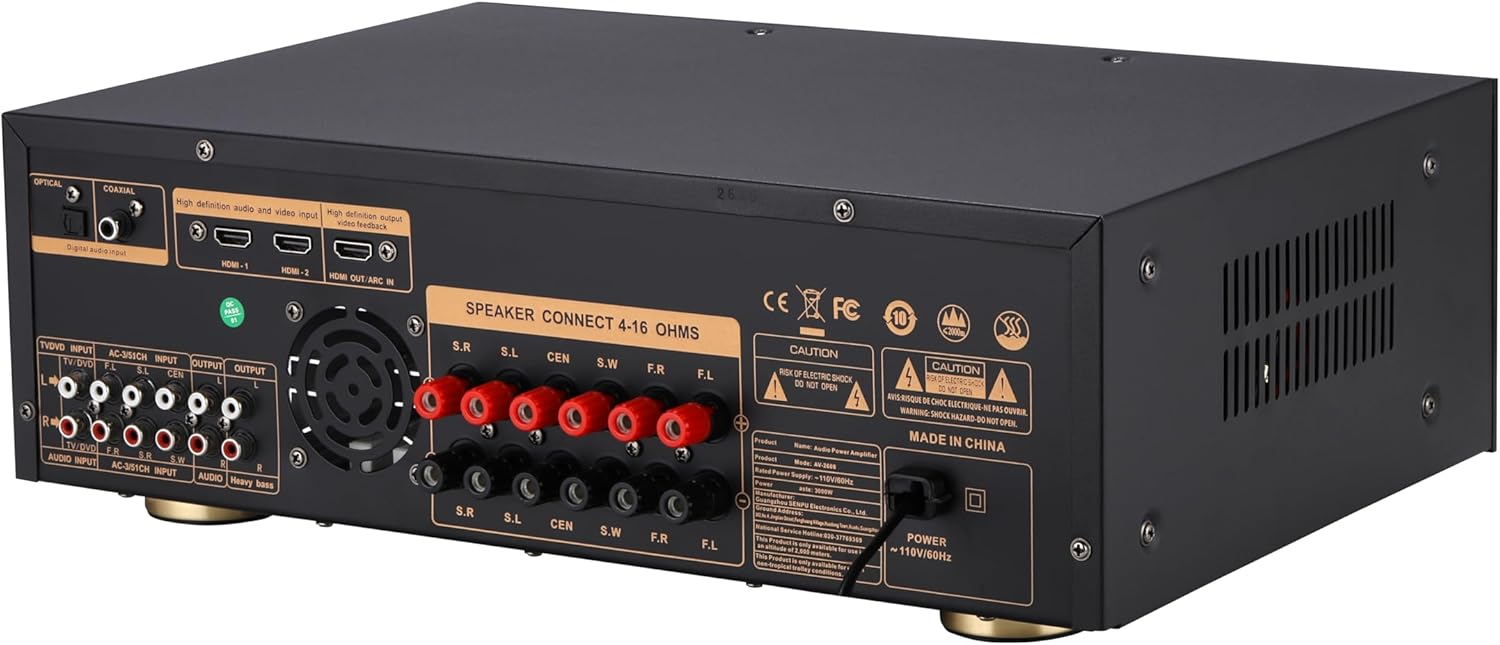
Billede: Bagside view of the SOBATTY AV-302 receiver, displaying various input and output ports including HDMI, optical, coaxial, RCA, and speaker terminals.
- Digitale lydindgange: Optical, Coaxial for multi-channel PCM signals.
- HDMI Inputs (HDMI-1, HDMI-2): For connecting HDMI source devices.
- HDMI OUT (ARC IN): For connecting to a TV, supporting Audio Return Channel (ARC).
- Analog RCA Inputs (TV/DVD, AC-3/5.1CH, AUDIO INPUT): Til tilslutning af analoge lydkilder.
- Analog RCA Outputs (OUTPUT, AUDIO, Heavy bass): For connecting to other audio devices or a dedicated subwoofer.
- Speaker Terminals (S.R, S.L, CEN, S.W, F.R, F.L): For connecting 4-16 Ohm speakers.
- Strømindgang: AC 110V/60Hz.
5. Opsætning og forbindelser
Follow these steps to set up your SOBATTY AV-302 receiver:
5.1 Højttalertilslutning
Connect your speakers to the corresponding terminals on the rear panel. Ensure correct polarity (+ to + and - to -) for each speaker. The receiver supports 4-16 Ohm speakers.
- Front Left (F.L) & Front Right (F.R): Tilslut dine primære stereohøjttalere.
- Center (CEN): Connect your center channel speaker.
- Surround Left (S.L) & Surround Right (S.R): Connect your surround speakers.
- Subwoofer (S.W): Connect your passive subwoofer. For a powered subwoofer, use the "Heavy bass" RCA output.
Note: This unit simulates 5.1 channels. Actual surround channels are 2.1 channels, meaning independent adjustment for surround and center channels is not available.
5.2 HDMI-forbindelser
The AV-302 features HDMI 2.1 for 8K/60Hz and 4K/120Hz video passthrough.
- Connect your HDMI source devices (e.g., Blu-ray player, game console, streaming device) to the HDMI-1 or HDMI-2 input ports.
- Tilslut HDMI OUT (ARC IN) port to your TV's HDMI ARC/eARC input. This allows audio from your TV to be sent back to the receiver.
5.3 Digital Audio Connections
For devices with optical or coaxial digital audio outputs:
- Connect an optical cable from your source device to the OPTISK indgang på receiveren.
- Alternatively, connect a coaxial cable from your source device to the KOAKSIAL indgang på receiveren.
5.4 Analog Audio Connections
For devices with analog RCA audio outputs:
- Connect RCA cables from your source device (e.g., CD player, turntable with pre-amp) til TV/DVD, AC-3/5.1CH, eller LYDINGANG havne.
5.5 Strømtilslutning
Once all audio and video connections are made, connect the power cord to the receiver's power input and then to a standard AC 110V/60Hz wall outlet.
6. Betjeningsvejledning
6.1 Tænd/sluk
Tryk på MAGT button on the front panel or the remote control to turn the receiver on or off.
6.2 Indgangsvalg
Tryk på det tilsvarende INPUT button on the front panel or the remote control (e.g., HDMI, KTV, USB, Bluetooth, Optical, Coaxial, TV/DVD, AC-3/5.1CH, AUDIO INPUT) to select your desired audio/video source.
6.3 Lydstyrkejustering
- Hovedvolumen: Use the large "MUSIC MULTIFUNCTIONAL ADJUSTMENT" knob on the front panel or the Master Volume buttons on the remote control to adjust the overall volume.
- Diskant og bas: These can be adjusted directly via the remote control.
- Subwoofer Volume (SUB): This can be adjusted through the music menu button on the receiver. Press the music menu button once to cycle through functions, then use the master volume knob to adjust the subwoofer level.
6.4 Sound Field Modes
The receiver offers 8 different sound field modes. Use the SOUND FIELD MODE button on the remote control to cycle through these modes. Press the SOUND FIELD MODE OFF button to restore the default setting.
6.5 Bluetooth-betjening
- Vælge Bluetooth as the input source using the input selector. The display will show "BLUE" or a similar indicator.
- Aktiver Bluetooth på din mobilenhed, og søg efter tilgængelige enheder.
- Select "SOBATTY AV-302" (or similar name) from the list to pair.
- Once paired, you can stream audio from your device to the receiver.
- The receiver supports Bluetooth 5.0 aptX HD for 24-bit lossless wireless streaming.
6.6 USB-afspilning
- Insert a USB storage device into the front-panel USB-A havn.
- Vælge USB som inputkilde.
- Brug FORR, P/P (Play/Pause), and NÆSTE buttons on the front panel or remote control to navigate and play audio files.
- The receiver supports PCM/DSD256/FLAC/WAV formats up to 32-bit/384kHz.
6.7 Basstyring
The dedicated LFE subwoofer output features an adjustable crossover (40-200Hz) and ±6dB gain control. Activate Bass Boost -tilstand to dynamically enhance low-frequency impact. This is compatible with all powered subwoofers.
7. Vedligeholdelse
- Rensning: Disconnect the power cord before cleaning. Use a soft, dry cloth to wipe the exterior surfaces. Do not use liquid cleaners or aerosol cleaners.
- Ventilation: Kontrollér regelmæssigt, at ventilationsåbningerne er fri for støv og snavs for at forhindre overophedning.
- Opbevaring: Hvis enheden opbevares i længere tid, skal den tages ud af stikkontakten og opbevares et køligt og tørt sted.
8. Fejlfinding
If you encounter issues with your receiver, refer to the following table for common problems and solutions:
| Problem | Mulig årsag | Løsning |
|---|---|---|
| Ingen strøm | Netledning ikke tilsluttet; stikkontakt defekt | Sørg for, at netledningen er korrekt tilsluttet. Test stikkontakten med en anden enhed. |
| Ingen lyd | Incorrect input selected; Volume too low; Speakers not connected properly; Mute function active | Select the correct input source. Increase volume. Check speaker connections and polarity. Deactivate mute. |
| Ingen videoudgang via HDMI | Incorrect HDMI input/output selected; HDMI cable faulty; TV input not set correctly | Ensure correct HDMI input on receiver and TV. Try a different HDMI cable. Check TV's input selection. |
| Bluetooth-parring mislykkes | Receiver not in Bluetooth mode; Device too far; Interference | Ensure receiver is in Bluetooth input mode. Move device closer. Avoid sources of interference. |
| Problemer med USB-afspilning | Ikke understøttet file format; USB device not recognized; Corrupt files | Sikre files are supported (PCM/DSD256/FLAC/WAV). Try a different USB device or reformat. |
| Fjernbetjening virker ikke | Batteries depleted; Obstruction; Remote not pointed at receiver | Replace batteries. Remove any obstructions. Point remote directly at the receiver's sensor. |
Hvis problemet fortsætter efter at have prøvet disse løsninger, bedes du kontakte kundesupport.
9. Specifikationer
| Modelnummer | AV-302 |
| Produktdimensioner | 12 x 16.93 x 5.91 tommer |
| Varens vægt | 6.34 pund |
| Forbindelsesteknologi | Bluetooth, HDMI, Optical, Coaxial, USB, RCA |
| Bluetooth version | 5.0 aptX HD |
| HDMI version | 2.1 (8K/60Hz & 4K/120Hz passthrough) |
| Total HDMI-porte | 3 (2 In, 1 Out with ARC) |
| USB Audio Support | PCM/DSD256/FLAC/WAV (up to 32-bit/384kHz) |
| Højttalerimpedans | 4-16 ohm |
| Subwoofer Crossover | Adjustable (40-200Hz) |
| Strømforsyning | 110V/60Hz |
| Surround Sound Kanalkonfiguration | 2.1 (Simulated 5.1) |
10. Garanti og support
SOBATTY products are designed and manufactured to the highest quality standards. For information regarding warranty coverage and customer support, please refer to the warranty card included with your product or visit the official SOBATTY webwebsted.
For technical assistance or inquiries, please contact SOBATTY customer service.
Ask a question about this manual
Ask about setup, troubleshooting, compatibility, parts, safety, or missing instructions. Manuals+ will review the question and use this page’s manual context to help answer it.