
1. Introduktion
Tak for købetasing the ZEBRONICS Juke BAR 200A Soundbar. This manual provides essential information for the safe and correct operation of your device. Please read it thoroughly before use and retain it for future reference.
Pakkens indhold
- Soundbar - 1 enhed
- Subwoofer - 1 enhed
- QR-kodeguide - 1 enhed
- Power Adapter - 1 unit
- Fjernbetjening - 1 enhed
2. Sikkerhedsinstruktioner
For at sikre sikker drift og forhindre skader, bedes du overholde følgende sikkerhedsforanstaltninger:
- Udsæt ikke enheden for regn eller fugt.
- Bloker ikke nogen ventilationsåbninger.
- Placer enheden på en stabil, flad overflade.
- Brug kun den strømadapter, der er leveret af producenten.
- Åbn ikke c'enasing; overlad al service til kvalificeret personale.
- Hold enheden væk fra direkte sollys, varmekilder og stærke magnetfelter.
- Rengør kun med en tør klud.
3. Produktet er slutview
The ZEBRONICS Juke BAR 200A is a compact soundbar system designed to enhance your audio experience. It features a soundbar with dual drivers and a dedicated subwoofer for powerful bass.
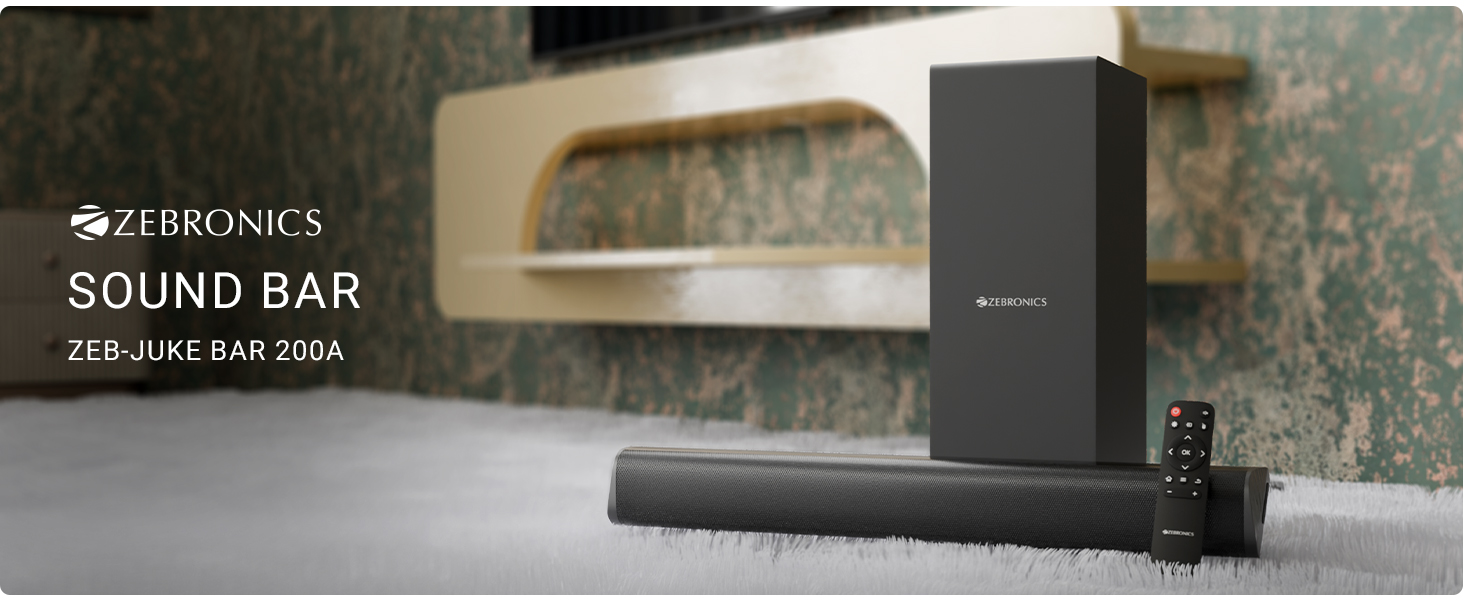
Figur 3.1: ZEBRONICS Juke BAR 200A Soundbar, Subwoofer, and Remote Control. This image displays the complete sound system, including the main soundbar unit, the separate subwoofer, and the remote control, providing a visual representation of all primary components.
Nøglefunktioner
- 90W RMS-udgang: Leverer kraftfuld og klar lyd.
- Dual Driver Soundbar: Equipped with 5.08cm x 2 drivers for balanced sound.
- 11.43 cm subwoofer: Provides deep, rich bass.
- Multiforbindelse: Supports Bluetooth v5.1, HDMI ARC, and USB.
- Dolby Audio Decoding: Built-in Dolby Digital and Dolby Digital+ decoding for versatile audio.
- Vægmonterbar: Designed for flexible placement options.
- Fjernbetjening: Full control over audio settings.

Figur 3.2: Soundbar Media and Volume Controls and Remote Control. This image highlights the physical control buttons on the soundbar for power, volume up, and volume down, alongside a detailed view of the included remote control, illustrating all available buttons for comprehensive audio management.

Figur 3.3: Soundbar Rear Panel with Connectivity Ports. This image provides a close-up view of the soundbar's rear panel, clearly labeling the HDMI ARC, USB, DC IN, and SW OUT ports, essential for understanding connection options.
4. Opsætning
4.1 Placering
Place the soundbar on a stable surface in front of your television or mount it on the wall below your TV. Position the subwoofer on the floor, ideally near the soundbar, for optimal bass performance.
4.2 Tilslutning af subwooferen
Connect the subwoofer to the soundbar using the provided SW OUT cable. Ensure a secure connection.
4.3 Strømtilslutning
- Tilslut strømadapteren til DC IN-porten på soundbaren.
- Sæt strømadapteren i en passende stikkontakt.
4.4 Lydforbindelser
Vælg en af følgende metoder til at tilslutte din lydkilde:
- HDMI ARC: For optimal audio quality and control, connect an HDMI cable from your TV's HDMI ARC port to the HDMI ARC port on the soundbar. This allows your TV remote to control the soundbar's volume.
- Bluetooth: For wireless connection, refer to the "Bluetooth Pairing" section in Operating Instructions.
- USB: Indsæt et USB-drev, der indeholder lyd files i USB-porten for direkte afspilning.
5. Betjeningsvejledning
5.1 Tænd/sluk
- Tryk på Magt knappen på soundbaren eller fjernbetjeningen for at tænde eller slukke enheden.
- The LED indicator on the soundbar will illuminate when powered on.
5.2 Valg af inputtilstand
Tryk på Input button on the remote control to cycle through available input modes: Bluetooth (BT), HDMI ARC, and USB.
5.3 Bluetooth -parring
- Turn on the soundbar and select Bluetooth mode. The LED indicator will flash, indicating pairing mode.
- Enable Bluetooth on your mobile device or computer and search for "ZEB-JUKE BAR 200A".
- Select the device to pair. Once connected, the LED indicator will glow steadily.
5.4 Lydstyrkekontrol
- Brug Lydstyrke op (+) og Skrue ned (-) buttons on the soundbar or remote control to adjust the volume.
- Tryk på Stum button on the remote to mute or unmute the audio.
5.5 USB-afspilning
Insert a USB flash drive into the USB port. The soundbar will automatically switch to USB mode and begin playing compatible audio files. Use the remote control for playback functions (Play/Pause, Next/Previous Track).
6. Vægmontering
The ZEBRONICS Juke BAR 200A is designed to be wall-mountable. Ensure you use appropriate screws and wall plugs for your wall type. It is recommended to consult a professional for wall mounting to prevent damage or injury.
- Measure the distance between the mounting holes on the back of the soundbar.
- Mark the corresponding positions on the wall.
- Bor huller og isæt vægdyvler (hvis nødvendigt).
- Secure the soundbar to the wall using suitable screws.
7. Vedligeholdelse
- Rensning: Brug en blød, tør klud til at rengøre overfladerne på soundbaren og subwooferen. Brug ikke flydende rengøringsmidler eller slibende materialer.
- Opbevaring: Hvis enheden opbevares i længere tid, skal den afbrydes fra strømmen og opbevares et køligt og tørt sted.
- Ventilation: Sørg for, at ventilationsåbningerne ikke er blokeret for at forhindre overophedning.
8. Fejlfinding
| Problem | Mulig årsag | Løsning |
|---|---|---|
| Ingen strøm | Strømadapteren er ikke tilsluttet, eller der er en defekt stikkontakt. | Kontrollér strømtilslutningerne. Prøv en anden stikkontakt. |
| Ingen lyd | Incorrect input mode, low volume, or incorrect cable connection. | Select the correct input mode. Increase volume. Check audio cables. |
| Bluetooth forbinder ikke | Soundbaren er ikke i parringstilstand, enheden er for langt væk, eller den er tidligere parret. | Ensure soundbar is in BT pairing mode. Move device closer. Forget device on your phone and re-pair. |
| Fjernbetjening virker ikke | Lavt batteri eller blokering. | Udskift batterierne i fjernbetjeningen. Sørg for, at der ikke er nogen forhindringer mellem fjernbetjeningen og soundbaren. |
9. Specifikationer
| Feature | Detalje |
|---|---|
| Modelnavn | Zeb - Juke Bar 200A |
| Højttaler type | Soundbar med subwoofer |
| Samlet udgangseffekt | 90 Watts RMS (Soundbar: 20W x 2, Subwoofer: 50W) |
| Subwoofer diameter | 11.43 centimeter |
| Soundbar Driver Size | 5.08cm x 2 |
| Forbindelse | Bluetooth v5.1, HDMI ARC, USB |
| Surround Sound Channel | 2.1 |
| Lydafkodning | Dolby Digital, Dolby Digital+ |
| Kontrolmetode | Remote, Control Buttons |
| Produktdimensioner | 6.3D x 50B x 6.3H centimeter (soundbar) |
| Varens vægt | 2.5 kg |
| Inkluderede komponenter | Sound Bar, Subwoofer, QR Code Guide, Power Adapter, Remote |
10. Garantioplysninger
This product is covered by a manufacturer's warranty. Please refer to the QR Code Guide included in your package or visit the official ZEBRONICS website for detailed warranty terms and conditions. Retain your purchase receipt as proof of purchase for warranty claims.
For extended warranty options, please check with your retailer or the ZEBRONICS official channels.
11. Support
For technical assistance, product inquiries, or service requests, please contact ZEBRONICS customer support:
- Officiel Webwebsted: www.zebronics.com
- Kundeservice: Refer to the QR Code Guide or the official website for the latest contact information (phone numbers, email support).
Please have your product model number (Juke BAR 200A) and purchase details ready when contacting support.