
BTMETER BT-5000Y
BTMETER BT-5000Y Digital Hot-Wire Anemometer User Manual
Model: BT-5000Y
1. Introduktion
Tak for købetasing the BTMETER BT-5000Y Digital Hot-Wire Anemometer. This high-precision portable anemometer is designed for environmental measurement, aviation transport, and HVAC monitoring systems. Its retractable sensor design allows for easy and convenient measurements in narrow spaces. Equipped with an advanced hot-wire sensor, it provides accurate wind speed, temperature, and airflow data, ensuring reliable performance.
This device features a large color LCD display that simultaneously shows multiple data points, including current wind speed, maximum wind speed, and minimum wind speed. Users can select different units of measurement as needed, adapting to various measurement requirements.
2. Produktet er slutview
2.1 Nøglefunktioner
- Simultaneous measurement of wind speed and temperature.
- High-precision hot-wire sensor for accurate readings.
- Retractable sensor probe for measurements in confined areas.
- Large color LCD display for clear data visualization.
- Multiple wind speed units: m/s, km/h, ft/min, Knots, Mph.
- Airflow measurement in CMM (cubic meters per minute) and CFM (cubic feet per minute).
- MAX/MIN/AVG data hold function.
- Indikator for lavt batteri.
- Configurable automatic shutdown function for power saving.
- Built-in 600mAh rechargeable lithium battery with USB Type-C charging.
- Waterproof and dustproof design for outdoor use.
2.2 Produktkomponenter

Figure 2.1: BTMETER BT-5000Y Anemometer with its extendable probe and included USB charging cables.

Figure 2.2: Detailed diagram showing the main components of the BT-5000Y, including the sensor, sensor protective cover, LCD screen, power switch, mode button, MAX/MIN/UNIT buttons, SET button, data hold button, and connection cable.
3. Specifikationer
| Parameter | Værdi |
|---|---|
| Målenøjagtighed | ±5 % |
| Vindhastighedsområde | 0-30 m/s |
| Vindhastighedsopløsning | 0.1 % |
| Temperaturområde | 0.0-45.0 °C (Resolution 0.1, Accuracy ±1.0°C) / 32.0-113.0 °F (Resolution 0.1, Accuracy ±1.8°F) |
| Airflow (CMM) Range | 0-999900 m³/min |
| Airflow (CFM) område | 0-999900 ft³/min |
| Airflow Resolution | 0.001-100 |
| Strømkilde | Built-in 600mAh rechargeable Lithium battery |
| Opladningsgrænseflade | USB Type-C |
| Produktets vægt | 250 g |
| Pakkedimensioner | 14.5 x 6 x 3 cm |
4. Opsætning
4.1 Opladning af enheden
The BT-5000Y comes with a built-in 600mAh rechargeable lithium battery. Before first use, or when the low battery indicator appears on the display, charge the device using the provided USB Type-C cable.
- Connect the USB Type-C end of the cable to the charging port on the anemometer.
- Tilslut USB-A-enden af kablet til en standard USB-strømadapter (medfølger ikke) eller en USB-port på computeren.
- Opladningsindikatoren på enheden viser opladningsstatussen. Når den er fuldt opladet, ændres eller slukkes indikatoren.
4.2 Montering af sonden
The hot-wire sensor probe is detachable for storage and transport. To attach it:
- Align the connector on the probe cable with the port on the main unit.
- Gently push and twist the connector until it is securely fastened. Ensure a firm connection to prevent inaccurate readings.
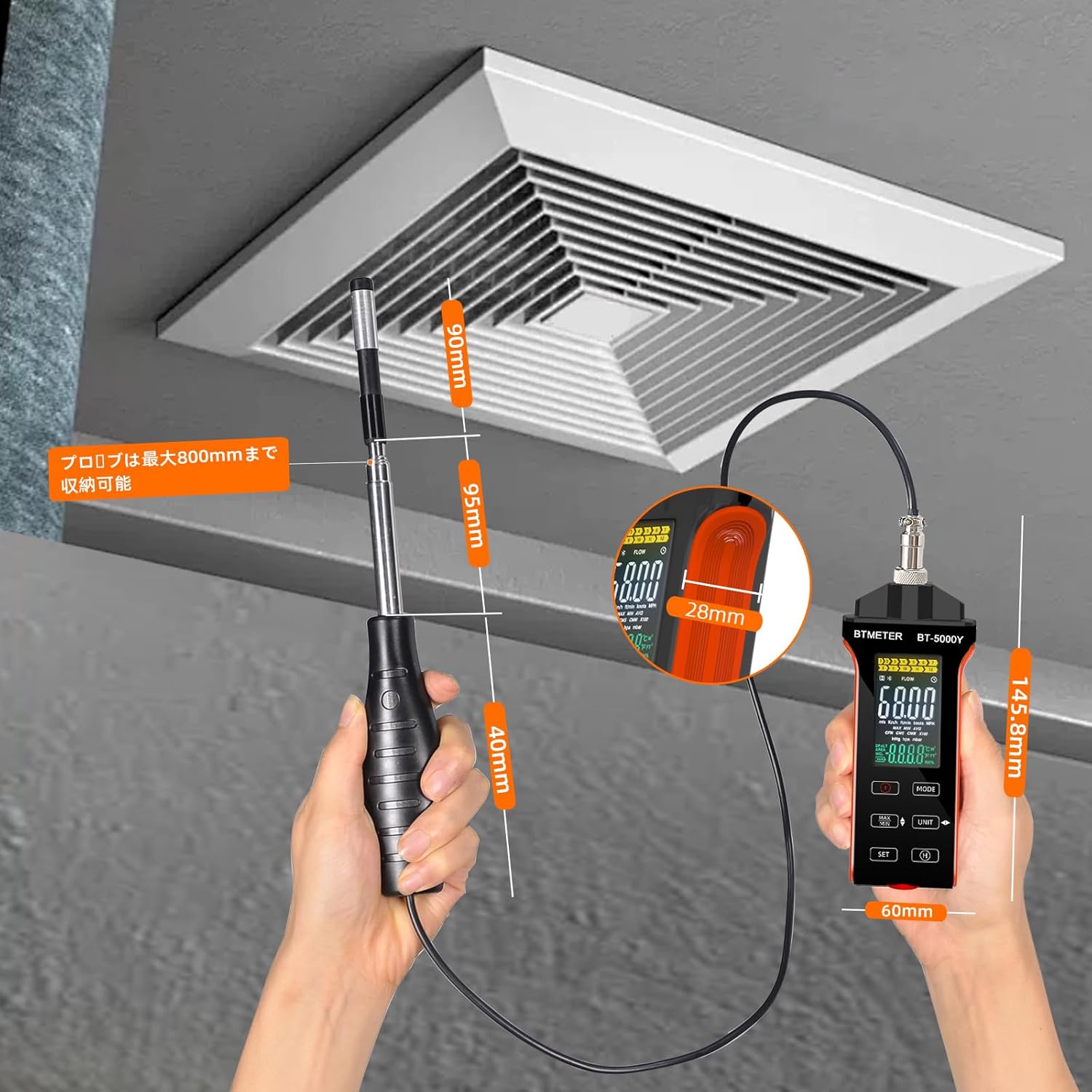
Figure 4.1: The extendable probe can reach up to 800mm, allowing for measurements in various environments.
5. Betjening
5.1 Tænd/sluk
- For at tænde: Tryk på Magt knap (indicated by a circle with a vertical line) located on the front panel.
- For at slukke: Tryk og hold nede Magt button for approximately 2 seconds. The device also features an automatic shutdown function to conserve battery life, which can be configured in the settings.
5.2 Udførelse af målinger
- Ensure the probe is securely connected and extended to the desired length.
- Position the sensor head in the airflow path you wish to measure. Ensure the airflow is directed towards the sensor for accurate readings.
- The large LCD display will show real-time wind speed, temperature, and airflow data.
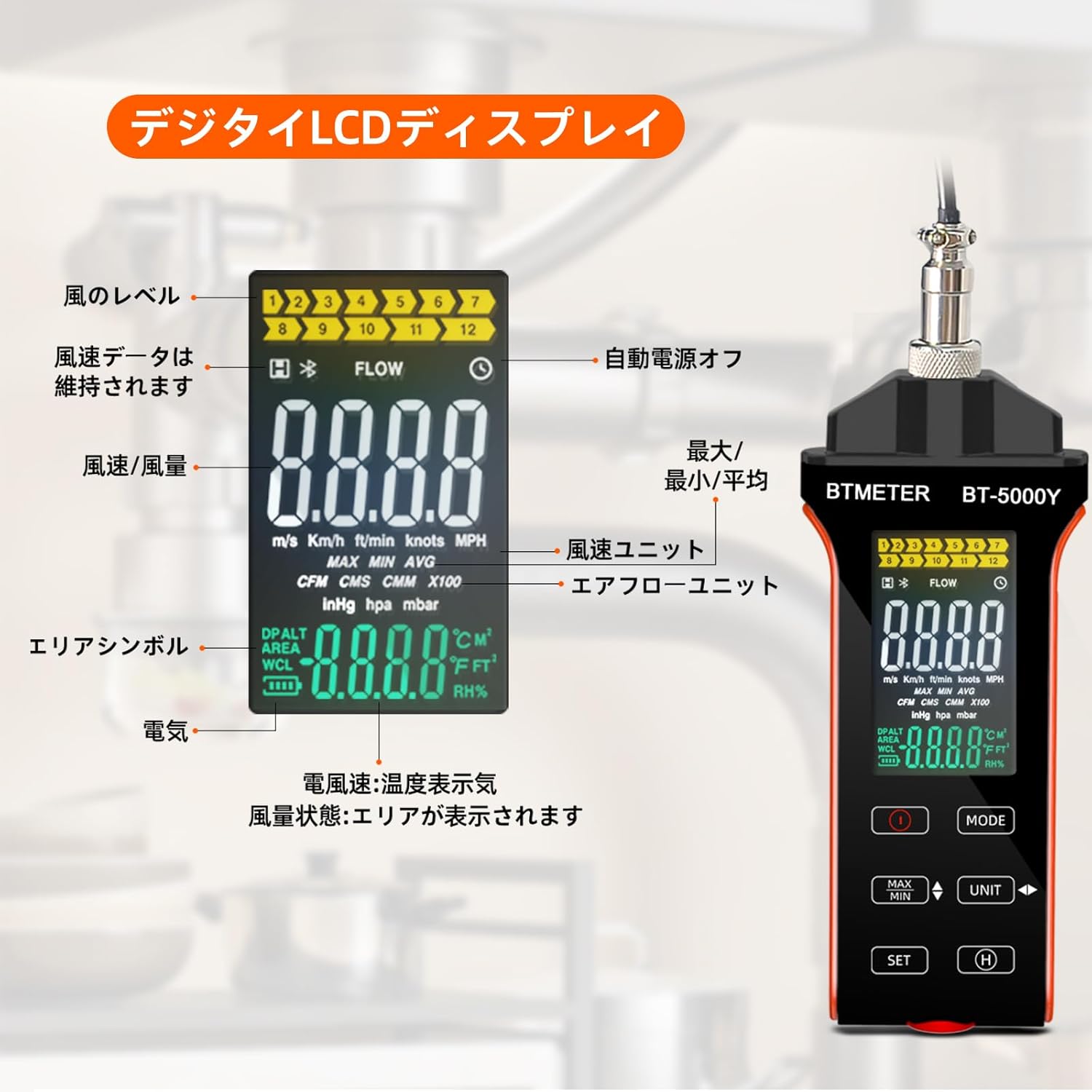
Figure 5.1: The digital LCD display shows wind level, data hold indicator, wind speed/airflow, wind speed units, airflow units, area symbol, battery indicator, and temperature/humidity display.
5.3 Dataholdefunktion
To hold the current measurement data on the screen, press the H button. Press it again to release the data hold and resume real-time measurements.
5.4 MAX/MIN/AVG Function
Til view the maximum, minimum, or average recorded values:
- Tryk på MAX/MIN button once to display the maximum wind speed recorded since power-on.
- Press it again to display the minimum wind speed.
- Press it a third time to display the average wind speed.
- Press it a fourth time to return to real-time measurement.
6. Measurement Units and Modes
6.1 Changing Wind Speed Units
The device supports 5 different wind speed units:
- Meters per second (m/s)
- Kilometers per hour (km/h)
- Feet per minute (ft/min)
- Knots (Knots)
- Miles per hour (Mph)
To cycle through these units, press the ENHED knap.

Figure 6.1: The anemometer supports five different wind speed units for versatile measurement.
6.2 Changing Airflow Units (CMM/CFM)
The device can measure airflow in Cubic Meters per Minute (CMM) or Cubic Feet per Minute (CFM).
- To switch between CMM and CFM, press the MODE knap.
- To set the area for airflow calculation, press the SÆT button and follow the on-screen prompts. Refer to the detailed instructions in the full manual for advanced area input.
7. Vedligeholdelse
7.1 Rengøring
- Tør enhedens kabinet af med en blød, tør klud.
- Brug ikke slibende rengøringsmidler eller opløsningsmidler.
- Keep the sensor head clean and free from dust or debris. Use a soft brush or compressed air if necessary, being careful not to damage the delicate hot-wire sensor.
7.2 Opbevaring
- When not in use, retract the sensor probe and store the device in its protective case (if provided) or a dry, cool place.
- Undgå at udsætte enheden for ekstreme temperaturer, høj luftfugtighed eller direkte sollys i længere perioder.
- Charge the battery periodically if storing for a long time to maintain battery health.
8. Fejlfinding
| Problem | Mulig årsag | Løsning |
|---|---|---|
| Enheden tænder ikke. | Lavt batteri. | Oplad enheden med USB Type-C-kablet. |
| Upræcise aflæsninger. | Sensor dirty or damaged; probe not securely connected; incorrect unit selected. | Clean the sensor carefully; ensure probe is firmly connected; verify selected measurement unit. |
| Display shows "Err" or abnormal characters. | Intern fejl eller sensorfejl. | Power off the device and restart. If the problem persists, contact customer support. |
| Auto-shutdown occurs too quickly. | Auto-shutdown setting is enabled and set to a short duration. | Refer to the full manual for instructions on adjusting or disabling the auto-shutdown feature. |
9. Sikkerhedsoplysninger
- Forsøg ikke at adskille eller modificere enheden.
- Keep the device away from strong magnetic fields or high voltage miljøer.
- Undgå at tabe enheden eller udsætte den for hårde stød.
- Udsæt ikke enheden for ætsende væsker.
- Bortskaf enheden og dens batteri i henhold til lokale regler.
10. Ansøgninger
The BTMETER BT-5000Y Anemometer is suitable for a wide range of applications, including but not limited to:
- Environmental monitoring and meteorology.
- HVAC system installation, maintenance, and troubleshooting (e.g., duct airflow).
- Outdoor activities such as drone operation, sailing, and archery.
- Industrial applications like ventilation system checks and spray painting booths.
- Research and development requiring precise air velocity measurements.

Figure 10.1: The BT-5000Y is versatile for various uses, from drone operation to industrial ventilation.
11. Garanti og support
For warranty information and technical support, please refer to the documentation included with your purchase or visit the official BTMETER website. If you encounter any issues not covered in this manual, please contact BTMETER customer service for assistance.