
1. Introduktion
This manual provides essential information for the safe and efficient installation, operation, and maintenance of your GEYA TUYA WIFI Smart Circuit Breaker, model GWS9-W. This device allows for remote control and monitoring of your electrical circuits via the Tuya application, offering advanced protection features and energy management capabilities.
2. Sikkerhedsoplysninger
WARNING: Electrical shock hazard. Installation and servicing should only be performed by qualified personnel. Always disconnect power before working with electrical circuits.
- Ensure the main power supply is turned off before installation or maintenance.
- Kontroller, at alle ledningsforbindelser er sikre og korrekte i henhold til ledningsdiagrammet.
- Brug ikke enheden, hvis den ser ud til at være beskadiget.
- Denne enhed er designet til indendørs brug i tørre miljøer.
- Overhold alle lokale elektriske forskrifter og bestemmelser.
3. Produktet er slutview
The GEYA GWS9-W is a smart WIFI circuit breaker designed for home automation and enhanced circuit protection. It integrates seamlessly with the Tuya app, providing remote control, energy monitoring, and various safety features.
Nøglefunktioner:
- Fjernbetjening og overvågning: Manage your circuit breaker from anywhere using the Tuya app.
- Omfattende beskyttelse: Includes protection against overvoltage, undervoltage, overcurrent, and high temperatures.
- Adjustable Load Control: Customize current settings (1A-63A) and power (50W-11KW) for optimal energy management.
- Energy Efficiency Tracking: Monitor real-time energy consumption and power usage.
- Custom Scenarios: Define personalized switching states for various home automation needs.
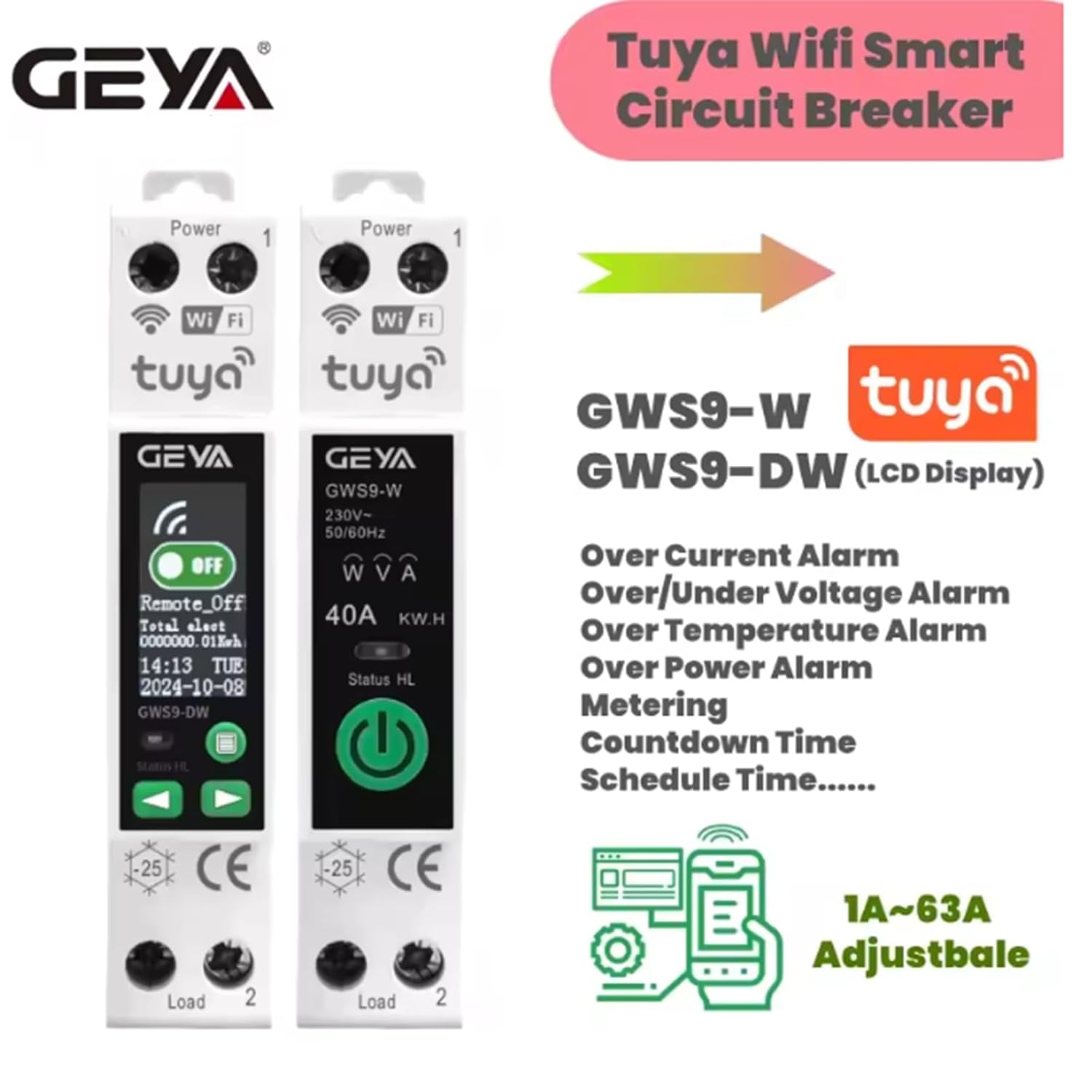
Billede: Overview of GWS9-W and GWS9-DW models, highlighting features like overcurrent, over/under voltage alarm, over temperature alarm, over power alarm, metering, countdown, and schedule time.
4. Specifikationer

Image: Detailed product parameters for GWS9-W and GWS9-DW models, including voltage, current, and communication methods.
| Parameter | Værdi |
|---|---|
| Bedømt arbejdsvolumentagRækkevidde | 90V-240V |
| Antal poler | 1P+N |
| Max Overcurrent | 63A (3-10s) |
| Nominel strøm | 1-63A justerbar |
| Kommunikationsmetode | TUYA WiFi |
| Driftsomgivelsestemperatur | -25°C~70°C |
| Ultimate Short-Circuit Capacity | 500A |
| Electrical Lifespan | ≥10000 operationer |
| Mekanisk levetid | ≥100000 operationer |
| Lukketid | <20 ms |
| Åbningstid | <20 ms |
| Skærm | None (GWS9-DW has LCD) |
| Dimensioner (ca.) | 10.2 x 7.5 x 2.2 cm |
| Vægt (ca.) | 110 gram |
5. Installation (Opsætning)
The GWS9-W smart circuit breaker is designed for DIN rail mounting. Follow these steps for proper installation:
- Afbryd strømmen: Before starting any electrical work, ensure the main power supply to the circuit is completely disconnected at the main breaker or fuse box. Use a voltagen tester for at bekræfte, at der ikke er strøm til stede.
- Monter enheden: Snap the GWS9-W onto a standard 35mm DIN rail in your electrical panel.
- Ledningsforbindelser: Refer to the wiring diagram below. Connect the main power supply (Line and Neutral) to the input terminals (marked 'Power' or '1'). Connect the load (the device or circuit you want to control) to the output terminals (marked 'Load' or '2'). Ensure all connections are tight and secure.
- Bekræft ledninger: Double-check all connections against the diagram to prevent short circuits or damage.
- Gendan strøm: Når alle forbindelser er verificeret og sikre, skal strømmen til kredsløbet genoprettes.

Image: Wiring diagram showing connections for main power supply, standby power supply, and load for the GWS9-W circuit breaker.
6. Betjeningsvejledning
6.1. App-opsætning og parring
- Download Tuya-appen: Søg efter "Tuya Smart" or "Smart Life" in your smartphone's app store (iOS or Android) and download it.
- Registrer/Log ind: Åbn appen, og opret en ny konto, eller log ind med en eksisterende.
- Tilføj enhed: Tap the "+" icon in the top right corner of the app to add a new device. Select "Electrical Engineer" > "Circuit Breaker (Wi-Fi)" or use the auto-scan feature.
- Indtast Wi-Fi-oplysninger: Sørg for, at din telefon er forbundet til et 2.4 GHz Wi-Fi-netværk. Indtast din Wi-Fi-adgangskode, når du bliver bedt om det.
- Parringstilstand: The circuit breaker should automatically enter pairing mode (Wi-Fi indicator light blinking rapidly). If not, press and hold the reset button on the device for 5-10 seconds until the Wi-Fi indicator blinks rapidly.
- Fuld parring: Follow the on-screen instructions in the app to complete the pairing process. Once connected, the Wi-Fi indicator light will become solid.

Image: Tuya app interface displaying real-time monitoring of voltage, current, power, and total consumption, along with settings for voltage (90V-240V) and current (1A-63A).
6.2. Daily Operation and Advanced Settings
- Fjernbetjening TIL/FRA: Use the main switch icon in the Tuya app to remotely turn the circuit breaker ON or OFF.
- Energiovervågning: View realtidsvolumentage, current, active power, and total energy consumption within the app.
- Beskyttelsesindstillinger: Access the device settings in the app to configure protection parameters such as overvoltage, undervoltage, overcurrent, and high-temperature thresholds. You can set these to trigger a trip or an alarm.
- Planlægning og timere: Set schedules for automatic ON/OFF operations at specific times or create countdown timers.
- Custom Scenarios: Create smart scenes to automate actions based on conditions like time, weather, or other smart devices.

Image: Tuya app interface demonstrating how to add schedules for automatic operation and configure various protection functions like over voltage, under bindtage, over load, high power, and high temperature.

Image: Visual representation of the key benefits: remote control via smartphone, comprehensive circuit protection, and timing control for connected devices.
7. Vedligeholdelse
The GEYA GWS9-W smart circuit breaker requires minimal maintenance. Follow these guidelines to ensure optimal performance and longevity:
- Regelmæssig rengøring: Rengør enhedens yderside regelmæssigt med en tør, blød klud. Brug ikke slibende rengøringsmidler eller opløsningsmidler.
- Undersøg forbindelser: Annually, or if you suspect an issue, have a qualified electrician inspect the wiring connections to ensure they remain tight and free from corrosion.
- Firmwareopdateringer: Keep the Tuya app updated to the latest version to receive any firmware updates for the device, which may include performance improvements or new features.
- Miljøforhold: Ensure the device operates within its specified ambient temperature range (-25°C to 70°C) and avoid exposure to excessive moisture or dust.
8. Fejlfinding
| Problem | Mulig årsag | Løsning |
|---|---|---|
| Enheden tænder ikke. | Ingen strøm til afbryderen; forkert ledningsføring. | Kontroller hovedstrømforsyningen. Bekræft ledningsforbindelserne i henhold til diagrammet. |
| Wi-Fi indicator not blinking during pairing. | Enheden er ikke i parringstilstand. | Press and hold the reset button for 5-10 seconds until the Wi-Fi indicator blinks rapidly. |
| Cannot connect to Tuya app. | Incorrect Wi-Fi password; 5GHz Wi-Fi network; poor signal. | Ensure correct 2.4GHz Wi-Fi password. Move device closer to router. Disable 5GHz band temporarily if necessary. |
| Afbryderen udløses ofte. | Overbelastning, overvoltage, or other protection triggered. | Check connected load for excessive current draw. Verify voltage stability. Adjust protection thresholds in the app if appropriate, or consult an electrician. |
| Fjernbetjeningen reagerer ikke. | No internet connection; app issue; device offline. | Check home Wi-Fi and internet connection. Restart the Tuya app. Check if the device is showing as 'offline' in the app. |
9. Garanti og support
GEYA products are manufactured to high-quality standards. For warranty information, please refer to the terms and conditions provided at the point of purchase or contact GEYA customer support directly. Keep your purchase receipt as proof of purchase.
For technical support or further assistance, please visit the official GEYA webwebstedet eller kontakt deres kundeserviceafdeling. Kontaktoplysninger kan typisk findes på produktemballagen eller i producentens webwebsted.


