
Indledning
This manual provides essential instructions for the installation, operation, maintenance, and troubleshooting of your ZOTAC Gaming GeForce RTX 5080 Solid Core graphics card. Designed for high-performance gaming, this card features the NVIDIA Blackwell architecture, DLSS 4, and advanced IceStorm 3.0 cooling. Please read this manual carefully before installation and use to ensure optimal performance and longevity of your product.
Opsætning og installation
Proper installation is crucial for the functionality and stability of your graphics card. Follow these steps carefully:
- Forbered dit system: Power off your computer and unplug all power cables from the wall outlet. Open your computer case.
- Find PCIe-slot: Identify an available PCI Express x16 slot on your motherboard. Remove any expansion slot covers that obstruct the installation.
- Installer grafikkortet: Carefully align the graphics card with the PCIe x16 slot. Press down firmly and evenly until the card is fully seated in the slot. Ensure the retention clip on the PCIe slot locks into place.
- Sikre kortet: Brug skruer til at fastgøre grafikkortet til pc-kabinettets udvidelsesslotbeslag.
- Tilslut strømkabler: Connect the necessary PCIe power cables from your power supply unit (PSU) to the graphics card's power connectors. This model requires sufficient power input for stable operation. Ensure all connectors are securely attached.
- Install GPU Support Stand: Utilize the bundled GPU support stand to prevent sag and provide additional stability for the graphics card. Adjust its height to properly support the card.
- Luk kassen og tilslut eksterne enheder: Close your computer case, reconnect all power cables, and connect your display cables (HDMI or DisplayPort) to the graphics card's output ports.
- Tænd og installer drivere: Power on your computer. Once the operating system loads, download and install the latest NVIDIA drivers for your GeForce RTX 5080 from the official NVIDIA webwebsted.

Front view of the ZOTAC Gaming GeForce RTX 5080 Solid Core graphics card, showcasing its triple-fan IceStorm 3.0 Advanced Cooling system.

Side view of the graphics card, illustrating the power connectors and the robust design.
Betjeningsvejledning
Once installed and drivers are updated, your graphics card is ready for use. Here are some operational guidelines:
- Driver opdateringer: Regularly check for and install the latest NVIDIA GeForce drivers to ensure optimal performance, compatibility, and access to new features.
- Skærmforbindelser: The card supports up to four displays simultaneously via 3 x DisplayPort 2.1b and 1 x HDMI 2.1b outputs. Connect your monitors to these ports.
- Opsætning af flere skærme: Configure your display settings within your operating system or through the NVIDIA Control Panel for extended desktop, duplicate displays, or surround gaming.
- ZOTAC FireStorm Utility: Download and install the ZOTAC FireStorm utility from the ZOTAC website. This software allows you to monitor GPU performance, adjust fan speeds (Active Fan Control), and customize the Spectra RGB lighting.
- Spil og applikationer: Ensure your games and applications are configured to utilize the ZOTAC Gaming GeForce RTX 5080 for the best performance.
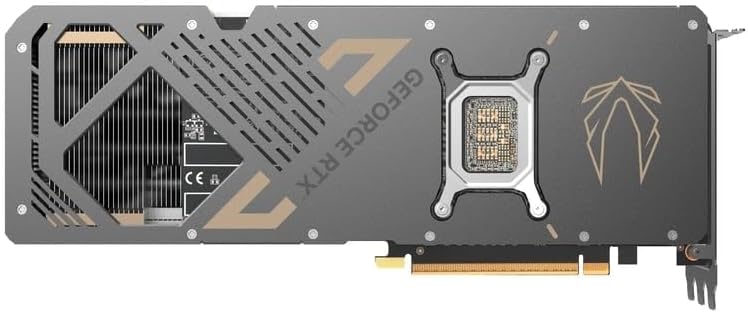
Tilbage view of the graphics card, showing the metal backplate and structural reinforcement.
Opretholdelse
Regular maintenance helps ensure optimal performance and extends the lifespan of your graphics card:
- Fjernelse af støv: Periodically clean the fans and heatsink of the graphics card using compressed air. Ensure the PC is powered off and unplugged before cleaning. Hold the fan blades gently to prevent them from spinning rapidly during cleaning.
- Luftstrøm: Maintain good airflow within your PC case. Ensure case fans are properly oriented and there are no obstructions to air intake or exhaust.
- Temperaturovervågning: Use monitoring software (e.g., ZOTAC FireStorm) to keep an eye on GPU temperatures during heavy loads. Excessive temperatures can indicate poor airflow or dust buildup.
- Ventilatorkontrol: The IceStorm 3.0 cooling system features Freeze Fan Stop (fans stop at low temperatures for silent operation) and Active Fan Control (individual fan speed adjustment). Ensure these features are operating correctly or adjust them as needed via the FireStorm utility.
Fejlfinding
Hvis du støder på problemer med dit grafikkort, kan du overveje følgende fejlfindingstrin:
- Ingen skærmoutput:
- Sørg for, at skærmkablerne er korrekt tilsluttet til både grafikkortet og skærmen.
- Kontroller, at skærmens inputkilde er indstillet korrekt.
- Check that the graphics card is fully seated in the PCIe slot and all power connectors are firmly attached.
- Test med et andet skærmkabel eller en anden skærm, hvis det er muligt.
- Driverproblemer:
- Perform a clean installation of the latest NVIDIA drivers. Use Display Driver Uninstaller (DDU) in Safe Mode to remove old drivers before installing new ones.
- Sørg for, at dit operativsystem er opdateret.
- Overheating/Performance Drops:
- Check GPU temperatures using monitoring software.
- Rengør grafikkortets køleplade og blæsere for støv.
- Sørg for tilstrækkelig luftgennemstrømning i dit pc-kabinet.
- Verify that case fans are functioning correctly.
- Systemustabilitet/nedbrud:
- Ensure your power supply unit (PSU) meets the recommended wattage til grafikkortet og dit system.
- Check for any loose connections inside the PC.
- Hvis du overclocker, skal du vende tilbage til standardindstillingerne for at kontrollere stabiliteten.
Specifikationer
Key technical specifications for the ZOTAC Gaming GeForce RTX 5080 Solid Core graphics card:
| Feature | Detalje |
|---|---|
| Grafik coprocessor | NVIDIA GeForce RTX 5080 |
| Mærke | ZOTAC |
| Grafik RAM-størrelse | 16 GB GDDR7 |
| Video Output Interface | 3 x DisplayPort 2.1b, 1 x HDMI 2.1b |
| Grafikkort interface | PCI-Express x16 (PCIe 5.0) |
| Hukommelses urhastighed | 30 Gbps |
| GPU-serien | NVIDIA RTX 50 Series |
| Maksimal opløsning | 7680x4320 (8K Ready) |
| Dimensioner (L x B) | 11.95 cm L x 2.19 cm B |
| Modelnummer | ZT-B50800D2-10P |
| Varens vægt | 1480 gram |
| Kølesystem | IceStorm 3.0 Advanced Cooling (3 x 90mm BladeLink Fans, Steam Chamber, Composite Heatpipes, Pass-Thru Airflow) |
| Funktioner | DLSS 4, Freeze Fan Stop, Active Fan Control, Spectra RGB Lighting, Metal Backplate, Reinforced Frame Structure, Bundled GPU Support Stand |
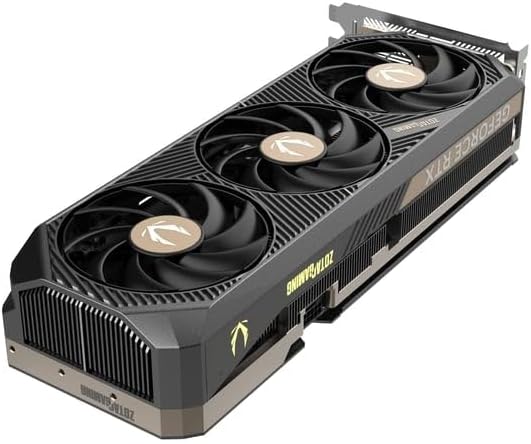
Vinklet view of the graphics card, highlighting the fan design and side profile.
Garantioplysninger
ZOTAC offers an extended warranty for its products. Your ZOTAC Gaming GeForce RTX 5080 Solid Core graphics card may be eligible for a 5 års udvidet garanti. Registration is required to activate this extended warranty. Please visit the official ZOTAC website for detailed terms, conditions, and the registration process.

Image indicating the availability of a 5-year extended warranty from ZOTAC. Registration is required.
Support og kontakt
For further assistance, technical support, or warranty claims, please contact ZOTAC directly:
- Fabrikant: ZOTAC Technology Limited
- Adresse: 19/F, SHATIN GALLERIA, 18-24 Shan Mei St, Fo Tan, Hong Kong
- Webwebsted: Besøg den officielle ZOTAC website for support resources, driver downloads, FAQs, and contact information.