
Indledning
Thank you for choosing the Mxmoonant Scent Air Machine, Model rad8. This waterless essential oil diffuser is designed to provide consistent and customizable fragrance for spaces up to 1500 sq.ft. Featuring smart app control, motion sensing capabilities, and a large 800ml oil reservoir, this device offers a convenient and efficient way to enhance your environment. Please read this manual thoroughly before operation to ensure proper use and maintenance.
Sikkerhedsoplysninger
- Use only pure essential oils or aroma oils specifically designed for waterless diffusers. Do not use water or other liquids.
- Hold enheden utilgængeligt for børn og kæledyr.
- Placer diffusoren på en stabil, flad overflade.
- Bloker ikke luftudløbet eller -indløbet under drift.
- Tag stikket ud af enheden før rengøring eller genopfyldning.
- Du må ikke skille enheden ad eller forsøge at reparere den selv. Kontakt kundesupport for at få hjælp.
- Avoid direct contact with essential oils, as they can cause irritation. In case of contact, wash thoroughly with water.
Pakkens indhold
Bekræft at alle varer er til stede i pakken:
- Mxmoonant Scent Air Machine (Model rad8)
- Strømadapter
- Monteringsudstyr (skruer, vægankre)
- Key for internal access
- Brugermanual

Image: The Mxmoonant Scent Air Machine shown with its power adapter, mounting screws, wall anchors, and a small key, illustrating the complete package contents.
Produkt overview
Familiarize yourself with the main components of your scent air machine:
- Hovedenhed: Houses the diffusion mechanism and control board.
- Oliereservoir: 800ml capacity bottle for essential oils.
- Kontrolpanel: Located on the top, with indicator lights for intensity levels (Min, Low, Med, High, Max) and a manual mode shift button.
- Bevægelsessensor: Detects movement for automatic scent adjustment.
- Afbryderen: On/Off switch, typically located on the side or back.
- Lock Design: A keyhole for secure internal access to the oil reservoir.
- Bottom Anti-skid Pad: Sikrer stabilitet på overflader.

Image: A close-up showing the internal 800ml oil reservoir, the key lock mechanism, the manual mode shift button, the durable PP material of the casing, and the anti-skid pads on the base.
Opsætning
1. Indledende placering
Choose a suitable location for your diffuser. It can be placed on a flat surface or mounted on a wall using the provided hardware. Ensure the area is clear and allows for optimal scent dispersion.

Image: The scent air machine positioned discreetly in a modern living room, blending with the decor.
2. Påfyldning af oliebeholderen
- Use the provided key to unlock and open the front panel of the diffuser.
- Carefully remove the empty oil bottle from its compartment.
- Unscrew the cap from the oil bottle.
- Fill the bottle with your desired waterless essential oil or aroma oil. Do not overfill.
- Screw the cap back onto the bottle securely.
- Insert the filled oil bottle back into the diffuser compartment.
- Luk frontpanelet og lås det med nøglen.
3. Tænder
- Connect the power adapter to the diffuser's power port.
- Sæt strømadapteren i en almindelig stikkontakt.
- Flip the power switch (usually located on the side or back) to the "ON" position. The indicator lights on the top panel will illuminate.
4. Download og tilslutning af appen
The Mxmoonant Scent Air Machine can be controlled via a smartphone app. Scan the QR code in the manual or search for "Aroma Link" in your app store.
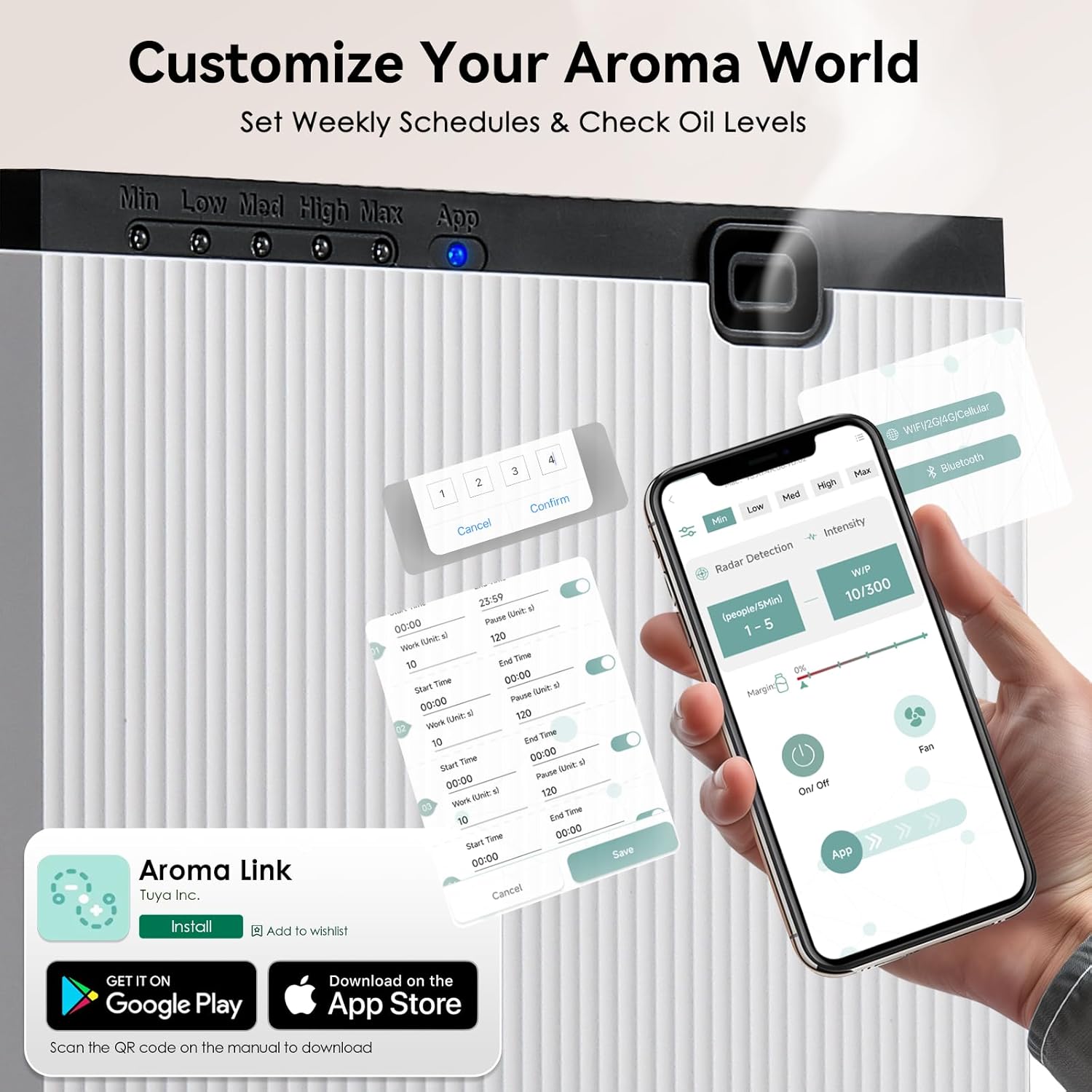
Image: A smartphone displaying the "Aroma Link" app, showing controls for work time, pause time, and radar detection settings.
- Download and install the "Aroma Link" app from the App Store (iOS) or Google Play Store (Android).
- Open the app and follow the on-screen instructions to register an account or log in.
- Add your device by selecting the appropriate model and following the pairing instructions. Ensure your phone's Bluetooth and Wi-Fi are enabled.
Betjeningsvejledning
1. Manuel kontrol
The device has a manual mode shift button on the top panel. Pressing this button cycles through different intensity levels (Min, Low, Med, High, Max), indicated by the LED lights. Each press changes the diffusion intensity.
2. App-kontrolfunktioner
The "Aroma Link" app provides comprehensive control over your diffuser:
- Til/fra: Remotely turn the diffuser on or off.
- Intensitetsjustering: Customize spray frequency (Work Time: 5 to 900 seconds) and pause intervals (Pause Time). This allows for precise control over scent output to match room size and preference.
- Weekly Scheduling: Program up to 5 daily time slots from Monday to Sunday for automated operation. Set specific start and end times for diffusion.
- Motion Sensing (Radar Detection): Activate the motion sensor mode. The diffuser will adjust spray frequency based on occupancy within a 3m/10ft range. More people detected may result in longer spray times and shorter pause intervals. If no one is detected for 5 minutes, the system enters standby mode.
- Kontrol af oliestand: Monitor the remaining essential oil level directly from the app.
- Ventilatorkontrol: Control the built-in fan for faster and more even fragrance dispersion.

Image: A smartphone screen displaying the app's scheduling interface, allowing users to set specific work and pause times for each day of the week.

Image: An illustration demonstrating the motion sensor's 3-meter detection range and a table detailing how working time and pause time adjust based on the number of detected people.
Opretholdelse
1. Rengøring af enheden
To maintain optimal performance, clean the diffuser periodically:
- Tag enheden ud af stikkontakten.
- Tør diffusorens yderside af med en blød kludamp klud. Brug ikke slibende rengøringsmidler, og nedsænk ikke enheden i vand.
- If changing essential oil types, it is recommended to clean the oil bottle. Empty any remaining oil, rinse the bottle with a small amount of rubbing alcohol, and let it air dry completely before adding new oil.
2. Refilling the Oil Reservoir
When the oil level is low (indicated by the app or reduced scent output), follow these steps:
- Tag stikket ud af enheden.
- Unlock and open the front panel using the key.
- Remove the oil bottle.
- Unscrew the cap and refill with essential oil.
- Securely screw the cap back on and reinsert the bottle.
- Luk og lås frontpanelet.
- Plug the device back in and turn it on.
Fejlfinding
| Problem | Mulig årsag | Løsning |
|---|---|---|
| No scent output | Oil reservoir empty or low. Nozzle clogged. Device not powered on. | Refill oil. Clean nozzle with rubbing alcohol. Ensure power switch is ON and adapter is plugged in. |
| Appen kan ikke oprette forbindelse til enheden | Bluetooth/Wi-Fi off. Device not in pairing mode. App error. | Ensure phone's Bluetooth/Wi-Fi is on. Restart diffuser and app. Re-attempt pairing process. |
| Scent is too weak/strong | Incorrect intensity settings. Room size mismatch. | Adjust work time and pause time in the app. Consider the room size relative to the diffuser's coverage. |
| Enheden laver usædvanlig støj | Normal operation (light vibration from air pump). Internal component issue. | A light vibration sound from the air pump is normal. If the noise is loud or unusual, unplug and contact support. |
Specifikationer
| Feature | Detalje |
|---|---|
| Mærke | Mxmoonant |
| Modelnavn | rad8 |
| Speciel funktion | App Control, Motion Sensing |
| Farve | Hvid |
| Dækning af gulvareal | Op til 1500 kvadratmeter |
| Driftstilstand | Automatic, Manual, App Controlled |
| Produktdimensioner | 106 mm x 106 mm x 240 mm (4.17 cm D x 4.17 cm B x 9.45 cm H) |
| Oliereservoirkapacitet | 800 milliliter |
| Strømkilde | Ledningsbaseret elektrisk (12V, 10W) |
| Støjniveau | <40dBa |
| Varens vægt | 6 pund (ca. 2.7 kg) |

Image: A visual representation of the diffuser's dimensions and a table summarizing its key specifications like voltage, power, noise, capacity, weight, scent coverage, and product size.
Garanti og support
The Mxmoonant Scent Air Machine comes with a standard manufacturer's warranty. For detailed warranty information, product support, or service inquiries, please refer to the warranty card included in your package or visit the official Mxmoonant website. You can also contact customer service through your purchase platform.