
KanDao opfylder Ultra Standard 2025
KanDao Meeting Ultra Standard instruktionsmanual
Model: Opfylder Ultra Standard 2025
Produkt overview
KanDao Meeting Ultra Standard er et 360° 4K alt-i-et videokonferencekamera, der er designet til at give en fordybende og effektiv mødeoplevelse. Det har AI-sporing, et array med 8 mikrofoner for klar lyd og et indbygget system, der er kompatibelt med større videokonferenceplatforme.

Figur 1: KanDao Meeting Ultra Standard-enhed. Dette billede viser hovedenheden på konferencekameraet, der fremhæver dets slanke sorte design og den fremtrædende 4K HDR-branding.
Opsætningsvejledning
1. Udpakning og pakkeindhold
Pak forsigtigt alle komponenter ud af kassen. Kontroller, at alle dele er til stede:
- Videokonferencekamerahus
- Fjernbetjening
- Linsedæksel
- Strømadapter
- USB-C til USB-C kabel
- USB-C til USB-A-kabel
- Opbevaringspose
- Andet tilbehør som angivet på pakkelisten.
2. Fysiske forbindelser
Placer KanDao Meeting Ultra Standard midt på mødebordet for optimal 360-graders dækning.
- Strømtilslutning: Tilslut strømadapteren til enheden, og sæt den i en stikkontakt. Enheden tænder automatisk.
- Netværks forbindelse: For optimal ydeevne og opdateringer skal du tilslutte et Ethernet-kabel til LAN-porten på enheden.
- Skærmforbindelse (fristående tilstand): Tilslut et HDMI-kabel fra en af HDMI OUT-portene på enheden til din skærm (skærm, projektor eller tv). Enheden har to HDMI OUT-porte til visning på flere skærme.
- Computerforbindelse (USB-tilstand): For at bruge enheden som en webkamera og højttalertelefon med din computer, skal du tilslutte det medfølgende USB-C til USB-C- eller USB-C til USB-A-kabel fra enheden til din computer.
- Ekstern indgang (valgfri): Hvis du ønsker at dele indhold fra en anden computer eller enhed direkte via Meeting Ultra Standard, skal du tilslutte et HDMI-kabel til HDMI IN-porten.

Figur 2: Tilslutningsmuligheder for KanDao Meeting Ultra Standard. Dette billede illustrerer enheden tilsluttet en bærbar computer via USB i 'Plug & Play'-tilstand og til en stor skærm i 'Indbygget Android OS'-tilstand, hvilket demonstrerer dens alsidighed.
Betjeningsvejledning
1. Tænd og første opstart
Når enheden er tilsluttet strøm, starter den automatisk op. Følg instruktionerne på skærmen for den indledende opsætning, inklusive netværkskonfiguration (Wi-Fi eller Ethernet) og valg af sprog.
2. Driftstilstande
KanDao Meeting Ultra Standard understøtter to primære driftstilstande:
- Indbygget Android OS (Standalone-tilstand): Enheden fungerer uafhængigt, hvilket muliggør direkte installation og brug af videokonferencesoftware (f.eks. Zoom, Microsoft Teams, Google Meet) uden behov for en ekstern computer.
- USB-tilstand (Plug & Play): Tilslut enheden til din computer via USB. Meeting Ultra Standard fungerer som en ekstern webkamera, mikrofon og højttaler, kompatibel med alle videokonferenceprogrammer på din computer.
3. Videofunktioner
Enheden tilbyder avancerede videofunktioner, der forbedrer din mødeoplevelse:
- 360° fuld dækning: Dobbelte ultravidvinkelobjektiver indfanger et komplet 360-graders billede view af mødelokalet, hvilket sikrer, at alle deltagere er synlige.
- AI-sporing: Meeting AI 4.0-algoritmen bruger ansigtsgenkendelse og stemmelokalisering til automatisk at spore aktive talere og holde dem i fokus, selvom de bevæger sig rundt i rummet.
- Dobbelt 4K HDR-optagelse: Leverer video i høj kvalitet med 4K 30FPS HDR, hvilket sikrer klare billeder selv under udfordrende lysforhold (f.eks. baggrundsbelyste omgivelser).
- Billedstøjreduktion: En indbygget algoritme reducerer visuel støj og giver klare billeder selv i svagt lys.
- Smart konference Views: Vælg mellem forskellige visningstilstande, der passer til dine mødebehov:
- Global View: Viser hele rummet.
- Galleri View: Viser deltagerne i et gitterformat.
- Højttaler View: Zoomer automatisk ind på den aktive højttaler.
- Stage View: Fokuserer på en præsentator, mens den viser publikum.
- Kan tilpasses Viewi vinkler: Juster zoom og fokus manuelt på bestemte områder eller deltagere under et møde.
- Ignorer zone: Konfigurer specifikke områder, der skal ignoreres af AI-sporing af hensyn til privatlivets fred, eller ekskluder irrelevante dele af rummet.

Figur 3: KanDao Meeting Ultra Standards 360-graders dækningskapacitet, der viser, hvordan den indfanger alle vinkler i et mødelokale og viser deltagerne i et gitter.
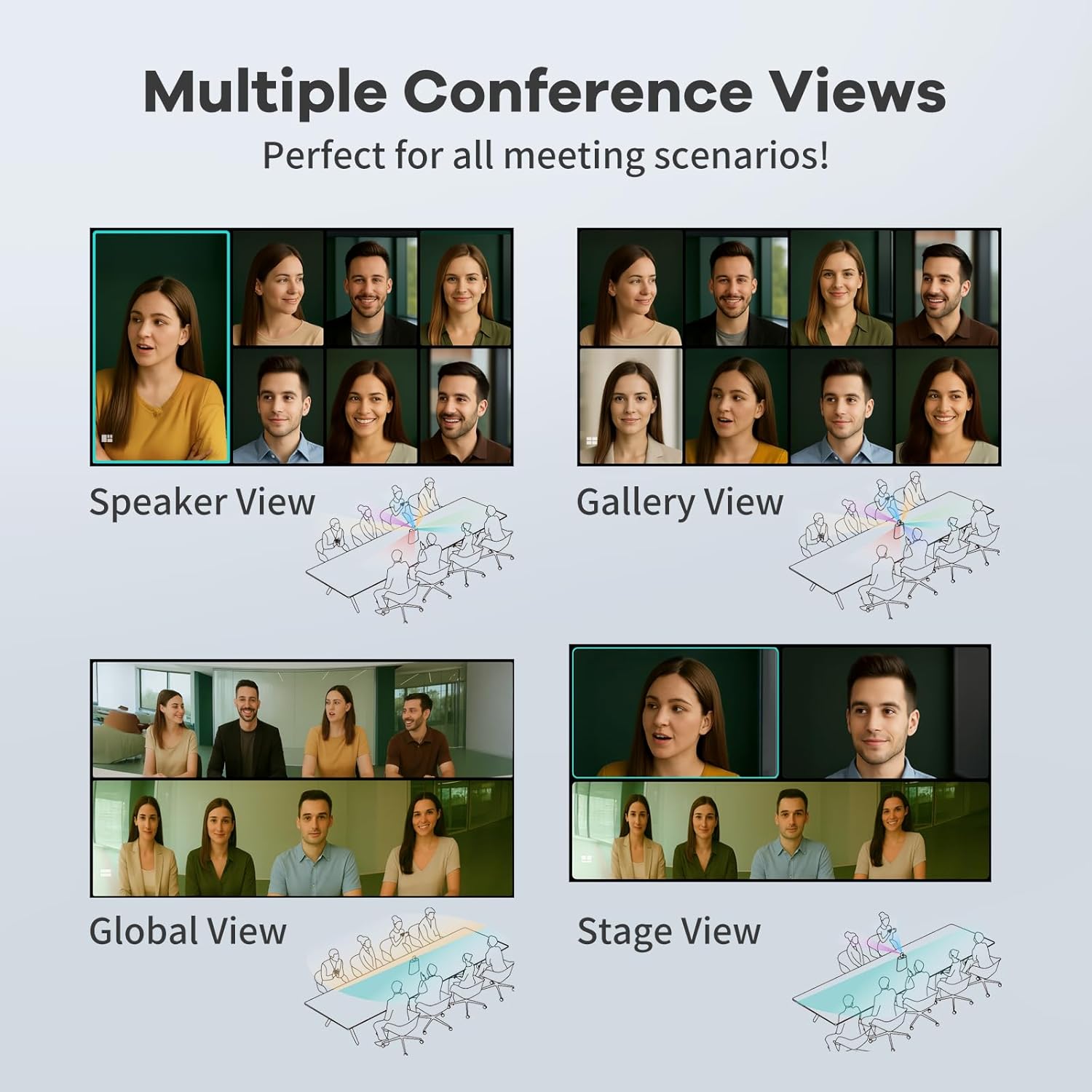
Figur 4: Illustration af de fire smarte tilstande: Højttaler View, Galleri View, Global Viewog Stage View, der demonstrerer, hvordan kameraet tilpasser sig forskellige mødescenarier.
4. Lydfunktioner
Oplev krystalklar lyd med følgende funktioner:
- 8-mikrofons array: Otte omnidirektionelle mikrofoner opfanger lyd inden for en radius af 5.5 m, hvilket sikrer klar lyd for alle deltagere.
- Miljøstøjreduktion: Avanceret støjreduktionsteknologi eliminerer distraherende baggrundslyde såsom tastaturklik, HVAC-brummen og ekstern snak og fokuserer udelukkende på dialog.
- 10W Hi-Fi-højttalere: Integrerede hi-fi-højttalere giver klar lyd til effektiv kommunikation.
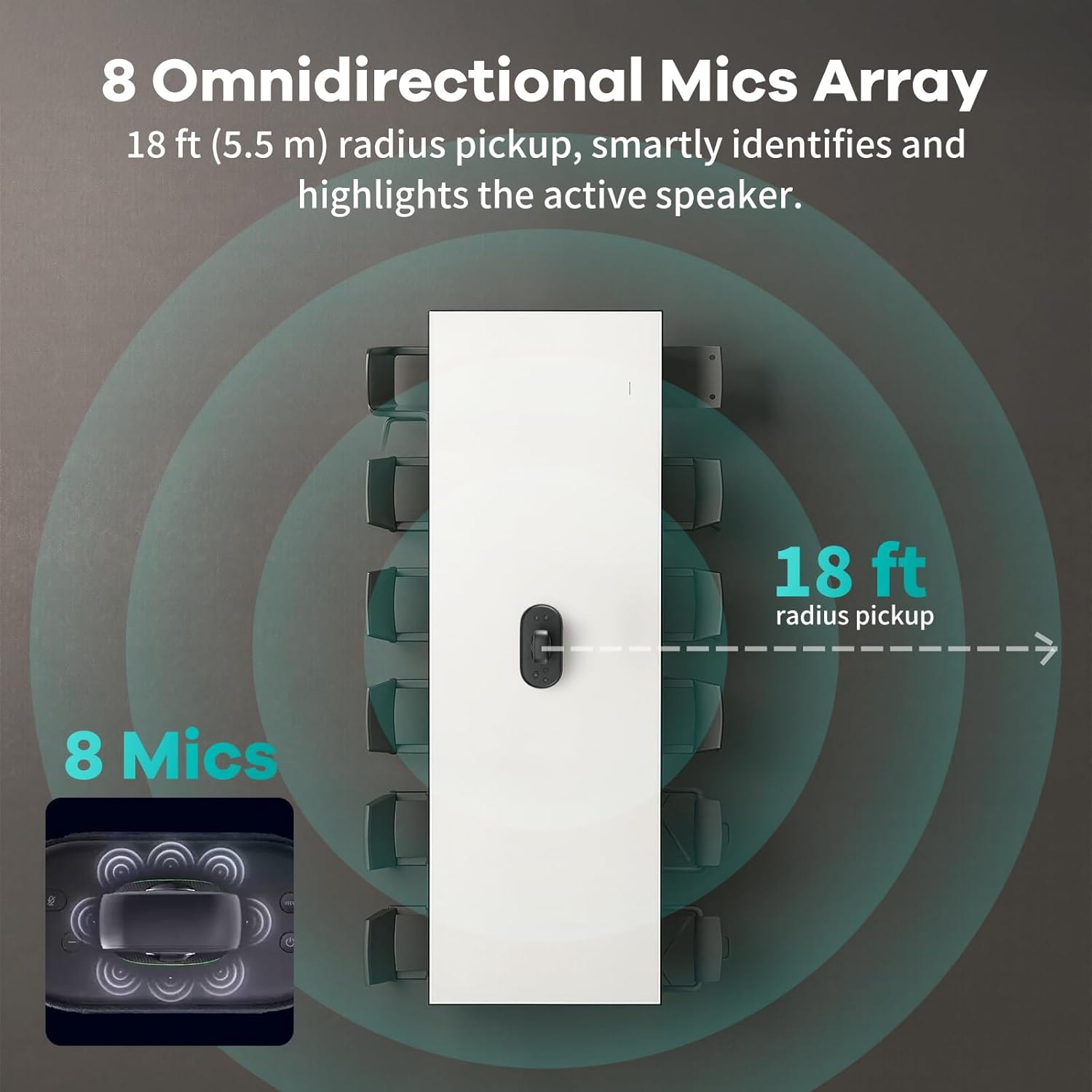
Figur 5: Diagram, der viser det 8 omnidirektionelle mikrofonarray og dets lydoptagelseskapacitet på 18 fod (5.5 m).

Figur 6: En visuel repræsentation af støjreduktion fra omgivelserne, der illustrerer, hvordan enheden filtrerer baggrundsforstyrrelser fra for at opnå klarere lyd.
5. Trådløs skærmdeling
Enheden understøtter AirPlay- og Miracast-protokoller, hvilket giver brugerne mulighed for trådløst at dele skærme fra iOS-, macOS-, Android- og Windows-enheder.
6. Fjernbetjening
Brug den medfølgende fjernbetjening til at styre forskellige funktioner, herunder ændring af views, justering af lydstyrke og styring af indhold under møder.
7. Optagelse af møder
Optag nemt møder ved at indsætte et SD-kort i den dertil beregnede plads på enheden.
8. Datasikkerhedsfunktioner
KanDao Meeting Ultra Standard inkorporerer datasikkerhedsforanstaltninger i virksomhedsklassen:
- IP- og lokationssikkerhed: Gemmer ikke IP-adresse og lokationsdata.
- Udlogning i ét trin: Understøtter hurtig og komplet logout for at forhindre datarest.
- Ingen åben API: Forhindrer uautoriseret adgang til enhedens funktioner.
- Bluetooth-skift: Bluetooth kan slås fra for øget sikkerhed.

Figur 7: Visuel repræsentation af datasikkerhedsfunktionerne, herunder IP- og lokationssikkerhed, One-Step Logout, No Open API og Bluetooth Toggle.
Opretholdelse
For at sikre din KanDao Meeting Ultra Standards levetid og optimale ydeevne, skal du følge disse vedligeholdelsesretningslinjer:
- Rensning: Brug en blød, tør klud til at tørre enhedens yderside af. Brug en specialklud og -opløsning til linserne. Undgå slibende rengøringsmidler eller opløsningsmidler.
- Linsedæksel: Brug altid det medfølgende linsedæksel, når enheden ikke er i brug, for at beskytte linserne mod støv og ridser.
- Opbevaring: Opbevar enheden et køligt og tørt sted væk fra direkte sollys og ekstreme temperaturer. Brug den medfølgende opbevaringstaske til beskyttelse under transport.
- Softwareopdateringer: Søg regelmæssigt efter og installer softwareopdateringer for at sikre, at enheden har de nyeste funktioner og forbedrede ydeevner. Opdateringer håndteres typisk automatisk i standalone-tilstand.
Fejlfinding
Dette afsnit omhandler almindelige problemer, du kan støde på med din KanDao Meeting Ultra Standard.
| Problem | Mulig årsag | Løsning |
|---|---|---|
| Ingen videoudgang på skærmen. | Løst HDMI-kabel, forkert indgang valgt på skærmen, enhed ikke tændt. | Kontrollér HDMI-kabelforbindelserne. Sørg for, at den korrekte HDMI-indgang er valgt på din skærm. Bekræft, at enheden er tændt. |
| Ingen lyd fra enhedens højttalere. | Lydstyrken er slået fra på enhed eller software, forkert lydudgang er valgt. | Øg lydstyrken ved hjælp af fjernbetjeningen eller skærmgrænsefladen. Kontroller lydindstillingerne i din konferencesoftware for at sikre, at KanDao Meeting Ultra Standard er valgt som outputenhed. |
| AI-sporing fungerer ikke korrekt. | Forhindringer i rummet, konfigureret ignoreringszone, forældet firmware. | Sørg for, at kameraet har frit udsyn. Kontroller indstillingerne for 'Ignorer zone' i kameraindstillingerne. Opdater enhedens firmware. |
| Enheden genkendes ikke af computeren i USB-tilstand. | Defekt USB-kabel, forkert USB-port, driverproblemer. | Prøv et andet USB-kabel eller en anden USB-port på din computer. Genstart både enheden og din computer. Sørg for, at de nødvendige drivere er installeret (normalt plug-and-play). |
Specifikationer
| Feature | Detalje |
|---|---|
| Mærkenavn | KanDao |
| Modelnummer | Opfylder Ultra Standard 2025 |
| Varens vægt | 4.9 pund |
| Pakkedimensioner | 16.5 x 11.8 x 10.5 tommer |
| Farve | Sort |
| Fotosensorteknologi | CMOS |
| Videooptagelsesopløsning | 1920x1080@30fps, 3840x2160@30fps (4K) |
| Maksimal brændvidde | 9.42 millimeter |
| Maksimal blænde | f/2 |
| Flash-hukommelsestype | SD |
| Videooptagelsesformat | MP4 |
| Forbindelsesteknologi | Wi-Fi |
| Særlige funktioner | 360 graders optagelse, 4K HDR, AI Smart ansigtsgenkendelse, automatisk højttalerfokus, smart zoom, fjernvideokonferenceløsning |
Garanti og support
KanDao tilbyder omfattende support til sine produkter:
- Garanti: KanDao Meeting Ultra Standard leveres med 12 måneders/1 års garanti.
- Teknisk support: Ved tekniske forespørgsler eller assistance bedes du kontakte KanDaos professionelle globale kundeserviceteam.asing fra den officielle KanDao-butik sikrer hurtig support.
- Firmware optimering: Der leveres regelmæssige firmwareopdateringer for at optimere ydeevnen og tilføje nye funktioner.
Officiel produktvideo
Video 1: KanDao Meeting Ultra Standard - 360 AI-konferenceenhed. Denne video giver en omfattende oversigtview af KanDao Meeting Ultra Standard, der demonstrerer dens 360-graders AI-konferencefunktioner, herunder videokvalitet, lydfunktioner og forskellige driftstilstande.
Ask a question about this manual
Ask about setup, troubleshooting, compatibility, parts, safety, or missing instructions. Manuals+ will review the question and use this page’s manual context to help answer it.