
RASTKY RASTKYxhm9bnta1g
RASTKY Smart Voice Translator User Manual
Model: RASTKYxhm9bnta1g
1. Introduktion
Thank you for choosing the RASTKY Smart Voice Translator. This device is designed to facilitate seamless communication across language barriers, offering high-accuracy online, offline, and photo translation capabilities. Its portable design and intuitive interface make it an ideal companion for travelers, language learners, and anyone needing quick and reliable translation.
This manual provides detailed instructions on how to set up, operate, and maintain your translator to ensure optimal performance and longevity.
2. Sikkerhedsoplysninger
Please read all safety instructions carefully before using the device to prevent damage or injury.
- Udsæt ikke enheden for ekstreme temperaturer, direkte sollys eller høj luftfugtighed.
- Undgå at tabe eller udsætte enheden for kraftige stød.
- Forsøg ikke selv at skille enheden ad eller reparere den. Kontakt kvalificeret servicepersonale.
- Hold enheden væk fra vand og andre væsker.
- Brug kun det medfølgende eller godkendte opladningskabel og den medfølgende adapter.
- Bortskaf enheden og dens batteri på en ansvarlig måde i henhold til lokale regler.
3. Produktet er slutview
Familiarize yourself with the components and controls of your RASTKY Smart Voice Translator.

Figur 3.1: Forside View
This image shows the front of the RASTKY Smart Voice Translator, featuring the 2.4-inch touch screen, the "YOU" button (left), the camera button (center), and the "ME" button (right). Below the buttons is the speaker grille.
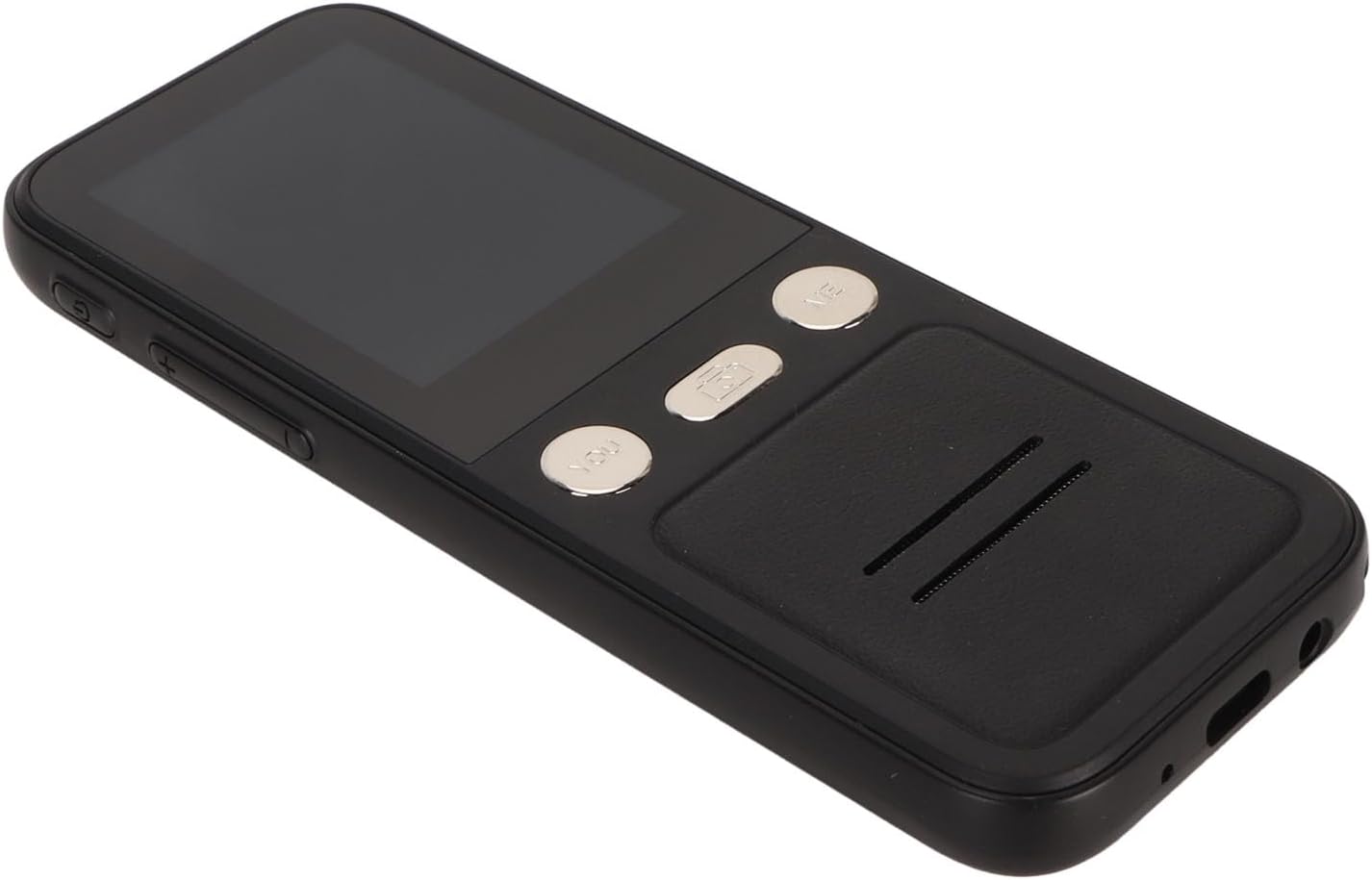
Figur 3.2: Side View
This image displays the side of the translator, highlighting the power button and volume control buttons located on the left side of the device.

Figur 3.3: Forside og bagside View
This image presents both the front and back of the translator. The back shows the "SMART CAMERA" lens and text indicating "charge Type-c USB=1.0Amax", along with compliance markings.

Figure 3.4: Bottom Ports
Et nærbillede view of the bottom of the device, showing the USB Type-C charging port and a 3.5mm headphone jack.
3.1. Enhedskomponenter
- 2.4-tommer berøringsskærm: For navigation and displaying translations.
- "YOU" Button: Press and hold to speak your language for translation.
- "ME" Button: Press and hold for the other person to speak their language for translation.
- Kameraknap: Activates the 5MP camera for photo translation.
- Power knap: Tænder/slukker enheden og låser/låser skærmen op.
- Lydstyrkeknapper: Justerer lydstyrken for udgangen.
- Højttaler: Udsender oversat lyd.
- Mikrofon: Captures speech for translation.
- USB Type-C-port: Til opladning af enheden.
- 3.5 mm hovedtelefonstik: For private listening of translations.
4. Opsætning
4.1. Opladning af enheden
Before first use, fully charge your translator. A full charge typically takes approximately 2-3 hours.
- Connect the provided USB Type-C cable to the charging port at the bottom of the device.
- Tilslut den anden ende af USB-kablet til en kompatibel USB-strømadapter (medfølger ikke) eller en computers USB-port.
- Opladningsindikatoren på skærmen viser opladningsstatus.

Figure 4.1: Device and Charging Cable
This image shows the RASTKY Smart Voice Translator alongside its USB Type-C charging cable, illustrating the components included for charging.
4.2. Tænd/sluk
- For at tænde: Press and hold the Power button (located on the side) for approximately 3 seconds until the screen lights up.
- For at slukke: Press and hold the Power button for approximately 3 seconds. A power-off menu will appear on the screen. Select "Power Off" to shut down the device.
- Skærmlås/lås op: Tryk kort på tænd/sluk-knappen for at låse eller oplåse skærmen.
4.3. Første opsætning og Wi-Fi-forbindelse
Upon first power-on, you may be prompted to select your preferred language and connect to a Wi-Fi network. A Wi-Fi connection is recommended for the most accurate and comprehensive translation services, including access to 112 online languages.
- Follow the on-screen prompts to select your system language.
- Naviger til Indstillinger > Wi-Fi.
- Select your desired Wi-Fi network from the list and enter the password if required.
- Når der er oprettet forbindelse, vises Wi-Fi-ikonet på statuslinjen.
5. Betjeningsvejledning
5.1. Online stemmeoversættelse (112 sprog)
This mode provides the highest accuracy and widest range of languages.
- Sørg for, at enheden er forbundet til Wi-Fi.
- On the main translation screen, select the source language (your language) and the target language (the language you want to translate to) by tapping on the language names at the top of the screen.
- To speak your language, press and hold the "YOU" button (left button). Speak clearly into the microphone. Release the button when you finish speaking.
- The device will display and speak the translation in the target language.
- To have the other person speak, press and hold the "ME" button (right button). They should speak clearly into the microphone. Release the button when they finish speaking.
- The device will display and speak the translation in your language.
5.2. Offline stemmeoversættelse (10 sprog)
The device supports 10 default offline languages. Additional offline language packs can be downloaded via Wi-Fi for use without an internet connection.
- Default Offline Languages: Simplified Chinese, Traditional Chinese, English, German, Spanish, French, Japanese, Korean, Russian, and Thai.
- To Download More Offline Languages: Connect to Wi-Fi, navigate to Indstillinger > Offline oversættelse, and select the language packs you wish to download.
- Once downloaded, the offline translation process is similar to online translation, using the "YOU" and "ME" buttons.
5.3. Fotooversættelse (43 sprog)
The 5MP camera allows you to translate text from images, such as signs, menus, or documents.
- Ensure the device is connected to Wi-Fi for optimal photo translation accuracy.
- Tryk på Kameraknap on the device's front panel or select the Photo Translation option from the main menu on the screen.
- Point the camera at the text you wish to translate. Ensure the text is well-lit and clear within the frame.
- Tap the capture button on the screen to take a photo.
- The device will process the image and display the translated text on the screen. You can select the source and target languages for photo translation.
5.4. Valg af sprog
To change the translation languages:
- On the main translation screen, tap on the language displayed for "YOU" (your language) to open the language list. Select your desired language.
- Tap on the language displayed for "ME" (the other person's language) to open the language list. Select their desired language.
- For photo translation, language selection options will appear within the photo translation interface.
6. Vedligeholdelse
Proper care will extend the life of your RASTKY Smart Voice Translator.
- Rensning: Use a soft, dry, lint-free cloth to clean the device. For stubborn smudges on the screen, slightly dampRengør kluden med vand eller et skærmrensemiddel. Brug ikke skrappe kemikalier eller slibende materialer.
- Opbevaring: Opbevar enheden et køligt, tørt sted væk fra direkte sollys og ekstreme temperaturer, når den ikke er i brug i længere perioder.
- Batteripleje: For at forlænge batteriets levetid bør du undgå at aflade batteriet helt ofte. Oplad enheden regelmæssigt, selvom den ikke er i konstant brug.
7. Fejlfinding
If you encounter issues with your translator, refer to the following common problems and solutions.
| Problem | Mulig årsag | Løsning |
|---|---|---|
| Enheden tænder ikke. | Lavt batteri; enheden er frosset. | Oplad enheden i mindst 30 minutter. Hvis den stadig ikke reagerer, skal du trykke på tænd/sluk-knappen og holde den nede i 10-15 sekunder for at fremtvinge en genstart. |
| Oversættelsen er unøjagtig eller langsom. | Poor Wi-Fi connection; unclear speech; incorrect language selection. | Ensure a stable Wi-Fi connection. Speak clearly and at a moderate pace. Verify that the correct source and target languages are selected. |
| Fotooversættelse virker ikke. | Poor lighting; blurry image; text not recognized. | Ensure adequate lighting. Hold the device steady to avoid blur. Make sure the text is within the camera frame and clearly legible. |
| Ingen lyd fra højttaleren. | Lydstyrken er for lav; højttaleren er blokeret. | Increase the volume using the volume buttons. Check if anything is blocking the speaker grille. |
| Kan ikke oprette forbindelse til Wi-Fi. | Forkert adgangskode; uden for rækkevidde; netværksproblem. | Double-check the Wi-Fi password. Move closer to the Wi-Fi router. Restart your router and the translator. |
8. Specifikationer
Technical specifications for the RASTKY Smart Voice Translator.
- Model: RASTKYxhm9bnta1g
- Skærmstørrelse: 2.4 tommer berøringsskærm
- Opløsning: 240 x 320
- Batterikapacitet: 1500mAh (indbygget)
- Kontinuerlig afspilning: 6 timer eller mere
- VÆDDER: 1 GB
- ROM: 8 GB
- Kamera: 5MP Pixels
- Netværksmetode: WIFI Networking
- Data interface: Type C grænseflade
- Talegenkendelse: For Google SR
- Translation Engine: For Google, for iFlytek
- Online Supported Languages: 112
- Offline Supported Languages: 10 (Simplified Chinese, Traditional Chinese, English, German, Spanish, French, Japanese, Korean, Russian, Thai)
- Fotooversættelsessprog: 43
- Dimensioner: Cirka 6.69 x 3.15 x 1.57 tommer
- Vægt: Cirka 8 ounce
9. Garanti og support
RASTKY products are manufactured to the highest quality standards. For warranty information and customer support, please refer to the warranty card included with your purchase or visit the official RASTKY website. Please have your model number (RASTKYxhm9bnta1g) and purchase details ready when contacting support.
For yderligere assistance kan du også kontakte din forhandler.
Ask a question about this manual
Ask about setup, troubleshooting, compatibility, parts, safety, or missing instructions. Manuals+ will review the question and use this page’s manual context to help answer it.