
1. Introduktion
This manual provides essential instructions for the safe and effective use of your Hello Kitty Kuromi Wireless Bluetooth Earbuds. Please read this manual thoroughly before using the product and retain it for future reference.
2. Pakkens indhold
Bekræft at alle varer er til stede i pakken:
- Hello Kitty Kuromi Wireless Bluetooth Earbuds (2)
- Roterende opladningsetui
- USB kabel
- Brugervejledning (dette dokument)
3. Produktet er slutview
3.1 Komponenter
The Hello Kitty Kuromi Wireless Bluetooth Earbuds system consists of two earbuds and a rotating charging case. The charging case features a unique flip-face design, allowing you to change Kuromi's expression.
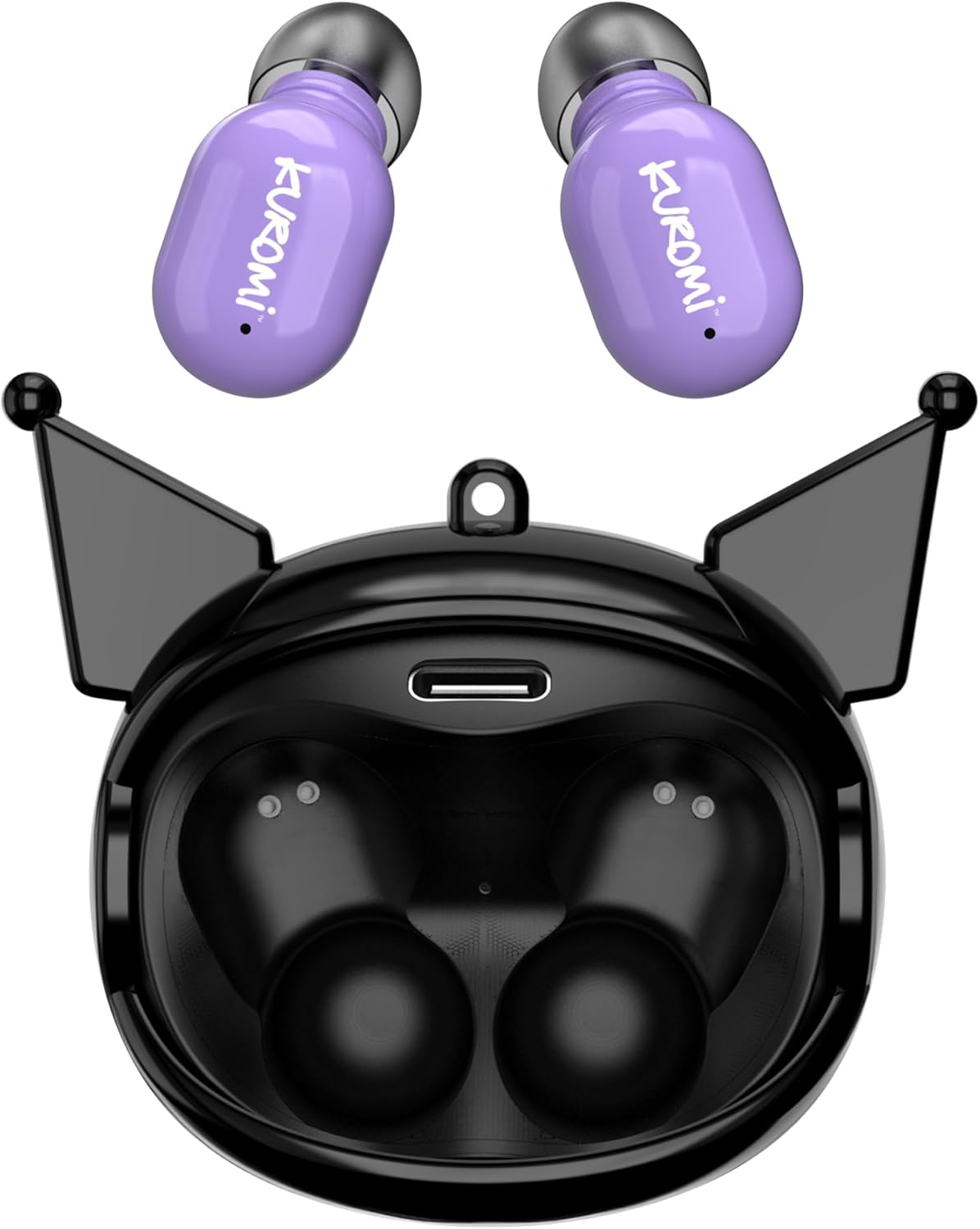
This image displays the two purple Kuromi wireless earbuds positioned above their open black charging case. The charging case features the Kuromi character design with pointed ears and an open compartment for the earbuds, revealing the charging contacts and a USB-C port.

The closed black charging case is shown, featuring Kuromi's default facial expression with a pink skull on her forehead and a neutral mouth.

The closed black charging case displays Kuromi's winking facial expression, with one eye closed and a small pink heart near her mouth.

The closed black charging case features Kuromi's heart-eyes facial expression, with two pink hearts replacing her eyes and an open-mouthed smile.
3.2 Styringer
The earbuds feature touch controls for various functions. Specific touch gestures may vary; refer to the 'Operating Instructions' section for details.
4. Opsætning
4.1 Indledende opladning
Oplad ørepropperne og opladningsetuiet helt inden første brug.
- Connect the provided USB cable to the charging port on the case and to a compatible USB power source.
- Placer begge ørepropper i opladningsetuiet. Sørg for, at de sidder korrekt.
- The charging indicator lights (if present) will illuminate to show charging status. A full charge typically takes approximately 1 hour.
4.2 Bluetooth -parring
Sådan tilslutter du dine ørepropper til en enhed:
- Sørg for, at ørepropperne er opladet og taget ud af opladningsetuiet. De burde automatisk gå i parringstilstand.
- Aktiver Bluetooth på din enhed (smartphone, tablet osv.).
- Søg efter tilgængelige Bluetooth-enheder.
- Select "HKTWSRKU" or a similar name from the list of devices.
- Når de er tilsluttet, vil ørepropperne indikere en vellykket parring (f.eks. en stemmemeddelelse eller et LED-skift).
- Ørepropperne genopretter automatisk forbindelse til den sidst parrede enhed, når de tages ud af etuiet, hvis Bluetooth er aktiveret på enheden.
5. Betjeningsvejledning
5.1 Tænd/sluk
- Tænd: Tag ørepropperne ud af opladningsetuiet. De tænder automatisk.
- Sluk: Place the earbuds back into the charging case. They will power off and begin charging automatically.
5.2 Musikafspilning
Use the touch controls on the earbuds:
- Afspil/pause: Tryk én gang på begge øretelefoner.
- Næste nummer: Dobbelttryk på den højre øretelefon.
- Forrige nummer: Dobbelttryk på den venstre øretelefon.
- Lydstyrkekontrol: Lydstyrken styres typisk via din tilsluttede enhed.
5.3 Opkaldshåndtering
Den indbyggede mikrofon muliggør håndfri opkald:
- Besvar opkald: Tap once on either earbud when a call comes in.
- Afslut opkald: Tap once on either earbud during a call.
- Afvis opkald: Press and hold either earbud for approximately 2 seconds.
5.4 Flip-Face Feature
The charging case features a rotating mechanism to change Kuromi's facial expression. Gently rotate the front panel of the case to cycle through the available expressions.
6. Opladning
6.1 Opladning af øretelefonerne
Place the earbuds into the charging case. They will automatically begin to charge from the case's internal battery.
6.2 Opladning af etuiet
When the charging case battery is low, connect it to a power source using the provided USB cable. The case's indicator lights will show charging status. A full charge for the case typically takes about 1 hour.
7. Vedligeholdelse og pleje
- Rensning: Brug en blød, tør klud til at rengøre ørepropperne og opladningsetuiet. Brug ikke skrappe kemikalier eller slibende materialer.
- Opbevaring: Opbevar ørepropperne i deres opladningsetui, når de ikke er i brug, for at beskytte dem og holde dem opladede. Undgå ekstreme temperaturer.
- Vandeksponering: Disse ørepropper er ikke vandtætte. Undgå udsættelse for vand eller overdreven fugt.
- Indvirkning: Handle the earbuds and case with care to prevent damage from drops or impacts.
8. Fejlfinding
Hvis du støder på problemer, skal du se følgende tabel:
| Problem | Mulig løsning |
|---|---|
| Øretelefoner parrer ikke | Ensure earbuds are charged. Turn off and on Bluetooth on your device. Forget the device in your Bluetooth settings and re-pair. |
| Ingen lyd fra øretelefoner | Tjek enhedens lydstyrke. Sørg for, at øretelefonerne er tilsluttet. Prøv at afspille en anden lyd. |
| Øretelefoner oplader ikke | Ensure earbuds are correctly seated in the case. Check if the charging cable is securely connected to the case and power source. |
| Mikrofon virker ikke | Ensure earbuds are properly connected. Check microphone permissions on your device. |
9. Specifikationer
Key technical details for the Hello Kitty Kuromi Wireless Bluetooth Earbuds:
| Feature | Detalje |
|---|---|
| Modelnavn | Wireless Earbuds (HKTWSRKU) |
| Forbindelsesteknologi | Bluetooth 5.3 |
| Batterilevetid (spilletid) | Op til 4 timer pr. opladning |
| Opladningstid | Cirka 1 time |
| Kontrolmetode | Røre |
| Øreplacering | In Ear |
| Speciel funktion | Rotating Charging Case with Flip-Face Feature |
| Inkluderede komponenter | Rotating Charging Case, USB Cable, User Manual |
| Fabrikant | Southern Telecom |
| Varens vægt | 3.52 ounce |
10. Garantioplysninger
For warranty details, please refer to the documentation included with your purchase or contact the retailer where the product was acquired. Warranty terms and conditions may vary by region and retailer.
11. Support
If you require further assistance or have questions not covered in this manual, please contact the manufacturer or your retailer's customer support. Keep your purchase receipt and product model number (HKTWSRKU) available when seeking support.