
1. Introduktion
Welcome to the user manual for your BOOX Tab X C 13.3-inch Color ePaper Tablet. This device combines the benefits of an e-reader with the versatility of an Android tablet, featuring a large color ePaper display, front light, G-Sensor, Wi-Fi, and Bluetooth connectivity. This manual provides essential information to help you set up, operate, maintain, and troubleshoot your device, ensuring an optimal user experience.

Image: The BOOX Tab X C tablet, showcasing dets elegante design og store skærm.
2. Opsætning
2.1 Udpakning og første opkrævning
Upon opening the package, ensure all components are present. The box should contain your BOOX Tab X C tablet and a USB cable. Before first use, fully charge the device using the provided USB cable and a compatible power adapter (not included). A full charge ensures the device is ready for initial setup and optimal performance.
2.2 Tænd/sluk
- For at tænde: Press and hold the power button (typically located on the side or top edge) for a few seconds until the BOOX logo appears.
- For at slukke: Press and hold the power button until a power-off menu appears on the screen. Select "Power Off".
- For at genstarte: Fra sluk-menuen skal du vælge "Genstart".
2.3 Indledende konfiguration
After powering on for the first time, the device will guide you through an initial setup wizard. Follow the on-screen prompts to:
- Vælg dit foretrukne sprog.
- Opret forbindelse til et Wi-Fi-netværk.
- Accepter vilkår og betingelser.
- Sign in with your Google account to access the Google Play Store and other services.
- Optionally, sign in with your BOOX account for cloud synchronization and other BOOX-specific features.
3. Betjeningsvejledning
3.1 Display og navigation
The BOOX Tab X C features a 13.3-inch Color ePaper display, designed for comfortable reading. The display offers various refresh modes to balance clarity and speed. Navigate the interface using touch gestures similar to other Android devices.

Image: The BOOX Tab X C displaying a detailed document with handwritten notes and highlights.
3.2 Applikationer og multitasking
Running on Android 13, the Tab X C supports a wide range of applications available through the Google Play Store. You can install productivity tools, reading apps, and more.

Image: The BOOX Tab X C home screen displaying a grid of various application icons.
The device also supports multitasking, allowing you to switch between or view flere applikationer samtidigt.

Image: The BOOX Tab X C displaying a view of multiple open applications for efficient multitasking.
3.3 Reading and Annotation
The Tab X C is optimized for reading various document formats, including PDFs and e-books. Use the built-in reader or third-party apps to open your files. The stylus allows for precise annotation, highlighting, and note-taking directly on documents.
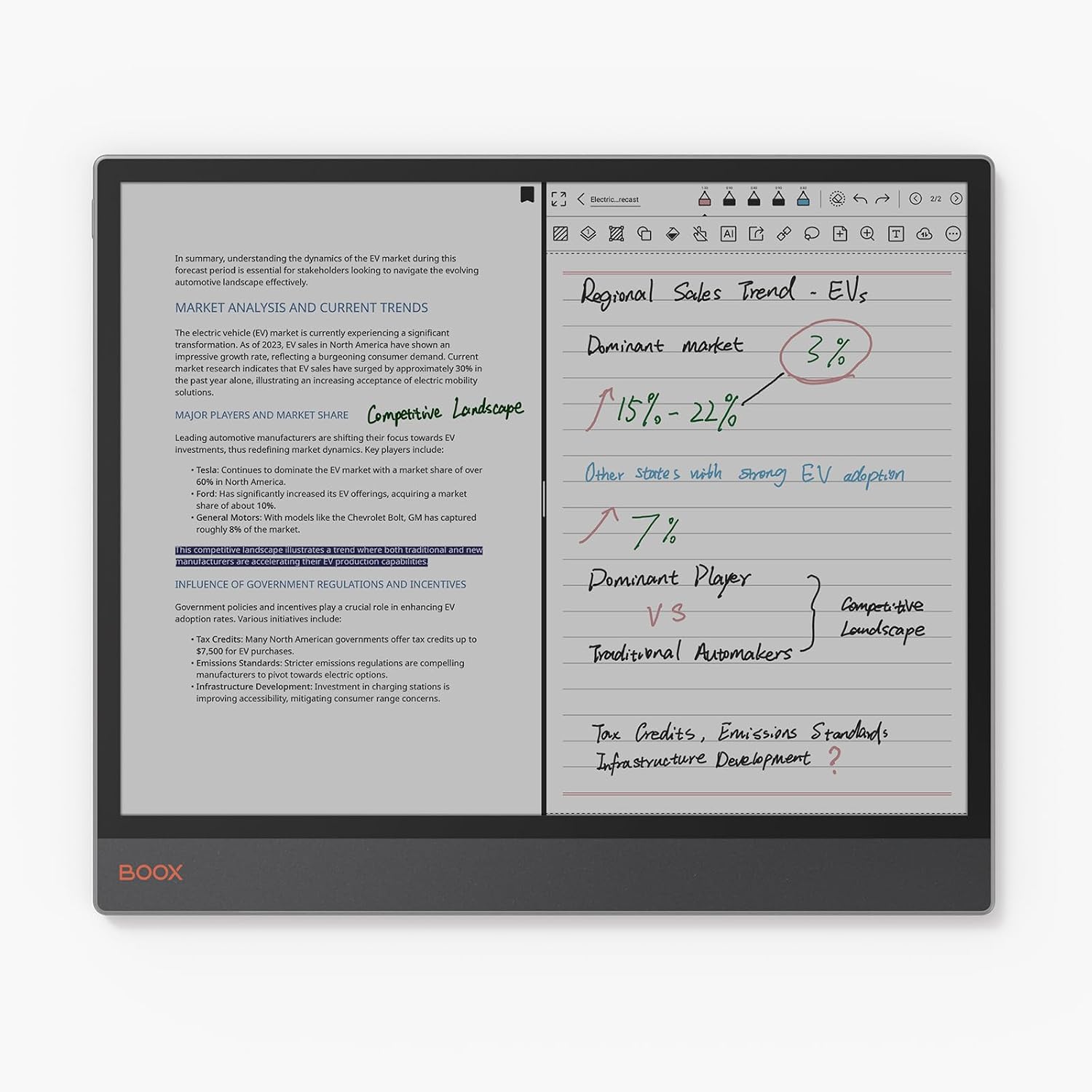
Image: The BOOX Tab X C in split-screen mode, showing a document on one side and handwritten notes on the other.
3.4 Brug af pennen
The included stylus enhances interaction with the tablet, offering a natural writing and drawing experience. It features wireless charging and magnetic attachment for convenience. The tip is durable and replaceable.

Billede: Nærbillede view of the BOOX stylus, highlighting its wireless charging, magnetic attachment, and durable, replaceable tip.
3.5 Forbindelse
- Wi-Fi: Connect to wireless networks for internet access, app downloads, and cloud synchronization.
- Bluetooth: Pair with Bluetooth accessories such as keyboards, headphones, or external speakers.
- USB OTG: The USB port supports On-The-Go (OTG) functionality, allowing you to connect external storage devices or peripherals.
4. Vedligeholdelse
4.1 Rengøring af enheden
To clean the screen and body of your BOOX Tab X C, use a soft, lint-free cloth. For stubborn smudges, slightly dampen the cloth with water or a screen-cleaning solution specifically designed for electronic displays. Avoid using harsh chemicals or abrasive materials.
4.2 Pleje af batterier
For at forlænge batterilevetiden:
- Undgå at aflade batteriet helt ofte.
- Udsæt ikke enheden for ekstreme temperaturer.
- Brug det medfølgende USB-kabel til opladning.
4.3 Softwareopdateringer
BOOX provides regular firmware updates to improve performance, add new features, and enhance security. It is recommended to keep your device's software up to date. You can check for updates in the device settings. BOOX commits to at least 3 years of firmware updates for each product.
5. Fejlfinding
5.1 Almindelige problemer og løsninger
- Enheden tænder ikke: Sørg for, at batteriet er opladet. Tilslut enheden til en strømkilde, og prøv igen.
- Langsom ydeevne: Luk ubrugte programmer, ryd cachen eller genstart enheden. Sørg for, at der er tilstrækkelig lagerplads tilgængelig.
- Display ghosting: This is a characteristic of ePaper displays. Adjusting the refresh rate settings or performing a full refresh (if available in settings) can minimize ghosting.
- Problemer med Wi-Fi/Bluetooth-forbindelse: Ensure Wi-Fi/Bluetooth is enabled. Restart the device and your router/accessory. Forget and re-add the network/device.
5.2 Fabriksindstilling
Hvis du støder på vedvarende problemer, kan en fabriksnulstilling muligvis løse dem. Advarsel: A factory reset will erase all data on your device. Back up important files before proceeding. The option for factory reset is typically found in the device's system settings under "System" or "About Tablet".
6. Specifikationer
| Feature | Detalje |
|---|---|
| Mærke | BOX |
| Modelnavn | Tab X C |
| Lagerkapacitet | 128 GB |
| Skærmstørrelse | 13.3 tommer |
| Maksimal skærmopløsning | 300 Pixels per inch |
| Operativsystem | Android 13 |
| Installeret RAM-størrelse | 6 GB |
| Speciel funktion | USB OTG-understøttelse |
| Model årgang | 2025 |
| Processor mærke | Qualcomm |
| Processorbeskrivelse | Qualcomm Snapdragon |
| Batteritype | Lithium-ion |
| Batteriets energiindhold | 21.2 watt-timer |
| Varens vægt | 625 gram |
| Dimensioner (L x B x H) | 28.7L x 0.5B x 24.3H cm |
| Indtastningsmetode | Touchscreen with Stylus |
| Display Type | Elektronisk blæk |
| Skærmopløsning | 3990 x 2640 pixels |
| Aspektforhold | 4:3 |
| Trådløs teknologi | Bluetooth, Wi-Fi (802.11ac) |
| Inkluderede komponenter | USB-kabel |
7. Garanti og support
7.1 Produktgaranti
The BOOX Tab X C comes with an official 2-year warranty. This warranty covers manufacturing defects and ensures your device functions as intended under normal use. Please retain your proof of purchase for warranty claims.
7.2 Kundesupport
For any questions, technical assistance, or warranty claims, please visit the official BOOX help center. You can submit your inquiries there for prompt support. BOOX aims to respond to requests within 24 hours.
For mere information og ressourcer, besøg BOOX Brand Store.