
1. Produktet er slutview
The Kratos K10 is a versatile 71-inch selfie stick tripod designed for mobile phones, GoPro cameras, and other compatible devices. It features a 360° rotating handle, a rechargeable remote, and a reinforced quadripod base for enhanced stability. This device is ideal for vlogging, panoramic shots, live streaming, and capturing wide-angle photos and videos.
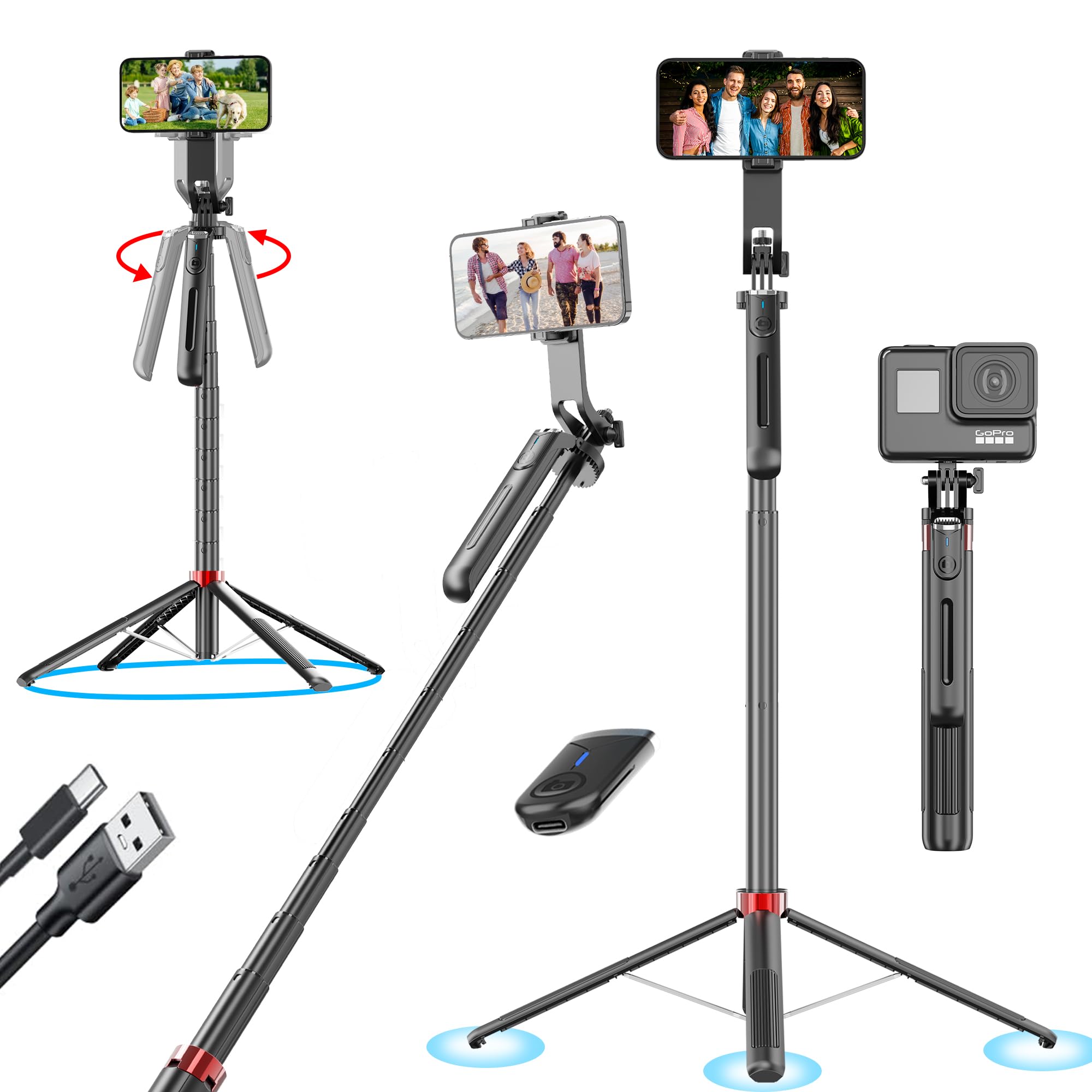
Image: The Kratos K10 Selfie Stick Tripod in its compact, folded state, showcasing dens bærbare design.
2. Nøglefunktioner
- 71-Inch Extendable Length: Provides an extended reach for wider shots, group photos, and diverse angles.
- 360° Panoramic Rotation: The handle allows for full rotation of the mount, enabling easy capture of panoramic videos and photos.
- Anti-Shake Gimbal Handle: Offers stable support for smooth video recording, even when moving.
- Genopladelig Bluetooth-fjernbetjening: Convenient wireless control for capturing photos and starting/stopping videos.
- Reinforced Quadripod Base: An upgraded 4-foot base with zinc alloy support ensures maximum stability on various surfaces.
- Durable Aero-Grade Aluminum Build: Constructed from high-strength aluminum alloy for reliability and longevity.
- 1/4" skruemontering: Ensures broad compatibility with mirrorless cameras, ring lights, microphones, and other accessories.
- Detachable Mobile Holder: A removable phone holder accommodates most smartphones and GoPro devices.

Image: Key structural features of the Kratos K10, including its multi-layer protection, non-slip silicone grip, and stable four-leg quadripod base.

Image: The 1/4" screw mount on the Kratos K10, demonstrating compatibility with smartphones, action cameras, and ring lights.
3. Opsætning og montering
- Fold stativbenene ud: Gently pull the tripod legs outwards from the base until they lock into place, forming a stable quadripod stand.
- Træk selfie-stangen ud: Pull the telescopic rod upwards to extend the selfie stick to your desired length (up to 71 inches).
- Tilslut din enhed:
- Til smartphones: Open the detachable mobile holder and securely place your smartphone. Ensure it is firmly gripped.
- For GoPro/Cameras/Ring Lights: Use the 1/4" screw mount to attach your compatible device. Tighten securely.
- Adjust Angle and Rotation: Loosen the rotation lock (if present) to adjust the device's angle and utilize the 360° panoramic rotation feature. Tighten the lock once the desired position is achieved.
- Par Bluetooth-fjernbetjeningen:
- Tænd for fjernbetjeningen.
- On your smartphone, go to Bluetooth settings and search for "Selfie" or "Kratos K10".
- Select and pair the device. The remote is now ready for use.

Image: A person extending the Kratos K10 selfie stick to its full length, demonstrating its reach.

Image: The Kratos K10 with a smartphone mounted, illustrating the 360-degree rotation capability for portrait and landscape modes.

Image: The rechargeable Bluetooth remote control for the Kratos K10, showing its Type-C charging port and pairing process with a smartphone.
4. Betjening
4.1 Brug som selfiestang
- Hold the Kratos K10 by its handle.
- Extend the stick to your desired length.
- Adjust the angle of your device using the rotating head.
- Use the Bluetooth remote to capture photos or start/stop video recording.
4.2 Brug som stativ
- Ensure the quadripod legs are fully extended and stable on a flat surface.
- Extend the stick to the desired height.
- Adjust your device's position and angle.
- Utilize the 360° rotation for panoramic shots or to change orientation without moving the tripod.
- Brug Bluetooth-fjernbetjeningen til håndfri betjening.
4.3 Anti-Shake Handle Function
- When recording videos, hold the anti-shake handle firmly.
- This feature helps to minimize camera shake, resulting in smoother and more stable video footage, especially when moving.

Image: A person using the Kratos K10 with the anti-shake handle feature while cycling, demonstrating its stability for video recording.
5. Produktspecifikationer
| Feature | Detalje |
|---|---|
| Mærke | Kratos |
| Modelnavn | K10 |
| Maksimal højde | 71 Inches (1.8 meters) |
| Materiale | Aero-Grade Aluminium |
| Kompatible enheder | Cellphones, GoPro, Mirrorless Cameras, Ring Lights, Microphones |
| Særlige funktioner | Rechargeable Remote, 360° Rotation, Anti-Shake Handle, Quadripod Base |
| Hovedtype | Væskehoved |
| Varens vægt | 411 gram |
| Varedimensioner (D x B x H) | 5.6D x 7W x 10H Centimeters (folded) |
| Vandmodstandsniveau | Ikke vandafvisende |
| Kassens indhold | Remote, Warranty Card |
6. Pleje og vedligeholdelse
- Rensning: Wipe the selfie stick tripod with a soft, dry cloth. Avoid using harsh chemicals or abrasive materials.
- Opbevaring: Store the device in a cool, dry place away from direct sunlight and extreme temperatures. Ensure it is fully collapsed before storage.
- Fjernbetjenings batteri: Recharge the Bluetooth remote regularly to ensure it is ready for use. Avoid overcharging.
- Vandeksponering: This product is not water-resistant. Avoid exposure to water or high humidity to prevent damage.
7. Fejlfinding
- Device not pairing with Bluetooth remote:
- Ensure the remote is charged and turned on.
- Tjek om Bluetooth er aktiveret på din smartphone.
- Make sure the remote is within range (typically 10 meters).
- Glem enheden i din telefons Bluetooth-indstillinger, og prøv at parre igen.
- Restart both your phone and the remote.
- Stativstabilitet:
- Ensure all four legs of the quadripod base are fully extended and locked.
- Placer stativet på en flad, stabil overflade.
- Do not overload the device beyond its recommended weight capacity.
- Selfie stick not extending/retracting smoothly:
- Check for any obstructions or debris in the telescopic sections.
- Avoid forcing the extension or retraction.
8. Garanti og support
The Kratos K10 Selfie Stick Tripod comes with a 1 års mærkegaranti. This warranty covers manufacturing defects and ensures replacement service. For any queries or technical support, please contact the Kratos Tech Support Team.
To avail your warranty, it is recommended to register your purchase on the brand's official webwebsted.
Fabrikantens kontaktoplysninger:
KRATOS, Ezeekart Creation LLP
Telefon: 81482 73270
E-mail: help@gokratos.com
9. Videodemonstration
Video: En hurtig gennemgangview and demonstration of the Kratos K10 Selfie Stick Tripod's features, including its extendable length, 360-degree rotation, and stable quadripod base. This video highlights the product's versatility and ease of use for various photography and videography needs.