
1. Introduktion
This manual provides detailed instructions for the installation, operation, and maintenance of your SANNCE PoE NVR 4K 8 Channel Security Camera System. This system is designed to provide high-definition surveillance with advanced features for both day and night monitoring.
2. Pakkens indhold
Please check the package contents carefully. If any items are missing or damaged, contact SANNCE support.
- SANNCE 8-Channel PoE NVR
- 8 x SANNCE 4K 8MP PoE IP Security Cameras
- Strømadapter til NVR
- USB-mus
- Ethernet-kabler
- Monteringsskruer og -dybler
- Hurtig startvejledning
3. Opsætning
3.1. System overview
The SANNCE PoE NVR system simplifies installation by using Power over Ethernet (PoE) technology. A single Ethernet cable transmits both power and video data to each camera.

Figure 3.1: Plug and Play Installation. This image illustrates the simplicity of PoE setup, where a single Ethernet cable connects the camera to the NVR, providing both power and data. The NVR is then connected to a router for network access.
3.2. Tilslutning af NVR'en
- Tilslut NVR'en til en skærm ved hjælp af et HDMI- eller VGA-kabel.
- Connect the included USB mouse to the NVR's USB port.
- Tilslut NVR'en til din router med et Ethernet-kabel for at få netværksadgang.
- Tilslut strømadapteren til NVR'en, og sæt den i en stikkontakt. NVR'en tænder automatisk.
3.3. Connecting PoE Cameras
Connect each PoE IP camera to an available PoE port on the NVR using an Ethernet cable. The cameras will receive power and transmit video data automatically.
3.4. Indledende konfiguration
Follow the on-screen prompts to complete the initial setup wizard, which includes setting a password, time zone, and network settings. The NVR will automatically detect and display the connected cameras.
4. Betjening af systemet
4.1. Lev View og optagelse
Once cameras are connected, you can view live footage on the connected monitor. The system is configured for continuous recording by default. You can adjust recording schedules and modes through the NVR's interface.

Figure 4.1: 4K UHD Day or Night Vision. This image demonstrates the camera's capability to capture clear 4K UHD video both during the day with natural light and at night using infrared illumination.
4.2. Nattesyn
The cameras are equipped with Smart IR LEDs, providing up to 100ft (30m) of night vision. The system automatically switches between day and night modes based on ambient light conditions.

Figure 4.2: 100ft Night Vision. This image highlights the camera's powerful infrared night vision, capable of illuminating and capturing clear footage up to 100 feet in complete darkness.
4.3. Bevægelsesdetektion og advarsler
The system features advanced human detection capabilities. When motion is detected, especially human shapes, the system can trigger email alerts and push notifications to your mobile device via the SANNCE VISION app.

Figure 4.3: Human Detection and Alerts. This image demonstrates the system's ability to detect human figures and send instant notifications to a mobile device, ensuring you are aware of activity on your property.
4.4. Envejslyd
Each PoE IP camera is equipped with a built-in microphone, allowing you to hear audio from the camera's location. This feature enhances surveillance by providing auditory context to visual events.

Figure 4.4: Real-Time One-Way Audio. This image illustrates the camera's ability to capture audio, allowing you to hear sounds from the monitored area, such as a conversation at your doorstep.
4.5. Fjernadgang
Download the SANNCE VISION app on your smartphone or tablet to access live view, playback recordings, and receive alerts from anywhere with an internet connection.
4.6. Viewi vinkel
The cameras feature a 105° field of view (FOV) with a 2.8mm lens, providing wide coverage for monitoring larger areas.
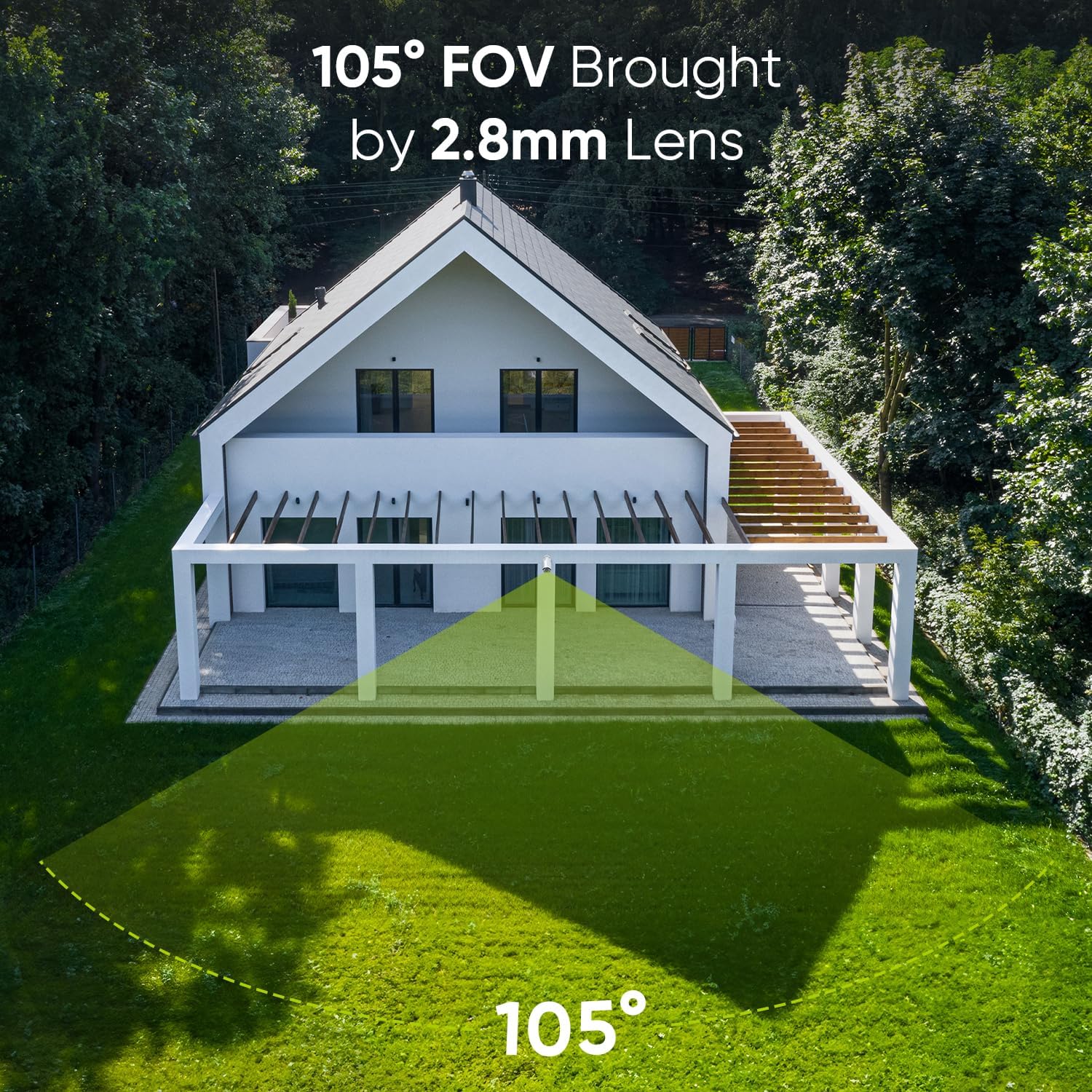
Figure 4.5: 105° Field of View. This image visually represents the wide coverage area provided by the camera's 105-degree lens, suitable for monitoring broad outdoor spaces.
4.7. Kompatibilitet
The system supports Open Network Video Interface Protocol (ONVIF), ensuring compatibility with both SANNCE NVRs and certain third-party NVRs.

Figure 4.6: Open Network Video Interface Protocol (ONVIF). This image demonstrates the system's ONVIF compliance, allowing for flexible integration with various NVR systems, including SANNCE and compatible third-party devices.
5. Vedligeholdelse
5.1. Vejrbestandigt design
The cameras feature an IP66 weatherproof metal housing, designed to withstand extreme temperatures from -4°F to 140°F (-20°C to 60°C). This ensures reliable operation in various outdoor conditions.

Figure 5.1: IP66 Weatherproof. This image illustrates the camera's robust IP66-rated housing, designed to protect it from harsh weather conditions, including rain and extreme temperatures.
5.2. Rensning
Rengør kameralinserne regelmæssigt med en blød kludamp cloth to ensure clear image quality. Do not use harsh chemicals or abrasive materials.
5.3. Firmwareopdateringer
Check the SANNCE official website regularly for firmware updates to ensure optimal performance and access to new features. Follow the provided instructions for safe firmware upgrades.
6. Fejlfinding
- Ingen videovisning:
- Ensure the NVR is powered on and connected to the monitor correctly.
- Kontroller, at kameraerne er korrekt tilsluttet NVR'ens PoE-porte.
- Kontroller Ethernet-kabler for beskadigelser eller løse forbindelser.
- Ingen fjernadgang:
- Confirm the NVR is connected to the internet via your router.
- Tjek din mobilenheds internetforbindelse.
- Ensure the SANNCE VISION app is updated to the latest version.
- Dårlig billedkvalitet:
- Rengør kameralinsen.
- Sørg for, at der ikke er nogen forhindringer i kameraets synsfelt view.
- Check for sufficient lighting in the area, especially at night.
7. Specifikationer
| Feature | Specifikation |
|---|---|
| Mærke | SANNCE |
| Modelnummer | SU-N98PBM0-74EE-P-OP-01 |
| Forbindelsesteknologi | PoE |
| Videooptagelsesopløsning | 4K UHD 2160p |
| Antal kanaler | 8 |
| Farve | Sort |
| Strømkilde | Elektrisk med ledning |
| Operativsystem | Linux |
| Anbefalede anvendelser | Sikkerhedsovervågning |
| Kompatible enheder | IP kamera |
| Low Light teknologi | IR |
| Night Vision Range | 100 fod (30m) |
| Billedhastighed | 30 fps |
| Optagetilstand | Sammenhængende |
| Samlet USB-porte | 2 |
| Hardware-interface | Ethernet |
| Video input | IP kamera |
| Viewi vinkel | 90 Degrees (105° FOV with 2.8mm lens) |
| Produktdimensioner | 9 x 3 x 3.99 tommer |
| Vejrbestandig vurdering | IP66 |
| Driftstemperatur | -4°F til 140°F (-20°C til 60°C) |
8. Garanti og support
All SANNCE products are CE, FCC, and HDMI certified, ensuring compliance with international standards. SANNCE offers premium 24/7 customer support to assist you with any questions or issues regarding your security system.
For technical assistance, troubleshooting, or warranty claims, please visit the official SANNCE website or contact our support team directly. Refer to your purchase documentation for specific warranty terms and conditions.