
1. Introduktion
Tak for købetasing the XDOBO Dolby Atmos 7.1.4 Surround Sound System. This manual provides essential information for setting up, operating, and maintaining your new audio system. Please read it thoroughly before use to ensure optimal performance and safety.
2. Produktfunktioner
- Dolby Atmos 7.1.4 Channel System: Delivers a revolutionary, immersive sound experience with overhead audio effects.
- 360° surroundlyd: Skaber en bred lydtage for enhanced immersion, reproducing environmental sounds with precision through left/right sky channels (up-firing speakers), a center speaker, and left/right surround channels.
- 8-inch Wireless Subwoofer: Provides powerful, deep bass, covering frequencies down to 40Hz for impactful audio.
- Bluetooth 5.3 EDR: Ensures stable, high-speed wireless connectivity for seamless audio streaming.
- 500W peak output: Delivers overwhelming power for a truly moving audio experience.
- DSP Digital Tuning Technology: Optimizes sound sources and adjusts the sound field for enhanced spatial presence.
- Wireless Speaker Connectivity: All speakers connect wirelessly, allowing for flexible placement with only power connections required.
- Flere tilslutningsmuligheder: Supports HDMI ARC, HDMI IN, Bluetooth, USB, Optical, and Coaxial inputs for versatile connectivity.

Billede: Overview of the system's key features, including Dolby Atmos, 7.1.4 channel configuration, wireless connectivity, DSP technology, 500W peak power, 8-inch wireless subwoofer, and Bluetooth 5.3 EDR.

Image: Illustration of the DSP (Digital Signal Processor) technology, highlighting its role in optimizing Dolby Atmos content and enhancing the sound field.

Billede: Nærbillede view of an up-firing speaker, demonstrating how it reflects sound off the ceiling at a 20-degree angle to create a three-dimensional audio space.
3. Pakkens indhold
Kontroller venligst, at alle varer er til stede i pakken:
- Soundbar x 1 (with Power Cable x 1)
- Surround Speakers x 2 (with Power Adapters x 2, Wall Mount Brackets x 2)
- Subwoofer x 1 (with Power Cable x 1)
- Fjernbetjening x 1
- Monteringsskruesæt x 1
- Brugsanvisning x 1
4. Opsætning
4.1 Højttalerplacering
The XDOBO 7.1.4 system consists of a soundbar, two surround speakers, and a subwoofer. All speakers are wireless, offering flexibility in placement.
- Soundbar: Place the soundbar centrally below your TV. Ensure there are no obstructions in front of the up-firing speakers on top of the soundbar.
- Surroundhøjttalere: Position the two surround speakers behind or to the sides of your listening position. They should be equidistant from the main listening area for optimal surround sound. Wall mounting is also an option using the included brackets.
- subwoofer: The wireless subwoofer can be placed anywhere in the room where it provides the best bass response. Experiment with different locations to find the ideal spot.

Image: Diagram showing the layout of the soundbar, subwoofer, and left/right surround speakers, illustrating the 7.1.4 channel configuration with left/right, center, left/right surround, and left/right sky channels.

Billede: En eksample setup showing a soundbar and two wireless surround speakers positioned around a TV and sofa, demonstrating the flexibility of wireless placement for an immersive experience.
4.2 Strømtilslutning
Connect the provided power cables to the soundbar, subwoofer, and surround speakers, then plug them into appropriate power outlets. The speakers will automatically pair upon powering on.
5. Betjeningsvejledning
5.1 Tænd/sluk
Tryk på tænd/sluk-knappen på soundbaren eller fjernbetjeningen for at tænde eller slukke systemet.
5.2 Indgangsvalg
Use the 'Input' button on the remote control or the soundbar to cycle through available input sources: HDMI ARC, HDMI IN, Bluetooth, USB, Optical, Coaxial, and AUX.
5.3 Lydstyrkekontrol
Adjust the volume using the Volume Up (+) and Volume Down (-) buttons on the remote control or the soundbar.
5.4 Bluetooth -parring
- Select 'Bluetooth' as the input source on the soundbar. The soundbar will enter pairing mode.
- Aktiver Bluetooth på din mobilenhed, og søg efter tilgængelige enheder.
- Select "XDOBO Draco Mini" (or similar) from the list to connect.
- Once connected, you can stream audio from your device to the sound system.
6. Forbindelser
The soundbar offers various connection options for different audio sources.
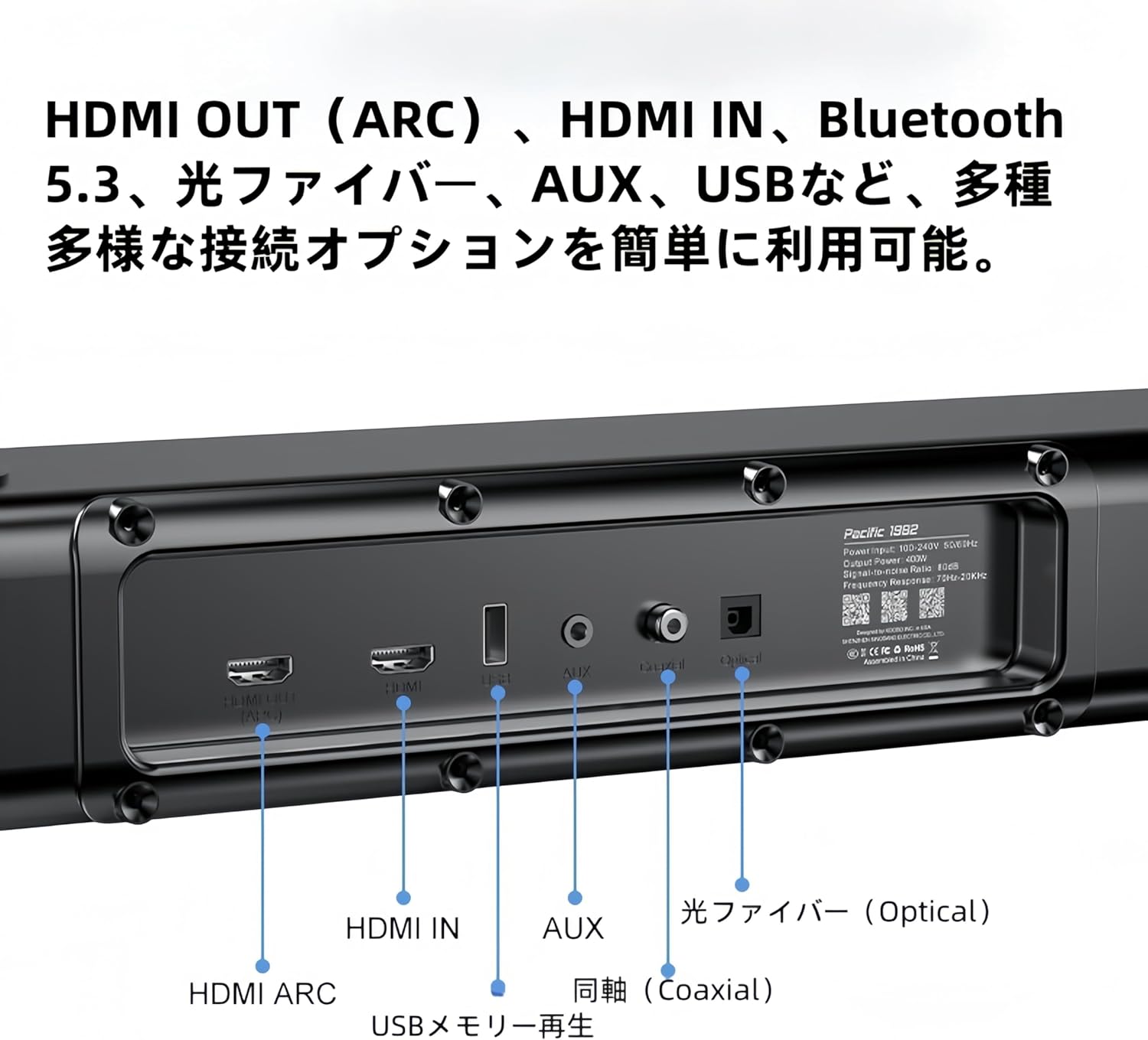
Billede: Detaljeret view of the soundbar's rear panel, showing various input ports including HDMI ARC, HDMI IN, USB, AUX, Optical, and Coaxial connections.
- HDMI ARC: Connect to your TV's HDMI ARC port for high-quality audio transmission and control.
- HDMI IN: Connect external devices like Blu-ray players or game consoles.
- Bluetooth: For wireless audio streaming from compatible devices (refer to 5.4 Bluetooth Pairing).
- USB: Insert a USB memory stick for direct audio playback.
- Optisk: Connect to your TV or other audio sources using an optical cable.
- Koaksial: Connect to compatible audio sources using a coaxial cable.
- AUX: Brug et 3.5 mm lydkabel til at tilslutte enheder med en analog lydudgang.
7. Vedligeholdelse
For at sikre dit lydsystems levetid og optimale ydeevne skal du følge disse vedligeholdelsesretningslinjer:
- Rensning: Use a soft, dry cloth to wipe the surfaces of the speakers. Do not use liquid cleaners, aerosols, or abrasive materials, as they may damage the finish.
- Ventilation: Ensure proper ventilation around all speaker units. Do not block any ventilation openings.
- Opbevaring: Hvis systemet opbevares i en længere periode, skal det afbrydes fra strømmen og opbevares et køligt, tørt sted væk fra direkte sollys og ekstreme temperaturer.
8. Fejlfinding
If you encounter any issues with your XDOBO sound system, please refer to the following common problems and solutions:
| Problem | Mulig årsag | Løsning |
|---|---|---|
| Ingen strøm | Strømkabel ikke tilsluttet; stikkontakt defekt | Sørg for, at alle strømkabler er korrekt tilsluttet, og at stikkontakten fungerer. |
| Ingen lyd | Forkert indgang valgt; Lydstyrke for lav; Kabler ikke tilsluttet korrekt | Select the correct input source. Increase the volume. Check all audio cables for secure connections. |
| Bluetooth-parring mislykkes | Enhed for langt væk; Soundbar ikke i parringstilstand; Interferens | Ensure the soundbar is in Bluetooth pairing mode. Move your device closer to the soundbar. Avoid strong electromagnetic interference. |
| Surround speakers or subwoofer not connecting wirelessly | Power issue; Out of range; Interference | Ensure all wireless speakers are powered on. Place them within range of the soundbar. Restart the soundbar and speakers. |
9. Specifikationer
| Feature | Detalje |
|---|---|
| Modelnavn | Draco Mini |
| Højttaler type | Soundbar |
| Surround Sound Kanalkonfiguration | 7.1.4 |
| Produktmål (Soundbar) | 5D x 110B x 6H cm |
| Produktmål (subwoofer) | 240 x 240 x 420 mm |
| Product Dimensions (Surround Speakers) | 228 x 114 x 72 mm |
| Trådløs kommunikationsteknologi | Bluetooth 5.3 + EDR |
| Frekvensresponsområde | 50Hz ~ 18KHz |
| Output lydtrykniveau | >80dB |
| Forvrængningshastighed | <10 % |
| Højttalerens maksimale output | 500 watt |
| Forbindelsesteknologi | HDMI ARC, Bluetooth, USB, Optical Fiber, Coaxial |
| Lydudgangstilstand | Omgive |
| Monteringstype | Væg, bordplade |

Image: A table summarizing the product specifications for the XDOBO Draco Mini, including model number, dimensions, Bluetooth version, frequency range, and interface types.
10. Sikkerhedsoplysninger
Overhold venligst følgende sikkerhedsforanstaltninger for at forhindre skader på produktet og sikre din sikkerhed:
- Udsæt ikke enheden for regn, fugt eller ekstreme temperaturer.
- Placer ikke enheden i nærheden af varmekilder såsom radiatorer, varmeapparater, komfurer eller andre apparater (herunder ampløftere), der producerer varme.
- Placer ikke genstande fyldt med væske, såsom vaser, på enheden.
- Bloker ikke ventilationsåbninger. Installer i overensstemmelse med producentens anvisninger.
- Beskyt netledningen mod at blive trådt på eller klemt, især ved stik, stikkontakter og det sted, hvor de kommer ud af apparatet.
- Brug kun tilbehør/tilbehør specificeret af producenten.
- Træk stikket ud af dette apparat under tordenvejr, eller når det ikke skal bruges i længere perioder.
11. Garanti og support
XDOBO products are designed and manufactured to the highest quality standards. For information regarding warranty coverage, technical support, or service inquiries, please refer to the warranty card included in your package or contact XDOBO customer support through the retailer where you purchased the product.