
1.Overview
The VAIO SX-R Laptop is a high-performance portable computer designed for productivity and creative tasks. It features an Intel Core Ultra 7 processor, a vibrant 14-inch WQXGA touch display, ample memory, and fast storage, all running on Windows 11 Pro.

Figure 1: VAIO SX-R Laptop, open view.
2. Produktfunktioner
- Intel Core Ultra 7 Processor: Equipped with 16 cores and AI-enhanced performance for speed and intelligent task management.
- 14" WQXGA Touch Display (2560x1600): High-resolution screen with wide color gamut and touch capability.
- 32 GB LPDDR5 RAM: Provides superior multitasking capabilities with instant responsiveness.
- 1TB PCIe NVMe SSD: Offers massive storage with ultra-fast read/write speeds.
- Windows 11 Pro: Includes enterprise-grade security and productivity features.
- IR Camera & Fingerprint Reader: Enhanced security and convenient login options.
- Carbon Fiber Chassis: Let og holdbar konstruktion.
- Water Resistant Keyboard: Designed to withstand accidental spills.

Figure 2: Key features of the VAIO SX-R Laptop.
3. Fysisk overview
3.1 Porte og stik
The VAIO SX-R Laptop is equipped with a variety of ports for connectivity. Refer to the diagram below for port locations and types.
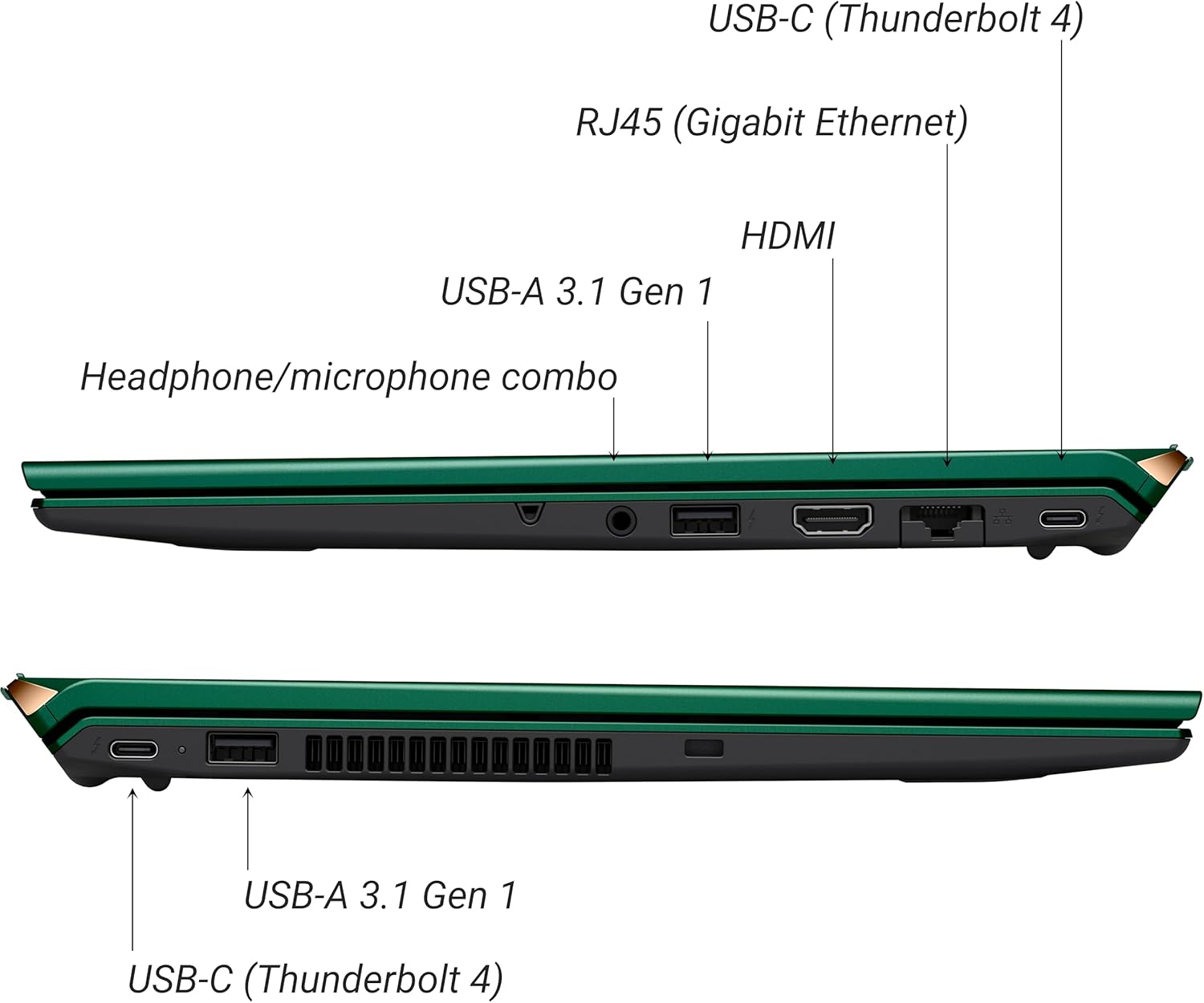
Figur 3: Side view of VAIO SX-R Laptop ports.
- USB-C (Thunderbolt 4): High-speed data transfer, video output, and power delivery.
- RJ45 (Gigabit Ethernet): Til kablede netværksforbindelser.
- HDMI: Til tilslutning til eksterne skærme.
- USB-A 3.1 Gen 1: Til tilslutning af USB-enheder.
- Kombinationsstik til hovedtelefoner/mikrofon: Til lydindgang og -udgang.
3.2 Tastatur og touchpad
The laptop features a full-sized keyboard and a responsive touchpad for navigation and input.

Figur 4: Tastatur- og touchpad-layout.
4. Opsætning
4.1 Indledende tænding
- Unpack the VAIO SX-R laptop and all accessories.
- Tilslut strømadapteren til den bærbare computers opladningsport og derefter til en stikkontakt.
- Open the laptop lid. The system may power on automatically or you may need to press the power button located on the top right of the keyboard.
- Følg instruktionerne på skærmen for at fuldføre Windows 11 Pro-opsætningen, inklusive sprog, region, netværksforbindelse og oprettelse af brugerkonto.
4.2 Tilslutning til et netværk
- Wi-Fi: During initial setup or via Windows settings, select your preferred Wi-Fi network and enter the password. The VAIO SX-R supports Wi-Fi 7 for fast and stable wireless connectivity.
- Kabelbaseret (Ethernet): Connect an Ethernet cable from your router or modem to the RJ45 port on the laptop.
5. Betjeningsvejledning
5.1 Tænd/sluk og dvaletilstand
- Tænd: Åbn låget, eller tryk på tænd/sluk-knappen.
- Luk ned: Klik på Start-knappen, og derefter på Tænd/sluk > Luk ned.
- Sove: Luk låget, eller klik på Start-knappen, og klik derefter på Tænd/sluk > Slumretilstand.
5.2 Brug af berøringsskærmen
The 14-inch WQXGA display supports touch input. You can interact with the screen using gestures similar to a tablet or smartphone.
5.3 IR Camera and Fingerprint Reader
For enhanced security and convenience, the laptop includes an IR camera for Windows Hello face recognition and a fingerprint reader.
- Windows Hello Face Recognition: Configure this feature in Windows Settings > Accounts > Sign-in options. The IR camera will recognize your face to unlock the device.
- Fingeraftrykslæser: Set up your fingerprint in Windows Settings > Accounts > Sign-in options for quick and secure access.
6. Vedligeholdelse
6.1 Generel pleje
- Opbevar den bærbare computer et sted med rent og tørt miljø.
- Undgå at udsætte den bærbare computer for ekstreme temperaturer eller direkte sollys.
- Placer ikke tunge genstande på den bærbare computer.
6.2 Rengøring
- Brug en blød, fnugfri klud til at rengøre skærmen og ydersiden.
- For genstridige pletter, tør letampRengør kluden med vand eller en skærmrengøringsopløsning.
- Do not spray cleaners directly onto the laptop.
6.3 Pleje af batterier
- For at forlænge batteriets levetid bør du undgå at aflade batteriet helt ofte.
- Opbevar den bærbare computer delvist opladet (ca. 50%), hvis den ikke bruges i længere perioder.
7. Fejlfinding
7.1 Strømproblemer
- Bærbar computer tænder ikke: Sørg for, at strømadapteren er korrekt tilsluttet, og at stikkontakten fungerer. Prøv en anden stikkontakt.
- Batteri oplades ikke: Kontrollér strømadapteren og kablet for skader. Sørg for, at opladningsporten er ren.
7.2 Skærmproblemer
- Ingen visning: Connect an external monitor to check if the issue is with the laptop's internal display.
- Berøringsskærmen reagerer ikke: Genstart den bærbare computer. Sørg for, at skærmdriverne er opdaterede.
7.3 Forbindelsesproblemer
- Ingen Wi-Fi-forbindelse: Check if Wi-Fi is enabled in Windows settings. Restart your router. Update wireless drivers.
- Bluetooth virker ikke: Ensure Bluetooth is enabled and your device is discoverable.
8. Specifikationer
| Feature | Detalje |
|---|---|
| Modelnavn | VAIO SX-R (VJS4R1X0811G) |
| Processor | Intel Core Ultra 7 (16-Core, AI-Boosted) |
| Operativsystem | Windows 11 Pro |
| Vise | 14 Inches WQXGA Touch (2560x1600) |
| VÆDDER | 32 GB LPDDR5 |
| Opbevaring | 1TB PCIe NVMe SSD |
| Grafik | Integreret Intel Arc-grafik |
| Trådløs forbindelse | 802.11ax (Wi-Fi 7), Bluetooth |
| Havne | USB-C (Thunderbolt 4) x2, USB-A 3.1 Gen 1 x3, HDMI x1, RJ45 (Gigabit Ethernet) x1, Headphone/microphone combo x1 |
| Kamera | IR Camera (Windows Hello compatible) |
| Sikkerhedsfunktioner | Fingerprint Reader, IR Camera |
| Batterilevetid | Op til 10 timer (gennemsnit) |
| Vægt | 3.1 pund |
| Dimensioner (LxBxH) | 14.2 x 15 x 3.3 tommer |
9. Durability and Testing
VAIO laptops are engineered with Japanese precision and undergo rigorous quality control to ensure reliability and performance. This includes various tests to withstand daily use.
9.1 Manufacturing and Quality Assurance
Video 1: VAIO Manufacturing and Durability Testing. This video demonstrates the quality control processes and durability tests performed on VAIO laptops, including keystroke testing, dust testing, LCD screen pressure testing, and opening/closure testing.
9.2 Key Durability Features
- Water Resistant Keyboard: The keyboard is designed to resist damage from accidental liquid spills.
- Screen Durability: The display undergoes pressure testing to ensure resilience.
- Tabe test: The laptop is tested to withstand drops from up to 3 feet.

Figure 5: Water resistant keyboard testing.

Figure 6: Screen durability test in progress.

Figure 7: 3-foot drop test for VAIO laptops.
10. Garanti og support
Your VAIO SX-R Laptop comes with a standard manufacturer's warranty. For specific warranty terms and conditions, please refer to the documentation included with your product or visit the official VAIO support webwebsted.
For technical support, troubleshooting assistance, or service requests, please contact VAIO customer support. Information regarding support channels can be found on the VAIO webwebstedet eller i din produkts emballage.
Protection plans are available for purchase to extend coverage beyond the standard warranty. Options include 2-Year and 4-Year Protection Plans, as well as a Complete Protect + Norton 360 monthly plan.