
1. Introduktion
Tak for købetasing the JVC XS-N1154B Bluetooth Speaker. This manual provides essential information for the safe and efficient operation of your device. Please read it thoroughly before use and retain it for future reference.
2. Sikkerhedsoplysninger
- Udsæt ikke højttaleren for ekstreme temperaturer, direkte sollys eller høj luftfugtighed.
- Undgå at tabe eller udsætte højttaleren for kraftige stød.
- Forsøg ikke at skille højttaleren ad eller ændre den. Dette vil ugyldiggøre garantien.
- Hold højttaleren væk fra vand og væsker, på trods af dens vandtæthedsklassificering, for at forhindre beskadigelse af interne komponenter.
- Brug kun det specificerede opladningskabel og strømadapter.
- Rengør højttaleren med en blød, tør klud. Brug ikke slibende rengøringsmidler eller opløsningsmidler.
3. Pakkens indhold
Sørg for at alle varer er til stede i pakken:
- JVC XS-N1154B Bluetooth Speaker
- Ladekabel
- Brugermanual
- Fjernbetjening (hvis inkluderet)
4. Produktet er slutview
Gør dig bekendt med højttalerens komponenter og betjeningselementer.
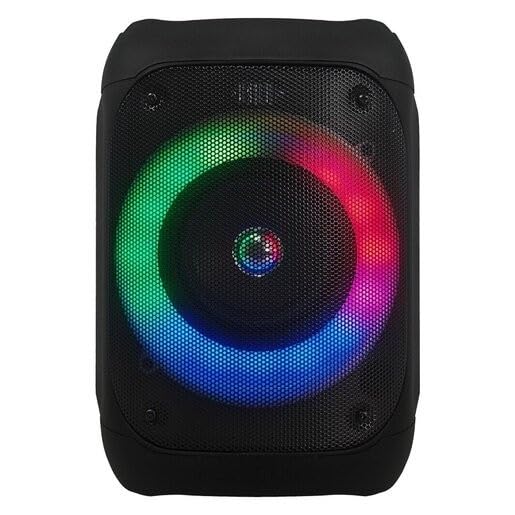
Figur 1: Front view of the JVC XS-N1154B Bluetooth Speaker, showcasing the speaker grille and integrated music-activated LED lights.
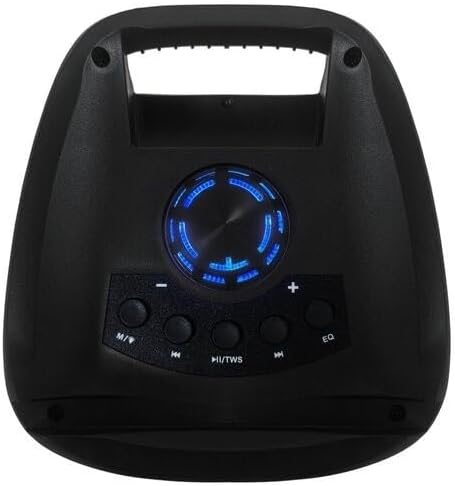
Figur 2: Top view of the JVC XS-N1154B Bluetooth Speaker, displaying the control panel with various buttons and the volume knob.
Kontrolpanelets funktioner:
- Power knap: Tænder eller slukker for højttaleren.
- Tilstandsknap (M): Switches between Bluetooth, USB, SD Card, and FM Radio modes.
- Play/Pause (►||) / TWS Button: Plays or pauses audio. Long press for TWS (True Wireless Stereo) pairing.
- Previous Track (◀◀) Button: Skips to the previous track or tunes down in FM mode.
- Next Track (►►) Button: Skips to the next track or tunes up in FM mode.
- EQ knap: Skifter gennem equalizer-forudindstillinger.
- Lydstyrkeknap: Rotates to adjust the volume level.
5. Opsætning
5.1 Opladning af højttaleren
- Tilslut opladningskablet til højttalerens opladningsport.
- Plug the other end of the cable into a suitable USB power adapter (not included) or a powered USB port.
- Opladningsindikatorlampen lyser typisk rødt under opladning.
- Once fully charged, the indicator light may change color (e.g., turn off or turn blue/green). Disconnect the speaker from the power source.
5.2 Tænd/sluk
- For at tænde: Press and hold the Power button until the speaker powers on and you hear an audible prompt.
- For at slukke: Tryk på tænd/sluk-knappen igen, og hold den nede, indtil højttaleren slukker.
6. Betjeningsvejledning
6.1 Bluetooth -parring
- Ensure the speaker is powered on and in Bluetooth mode. If not, press the Mode (M) button to switch to Bluetooth mode. The speaker will indicate it is ready for pairing (e.g., a blinking LED or audible prompt).
- Aktiver Bluetooth på din mobile enhed (smartphone, tablet, bærbar computer), og søg efter tilgængelige enheder.
- Select "JVC XS-N1154B" from the list of devices.
- Når højttaleren er parret, vil den afgive en hørbar bekræftelse, og Bluetooth-indikatorlampen lyser konstant.
- Du kan nu afspille lyd fra din enhed via højttaleren.
6.2 USB/SD-kortafspilning
- Insert a USB flash drive or an SD card (with supported audio files) into the corresponding port on the speaker.
- The speaker will automatically switch to USB or SD card mode and begin playing audio. If not, press the Mode (M) button to select the correct input.
- Use the Previous Track (◀◀), Next Track (►►), and Play/Pause (►||) buttons to control playback.
6.3 FM-radiofunktion
- Tryk på tilstandsknappen (M) for at skifte til FM-radiotilstand.
- To auto-scan and save available stations, press and hold the Play/Pause (►||) button. The speaker will scan and store stations automatically.
- Use the Previous Track (◀◀) and Next Track (►►) buttons to navigate between saved FM stations.
6.4 LED-lystilstande
The speaker features music-activated LED lights. These lights typically synchronize with the audio playback. There may be an additional button or a combination of buttons to cycle through different light modes or to turn them off. Refer to the remote control section for specific controls if available.
6.5 Lydstyrkekontrol
Rotate the Volume Knob on the top panel clockwise to increase volume and counter-clockwise to decrease volume.
6.6 Brug af fjernbetjening
If your package includes a remote control, it provides convenient access to various functions:
- Magt: Til/Fra
- Mode: Switch input sources (Bluetooth, USB, SD, FM)
- Volumen +/-: Juster lydstyrken
- Afspil/pause: Styr afspilning
- Forrige Næste: Skip tracks/stations
- EQ: Change equalizer presets
- LED: Control LED light modes (if applicable)
7. Vedligeholdelse
7.1 Rengøring
Wipe the speaker's exterior with a soft, dry, lint-free cloth. Do not use liquid cleaners, sprays, or solvents, as these may damage the finish or internal components. Ensure all ports are dry before use, especially given its waterproof nature.
7.2 Opbevaring
When not in use for extended periods, store the speaker in a cool, dry place, away from direct sunlight and extreme temperatures. It is recommended to charge the battery periodically to maintain its lifespan.
8. Fejlfinding
| Problem | Mulig årsag | Løsning |
|---|---|---|
| Højttaleren tænder ikke. | Batteriet er afladet. | Oplad højttaleren helt. |
| Ingen lyd. | Lydstyrken er for lav eller slået fra. Enheden er ikke parret korrekt. | Increase volume. Re-pair Bluetooth device. Check audio source. |
| Bluetooth-parring mislykkes. | Højttaleren er ikke i parringstilstand. Enheden er for langt væk. Interferens. | Sørg for, at højttaleren er i Bluetooth-parringstilstand. Flyt enheden tættere på. Sluk andre Bluetooth-enheder. |
| USB/SD-kort afspiller ikke. | Ukorrekt file format. Kort/drev er ikke isat korrekt. | Sørg for lyd files are in a supported format. Reinsert the USB drive/SD card. Press Mode button to select correct input. |
| FM-radiomodtagelsen er dårlig. | Svagt signal. | Flyt højttaleren til et område med bedre modtagelse. |
9. Specifikationer
- Model: XS-N1154B
- Mærke: JVC
- Forbindelse: Bluetooth, USB, SD-kort
- Radio: Digital FM-radio
- Strømudgang: 4 watt
- Lydudgangstilstand: Stereoanlæg
- Kontrolmetode: Fjern
- Materiale: Plast
- Vandtæt: Ja
- Strømkilde: Batteridrevet
- Dimensioner: Cirka 18.6D x 18.9B x 25.5H cm
- Vægt: Cirka 1.2 kg
- Kompatible enheder: Laptop, smartphone
10. Garanti og support
10.1 Garantioplysninger
This JVC XS-N1154B Bluetooth Speaker comes with a 1 års garanti fra købsdatoen. Denne garanti dækker fabrikationsfejl og udførelse under normal brug. Den dækker ikke skader forårsaget af misbrug, ulykker, uautoriserede ændringer eller normal slitage.
10.2 Kundesupport
For technical assistance, warranty claims, or further inquiries, please contact JVC customer support through their official website or the retailer where the product was purchased. Please have your product model number (XS-N1154B) and proof of purchase ready when contacting support.