Sikkerhedsforanstaltninger
Please read and understand all safety instructions before operating the RC ERA C032 helicopter. Failure to follow these instructions may result in injury or damage to the product.
- Fly in open areas, away from people, animals, and obstacles such as power lines, roads, and water.
- Adult supervision is recommended for younger users to ensure safe operation.
- Ensure all helicopter components, especially the propeller blades, are securely attached before each flight.
- Do not touch rotating blades during operation. Keep hands and face clear of the helicopter.
- Turn off the helicopter and remote control immediately after use or in case of an emergency.
- Avoid flying in strong winds or adverse weather conditions, as this can lead to loss of control.
- Do not attempt to modify the helicopter or its components. Use only original replacement parts.
- Keep the helicopter and remote control away from moisture and extreme temperatures.
Batterisikkerhed
- Use only the provided USB charging cable for the helicopter battery.
- Do not overcharge or short-circuit batteries. Disconnect the charger once charging is complete.
- Do not expose batteries to direct sunlight, fire, or extreme heat.
- Hvis batteriet casing appears loose, refer to the troubleshooting section for guidance.
- Bortskaf brugte batterier i henhold til lokale regler.
Pakkens indhold
Bekræft at alle varer er til stede i din pakke:
- RC ERA C032 UH-1 Huey RC Helicopter
- 2.4G fjernbetjeningssender
- Modular Battery (quantity may vary by variant)
- USB opladningskabel
- Mini skruetrækker
- Reserve propelblade
- Brugermanual
- Helipad Sticker
Opsætningsvejledning
1. Opladning af helikopterbatteriet
Locate the charging port on the helicopter. Connect the provided USB charging cable to the helicopter and a suitable USB power source. The indicator light on the cable will show charging status. Ensure the battery is fully charged before first use for optimal flight time (up to 13 minutes per charge).

Image: The RC ERA C032 helicopter showing the charging port and the USB charging cable connected. The helicopter is green with military-style markings.
2. Installation af senderbatterier
Open the battery compartment on the back of the remote control transmitter. Insert the required batteries (typically AA, not included) ensuring correct polarity. Close the battery compartment securely.

Image: Close-up of the RC ERA remote control transmitter, showing the joysticks and control buttons.
3. Parring af helikopter og sender
- Sørg for, at både helikopteren og senderen er slukket.
- Placer helikopteren på en flad, jævn overflade.
- Tænd for helikopteren.
- Turn on the remote control transmitter.
- Push the left throttle stick all the way up, then all the way down. The indicator light on the transmitter will become solid, indicating successful pairing.
Betjeningsvejledning
Grundlæggende flyvekontrol
- Gashåndtag (venstre greb op/ned): Controls the helicopter's ascent and descent.
- Retning (højre pind venstre/højre): Controls the helicopter's left and right turns (yaw).
- Frem/Bagud (Højre pind op/ned): Controls the helicopter's forward and backward movement (pitch).
One-Key Take-off and Landing
Press the dedicated one-key take-off/landing button on the transmitter to automatically launch or land the helicopter. This feature simplifies initial operation for beginners.
Højde Hold
The helicopter features an altitude hold function, which uses barometer and TOF sensors to maintain a stable height, making hovering easier and more precise for both indoor and outdoor flights.
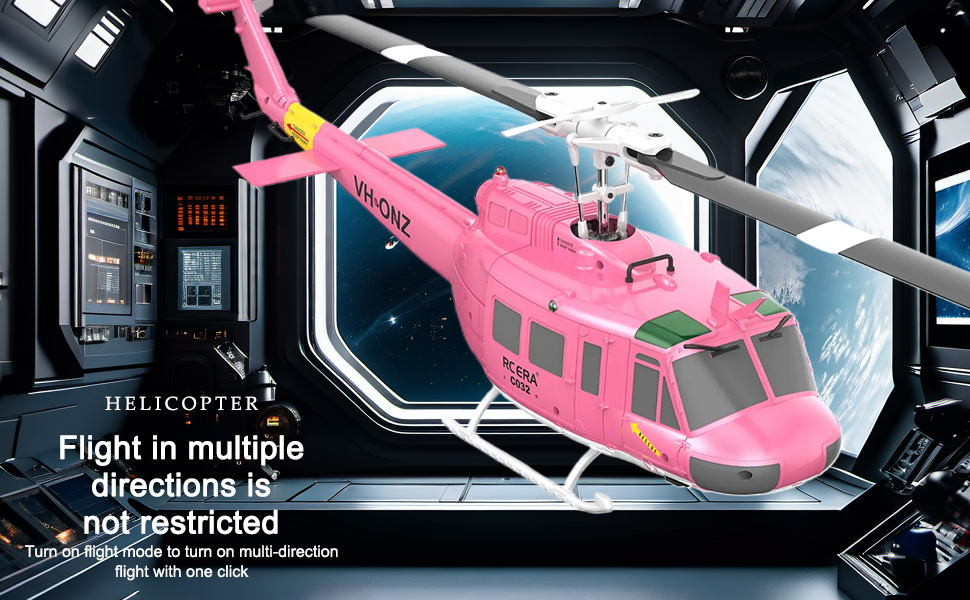
Image: A pink variant of the RC ERA C032 helicopter hovering, illustrating the optical flow positioning and fixed height features.
3D Inverted Flight
For advanced pilots, the helicopter supports 3D inverted flight. This allows for complex maneuvers. Ensure you have sufficient open space and practice in a controlled environment when attempting 3D flight.

Image: The RC ERA C032 helicopter shown in an inverted flight position, demonstrating its 3D flight capabilities.
Hastighedsjustering
The remote control transmitter allows for three-speed gear adjustment (Low, Moderate, High). Select the appropriate speed setting to match your flying proficiency and the current environment.

Image: The RC ERA C032 helicopter with an overlay showing three speed settings: Low, Moderate, and High, indicating adjustable flight speeds.
Opretholdelse
- Rensning: Use a soft, dry cloth to gently clean the helicopter after each flight. Avoid using water or harsh chemical cleaners.
- Udskiftning af propel: If any propeller blades become damaged, replace them immediately with the provided spare parts using the mini screwdriver. Ensure they are securely fastened.
- Batteripleje: Store batteries in a cool, dry place. Do not leave batteries fully charged or fully discharged for extended periods to prolong their lifespan.
- Opbevaring: Når helikopteren og fjernbetjeningen ikke er i brug, skal de opbevares et sikkert og tørt sted, væk fra direkte sollys og ekstreme temperaturer.
Propeller Obstruction Protection
The helicopter is equipped with intelligent anti-stuck protection. If the propellers encounter an obstruction during flight, they will automatically stop to prevent damage to the blades and motor, ensuring user safety.

Image: The RC ERA C032 helicopter illustrating its intelligent anti-stuck protection feature, designed to prevent propeller damage upon obstruction.
Fejlfinding
| Problem | Mulig årsag | Løsning |
|---|---|---|
| Helikopteren reagerer ikke på senderen. | Not paired; low battery in helicopter or transmitter. | Re-pair the helicopter and transmitter. Charge helicopter battery. Replace transmitter batteries. |
| Helicopter is unstable or drifts. | Uncalibrated gyroscope; strong wind interference. | Perform gyroscope calibration (refer to transmitter instructions). Fly in calm conditions. |
| Kort flyvetid. | Batteriet er ikke fuldt opladet; batteri er gammelt. | Sørg for, at batteriet er fuldt opladet. Overvej at udskifte batteriet, hvis det er gammelt. |
| Propellers stop unexpectedly. | Propeller obstruction detected. | Clear any obstructions from the propellers. The safety stop feature is active. |
| Batteri casing er løs. | Manufacturing variation or wear. | Refer to the video below for guidance on securing a loose battery casing. |
| Right hand throttle switch to left hand throttle. | User preference or accidental mode change. | Refer to the video below for instructions on switching throttle modes. |
| Helicopter does not fly straight. | Trim settings incorrect. | Adjust the trim buttons on the remote control to correct drift. |
Fejlfinding af videoer
The following videos provide visual guidance for common issues:
Specifikationer
- Model: C032 (UH-1 Huey Scale Design)
- Skala: 1/48
- Kontrolsystem: 2.4G 6CH
- Stabilisering: 6-Axis Gyroscope, Flybarless System
- Motor: Kraftig børsteløs motor
- Placering: Altitude Hold, Optical Flow Positioning (Barometer and TOF sensors)
- Flytilstande: 3D Inverted Flight, One-Key Take-off/Landing, Three-Speed Adjustment
- Batteri: Modular, up to 13 minutes flight time per charge
- Sikkerhedsfunktioner: Intelligent Anti-Stuck Protection (auto-stall), Low Battery LED Alert
- Varens vægt: 1.57 pund
- Fabrikant: rcxperts
- Anbefalet alder: 18 months - 17 years (Note: Advanced features may require higher skill levels)

Image: Technical drawing showing the dimensions of the RC ERA C032 helicopter, including length, width, and height measurements.
Garanti og support
For warranty information, technical support, or replacement parts, please contact rcxperts customer service. Refer to the product packaging or the official rcxperts webwebsted for kontaktoplysninger.
This product is designed for durability, but proper handling and maintenance are essential for longevity. Always refer to the safety guidelines before operation.
For yderligere information og produktopdateringer, besøg RCXperts Store on Amazon.