1. Introduktion
This manual provides comprehensive instructions for the setup, operation, and maintenance of your Generic X90 Max Smart Watch. Please read this manual thoroughly before using your device to ensure proper functionality and to maximize your user experience. The X90 Max Smart Watch is designed to integrate seamlessly into your daily routine, offering a vibrant digital display and various smart features.
2. Pakkens indhold
Bekræft, at alle nedenstående varer er til stede i din produktpakke:
- X90 Max Smart Watch
- Adjustable Silicone Strap (pre-attached or separate)
- USB Charging Cable (for wireless charging)
- Brugervejledning (dette dokument)

Figur 2.1: Package contents of the X90 Max Smart Watch. This image displays the smartwatch, its black silicone strap, and the USB charging cable with its wireless charging puck, all presented in their retail packaging.
3. Opsætning
3.1. Opladning af smarturet
Before initial use, fully charge your X90 Max Smart Watch. The watch uses a wireless charging method via the provided USB charging cable.
- Connect the USB end of the charging cable to a compatible USB power adapter (not included) or a computer's USB port.
- Place the back of the X90 Max Smart Watch onto the wireless charging puck. Ensure the watch is correctly aligned for charging to begin.
- Urets display viser opladningsstatus. En fuld opladning tager typisk cirka 2 timer.
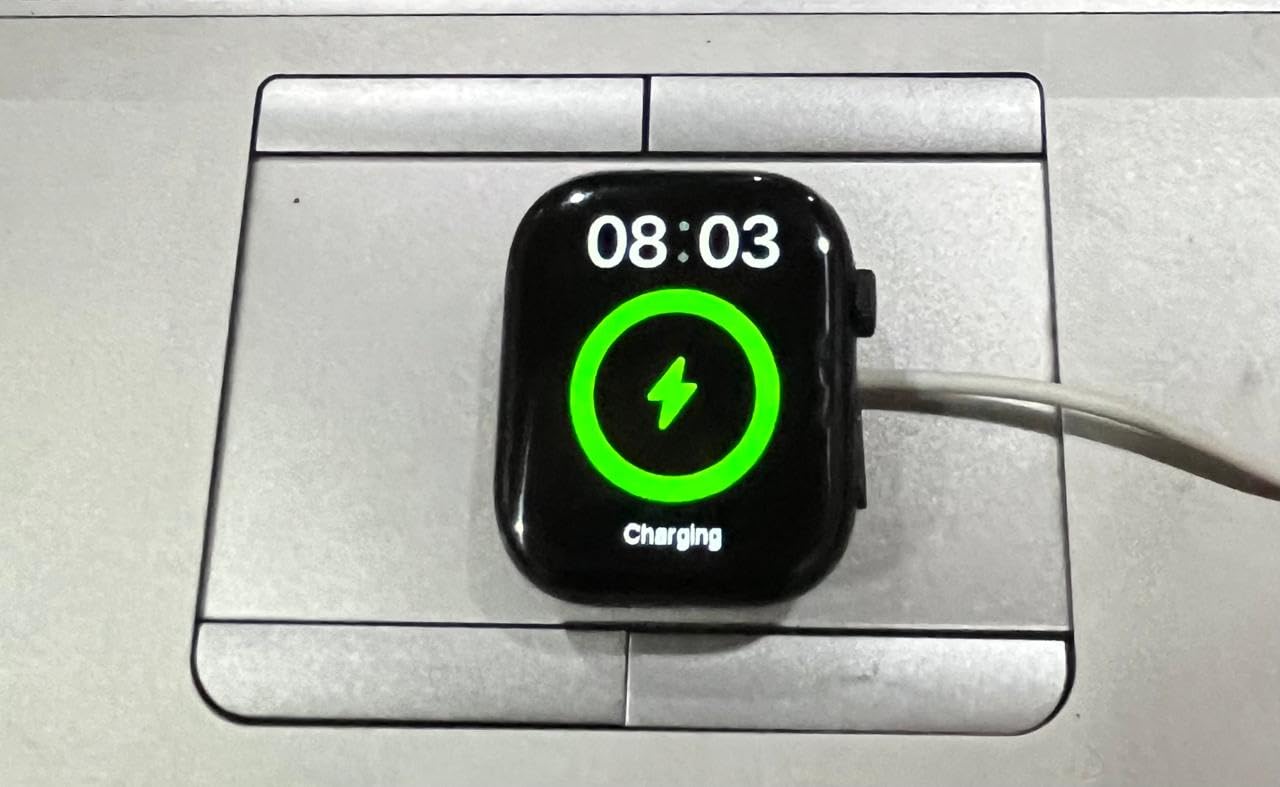
Figur 3.1: The X90 Max Smart Watch connected to its wireless charger, showing the charging indicator on the display.
3.2. Tænd/sluk
- For at tænde: Press and hold the side button (crown) until the display illuminates.
- For at slukke: Press and hold the side button (crown), then select the power off option on the screen.
3.3. Parring med en mobilenhed
To access all smart features and notifications, pair your X90 Max Smart Watch with a compatible mobile device via Bluetooth.
- Sørg for, at din mobilenheds Bluetooth er aktiveret.
- On your X90 Max Smart Watch, navigate to the Bluetooth settings (refer to Section 4.1 for navigation).
- On your mobile device, search for available Bluetooth devices and select "X90 Max" from the list.
- Follow any on-screen prompts on both devices to complete the pairing process.
4. Betjeningsvejledning
4.1. Navigation
The X90 Max Smart Watch features a responsive touchscreen and a physical side button (crown) for navigation.
- Touchskærm: Stryg til venstre, højre, op eller ned for at navigere gennem menuer og notifikationer. Tryk for at vælge elementer.
- Sideknap (krone): Press to return to the home screen or wake the display. Rotate to scroll through lists or adjust settings (functionality may vary by software version).
4.2. Display Features and Watch Faces
The 1.78-inch digital display offers clear visibility and customizable options.
- Tilpasbare urskiver: Long-press the home screen to access watch face options. Swipe to browse and tap to select a new watch face.
- Meddelelser: Once paired with your mobile device, notifications for calls, messages, and apps will appear on the watch display.

Figur 4.1: The X90 Max Smart Watch displaying a modern digital watch face with clear blue numerals.

Figur 4.2: The X90 Max Smart Watch showcasing an alternative analog-style watch face with Roman numerals.
4.3. Aktivitetssporing
The X90 Max Smart Watch includes an activity tracker to monitor your daily movements.
- Access the activity tracking application from the main menu.
- View steps taken, distance covered, and calories burned.
- For detailed insights and historical data, synchronize your watch with the companion app on your mobile device.
5. Vedligeholdelse
5.1. Rensning
- Wipe the watch display and body with a soft, lint-free cloth.
- For genstridige pletter, tør letampRengør kluden med vand. Undgå at bruge skrappe kemikalier eller slibende materialer.
- Clean the silicone strap regularly with mild soap and water, then rinse thoroughly and dry completely before reattaching to the watch.
5.2. Opbevaring
When not in use for extended periods, store the X90 Max Smart Watch in a cool, dry place away from direct sunlight and extreme temperatures. Ensure the watch is fully charged before long-term storage to preserve battery health.
6. Fejlfinding
If you encounter issues with your X90 Max Smart Watch, refer to the following common solutions:
- Uret tænder ikke: Sørg for, at uret er fuldt opladet. Tilslut det til opladeren i mindst 30 minutter.
- Unable to Pair with Mobile Device:
- Confirm Bluetooth is enabled on both devices.
- Ensure the watch is in pairing mode.
- Try restarting both the watch and your mobile device.
- Clear previous Bluetooth connections on your mobile device if necessary.
- Skærmen reagerer ikke: Try restarting the watch. If the issue persists, ensure the watch is charged.
- Inaccurate Activity Tracking: Ensure the watch is worn snugly on your wrist. Calibrate the activity tracker through the companion app if available.
7. Specifikationer
| Feature | Detalje |
|---|---|
| Mærke | Generisk |
| Modelnavn | X90 Max |
| Display Type | Digital |
| Skærmstørrelse | 1.78 tommer |
| Operativsystem | Proprietært operativsystem |
| Hukommelseslagringskapacitet | 1 GB |
| Forbindelsesteknologi | Bluetooth |
| Kompatible enheder | Mobile enheder |
| Særlige funktioner | Aktivitetssporer |
| Batterikapacitet | 99.96 Amp Timer |
| Opladningstid | 2 timer |
| Varens vægt | 230 g |
8. Garanti og support
For information regarding warranty coverage, technical support, or service inquiries, please refer to the documentation provided at the point of purchase or contact your retailer. Specific warranty terms may vary by region and retailer.


