
1. Introduktion
Thank you for choosing the Lamicall Quick-Mount Bicycle Phone Holder. This holder is designed to provide a secure and convenient way to mount your smartphone on your bicycle or motorcycle handlebars. Its quick-release mechanism allows for easy one-hand operation, and its thoughtful design ensures your phone's camera remains unobstructed during use. Please read this manual carefully before installation and use to ensure proper function and safety.
2. Sikkerhedsoplysninger
- Vigtig bemærkning: This product is designed to mitigate certain bicycle vibrations but does not absorb all vibrations.
- Avoid strong impacts, as they may damage the product.
- Extreme cold and heat can affect the product's performance and potentially cause damage. Use within appropriate temperature ranges.
- Always ensure your smartphone is securely locked in the holder before riding.
- Do not operate your smartphone in a way that distracts you from riding safely.
3. Setup: Installing the Holder on Your Handlebar
The Lamicall Quick-Mount Bicycle Phone Holder is designed for easy installation without the need for additional tools. It is compatible with handlebar diameters ranging from 15mm to 40mm.
- Step 1: Attach the Holder to the Clamp. Insert the joint ball of the phone holder into the socket of the handlebar clamp. Ensure it clicks into place.
- Step 2: Position the Clamp on the Handlebar. Åbn styret clamp and place it around your bicycle or motorcycle handlebar. Ensure it is positioned securely and does not interfere with other controls.
- Trin 3: Fastgør Clamp. Rotate the screw on the clamp to tighten it firmly onto the handlebar. Ensure the holder is stable and does not rotate freely.

Image: A visual guide demonstrating the three steps to install the phone holder onto a bicycle handlebar.
Styrkompatibilitet: Klamp supports handlebar diameters from 15mm to 40mm. Please verify your handlebar's diameter before installation.
4. Operation: Mounting and Removing Your Smartphone
This holder features a quick-release mechanism for convenient one-hand operation.
- Open the Holder: Locate the lock lever on the side of the phone holder. Open the lock lever and rotate it towards you. This action will expand the width of the holder arms.
- Indsæt din smartphone: Place your smartphone into the expanded holder.
- Secure Your Smartphone: Rotate the lock lever in the opposite direction (away from you) to tighten the holder arms around your smartphone. Adjust the width so it is approximately 3-4mm wider than your smartphone, then engage the lock to firmly secure the phone.
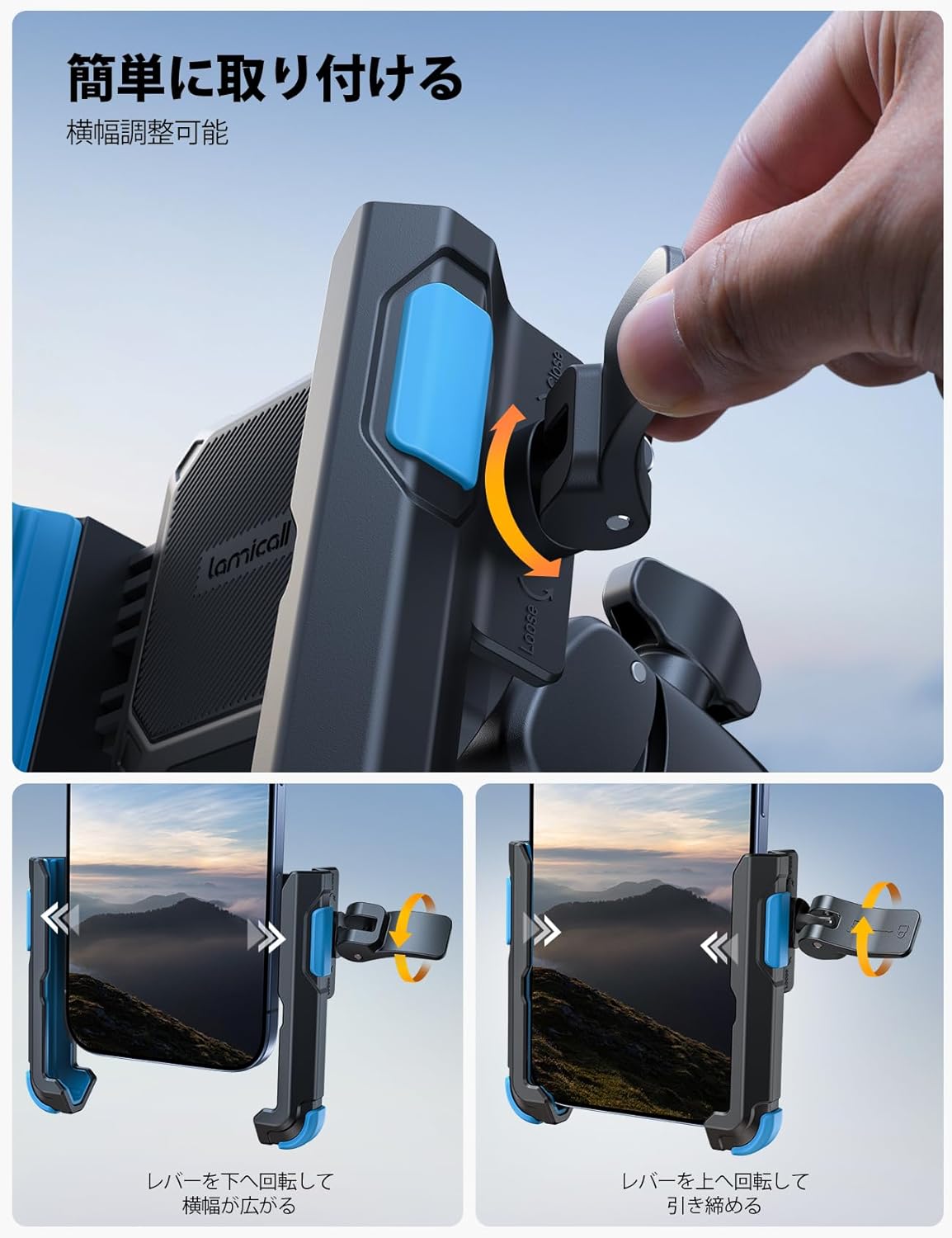
Image: A sequence showing the lock lever being rotated to expand the holder, and then rotated back to secure the phone.
Quick Attachment/Detachment: Once the width is set for your specific smartphone, you can quickly attach and remove it by simply opening and closing the lock lever without needing to readjust the width each time. This allows for one-hand operation.

Image: A hand demonstrating the quick insertion of a smartphone into the holder.
Smartphone -kompatibilitet: The holder supports smartphones with a width of 60mm-90mm and a thickness of up to 15mm (including case). Please confirm your device dimensions before use.
Camera-Friendly Design: This holder secures only the lower half of your smartphone, ensuring that the camera lens and side buttons remain unobstructed. This allows you to record videos or take photos while riding without interference.

Image: A smartphone mounted on a bicycle handlebar, clearly showing the camera area is free from obstruction, allowing for recording while riding.
5. Vedligeholdelse
- Rensning: Tør holderen af med en blød kludamp klud til at fjerne støv og snavs. Undgå at bruge skrappe kemikalier eller slibende rengøringsmidler.
- Inspektion: Periodically check all screws and moving parts to ensure they are secure. Tighten any loose components.
- Opbevaring: When not in use, the holder can remain attached to your bicycle due to its durable materials. If removed, store it in a cool, dry place away from direct sunlight and extreme temperatures.
6. Fejlfinding
| Problem | Mulig årsag | Løsning |
|---|---|---|
| Smartphone does not fit in the holder. | Smartphone width or thickness exceeds specifications. | Ensure your smartphone (including case) is within 60-90mm width and 15mm thickness. Fully open the holder arms by rotating the lock lever. |
| Holder is loose on the handlebar. | Clamp screw not tightened sufficiently. Handlebar diameter is outside the compatible range. | Spænd clamp screw firmly. Verify your handlebar diameter is between 15mm and 40mm. |
| Smartphone is not secure in the holder. | Lock lever not fully engaged. Holder arms not adjusted correctly. | Ensure the lock lever is fully rotated to the locked position. Adjust the holder arms to grip the phone firmly, then engage the lock. |
| Excessive vibration of smartphone. | Road conditions. Product limits. | While the product reduces some vibration, it cannot eliminate all. Avoid extremely rough terrain. Ensure the phone is securely mounted. |
7. Specifikationer
| Feature | Detalje |
|---|---|
| Mærke | Lamicall |
| Modelnummer | BP12-JP-BU |
| Farve | Blå |
| Kompatible telefonstørrelser | Approx. 4.7-7 inches (Width: 60-90mm, Thickness: Max 15mm including case) |
| Compatible Handlebar Diameter | 15-40 mm |
| Monteringstype | Styr Clamp |
| Materiale | ABS Resin (Body), EVA Resin (Pads) |
| Nøglefunktioner | Quick Mount, 360-degree Rotation, One-hand Operation, Drop Prevention, Camera Unobstructed Design |
| Kompatible køretøjstyper | Bicycles, Motorcycles |

Image: A diagram illustrating the dimensions of the phone holder and examples of compatible phone models with their widths.
8. Garanti og support
For warranty information or technical support, please refer to the product packaging or contact Lamicall customer service directly. Contact details can typically be found on the official Lamicall webhjemmeside eller gennem din forhandler.