
Arylic A100
Arylic A100 Trådløs Fuld Digital HiFi Amplivligere brugervejledning
Model: A100 | Brand: Arylic
1. Introduktion
The Arylic A100 is a 100W×2 high-power stereo amplifier designed for home audio systems. It integrates wireless streaming capabilities including WiFi, Bluetooth, and AirPlay, along with support for various online music services and FM radio. The device features dual microphone input jacks for karaoke and multiroom audio functionality, allowing synchronized or independent playback across multiple rooms.
This manual provides detailed instructions for the setup, operation, and maintenance of your Arylic A100 amplifier. Please read it thoroughly before use to ensure proper functionality and to maximize your listening experience.

This image highlights the comprehensive features of the Arylic A100, including its support for WiFi, AirPlay, Bluetooth, FM Radio, KTV, and multiroom audio, making it a versatile audio solution.
2. Vigtige sikkerhedsoplysninger
- Strømkilde: Tilslut kun enheden til en stikkontakt med vekselstrøm med den angivne lydstyrke.tage. Sørg for, at netledningen er korrekt tilsluttet.
- Ventilation: Bloker ikke ventilationsåbningerne. Sørg for tilstrækkelig luftgennemstrømning omkring enheden for at forhindre overophedning.
- Vand og fugt: Udsæt ikke enheden for regn, fugt eller dryppende/sprøjtende væsker. Placer ikke genstande fyldt med væsker, såsom vaser, oven på apparatet.
- Varme: Hold enheden væk fra varmekilder såsom radiatorer, varmeapparater, komfurer eller andre apparater (herunder ampløftere), der producerer varme.
- Rensning: Rengør kun med en tør klud.
- Service: Forsøg ikke selv at servicere dette produkt. Overlad al service til kvalificeret servicepersonale.
- Antenner: Ensure all antennas (WiFi, Bluetooth, FM) are properly connected for optimal performance.
3. Pakkens indhold
Bekræft, at alle nedenstående varer er inkluderet i din pakke:
- Arylic A100 Amplifier enhed
- Strømkabel
- Fjernbetjening
- WiFi antenne
- Bluetooth antenne
- FM Antenna (wire type)
- Brugervejledning (dette dokument)
4. Produktet er slutview
4.1 Frontpanel

This image displays the front panel of the Arylic A100 amplifier, featuring the power button, display screen, volume knob, mode button, preset buttons (1-6), playback controls, and dual microphone inputs with a USB port.
4.2 Bagpanel

This image illustrates the rear panel of the Arylic A100 amplifier, detailing all connection ports including antennas, audio inputs/outputs, speaker terminals, LAN port, and power input.

Dette diagram giver en detaljeret view of both the front and rear panels of the Arylic A100, with all buttons, ports, and terminals clearly labeled for easy identification.
5. Opsætning
5.1 Fysiske forbindelser
- Tilslut antenner: Screw the provided WiFi, Bluetooth, and FM antennas into their respective ports on the rear panel.
- Tilslut højttalere: Connect your passive speakers to the R (Right) and L (Left) speaker terminals on the rear panel. Ensure correct polarity (+ to + and - to -).
- Connect Audio Sources (Optional):
- For analog devices (e.g., CD player), use the Linie ind RCA ports.
- For turntables, use the Phono In RCA ports and connect the turntable's ground wire to the GND terminal.
- For digital audio sources (e.g., TV, game console), use the OPT In (optical) or Koaksial ind havne.
- Tilslut strøm: Plug the power cable into the AC Power Input on the rear panel, then plug the other end into a wall outlet.

This image shows the Arylic A100 amplifier connected to a pair of speakers and a CD player, demonstrating the use of Line In and Line Out connections for analog audio equipment.

This image illustrates the Arylic A100 amplifier connected to a turntable, highlighting its dedicated Phono In input for vinyl playback.

This image shows the Arylic A100 amplifier connected to a television, demonstrating its capability to play high-quality digital sound from a TV source.
5.2 Network Setup (WiFi / LAN)
The Arylic A100 supports both wired (LAN) and wireless (WiFi) network connections for streaming services and multiroom functionality.
- Kabelbaseret forbindelse (anbefales af hensyn til stabilitet):
- Tilslut et Ethernet-kabel fra din router til LAN-port on the rear panel of the A100. The device will automatically connect to the network.

This image demonstrates connecting an Ethernet cable to the LAN port on the Arylic A100 for a stable wired network connection.
- Trådløs forbindelse (WiFi):
- Sørg for, at WiFi-antennen er tilsluttet.
- Download the "Go Control" or "4Stream" app from your mobile device's app store.
- Follow the in-app instructions to connect the A100 to your home WiFi network. This typically involves selecting the A100 from a list of devices and entering your WiFi password.
6. Betjeningsvejledning
6.1 Grundlæggende betjening
- Tænd/sluk: Tryk på Power knap på frontpanelet.
- Lydstyrkejustering: Drej på Volumenknap to increase or decrease the audio output.
- Valg af input: Tryk på Volumenknap to cycle through available input sources (WiFi, Bluetooth, Line In, Phono In, Optical, Coaxial, FM, USB).
- Forudindstillet valg: Brug Forudindstillede knapper (1-6) to quickly access saved radio stations or streaming playlists.
6.2 Wireless Audio Streaming
The A100 supports various wireless streaming technologies:
- Bluetooth:
- Vælg Bluetooth som inputkilde.
- On your mobile device, search for "Arylic A100" in the Bluetooth settings and pair.
- WiFi Streaming (AirPlay, Spotify Connect, DLNA, UPnP):
- Ensure the A100 is connected to your WiFi network (see Section 5.2).
- Use compatible apps (e.g., Spotify, Apple Music) on your mobile device to stream audio to the A100 via AirPlay or Spotify Connect.
- The A100 is compatible with a wide range of online streaming music platforms and protocols, including Spotify, Amazon Music, TuneIn, iHeartRadio, QQ Music, TIDAL, Napster, and more.

This image displays the logos of several popular music services and platforms that are compatible with the Arylic A100 amplifier, highlighting its broad streaming capabilities.
6.3 FM radio
The A100 features a built-in FM radio tuner.
- Ensure the FM antenna is connected.
- Select FM as the input source.
- The unit supports automatic scanning of local FM channels.
- You can preset multiple favorite channels using the preset buttons for quick access.

This close-up image of the Arylic A100's display panel shows the FM radio interface, indicating a tuned frequency and station information.
6.4 Microphone Input (KTV Function)
The A100 includes dual microphone input jacks for karaoke or public address applications.
- Tilslut op til to mikrofoner til Mikrofon 1 og Mikrofon 2 input jacks on the front panel.
- Adjust microphone volume as needed.

This image shows a person using a microphone connected to the Arylic A100 amplifier, demonstrating its karaoke (KTV) functionality.
6.5 Multirumsfunktionalitet
By setting up multiple Arylic devices in different rooms, you can create a multiroom audio system.
- Synchronized Playback: Play the same song in all connected rooms simultaneously.
- Uafhængig afspilning: Play different songs in different rooms at the same time.
- Control multiroom settings using the "Go Control" or "4Stream" app.
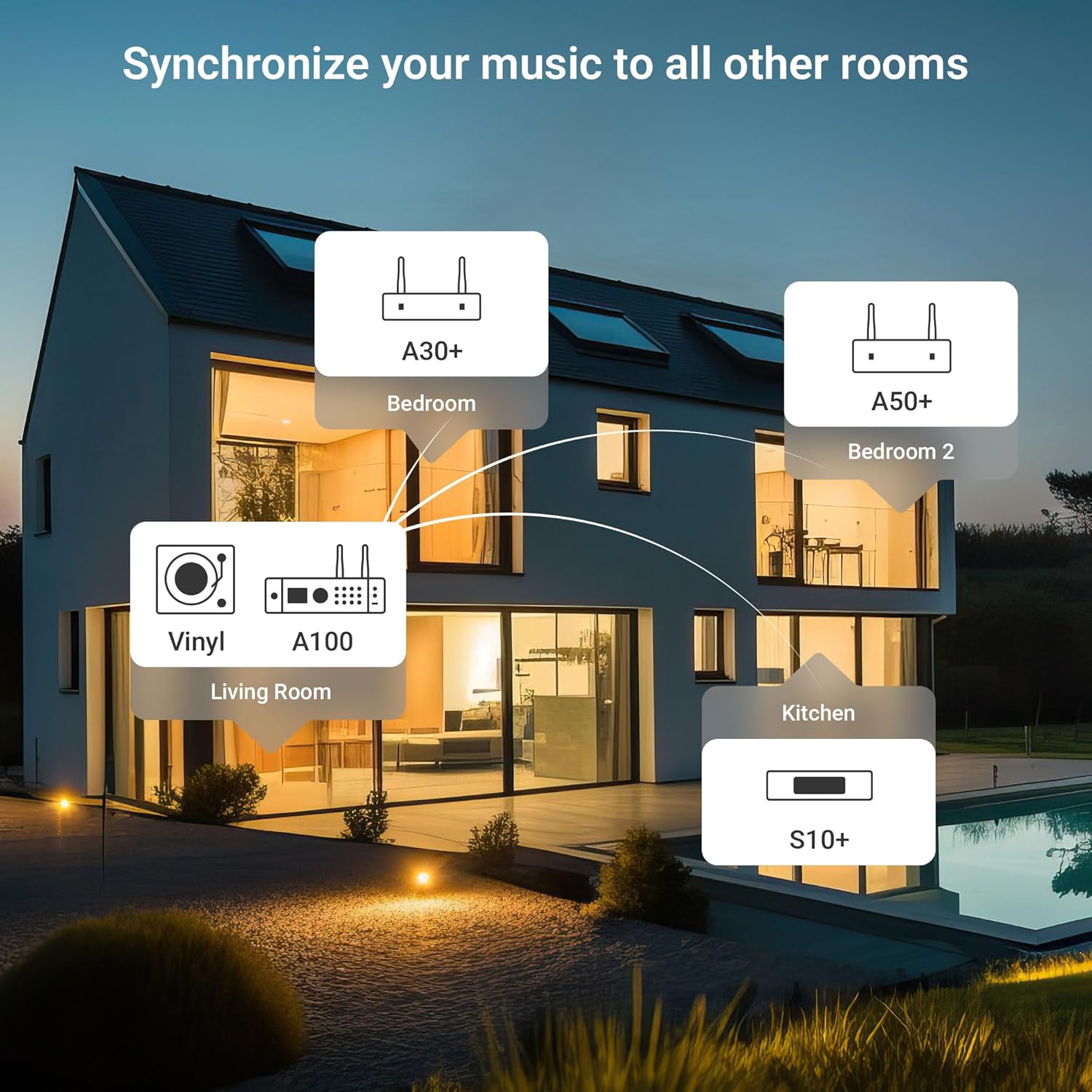
This diagram illustrates a multiroom audio setup, showing how various Arylic devices, including the A100, can be distributed throughout a home to play synchronized or independent music.
6.6 App Control (Go Control / 4Stream)
The "Go Control" and "4Stream" apps provide comprehensive control over the A100 amplivligere.
- Download: Obtain the apps from your mobile device's app store.
- Funktioner: Adjust volume, switch input sources, manage multiroom zones, and apply equalizer (EQ) settings.

This image displays multiple screenshots of the "Go Control" mobile application, showcasing its interface for managing audio settings, input sources, and multiroom configurations.
6.7 USB-afspilning
The A100 supports audio playback from USB storage devices.
- Indsæt et USB-drev, der indeholder lyd files into either the front or rear USB port.
- Vælg USB som inputkilde.
- Playback can be controlled via the front panel buttons or the mobile app.

This image illustrates a USB drive connected to the Arylic A100 amplifier, with a smartphone screen displaying a music playlist, indicating USB playback functionality.
7. Vedligeholdelse
- Rensning: Brug en blød, tør klud til at rengøre enhedens yderside. Brug ikke flydende rengøringsmidler eller aerosoler.
- Ventilation: Kontrollér regelmæssigt, at ventilationsåbningerne er fri for støv og snavs.
- Opbevaring: Hvis enheden skal opbevares i længere tid, skal den afbrydes fra strømforsyningen og opbevares et køligt og tørt sted.
8. Fejlfinding
| Problem | Mulig årsag | Løsning |
|---|---|---|
| Ingen strøm | Strømkabel ikke tilsluttet; Strømudtag ikke aktivt. | Sørg for, at strømkablet er korrekt tilsluttet. Test stikkontakten med en anden enhed. |
| Ingen lydudgang | Incorrect input source selected; Speaker cables loose; Volume too low; Mute activated. | Select the correct input source. Check speaker connections. Increase volume. Deactivate mute. |
| Kan ikke oprette forbindelse til WiFi | Incorrect WiFi password; Router too far; WiFi antenna not connected. | Verify WiFi password. Move unit closer to router or use wired LAN. Ensure WiFi antenna is connected. Re-run app setup. |
| Bluetooth-parring mislykkes | Bluetooth not selected as input; Device already paired to another unit; Bluetooth antenna not connected. | Select Bluetooth input. Disconnect from other devices. Ensure Bluetooth antenna is connected. Try pairing again. |
| Dårlig FM-radiomodtagelse | FM antenna not properly positioned or connected. | Adjust the position of the FM wire antenna. Ensure it is fully extended and connected. Consider an external FM antenna for improved reception. |
| Mikrofon virker ikke | Mikrofonen er ikke tilsluttet korrekt; Mikrofonens lydstyrke er for lav. | Ensure microphones are securely plugged into Mic 1/2 jacks. Adjust microphone volume. |
9. Specifikationer
| Feature | Detalje |
|---|---|
| Model | A100 |
| Udgangseffekt | 100W x 2 (into 4 Ohms) |
| Trådløs forbindelse | WiFi, Bluetooth, AirPlay, Spotify Connect, DLNA, UPnP |
| Lydindgange | Line In (RCA), Phono In (RCA), Optical In, Coaxial In, USB (front & rear), Dual Microphone (front) |
| Lydudgange | Speaker Terminals (R/L), Line Out (RCA) |
| Særlige funktioner | FM Radio, Multiroom Audio, App Control (Go Control/4Stream), Built-in Power Supply with Toroidal Transformer, TPA3255 Amplifier Chip, ESS 9023P DAC |
| Pakkedimensioner | 14 x 10.8 x 4.4 tommer |
| Varens vægt | 3 pund |
| Fabrikant | Rakoit Technology (Shenzhen) Co., Ltd. |
10. Garanti og support
For warranty information and technical support, please refer to the official Arylic webwebstedet eller kontakt din lokale forhandler. Gem din købskvittering til garantikrav.
Fabrikant: Rakoit Technology (Shenzhen) Co., Ltd.
For yderligere hjælp, besøg Arylic Store on Amazon.
Ask a question about this manual
Ask about setup, troubleshooting, compatibility, parts, safety, or missing instructions. Manuals+ will review the question and use this page’s manual context to help answer it.