
Indledning
The Prolink GK-6002MS is a compact, 68-key hot-swappable mechanical gaming keyboard designed for versatility and performance. It features customizable RGB backlighting, full N-Key Rollover, and durable doubleshot keycaps. This manual provides instructions for setup, operation, and maintenance of your keyboard.
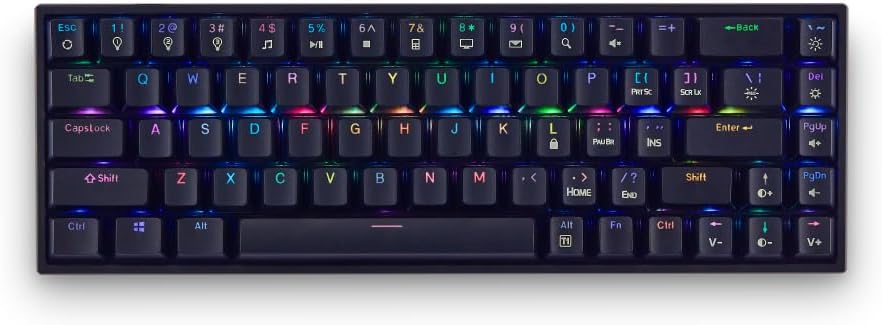
Billede: Forside view of the Prolink GK-6002MS keyboard showcasing dens kompakte layout og RGB-baggrundsbelysning.
Nøglefunktioner:
- Hot-swap-kontakter: Compatible with 3-pin or 5-pin Outemu mechanical switches (Blue, Brown, Red) for personalized typing feel.
- Dynamisk RGB-baggrundsbelysning: 12 preset RGB lighting effects and 3 customizable lighting profiles.
- Compact 68-Key Design: Space-saving layout while retaining full functionality.
- Fuld N-nøgleoverførsel (NKRO): Ensures every keystroke is registered, even during simultaneous presses.
- Doubleshot Keycaps: Enhanced durability and resistance to wear.
- Plug & Play: Easy setup with a detachable 1.75m USB Type-C braided cable.
Video: Officielt produkt slutview of the Prolink GK-6002MS Mechanical Gaming Keyboard, highlighting its features and design.
Opsætning
The Prolink GK-6002MS keyboard is designed for simple plug-and-play operation.
- Tilslut USB-kablet: Locate the USB Type-C port on the keyboard. Connect one end of the provided 1.75m USB Type-C braided cable to this port.
- Tilslut til computer: Plug the other end of the USB cable into an available USB port on your computer (PC or Laptop).
- Driver installation: The keyboard is plug-and-play and typically does not require additional drivers. Your operating system (Windows, Mac OS) will automatically detect and install the necessary drivers.

Image: Diagram illustrating the keyboard's dimensions, the detachable USB-C cable connection point, multimedia shortcuts, NKRO, and doubleshot keycaps.
The keyboard is compatible with both Windows and Mac OS operating systems.

Image: The Prolink GK-6002MS keyboard shown with Windows and Mac OS logos, indicating broad compatibility.
Betjeningsvejledning
RGB-baggrundsbelysningskontrol
The GK-6002MS features 12 dynamic RGB backlit presets and 3 customizable lighting profiles. Use the Function (Fn) key in combination with other keys to control the lighting effects.
- Ændring af forudindstillinger: Trykke Fn + [Tast] (e.g., Fn + 1!, Fn + 2@, etc.) to cycle through the 12 dynamic RGB presets.
- Tilpasset Profiles: The keyboard supports 3 customizable lighting profiles. Refer to the full software manual (if available) for detailed customization instructions.
- Justering af belysning: Bruge Fn + Piletaster or other designated keys to adjust brightness, speed, and direction of lighting effects.
- LED tænd/sluk: A dedicated switch on the keyboard allows you to turn the LED lighting on or off.

Image: The keyboard displaying various RGB lighting effects and highlighting the keys used for customization and profile udvælgelse.
Multimediegenveje
Access 10 multimedia shortcuts by pressing the Fn key in combination with the corresponding function keys (e.g., Fn + F1 for media player, Fn + F2 for volume down, etc.). The specific functions are typically indicated on the keycaps.
N-Key Rollover (NKRO)
The GK-6002MS features Full N-Key Rollover, meaning all keystrokes are registered accurately, regardless of how many keys are pressed simultaneously. This is particularly beneficial for fast-paced gaming and typing.
Hot-swap-switche
The keyboard supports hot-swappable Outemu mechanical switches (Blue, Brown, Red), allowing you to change switches without soldering. This enables customization of your typing experience.
- Fjernelse af tastehætter: Brug den medfølgende tastaftrækker til forsigtigt at fjerne den ønskede tast.
- Fjernelse af kontakter: Use the provided switch puller to carefully extract the mechanical switch from its socket.
- Installation af nye afbrydere: Align the pins of the new 3-pin or 5-pin Outemu switch with the holes on the PCB. Gently press the switch into place until it clicks. Ensure the switch is seated correctly and the pins are not bent.
- Genmontering af tastehætter: Sæt tastaturet tilbage på den nye switch-stilk.
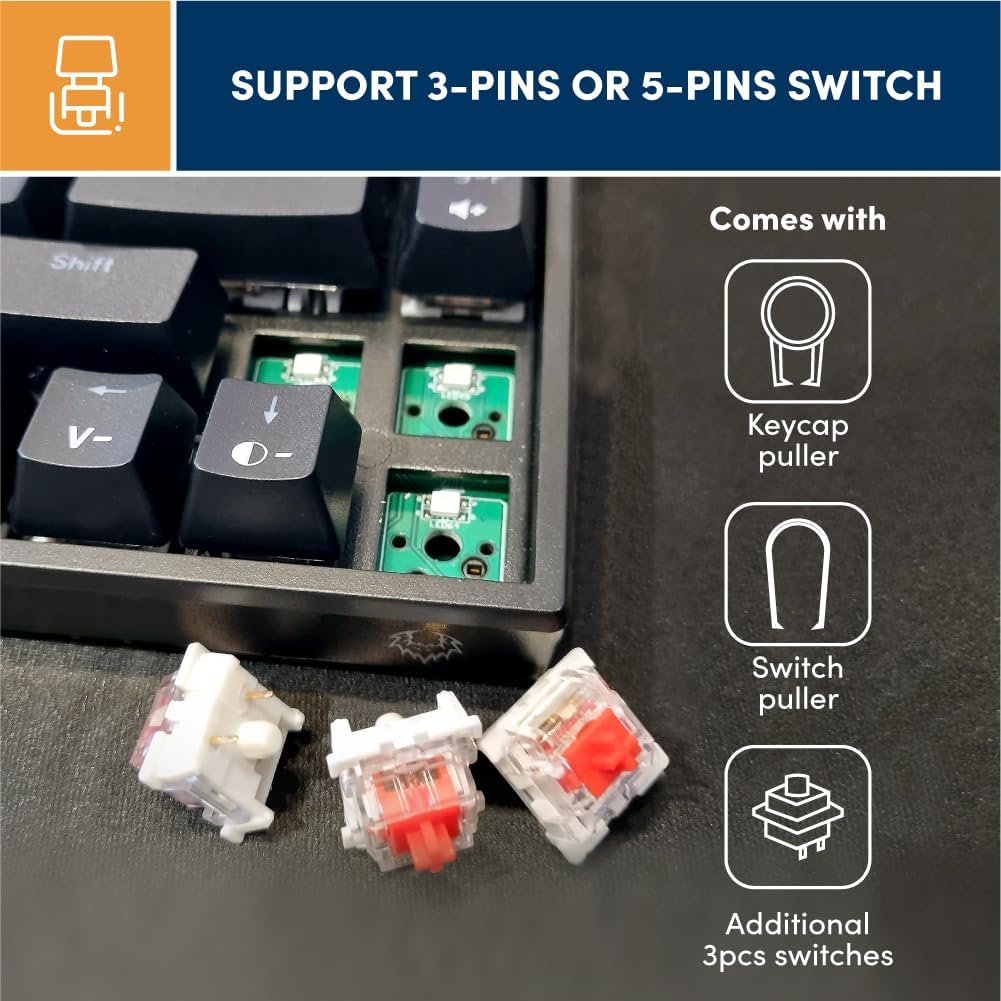
Billede: Nærbillede view of the keyboard's PCB with switches removed, alongside a keycap puller, switch puller, and additional Outemu switches (Blue, Brown, Red) for hot-swapping.
Opretholdelse
Proper maintenance ensures the longevity and performance of your Prolink GK-6002MS keyboard.
- Rensning: Regularly clean the keycaps and spaces between keys using a soft brush or compressed air to remove dust and debris. For stubborn dirt, gently wipe keycaps with a damp klæde.
- Doubleshot Keycaps: The doubleshot keycaps are designed for enhanced durability, resisting fading and wear from frequent use.
- Kabelpleje: Handle the detachable USB Type-C cable with care. Avoid sharp bends or excessive pulling to prevent damage.
- Opbevaring: When not in use, store the keyboard in a clean, dry environment away from extreme temperatures and direct sunlight.
Fejlfinding
Hvis du støder på problemer med dit tastatur, kan du se følgende almindelige fejlfindingstrin:
- Tastaturet reagerer ikke:
- Sørg for, at USB-kablet er korrekt tilsluttet til både tastaturet og computeren.
- Prøv at tilslutte tastaturet til en anden USB-port på din computer.
- Test tastaturet på en anden computer for at udelukke et computerspecifikt problem.
- If the LED light switch is present, ensure it is in the 'On' position.
- Nøgler registreres ikke:
- Kontroller, om der er snavs under tastaturet eller kontakten.
- If using hot-swappable switches, ensure the switch is fully seated and its pins are not bent. Try re-seating the switch or replacing it with a spare.
- RGB-belysning virker ikke/forkert:
- Ensure the LED light switch on the keyboard is turned on.
- Cycle through the RGB presets using the Fn key combinations to see if the lighting responds.
- Kontroller, at tastaturet modtager tilstrækkelig strøm fra USB-porten.
- Windows Key Lock Function:
- The keyboard may have a function to lock the Windows key to prevent accidental presses during gaming. Refer to the keycap legends or product documentation for the specific Fn key combination to toggle this feature.
Specifikationer
| Feature | Detalje |
|---|---|
| Modelnummer | GK-6002MS |
| Mærke | Prolink |
| Tastaturbeskrivelse | Mekanisk |
| Switch Type | Outemu Mechanical (Red, Blue, Brown hot-swappable) |
| Antal nøgler | 68 |
| Forbindelsesteknologi | USB-C (Wired, Detachable) |
| Kabellængde | 1.75 meter |
| Tastaturbaggrundslys | RGB (12 presets, 3 customizable profiles) |
| Key Rollover | Fuld N-nøgleoverførsel (NKRO) |
| Keycap Type | Doubleshot ABS |
| Tastetryklevetid | 50 mio |
| Kompatible enheder | Laptop, PC |
| Kompatibel OS | Windows, Mac OS |
| Produktmål (L x B x H) | 31.2 x 10.2 x 3.8 cm |
| Materiale | Plast |
Garanti og support
The Prolink GK-6002MS Mechanical Gaming Keyboard comes with a 1 års producentgaranti.
For technical support, warranty claims, or further inquiries, please visit the official Prolink webwebstedet eller kontakt deres kundeserviceafdeling. Gem din købskvittering som købsbevis af garantihensyn.
Prolink Officiel Webwebsted: www.prolink2u.com