
1. Introduktion
This manual provides essential information for the safe and efficient operation, maintenance, and troubleshooting of your MOVA P20 Ultra Robot Vacuum Cleaner. Please read this manual thoroughly before using the product and retain it for future reference.
The MOVA P20 Ultra is designed to automate your home cleaning, offering advanced features such as 75°C hot water mop cleaning, MopExtend technology, and powerful 12,800Pa suction. It is engineered to handle various floor types, including hardwood, tile, and low-pile carpet.
2. Sikkerhedsoplysninger
Always follow basic safety precautions when using electrical appliances to reduce the risk of fire, electric shock, or injury. This device is for indoor household use only.
- Lad ikke børn lege med robotten. Hold øje med børn og kæledyr, når robotten er i brug.
- Sørg for, at strømadapterens lydstyrketage er kompatibel med din lokale strømforsyning.
- Brug ikke robotten i våde omgivelser eller i nærheden af vand.
- Hold hår, løstsiddende tøj, fingre og alle kropsdele væk fra åbninger og bevægelige dele.
- Brug ikke robotten til at opsamle store genstande, skarpe genstande eller brændende/rygende materialer.
- Before cleaning or performing maintenance, ensure the robot is turned off and unplugged from the charging base.
- Brug kun tilbehør og tilbehør, der er specificeret af producenten.
3. Pakkens indhold
Carefully unpack your MOVA P20 Ultra and check that all items are present. If any items are missing or damaged, please contact customer support.
- MOVA P20 Ultra robotstøvsuger
- Base Station
- HyperStream Detangling Brush (pre-installed or separate accessory)
- Dust Bag (one pre-installed, additional may be included)
- Water Tank (for clean water and dirty water)
- Mop Pads (set of two)
- Cleaning Pad (for base station washboard)
- Strømledning
- Brugervejledning (dette dokument)
4. Produktet er slutview
Familiarize yourself with the components of your robot vacuum and base station.
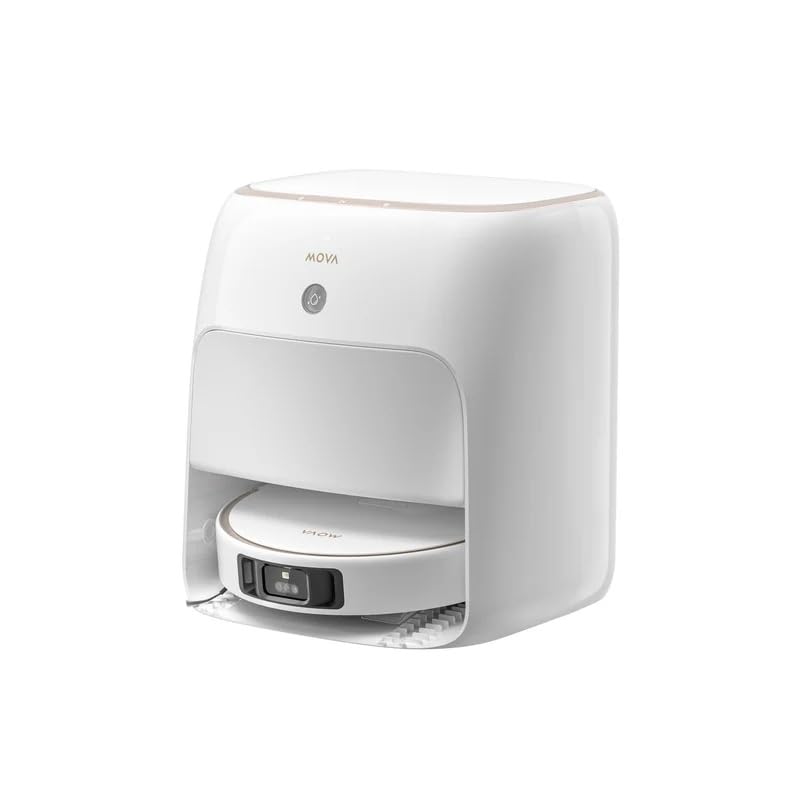
Image: The MOVA P20 Ultra Robot Vacuum Cleaner docked in its base station. The robot is round and white, with sensors visible on top. The base station is a larger white unit designed to automatically empty dust, refill water, and clean the mop pads.
Robotstøvsuger funktioner:
- MopExtend RoboSwing: Exclusive auto mop extension and retraction for thorough cleaning in corners and under low furniture.
- 12,800Pa sugekraft: Provides strong vacuuming for effective dirt, dust, and hair removal.
- HyperStream Detangling Brush: Designed to prevent hair tangles, ensuring consistent cleaning performance.
- Navigation Mapping Sensor: Utilizes Dual-Line Laser, 3D Structured Light + AI for precise navigation and 3D mapping.
- Object Recognition & Avoidance: Advanced sensors help the robot identify and avoid obstacles.
Basestationens funktioner:
- Auto Self-Cleaning Washboard 2.0: Cleans the mop pads and washboard with 75°C hot water.
- Varmlufttørring: Dries mop pads after cleaning to prevent odors and mildew.
- Auto Dust-Emptying: Tømmer automatisk robottens støvbeholder i en 2.5-liters støvpose, hvilket giver op til 75 dages håndfri rengøring.
- Auto Refilling of Water & Detergent: Automatically refills the robot's water tank and adds Mova cleaning solution for effective mopping.
- 99.99% End-to-End Sterilisation: Helps eliminate mold and odors in the dust bag and water tank.
5. Opsætning
5.1 Udpakning og placering
- Remove all packaging materials and protective films from the robot and base station.
- Place the base station on a hard, level surface against a wall. Ensure there is at least 0.5 meters of clear space on both sides and 1.5 meters in front of the base station for optimal robot navigation.
- Plug the power cord into the base station and then into a wall outlet. Ensure the power indicator on the base station illuminates.
5.2 Indledende opladning
Place the robot onto the charging contacts of the base station. Ensure the robot is properly aligned and the charging indicator on the robot or base station confirms charging has begun. For first-time use, fully charge the robot before operation, which typically takes several hours.
5.3 App-forbindelse
- Download the official MOVA app from your smartphone's app store (iOS or Android).
- Åbn appen, og opret en konto, eller log ind.
- Follow the in-app instructions to add your MOVA P20 Ultra. This typically involves connecting the robot to your home Wi-Fi network (2.4GHz only).
- Når den er tilsluttet, vil appen guide dig gennem den indledende kortlægning af dit hjem.
6. Betjeningsvejledning
The MOVA P20 Ultra offers various cleaning modes and smart features for a customized cleaning experience.
6.1 Start af en rengøringscyklus
- Via robotten: Press the power button on the robot once to start a standard cleaning cycle. Press again to pause.
- Via app: Open the MOVA app, select your device, and tap "Start Cleaning". You can choose specific rooms, zones, or cleaning modes (e.g., vacuum only, mop only, vacuum & mop).
6.2 Rengøringstilstande og -funktioner
- Støvsugning: The robot provides 12,800Pa suction power for effective dry cleaning. It automatically boosts suction on carpets.
- Mopping: The MopExtend RoboSwing feature ensures thorough mopping, reaching into corners and along edges. The base station supplies 75°C hot water for effective stain removal.
- Planlagt rengøring: Use the MOVA app to set up daily or weekly cleaning schedules.
- Stemmestyring: Integrate your robot with Google Assistant, Amazon Alexa, or Siri for hands-free control. Refer to the app for specific voice commands.
- Remote Video Supervision: Utilize the app for remote monitoring of your home via the robot's camera.
7. Vedligeholdelse
Regular maintenance ensures optimal performance and extends the lifespan of your MOVA P20 Ultra.
7.1 Robotvedligeholdelse
- HyperStream Detangling Brush: Periodically check the main brush for tangled hair or debris. Use the included cleaning tool to remove any obstructions.
- Sidebørster: Inspect and clean side brushes regularly. Replace if worn or damaged.
- Filters (Cloth, Foam): The robot's internal filters should be cleaned weekly and replaced every 3-6 months, depending on usage. Tap out dust and rinse if washable (check specific instructions in the app).
- Sensorer: Tør alle sensorer (klippesensorer, vægsensorer, opladningskontakter) af med en ren, tør klud for at sikre korrekt funktion.
7.2 Vedligeholdelse af basestation
- Støvpose: The 2.5L dust bag in the base station needs replacement approximately every 75 days, or when the app indicates it is full.
- Vandtanke: Regularly empty the dirty water tank and refill the clean water tank. Clean both tanks to prevent mold and odors.
- Self-Cleaning Washboard 2.0: The base station automatically cleans its washboard. However, occasional manual cleaning of the washboard and cleaning pad may be necessary to remove stubborn residue.
- Moppepuder: The robot's mop pads are automatically cleaned and dried by the base station. Replace mop pads every 1-3 months depending on usage and wear.
8. Fejlfinding
If you encounter issues with your MOVA P20 Ultra, refer to the following common problems and solutions. For more detailed troubleshooting, consult the MOVA app or customer support.
| Problem | Mulig årsag | Løsning |
|---|---|---|
| Robotten starter eller reagerer ikke. | Lavt batteri; strømafbryder slukket; robotten sidder fast. | Oplad robotten; sørg for, at tænd/sluk-knappen er tændt; fjern eventuelle forhindringer. |
| Dårlig rengøringsevne. | Full dustbin; clogged brushes/filters; worn mop pads. | Empty dustbin; clean/replace brushes and filters; replace mop pads. |
| Robotten kan ikke vende tilbage til basestationen. | Base station obstructed; robot too far; dirty charging contacts. | Clear area around base station; manually place robot on base; clean charging contacts. |
| Problemer med app-forbindelse. | Forkert Wi-Fi-adgangskode; 5 GHz Wi-Fi-netværk; robotten er for langt fra routeren. | Verify Wi-Fi password; ensure 2.4GHz network; move robot closer to router or reset Wi-Fi. |
9. Specifikationer
| Mærke | Mova |
| Modelnavn | P20 Ultra |
| Varenummer | MV-P20U+EXW-1Y |
| Robotens dimensioner (L x B x H) | 35 x 35 x 10.8 cm |
| Basestationens dimensioner (L x B x H) | 39.6 x 41.5 x 45.7 cm |
| Sugekraft | 12,800 Pa |
| Water Tank Capacity (Base Station) | 4.5L (Clean Water) / 4L (Dirty Water) |
| Støvposekapacitet (basestation) | 2.5L (Up to 75 Days) |
| Mop Raising Height | 10.5 mm |
| Temperatur for mopperengøring | 75°C Hot Water |
| Navigationssystem | Dual-Line Laser, 3D Structured Light + AI, 3D Mapping |
| Object Recognition & Avoidance | Ja |
| Forbindelse | Wi-Fi (2.4GHz), Smartphone App |
| Stemmeassistentkompatibilitet | Google Assistant, Amazon Alexa, Siri |
| Overfladeanbefaling | Hardwood, Tile, Low-pile Carpet |
| Strømkilde | Batteridrevet |
10. Garanti og support
Your MOVA P20 Ultra Robot Vacuum Cleaner comes with a 2 års lokal garanti. This warranty covers manufacturing defects and ensures your product performs as expected under normal use. Please retain your proof of purchase for warranty claims.
For technical support, warranty claims, or further assistance, please contact MOVA customer service through the official MOVA app or website. Our support team is available to help you with any questions or issues you may encounter.