1. Introduktion
This manual provides detailed instructions for the installation, operation, and maintenance of the QUASAR X99 H5 Motherboard. The X99 H5 is a robust solution designed for workstations and servers, supporting LGA 2011-3 socket processors, including Intel Xeon V3/V4 series. It features DDR4 REG ECC memory support in a Dual Channel configuration, ensuring reliable stability and high performance for demanding applications such as rendering, virtualization, and intensive data processing.
Key features include PCIe 16X slots for expansion, an M.2 NVMe slot for high-speed storage, and multiple SATA 3.0 ports for additional drives. High-speed USB 3.0 ports are also integrated for rapid data transfer and peripheral connectivity. Its well-planned layout simplifies system assembly and maintenance, while quality components contribute to operational longevity and stability.
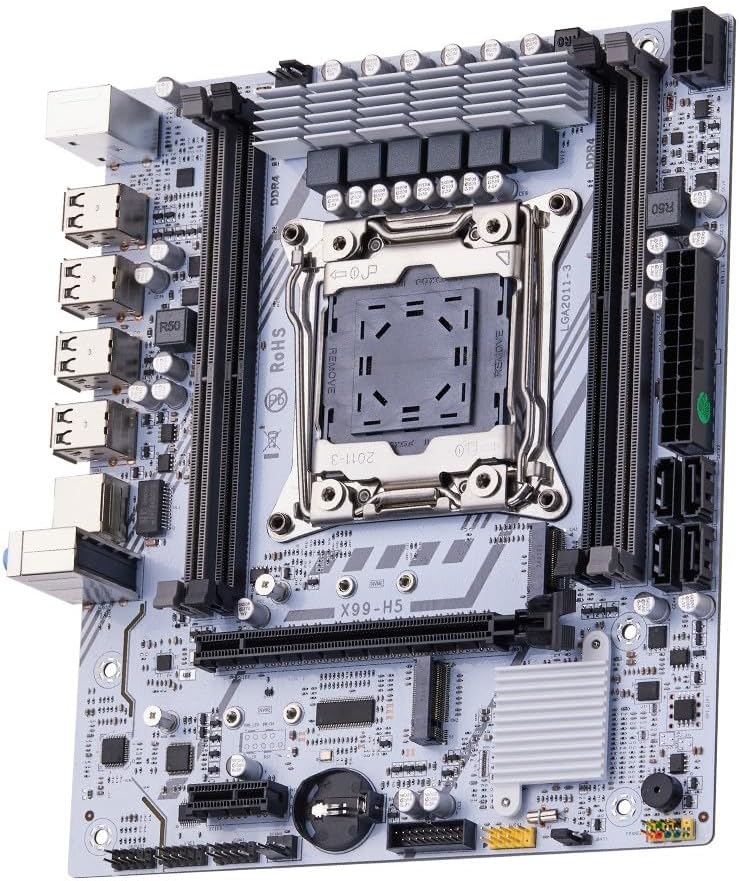
Figur 1.1: Overview of the QUASAR X99 H5 Motherboard. This image displays the full motherboard, highlighting its compact and efficient design, including the CPU socket, memory slots, and various expansion ports.
2. Sikkerhedsoplysninger
Please read all safety instructions carefully before installing or operating the motherboard. Failure to follow these guidelines may result in personal injury, damage to the product, or damage to other components.
- Afbryd altid strømforsyningen fra stikkontakten, før du installerer eller fjerner komponenter.
- Bær en antistatisk håndledsrem, eller rør ofte ved en jordforbundet metalgenstand for at aflade statisk elektricitet, før du håndterer bundkortet eller andre komponenter.
- Hold bundkortet i kanterne for at undgå at berøre følsomme komponenter.
- Sørg for tilstrækkelig ventilation i computerkabinettet for at forhindre overophedning.
- Udsæt ikke bundkortet for fugt eller ekstreme temperaturer.
- Opbevares utilgængeligt for børn.
3. Opsætning og installation
3.1. Komponentidentifikation
Gør dig bekendt med de forskellige komponenter og stik på bundkortet, før du begynder installationen.

Figure 3.1: Labeled diagram of the QUASAR X99 H5 Motherboard. This image indicates the location of key components such as the CPU socket, DDR4 memory slots, PCIe slots, M.2 NVMe slot, SATA ports, USB ports, and power connectors.
- LGA 2011-3 CPU Socket: For Intel Xeon V3/V4 processors.
- DDR4 Memory Slots (4x): Supports DDR4 REG ECC memory up to 128GB.
- PCIe 16X Slots: For graphics cards and other expansion cards.
- M.2 NVMe Slot: For high-speed solid-state drives.
- SATA 3.0 Ports: For connecting traditional hard drives and SSDs.
- 24-bens ATX-strømstik: Main power input.
- 8-bens CPU-strømstik: Additional power for the CPU.
- USB 3.0/2.0 Ports: For peripheral connectivity.
- Gigabit Ethernet-port: Til netværksforbindelse.
- Lydstik: Til lydindgang/udgang.
- PS/2-porte: For legacy keyboard and mouse.
3.2. Tjekliste før installation
- Compatible CPU (Intel Xeon V3/V4 series, LGA 2011-3 socket).
- Compatible DDR4 REG ECC memory modules.
- ATX power supply unit.
- Computer case with ATX form factor support.
- Storage devices (M.2 NVMe SSD, SATA SSD/HDD).
- Graphics card (if CPU does not have integrated graphics or for dedicated performance).
- Screwdriver set, anti-static wrist strap.
3.3. Installationstrin
- Forbered sagen: Installer I/O-skjoldet i den bageste åbning af computerkabinettet.
- Installer CPU'en:
- Open the CPU socket retention mechanism.
- Juster omhyggeligt CPU'en med soklen, og sørg for, at det trekantede mærke på CPU'en matcher mærket på soklen.
- Placer forsigtigt CPU'en i soklen uden at tvinge den.
- Luk fastholdelsesmekanismen for at sikre CPU'en.
- Installer CPU-køleren: Apply thermal paste (if not pre-applied) and install the CPU cooler according to its manufacturer's instructions. Connect the CPU fan cable to the CPU_FAN header on the motherboard.
- Installer hukommelsesmoduler:
- Åbn klipsene på DDR4-hukommelsespladserne.
- Juster hakket på hukommelsesmodulet med nøglen i stikket.
- Press down firmly on both ends of the module until the clips snap into place. For Dual Channel configuration, refer to the motherboard's silkscreen for recommended slot pairing (e.g., A1 and B1).
- Monter bundkortet: Carefully place the motherboard into the computer case, aligning it with the standoffs. Secure the motherboard with screws.
- Installer lagerenheder:
- For M.2 NVMe SSDs: Insert the M.2 SSD into the M.2 slot and secure it with the provided screw.
- For SATA drives: Connect SATA data cables from the motherboard's SATA ports to your drives. Connect power cables from the PSU to your drives.
- Installer udvidelseskort: Insert graphics cards or other PCIe expansion cards into the appropriate PCIe slots and secure them with the case's retention mechanism.
- Tilslut strømforsyning:
- Connect the 24-pin ATX power cable from the PSU to the motherboard.
- Connect the 8-pin CPU power cable from the PSU to the motherboard.
- Tilslut frontpanelkabler: Connect the power button, reset button, HDD LED, power LED, and front panel USB/audio cables to their respective headers on the motherboard. Refer to the motherboard's silkscreen or a detailed diagram for correct pin assignments.
- Tilslut ydre enheder: Tilslut din skærm, tastatur, mus og andet tilbehør til de bageste I/O-porte.

Figur 3.2: Nærbillede view of the rear I/O panel of the QUASAR X99 H5 Motherboard. This image shows the PS/2 ports for keyboard and mouse, multiple USB ports, the Ethernet port, and the audio jacks.
4. Betjeningsvejledning
4.1. Første opstart og BIOS-opsætning
- After connecting all components and power, press the power button on your computer case.
- Under opstartsprocessen skal du gentagne gange trykke på DEL or F2 key (common BIOS entry keys) to enter the BIOS/UEFI setup utility. The exact key may vary; check your screen for prompts.
- Kontroller i BIOS, at alle installerede komponenter (CPU, RAM, lagerdrev) registreres korrekt.
- Konfigurer opstartsrækkefølgen for at prioritere dit operativsystems installationsmedie (USB-drev eller dvd).
- Gem ændringerne, og afslut BIOS. Systemet genstarter.
4.2. Installation af operativsystem
Follow the instructions provided with your operating system (e.g., Windows, Linux) to complete the installation process. Ensure you install all necessary drivers for the motherboard's chipsets, network adapter, audio, and any other integrated components. Drivers are typically available on the manufacturer's website or included on a driver disc.
4.3. Driver installation
For optimal performance and stability, install the latest drivers for your motherboard. These typically include:
- Chipsæt-drivere
- LAN (Ethernet) Drivers
- Lyd-drivere
- USB Drivers (if specific ones are required)
- SATA/NVMe-lagerdrivere
Visit the manufacturer's support website for the X99 H5 motherboard to download the most current drivers.
5. Vedligeholdelse
Regelmæssig vedligeholdelse er med til at sikre dit bundkorts og systems levetid og optimale ydeevne.
- Fjernelse af støv: Periodically clean dust from inside your computer case, especially from fans, heatsinks, and the motherboard surface. Use compressed air or a soft brush. Ensure the system is powered off and unplugged before cleaning.
- BIOS/UEFI-opdateringer: Tjek producentens website for BIOS/UEFI updates. Updates can improve compatibility, stability, and performance. Follow the update instructions carefully to avoid damaging the motherboard.
- Driver opdateringer: Keep your system drivers updated to the latest versions.
- Kabelstyring: Sørg for, at de interne kabler er korrekt ført for at forbedre luftstrømmen og forhindre interferens.
- Miljøkontrol: Operate the system in a clean, dry, and well-ventilated environment. Avoid extreme temperatures and humidity.
6. Fejlfinding
Dette afsnit indeholder løsninger på almindelige problemer, du kan støde på.
| Problem | Mulig årsag | Løsning |
|---|---|---|
| Systemet tænder ikke. | No power, loose connections, faulty PSU. | Check power cable, 24-pin and 8-pin power connectors. Ensure PSU switch is ON. Test PSU if possible. |
| Ingen visning på skærmen. | Loose graphics card, faulty RAM, incorrect monitor input. | Reseat graphics card and RAM modules. Check monitor cable and input source. Test with one RAM stick. |
| Systemet genstarter uventet. | Overheating, unstable power, faulty components. | Check CPU cooler installation. Ensure adequate case ventilation. Verify PSU stability. Run memory diagnostic. |
| Operativsystemet blev ikke fundet. | Incorrect boot order, unformatted drive, faulty drive. | Check BIOS boot order. Ensure storage drive is properly connected and formatted with an OS. |
| USB-enheder genkendes ikke. | Missing drivers, faulty port, device issue. | Install/update USB drivers. Try different USB ports. Test device on another system. |
If issues persist, consult the manufacturer's support resources or a qualified technician.
7. Specifikationer
| Feature | Detalje |
|---|---|
| Mærke | Generic (Manufactured by Machinist) |
| Model serie | X99 H5 |
| CPU socket | LGA 2011-3 |
| Kompatible processorer | Intel Xeon V3/V4 series |
| Hukommelsesteknologi | DDR4 REG ECC |
| Hukommelsessokler | 4 x DDR4 DIMM slots (Dual Channel) |
| Maks. understøttet hukommelse | 128 GB |
| Hukommelses urhastighed | Up to 3200 MHz (actual speed depends on CPU and memory modules) |
| Lagringsgrænseflader | 1 x M.2 NVMe slot, Multiple SATA 3.0 ports |
| Udvidelsesslots | PCIe 16X slots (number not specified, but typically at least one) |
| Netværk | 1 x Gigabit Ethernet-port |
| USB-porte | USB 3.0 and USB 2.0 ports (number not specified, but typically multiple) |
| Lyd | Integrated Audio Jacks |
| Formfaktor | ATX (Dimensions: 30.5 x 24.4 cm) |
| Produktets vægt | 1 kilo |
8. Garanti og support
For warranty information and technical support, please refer to the documentation provided with your purchase or visit the manufacturer's official webwebsted. Gem din købsbevis til garantikrav.
Typical support resources include:
- Online FAQs and Knowledge Base
- Driver and BIOS Download Section
- Customer Service Contact Information (Email/Phone)
When contacting support, please have your motherboard model (X99 H5) and any relevant error messages or system configurations ready.


