
Indledning
Thank you for choosing the wolfcraft PRO SAFETY 18mm Snap-Off Blade Cutter, Model 4290000. This professional-grade utility knife is engineered for high performance and safety, featuring an ultra-sharp blade and optimal ergonomics for both left and right-handed users. It is ideal for cutting sheet materials, carpets, and wood. Please read this manual carefully before use to ensure safe and effective operation.

Image: The wolfcraft PRO SAFETY 18mm Snap-Off Blade Cutter, showcasing its ergonomic design and retractable blade.
Sikkerhedsinstruktioner
- Always handle the blade with extreme care. Blades are very sharp.
- Keep the cutter out of reach of children.
- Wear appropriate personal protective equipment, such as safety gloves and eye protection, when using the cutter.
- Sørg for, at bladet er helt trukket tilbage, når det ikke er i brug.
- Only use the cutter for its intended purpose.
- Bortskaf brugte knive sikkert i en dertil beregnet beholder.
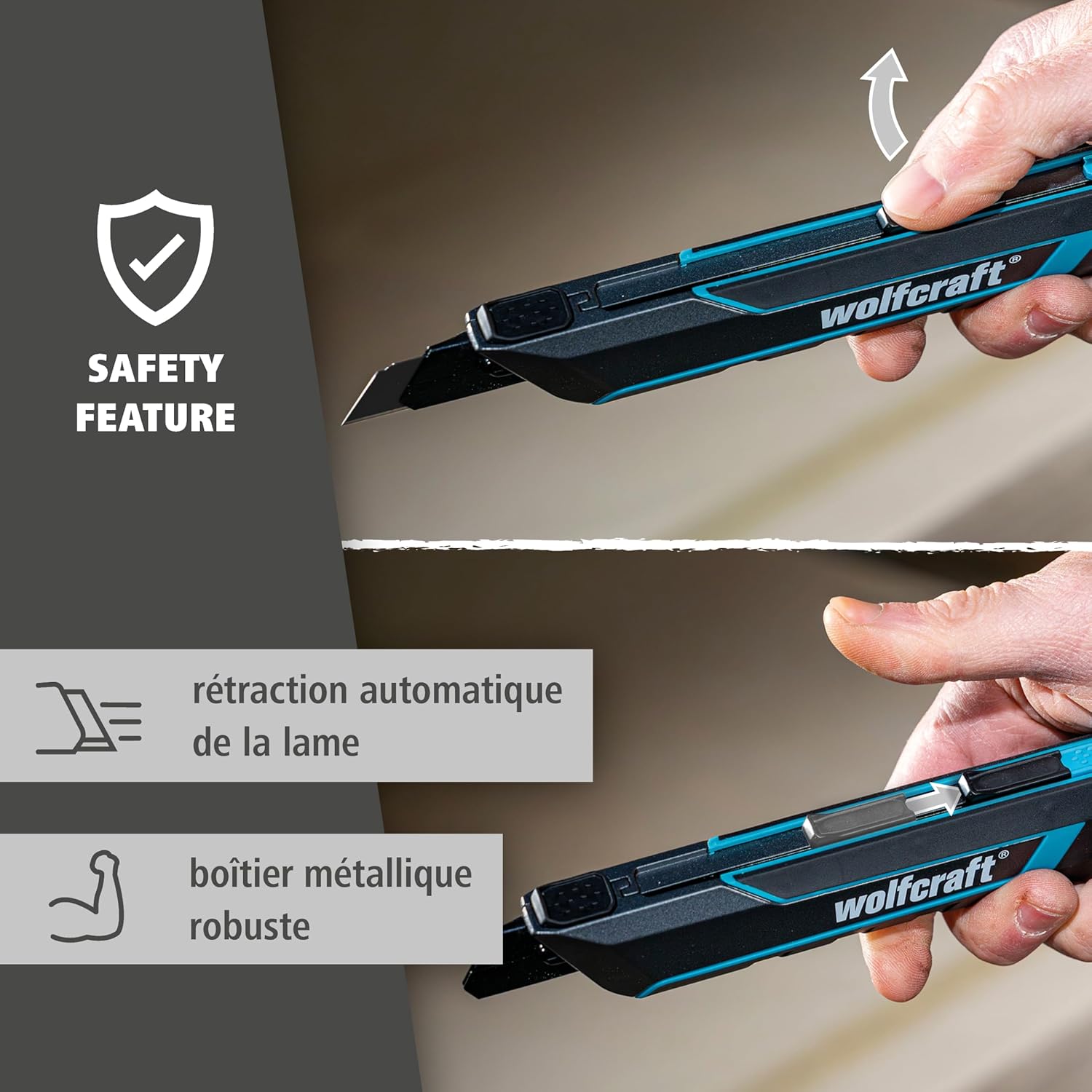
Image: The automatic blade retraction safety feature of the wolfcraft PRO SAFETY cutter, showing the blade retracting when pressure is released.
Opsætning og montering af blade
The wolfcraft PRO SAFETY cutter features tool-free blade changes for convenience.
- To open the blade housing, locate the release mechanism at the rear of the cutter.
- Press the release button or slide the cover to open the housing.
- Fjern forsigtigt det gamle blad.
- Insert a new 18mm snap-off blade (e.g., wolfcraft PRO SHARP black blade) into the blade guide. Ensure it is seated correctly.
- Close the blade housing until it clicks securely into place.
Always ensure the blade is securely locked before use.
Video: Demonstrates the tool-free blade change process and various cutting applications of the wolfcraft PRO SAFETY cutter.
Betjeningsvejledning
Generel brug
- Extend the blade to the desired length using the slider. For safety, extend only the necessary segment.
- The central blade slider allows for comfortable use by both left and right-handed individuals.
- The ergonomic handle with finger grooves and a soft-grip zone provides optimal grip and control, preventing slippage during use.
- Apply firm, even pressure when cutting.
- For materials like cardboard, film, carpet, cork, and wood, ensure a stable cutting surface.

Billede: Detaljeret view of the wolfcraft PRO SAFETY cutter's ergonomic design, highlighting features like grip zones and blade guide.

Image: A user demonstrating the wolfcraft PRO SAFETY cutter for cutting a rolled material, highlighting its versatility.
Sikkerhedsfunktioner
- Automatic Blade Retraction: The blade automatically retracts into the housing when pressure is released, minimizing the risk of accidental cuts.
- Automatisk låsefunktion: For tasks requiring a fixed blade, engage the automatic locking function to keep the blade extended.

Image: Illustrates the automatic locking function, allowing the blade to remain extended for specific cutting needs.
Opretholdelse
Udskiftning af knive
When the blade becomes dull, snap off the used segment to reveal a fresh, sharp edge. The cutter includes a removable cap with a snap-off aid for safe blade segment removal.
- Træk bladet helt tilbage.
- Remove the cap from the rear of the cutter.
- Insert the dull blade segment into the slot on the cap.
- Carefully snap off the dull segment.
- Dispose of the snapped-off segment safely.
- Reattach the cap securely.

Image: The removable cap with an integrated snap-off aid, demonstrating how to safely break off dull blade segments.
Rengøring og opbevaring
- Clean the cutter regularly to remove debris and ensure smooth operation of the blade slider.
- Use a dry cloth to wipe down the metal and plastic components. Avoid harsh chemicals.
- Store the cutter in a dry place with the blade fully retracted.
Fejlfinding
Bladet trækkes ikke jævnt ud/tilbage
- Tjek for affald: Dust or material fragments can obstruct the blade mechanism. Clean the blade guide thoroughly.
- Blade condition: A bent or damaged blade can cause issues. Replace the blade if necessary.
Dårlig skæreydelse
- Dull blade: Snap off the dull segment to expose a fresh edge, or replace the entire blade if all segments are used.
- Incorrect technique: Ensure you are applying consistent pressure and using the correct angle for the material being cut.
Specifikationer
| Feature | Detalje |
|---|---|
| Modelnummer | 4290000 |
| Bladstørrelse | 18 millimeter |
| Materiale (Krop) | Metal |
| Materiale (håndtag) | Termoplastisk gummi (TPR) |
| Materiale (klinge) | Rustfrit stål |
| Farve | Black and Turquoise |
| Ergonomi | Optimized for left and right-handed users |
| Sikkerhedsfunktioner | Automatic blade retraction, automatic locking function, removable cap with snap-off aid |
Garantioplysninger
wolfcraft products are manufactured to high-quality standards. For specific warranty details, please refer to the warranty card included with your product or visit the official wolfcraft webwebsted. Gem din købsbevis i tilfælde af garantikrav.
Kundesupport
Should you have any questions, require assistance, or need to order replacement parts, please contact wolfcraft customer support. Contact information can be found on the product packaging or the official wolfcraft webwebsted.
Fabrikant: wolfcraft GmbH, Wolffstraße 1, 56746 Kempenich, Germany