
ZCMMF N9
N9 Trådløs GSM Lyt Lyd Bug Overvågningsenhed Brugermanual
Mærke: ZCMMF | Model: N9
Indledning
Denne brugermanual indeholder omfattende instruktioner til ZCMMF N9 trådløs GSM-lydovervågningsenhed. Den dækker produktfunktioner, opsætning, betjening, vedligeholdelse og fejlfinding for at sikre optimal ydeevne og sikker brug af din enhed. N9 er en kompakt quad-band GSM-enhed designet til lydovervågning med stemmegenkendelse og alarmudløsningsfunktioner.
Hvad er der i æsken
Kontroller venligst, at alle varer er til stede i din pakke:
- Digital satellitfinder
- Brugermanual
- AV kabel
- Bil oplader kabel
- Adapter
- Bæretaske
Bemærk: Den "Digital satellitfinder", der er angivet i pakkens indhold, refererer til hovedenheden, som er en trådløs GSM-enhed til overvågning af lyd og bugs.
Produkt overview
N9 Wireless GSM Listen Audio Bug er en kompakt og diskret overvågningsenhed. Den fungerer på GSM quadband-frekvenser, hvilket muliggør verdensomspændende kompatibilitet. Nøglefunktioner inkluderer:
- Super Mini størrelse: Let at bære og skjule.
- Nem betjening: Ring blot til enhedens SIM-nummer for at lytte til omgivende lyd.
- GSM firebånd: Understøtter 850/900/1800/1900 MHz til global brug.
- Dobbelte mikrofoner: Sikrer klar lydkvalitet.
- Alarmudløser: Ringer automatisk op til et forudindstillet nummer, når den omgivende støj overstiger 45 dB inden for 4 meter.
- Forudindstilling af nummerunderstøttelse: Tillader konfiguration af et specifikt nummer til alarmopkald.
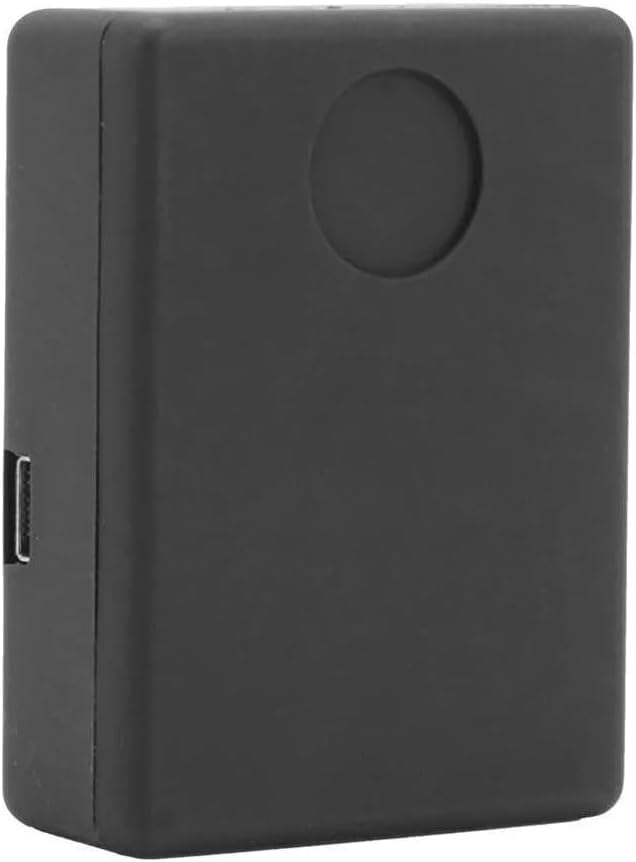
Figur 1: Front view af N9-enheden. Dette billede fremhæver lydmikrofonens kompakte, rektangulære design med en glat sort finish og en diskret cirkulær fordybning på dens overflade, hvilket sandsynligvis indikerer en mikrofon eller et indikatorlys.

Figur 2: SIM-kort installationsområde. Dette view viser N9-enheden med bagpanelet afmonteret, hvor de interne komponenter blotlægges, herunder den dedikerede plads til indsættelse af et SIM-kort og det underliggende printkort.

Figur 3: Enhedsstørrelse og isætning af SIM-kort. Dette billede illustrerer de kompakte dimensioner af N9-enheden, vist hvilende i håndfladen. Ledsagende grafik viser processen med at indsætte et SIM-kort i enhedens slot.
Opsætning
- Oplad enheden: Før første brug skal N9-enheden oplades helt med den medfølgende adapter og bilopladerkabel. Tilslut kablet til enhedens opladningsport, og sæt adapteren i en strømkilde. Enheden har typisk en indikatorlampe, der skifter farve, når den er fuldt opladet.
- Indsæt SIM-kort:
- Åbn bagdækslet på N9-enheden (se figur 2).
- Sæt forsigtigt et standard GSM SIM-kort i den dertil beregnede plads. Sørg for, at SIM-kortet er aktivt og har tilstrækkelig kredit til opkald, hvis det er nødvendigt.
- Luk bagdækslet forsvarligt.
- Tænd: Enheden tændes typisk automatisk, når et SIM-kort er indsat og den får strøm, eller den kan have en lille tænd/sluk-knap. Se enhedens fysiske layout for specifikke tændingsinstruktioner.
- Indledende testopkald: Fra en hvilken som helst telefon skal du ringe til nummeret på det SIM-kort, der er sat i N9-enheden. Enheden burde svare automatisk, så du kan høre den omgivende lyd. Dette bekræfter den grundlæggende funktionalitet.
- Indstil forudindstillingsnummer (til alarmudløser): For at aktivere den stemmeaktiverede alarmfunktion skal du sende en SMS-besked til N9-enhedens SIM-kortnummer med kommandoen om at indstille det forudindstillede nummer. Det nøjagtige SMS-kommandoformat findes normalt i en separat hurtigstartguide eller på produktemballagen. Dette nummer ringes op, når enheden registrerer lyd over 45 dB.
Betjeningsvejledning
Lydovervågning
Sådan lytter du til den omgivende lyd på N9-enheden:
- Sørg for, at N9-enheden er tændt og har et aktivt SIM-kort.
- Ring til telefonnummeret på det SIM-kort, der er sat i N9-enheden, fra din mobiltelefon.
- N9-enheden besvarer automatisk opkaldet (uden at ringe eller vibrere), så du kan høre lyden fra dens omgivelser.
- For at afslutte overvågningen skal du blot lægge på.
Stemmeaktiveret alarmudløser
N9-enheden kan automatisk ringe til et forudindstillet nummer, når den registrerer lyd over en bestemt tærskel (ca. 45 dB inden for 4 meter).
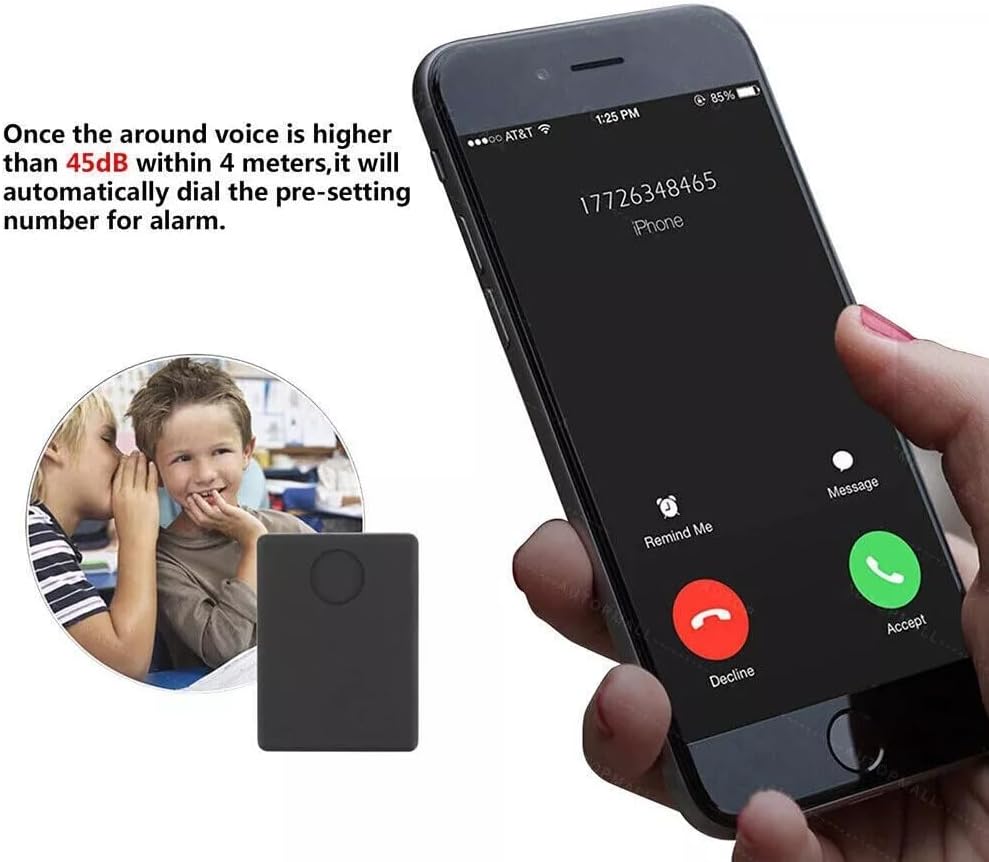
Figur 4: Stemmeaktiveret alarmfunktion. Dette billede viser N9-enhedens evne til at foretage et opkald til et forudindstillet mobilnummer, når det omgivende lydniveau overstiger 45 dB inden for en radius af 4 meter, hvilket illustrerer den automatiske opkaldsfunktion.
- Sørg for, at du har konfigureret det forudindstillede nummer som beskrevet i afsnittet Opsætning.
- Placer N9-enheden på det ønskede overvågningssted.
- Når det omgivende støjniveau omkring enheden overstiger 45 dB, ringer den automatisk til det forudindstillede nummer.
- Besvar det indgående opkald på din forudindstillede telefon for at lytte til lyden.
For at deaktivere eller ændre den stemmeaktiverede alarm skal du sende specifikke SMS-kommandoer til enheden. Se enhedens specifikke kommandoliste for yderligere oplysninger.
Typiske anvendelsestilfælde

Figur 5: Alsidige anvendelser af N9-enheden. Dette diagram illustrerer forskellige miljøer, hvor N9-enheden kan bruges til lydovervågning, herunder for børn, ældre, i et hjem, en bil, en motorcykel eller monteret på en cykel.
N9-enheden er velegnet til forskellige overvågningsapplikationer på grund af dens kompakte størrelse og stemmegenkendelsesfunktioner. Almindelige anvendelser omfatter:
- Overvågning af børns sikkerhed.
- Sikring af ældres velbefindende.
- Generel sikkerhedsovervågning af hjemmet.
- Sikkerhed af køretøjer (biler, motorcykler, cykel).
Opretholdelse
- Rensning: Tør enheden af med en blød, tør klud. Brug ikke flydende rengøringsmidler eller slibende materialer.
- Opbevaring: Opbevar enheden et køligt, tørt sted væk fra direkte sollys og ekstreme temperaturer, når den ikke er i brug.
- Batteripleje: For at forlænge batteriets levetid bør du undgå at aflade enheden helt ofte. Genoplad den regelmæssigt, selvom den ikke er i konstant brug.
- SIM-kort: Sørg for, at SIM-kortet er rent og korrekt isat. Hvis enheden ikke svarer, skal du kontrollere SIM-kortforbindelsen.
Fejlfinding
| Problem | Mulig årsag | Løsning |
|---|---|---|
| Enheden tænder ikke. | Lavt batteri; Enheden er ikke opladet; Defekt tænd/sluk-knap. | Oplad enheden helt. Sørg for, at opladningskablet og adapteren fungerer. Tryk, hvis det er relevant, på tænd/sluk-knappen og hold den nede i et par sekunder. |
| Kan ikke høre lyd, når jeg ringer til enheden. | SIM-kort er ikke isat korrekt; SIM-kort er inaktivt eller har ingen kredit; Enhed uden for GSM-netværkets rækkevidde; Enhed er ikke tændt. | Sæt SIM-kortet i igen. Tjek SIM-kortets status og kredit hos din mobiludbyder. Flyt enheden til et område med bedre GSM-signal. Sørg for, at enheden er tændt. |
| Stemmeaktiveret alarm udløses ikke. | Forudindstillingsnummer ikke konfigureret; Lydniveauet er for lavt; Enheden er ikke tændt. | Sørg for, at det forudindstillede nummer er korrekt konfigureret via SMS-kommando. Bekræft, at lydniveauet overstiger 45 dB. Bekræft, at enheden er tændt. |
| Enheden svarer ikke på SMS-kommandoer. | Forkert SMS-kommandoformat; problemer med SIM-kort; enhed uden for netværksrækkevidde. | Dobbelttjek SMS-kommandosyntaksen. Bekræft, at SIM-kortet er aktivt og har kredit til SMS. Sørg for, at enheden er i et område med godt GSM-signal. |
Specifikationer
| Feature | Detalje |
|---|---|
| Model | N9 |
| Mærke | ZCMMF |
| Forbindelsesteknologi | Mobil (GSM Quad Band: 850/900/1800/1900Mhz) |
| Speciel funktion | Trådløs, stemmeaktiveret alarmudløser (45 dB tærskel) |
| Understøttet applikation | Alarm |
| Specifikke anvendelser af produktet | Overvågning |
| Varens vægt | 3.19 ounce |
| Pakkedimensioner | 4.8 x 4.1 x 1.1 tommer |
| Fabrikant | N9 TRACKER |
| Oprindelsesland | Kina |
| Dato først tilgængelig | 21. maj 2016 |
Garanti og support
Specifikke garantioplysninger for ZCMMF N9 Wireless GSM Listen Audio Bug Surveillance Device findes ikke i produktoplysningerne. Se venligst din købsadresse eller producentens officielle adresse. webwebstedet for at se eventuelle tilgængelige garantivilkår.
For teknisk support eller yderligere assistance, kontakt venligst forhandleren eller producenten direkte. Gem din købskvittering som købsbevis.
Ask a question about this manual
Ask about setup, troubleshooting, compatibility, parts, safety, or missing instructions. Manuals+ will review the question and use this page’s manual context to help answer it.