
Indledning
This manual provides comprehensive instructions for the installation, operation, and maintenance of your Vrabocry DC5V-24V Smart Tuya APP LED SPI Controller. This device is designed to control various SPI RGB/RGBW LED strips, offering versatile lighting effects through APP and music synchronization.
Hvad er der i æsken
Kontroller venligst, at alle komponenter er til stede, før du fortsætter installationen.
- 1 x Tuya SPI RGB/RGBW LED Controller (Colorful-X7)
- 1 x brugermanual
- Necessary connection cables (as supplied)

Image: The Vrabocry LED SPI Controller, its accompanying cables, and a small screwdriver, laid out next to its packaging and a user manual. This illustrates the complete package contents.
Specifikationer
| Feature | Detalje |
|---|---|
| Produktnavn | Tuya SPI RGB/RGBW LED Controller |
| Working Voltage | DC 5~24V |
| Kontrolmetoder | APP (Smart Life or Tuya) or Music |
| Forbindelse | WiFi-IEEE 802.11b/g/n 2.4GHz, Bluetooth mesh |
| Produktion | 4A/Kanal (samlet udgang maks. 12A) |
| Supported LED Strip Types | All SPI RGB LED strips (WS/SK/SM/TX/LPD/TM series) |
| Arbejdstemperatur | -20°C til 60°C |
| Max Supported Pixel Number | 1024 pixels |
| Materiale | Plast |
| Indendørs/Udendørs brug | Indendørs |
Opsætning
1. Fysisk forbindelse
Ensure all power is disconnected before making any connections. Refer to the diagram below for proper wiring.
- Connect the DC 5-24V power supply to the controller's power input terminals (DC5-24V).
- Connect the LED strip to the controller's output terminals:
- GND: Ground connection for the LED strip.
- DAT: Data line for the LED strip.
- CLK: Clock line for the LED strip (if applicable for your strip type).
- VCC: Positive power supply for the LED strip.
- The AUX IN port is for external audio input for music synchronization.
- The SET button is used for pairing and mode selection.

Billede: En detaljeret view of the Vrabocry Colorful-X7 Smart LED Music Controller, highlighting the DC5-24V power input, AUX IN, SET button, and the GND, DAT, CLK, VCC output terminals for LED strip connection.
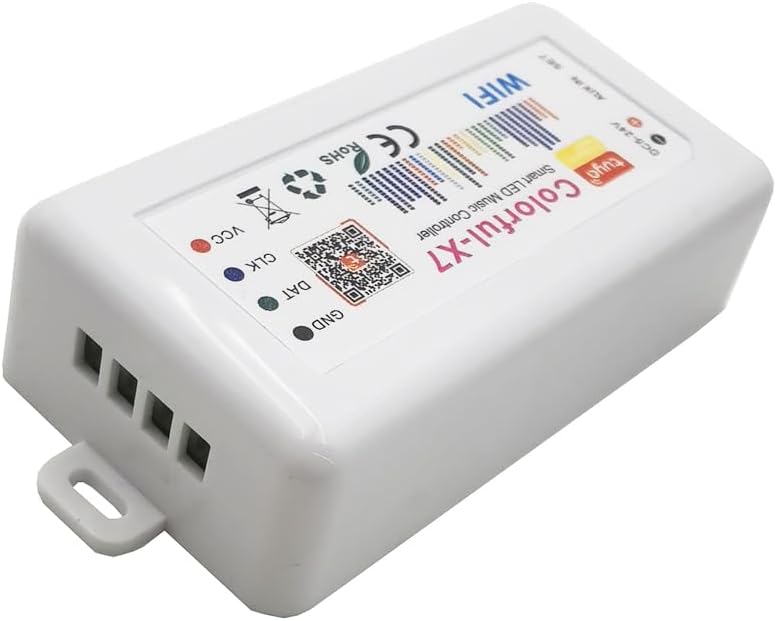
Image: An angled perspective of the Vrabocry Colorful-X7 LED controller, focusing on the output terminals (GND, DAT, CLK, VCC) where the LED strip connects.
2. App Installation
Download the "Smart Life" or "Tuya" app from your mobile device's app store (iOS App Store or Google Play Store). Register or log in to your account.
3. WiFi-forbindelse
- Tænd LED-controlleren.
- Open the Smart Life or Tuya app.
- Tryk på ikonet "+" for at tilføje en ny enhed.
- Follow the in-app instructions to connect the controller to your 2.4GHz WiFi network. This typically involves putting the device into pairing mode (often by pressing and holding the SET button until an indicator light flashes).

Image: The Vrabocry LED controller shown alongside a smartphone displaying the Smart Life/Tuya control app interface, and two smart speakers, illustrating its smart home integration capabilities.
Betjeningsvejledning
1. Basic Control via APP
Once connected, you can control the LED strip directly from the Smart Life or Tuya app. The app allows you to:
- Tænd/sluk lysene.
- Adjust brightness and color.
- Select from 40 different dynamic lighting modes.
- Add up to 10 customized lighting modes.
2. Music Sync Control
The controller features a built-in microphone for music synchronization. The lights will react to the rhythm and beat of the music playing in the environment. For external audio input, connect an audio source to the AUX IN port.
3. Tilpasning og avancerede funktioner
The app provides advanced tools for creating personalized lighting effects:
- DIY Dynamic Lighting: Utilize tools like Paint Bucket, Color Pen, and Eraser within the app to design unique lighting patterns.
- Device Name Modification: Rename your controller in the app for easier identification.
- Color Order Correction: Adjust the color order (RGB, GRB, etc.) to match your specific LED strip.
- Indstilling af timere: Schedule your lights to turn on or off at specific times.
Opretholdelse
To ensure the longevity and optimal performance of your LED SPI Controller, follow these maintenance guidelines:
- Keep the controller in a dry environment, away from moisture and extreme temperatures.
- Rengør enheden med en blød, tør klud. Brug ikke flydende rengøringsmidler eller slibende materialer.
- Sørg for tilstrækkelig ventilation omkring controlleren for at forhindre overophedning.
- Regularly check connections for any signs of wear or looseness.
Fejlfinding
| Problem | Mulig årsag | Løsning |
|---|---|---|
| Controlleren tænder ikke. | Ingen strømforsyning; forkert lydstyrketage; faulty power adapter. | Check power connections. Ensure power supply is DC 5-24V. Test with a different power adapter if available. |
| LED strip not lighting up. | Incorrect wiring (GND, DAT, CLK, VCC); incompatible LED strip; faulty LED strip. | Verify all wiring connections are correct. Ensure your LED strip is an SPI type. Test the LED strip with another controller if possible. Check color order settings in the app. |
| Kan ikke oprette forbindelse til WiFi. | Incorrect WiFi password; 5GHz WiFi network; controller not in pairing mode; weak signal. | Double-check WiFi password. Ensure you are connecting to a 2.4GHz network. Put the controller into pairing mode (refer to app instructions). Move controller closer to router. |
| Music sync not working. | No music playing; music too quiet; microphone obstructed; incorrect AUX IN connection. | Ensure music is playing loudly enough near the controller. Check if the microphone port is clear. If using AUX IN, ensure the cable is properly connected and the audio source is active. |
Garanti og support
Vrabocry products are designed for reliability and performance. For warranty information and technical support, please refer to the contact details provided on the product packaging or visit the official Vrabocry webwebsted. Gem din købskvittering for garantikrav.