
1. Produktet er slutview
The BISSELL PowerClean Cordless Stick Vacuum is designed for powerful and versatile cleaning. Featuring a 200W motor, it offers strong suction for various cleaning tasks. Its lightweight and self-standing design ensures convenience and ease of use throughout your home.
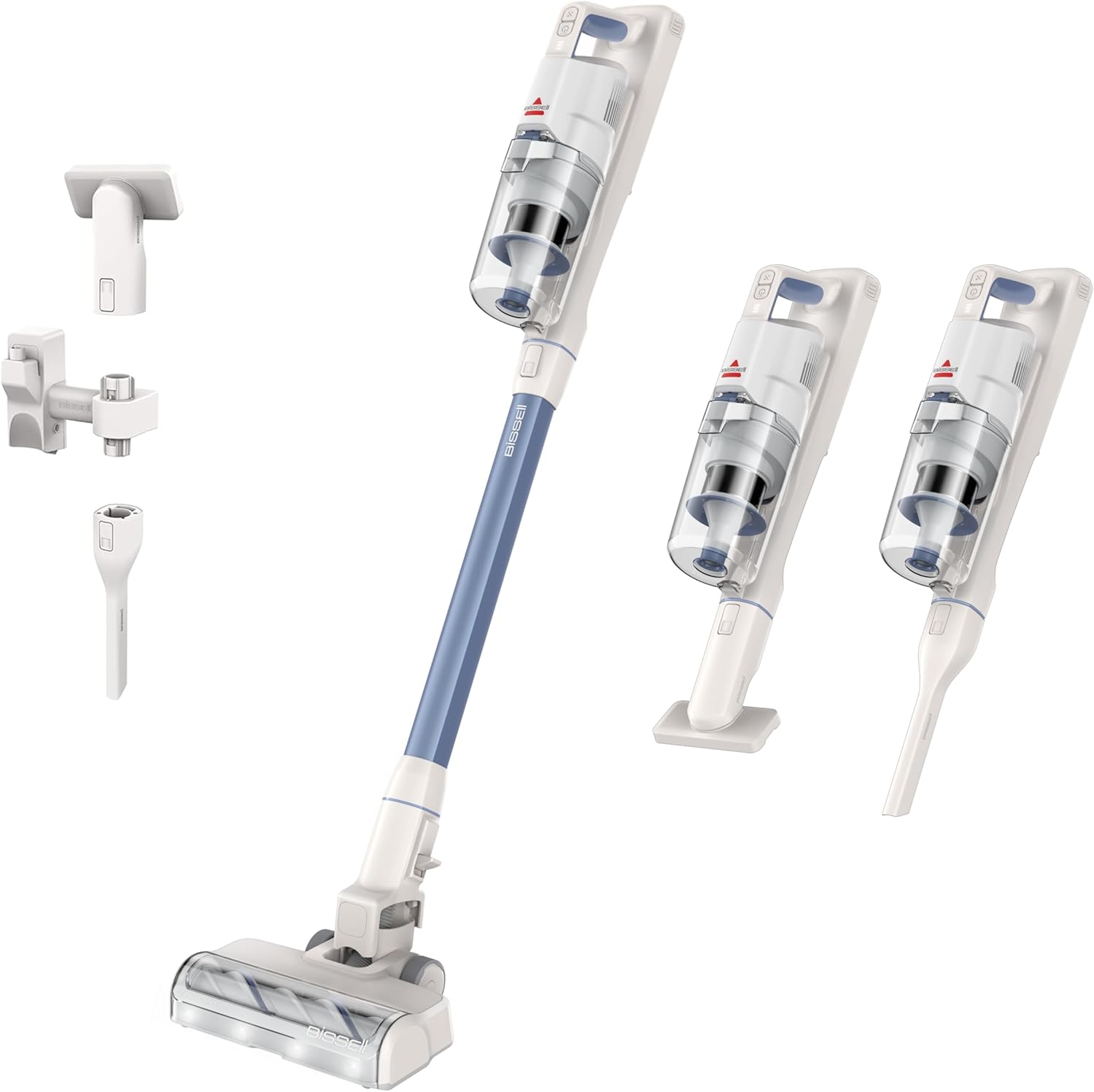
Image: The Bissell PowerClean 200W Cordless Vacuum in its upright, self-standing position.
Nøglefunktioner:
- 200W motor: Provides powerful suction for effective cleaning.
- Selvstående design: Allows the vacuum to stand upright independently, offering convenience during cleaning breaks.
- Tangle-Free Brush Roll: Engineered to prevent hair wrap, ensuring consistent performance.
- HEPA Sealed Allergen System: Captures 99.97% of dust and dander, promoting cleaner air.
- 3-i-1 alsidighed: Easily converts between a stick vacuum, handheld vacuum, and high-reach vacuum.
- Aftageligt batteri: Offers flexible charging options and extended runtime.
- Bright Headlights: Illuminates dirt and debris on various surfaces.
2. Hvad er der i æsken
Your Bissell PowerClean 200W Cordless Vacuum package includes the following components:
- Main Handheld Unit
- Forlængerstav
- Motorized Floor Nozzle with Tangle-Free Brush Roll
- Removable Lithium-Ion Battery
- Wall Mount with Charging Dock
- Sprækkeværktøj
- Værktøj til kæledyrspolstring
- Strømadapter
- Instruktionsmanual

Image: An illustration showing the various parts included in the Bissell PowerClean package, such as the main unit, extension wand, floor nozzle, and specialized tools.
3. Opsætning og montering
3.1 Første samling
- Insert the Extension Wand into the Main Handheld Unit until it clicks securely into place.
- Attach the Motorized Floor Nozzle to the other end of the Extension Wand, ensuring it clicks firmly.
- Ensure the Removable Lithium-Ion Battery is fully charged before first use.
3.2 Opladning af batteriet
The battery can be charged in three ways:
- On the Wall Mount: Install the wall mount in a convenient location using the provided hardware. Connect the power adapter to the wall mount and place the vacuum onto the mount.
- On the Unit: Connect the power adapter directly to the charging port on the handheld unit.
- Off the Unit: Remove the battery from the handheld unit and connect the power adapter directly to the battery.
A full charge typically takes approximately 3 hours. The battery indicator lights will show the charging status.

Image: A visual guide demonstrating the three flexible charging methods for the vacuum's removable battery: on the wall mount, directly into the unit, or charging the battery separately.
4. Betjeningsvejledning
4.1 Tænd/sluk og valg af tilstand
- Press the Power Button on the handle to turn the vacuum on or off.
- Use the Mode Selection Button to cycle through the three power settings: Øko-tilstand (up to 40 minutes runtime for light cleaning), Medium tilstand (up to 20 minutes runtime for regular cleaning), and Turbo tilstand (up to 13 minutes runtime for heavy-duty tasks).
4.2 Brug som stavstøvsuger
For floor cleaning, ensure the Motorized Floor Nozzle is attached. The bright headlights will illuminate debris on all floor types, from hard floors to carpets.

Image: The Bissell PowerClean vacuum's motorized floor nozzle with bright headlights actively cleaning a floor covered in dirt and debris.
4.3 Using as a Handheld or High-Reach Vacuum
Detach the extension wand and/or floor nozzle to use the main handheld unit for smaller areas. Attach the Crevice Tool for tight spaces or the Pet Upholstery Tool for furniture and car interiors.

Image: A composite image illustrating the vacuum's 3-in-1 versatility, showing it used as a full stick vacuum, a compact handheld unit, and with the extension wand for high-reach cleaning.
4.4 Selvstående funktion
The vacuum is designed to stand upright on its own. Simply push the handle forward until it locks into the vertical position to pause cleaning at any time without needing to lean it against a surface.

Image: The Bissell PowerClean vacuum standing freely in a room, highlighting its convenient self-standing design.
5. Vedligeholdelse
5.1 Emptying the Dirt Tank
- Sørg for, at støvsugeren er slukket.
- Press the release button on the dirt tank to detach it from the handheld unit.
- Hold the dirt tank over a trash bin and press the bottom release latch to empty contents.
- Close the bottom lid securely and reattach the dirt tank to the handheld unit.
5.2 Rengøring af filtre
Regularly clean the pre-motor and post-motor (HEPA) filters to maintain optimal suction performance.
- Remove the dirt tank. The pre-motor filter is located inside.
- Twist to unlock and remove the pre-motor filter assembly. Tap it against a trash bin to remove loose debris. Rinse with water if necessary and allow to air dry completely before reinserting.
- The post-motor (HEPA) filter is located at the top of the handheld unit. Twist to unlock and remove. Tap to clean or replace if heavily soiled. This filter is not washable.
- Ensure all filters are completely dry before reassembling the vacuum.

Billede: En detaljeret view of the vacuum's HEPA filtration system, showing the various filter components for effective dust and allergen capture.
5.3 Cleaning the Tangle-Free Brush Roll
The Tangle-Free Brush Roll is designed to minimize hair wrap, but occasional cleaning may be required.
- Sørg for, at støvsugeren er slukket og frakoblet opladeren.
- Locate the brush roll access cover on the bottom of the motorized floor nozzle.
- Use a coin or flathead screwdriver to unlock the cover and remove the brush roll.
- Remove any accumulated hair or debris from the brush roll and its housing.
- Sæt børsterullen i igen, og fastgør dækslet.

Image: The Tangle-Free Brush Roll in action on a carpet, demonstrating its ability to pick up debris while resisting hair entanglement.
6. Fejlfinding
If you encounter any issues with your Bissell PowerClean vacuum, please refer to the following common solutions:
- Ingen strøm: Ensure the battery is fully charged. Check that the power adapter is correctly plugged into both the wall outlet and the charging port.
- Reduceret sugning: Check if the dirt tank is full and needs emptying. Inspect the filters for clogs and clean them as per maintenance instructions. Ensure all connections (wand, nozzle) are secure.
- Børsterullen drejer ikke: Turn off the vacuum and check the brush roll for any obstructions (e.g., tangled hair, large debris). Clear any blockages and reassemble.
- Vacuum Falls Over: Ensure the vacuum is pushed fully into its upright, self-standing position until it locks.
For further assistance, please contact Bissell Customer Support.
7. Specifikationer
| Feature | Specifikation |
|---|---|
| Mærke | Bissell |
| Modelnavn | PowerClean 200W Stick Vacuum |
| Modelnummer | 4173 |
| Strømkilde | Batteridrevet |
| Motor hestekræfter | 200 watt |
| Voltage | 25.2 volt |
| Batteriopladningstid | 3 timer |
| Runtime | Op til 40 minutter (Øko-tilstand) |
| Filtertype | HEPA filter |
| Kapacitet | 0.5 liter |
| Varens vægt | 7.1 pund |
| Varedimensioner (L x B x H) | 7.7 cm L x 10.6 cm B x 45.6 cm H |
| Overfladeanbefaling | Alle etager |
8. Officiel produktvideo
Video: En officiel overview of the Bissell PowerClean 200W Self-Standing Cordless Vacuum, demonstrating its features and ease of use.
9. Garanti og support
Bissell products are manufactured to the highest quality standards. For warranty information, product registration, or customer support, please refer to the contact information provided in your product packaging or visit the official Bissell webwebsted.
Extended protection plans are also available for purchase to cover your product beyond the standard warranty period.