
1. Introduktion
The KONNWEI KW330 is an advanced OBD2 diagnostic scanner designed to help vehicle owners and technicians quickly and accurately diagnose engine-related issues. This tool provides comprehensive OBDII/EOBD diagnostic capabilities, including reading and clearing Diagnostic Trouble Codes (DTCs), performing battery voltage tests, monitoring live data streams, and checking I/M readiness status. It is compatible with most OBDII compliant vehicles manufactured since 1996.
2. Hvad er der i æsken
- KONNWEI KW330 OBD2-scannerenhed
- Brugermanual
- USB-kabel (til opdateringer og dataudskrivning)
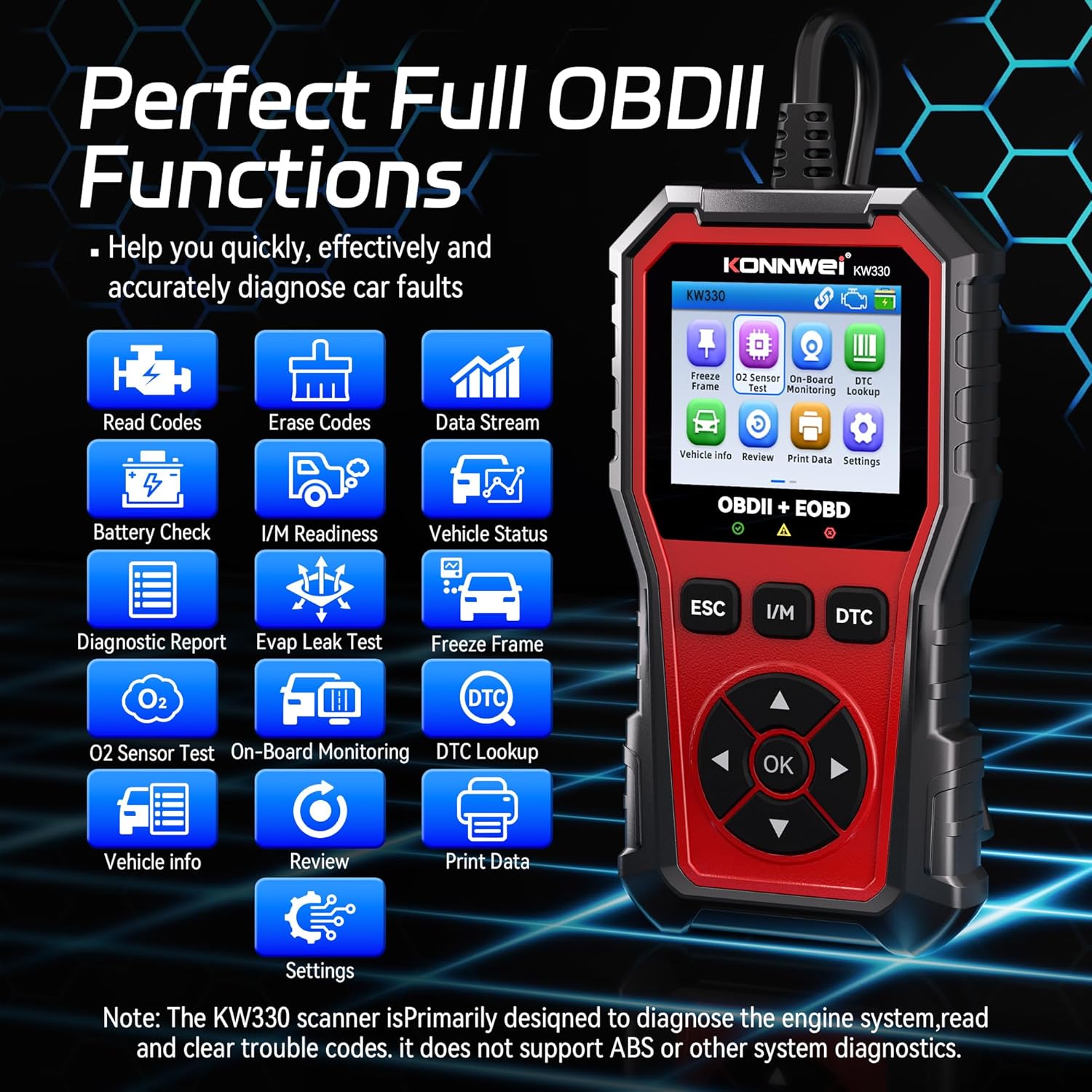
Image: The KONNWEI KW330 OBD2 Scanner unit with its diagnostic cable.
Video: An unboxing of the KONNWEI KW330 OBD2 Scanner, showing the device and included accessories.
3. Produktet er slutview
The KW330 features a robust design with a 2.8-inch color LCD screen, making it easy to read diagnostic information. It includes dedicated buttons for navigation, ESC (Escape), I/M (I/M Readiness), and DTC (DTC Lookup) for quick access to key functions.

Image: The KONNWEI KW330 scanner's main menu interface showing various diagnostic functions.
4. Opsætning
The KONNWEI KW330 is designed for plug-and-play operation, requiring no complex setup or external power source beyond the vehicle's OBDII port.
4.1 Tilslutning af scanneren
- Find bilens 16-bens datalinkstik (DLC). Dette findes typisk under instrumentbrættet i førersiden.
- Sørg for, at køretøjets tænding er slukket.
- Sæt KW330's OBDII-stik godt i køretøjets DLC.
- Turn the vehicle's ignition to the ON position (engine can be off or running, depending on the test). The scanner will automatically power on and establish communication with the vehicle's ECU.
Video: Demonstration of connecting the KW330 OBD2 scanner to a vehicle's diagnostic port and initiating a scan.
5. Betjeningsvejledning
The KW330 offers various diagnostic functions accessible through its intuitive menu system.
5.1 Reading Trouble Codes (DTCs)
This function allows you to retrieve Diagnostic Trouble Codes (DTCs) from the vehicle's computer, which indicate specific issues detected by the system.
- Fra hovedmenuen skal du vælge 'Læs koder' og trykke på 'OK'.
- Scanneren viser alle gemte, ventende eller permanente DTC'er.
- Use the up/down arrows to scroll through the codes and their descriptions.

Image: The KW330 displaying a P0123 trouble code with its description.
5.2 Clearing Trouble Codes
After performing necessary repairs, you can use this function to clear the DTCs and turn off the Check Engine Light (CEL).
- Fra hovedmenuen skal du vælge 'Slet koder' og trykke på 'OK'.
- Bekræft handlingen, når du bliver bedt om det.
- The scanner will clear the codes, and the Check Engine Light should turn off.

Image: Visual representation of the Check Engine Light turning off after codes are cleared.
5.3 I/M-parathedstest
This function checks the readiness of the vehicle's emission-related monitoring systems, indicating if the vehicle is ready for an emissions test.
- Fra hovedmenuen skal du vælge 'I/M-beredskab' og trykke på 'OK'.
- The scanner will display the status of various monitors (e.g., MIS, FUE, CCM, CAT, EVAP, O2S). A '✓' indicates completion, while an 'X' indicates an incomplete test.

Image: The KW330 displaying the I/M Readiness status for various vehicle systems.

Image: A visual guide to performing the one-click I/M Readiness test.
5.4 Live-datastrøm
View real-time operational parameters of the vehicle's engine, such as RPM, coolant temperature, and fuel system status.
- From the main menu, select 'Data Stream' and press 'OK'.
- Du kan vælge at view alle elementer, vælg specifikke elementer, eller view graphic frames.
- The scanner will display the selected data in numerical or graphical format.

Image: The KW330 showing real-time data stream in a graphical format, including RPM, FRP, IAT, and O2S values.
5.5 Batteri Voltage Test
This feature allows you to check the voltage of your vehicle's battery and assess the charging system's performance.
- From the main menu, select 'Battery Check' and press 'OK'.
- Follow the on-screen prompts to turn the engine off, then start it.
- The scanner will display the battery voltage performance, including minimum and maximum values during cranking and running.

Image: The KW330 displaying battery voltage test results, indicating normal ranges for before starting, instant ignition, and after starting.

Image: A visual guide demonstrating the battery voltage test with the KW330 scanner.
5.6 DTC-opslag
The built-in DTC Lookup feature provides detailed definitions for over 40,000 trouble codes, helping you understand the meaning of a code without needing to search online.
- Press the 'DTC' hotkey from the main menu or during a diagnostic scan.
- Indtast DTC'en ved hjælp af navigationsknapperne.
- Scanneren viser definitionen af koden.
Image: The KW330's DTC Lookup interface, illustrating how to input a code and view dens definition.
6. Indstillinger
Customize your KW330 scanner experience through the settings menu.
- From the main menu, select 'Settings' and press 'OK'.
- Valgmuligheder omfatter:
- Måleenhed: Skift mellem metriske og britiske enheder.
- Sprog: Select from supported languages (e.g., English, German, French, Spanish).
- Tema: Switch between day and night display modes for optimal visibility.
- Bipper: Turn audible alerts on or off.
- Opstartsscanning: Enable or disable automatic scanning on startup.

Image: The KW330's settings menu, highlighting the option to switch between day and night display themes.
7. Køretøjskompatibilitet
The KONNWEI KW330 is designed to be universally compatible with most OBDII compliant vehicles. This includes:
- US-based cars after 1996
- EU-based cars after 2000
- Asian-based cars after 2008
For specific compatibility questions, it is recommended to contact customer service with your vehicle's VIN before purchase.

Image: A chart illustrating the broad vehicle compatibility of the KW330 scanner across different regions and manufacturing years.
8. Vedligeholdelse
For at sikre din KONNWEI KW330-scanners lange levetid og optimale ydeevne, skal du følge disse vedligeholdelsesretningslinjer:
- Hold enheden ren og fri for støv og fugt. Brug en blød, tør klud til rengøring.
- Undgå at tabe enheden eller udsætte den for ekstreme temperaturer.
- Store the scanner in a safe place when not in use, preferably in its original packaging or a protective case.
- Regularly check the diagnostic cable for any signs of damage.
8.1 Softwareopdateringer
The KW330 supports free lifetime software upgrades to ensure compatibility with new vehicle models and to add new features. Refer to the official KONNWEI webwebstedet for den nyeste software og instruktioner om, hvordan du opdaterer din enhed ved hjælp af det medfølgende USB-kabel.
9. Fejlfinding
Hvis du støder på problemer, mens du bruger din KW330-scanner, kan du se følgende almindelige fejlfindingstips:
- Ingen strøm: Ensure the OBDII connector is firmly plugged into the vehicle's DLC. Check the vehicle's ignition status.
- Linkfejl: Verify the ignition is ON. Check for a secure connection to the DLC. Ensure the vehicle is OBDII compliant. Try the scanner on another vehicle if possible to rule out a vehicle-specific issue.
- DTCs Not Clearing: Ensure the ignition is ON and the engine is OFF when attempting to clear codes. Some codes may require multiple drive cycles to clear after repairs.
- Skærmproblemer: If the screen is unreadable, adjust the display theme in the settings (Day/Night mode).
For persistent issues, consult the detailed user manual or contact KONNWEI customer support.
10. Specifikationer
| Feature | Beskrivelse |
|---|---|
| Mærke | KONNWEI |
| Model | KW330 |
| Strømkilde | Batteridrevet (via OBDII-port) |
| Operativsystem | Linux |
| Skærmstørrelse | 2.8 tommer |
| Automotive Fit Type | Universal Fit (OBDII compliant vehicles) |
| Inkluderede komponenter | KW330 OBD2 Scanner, Manual |
11. Garanti og support
The KONNWEI KW330 OBD2 Diagnostic Scanner comes with a standard manufacturer's warranty. For detailed warranty information, product support, or technical assistance, please visit the official KONNWEI webwebstedet eller kontakt deres kundeservice direkte. Gem din købskvittering som købsbevis i tilfælde af garantikrav.