
Indledning
Thank you for choosing the Nacon PCCH-380 Ergonomic Gaming Chair. This manual provides essential information for the safe and effective use of your new chair. Please read these instructions carefully before assembly and use, and retain them for future reference.
Sikkerhedsoplysninger
ADVARSEL:
- Do not use the chair for extended periods without taking adequate breaks.
- Always use the height adjustment function safely and follow the manufacturer's instructions to prevent injuries.
- Sørg for, at alle komponenter er forsvarligt fastgjort før brug.
- Stå ikke på stolen, og brug den ikke som skammel.
- Hold børn og kæledyr væk fra stolen under montering.
Produkt overview
The Nacon PCCH-380 is an ergonomic gaming chair designed for comfort and support during long sessions. It features 2D adjustable armrests, a lumbar cushion, and a reclinable backrest.
Nøglefunktioner:
- Ergonomic design for M-L users.
- 2D justerbare armlæn.
- Adjustable lumbar cushion.
- Reclinable backrest up to 135°.
- Textile fabric in dark grey.
- 5-star base with smooth-rolling wheels.
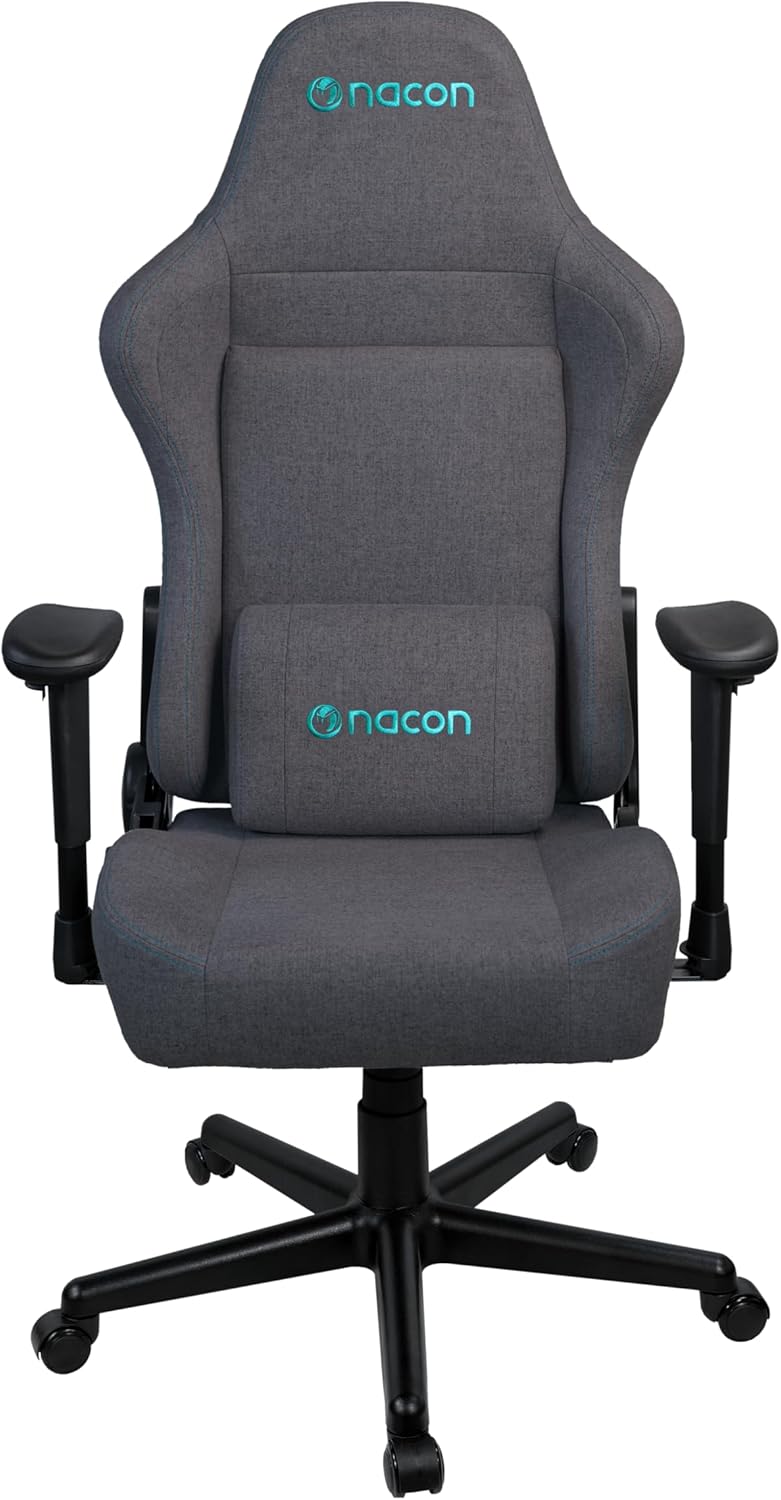
Figur 1: Forside view of the Nacon PCCH-380 Ergonomic Gaming Chair in dark grey.

Figur 2: Tilbage view of the Nacon PCCH-380 Ergonomic Gaming Chair, highlighting the backrest design.
Monteringsvejledning
The Nacon PCCH-380 gaming chair requires assembly. Please follow the detailed instructions provided in the separate assembly guide included with your product packaging. Ensure all parts are present before beginning assembly.
Trin for generalforsamling:
- Pak alle komponenter ud, og verificer dem i forhold til styklisten.
- Attach the wheels to the 5-star base.
- Indsæt gasløftecylinderen i midten af basen.
- Attach the seat mechanism to the bottom of the seat.
- Secure the backrest to the seat assembly.
- Install the 2D armrests.
- Place the assembled chair onto the gas lift cylinder.
- Attach the lumbar cushion as desired.

Figure 3: Packaging box for the Nacon PCCH-380 Gaming Chair, indicating assembly is required.
Betjeningsvejledning
Your Nacon PCCH-380 gaming chair offers several adjustment options to customize your seating experience for maximum comfort and ergonomic support.
1. Højdejustering:
To adjust the chair's height, locate the lever on the right side beneath the seat. While seated, pull the lever up to lower the chair. To raise the chair, stand up and pull the lever up. Release the lever at your desired height.
2. Backrest Recline:
The backrest can be reclined up to 135 degrees. Locate the recline lever on the left side of the chair. Pull the lever up and lean back to your desired angle. Release the lever to lock the backrest in position. To return to an upright position, pull the lever and lean forward slightly.

Figure 4: The Nacon PCCH-380 Gaming Chair shown in a reclined position, demonstrating its flexibility.
3. Armrest Adjustment (2D):
The 2D armrests can be adjusted in two dimensions: height and rotation. Use the buttons or levers on the armrests to adjust them to your preferred height and angle for optimal arm and wrist support.
4. Lumbar Cushion:
The included lumbar cushion provides additional support for your lower back. Position it along the backrest to align with the natural curve of your spine for enhanced comfort. The cushion can be removed if not desired.

Figur 5: Nærbillede view of the adjustable lumbar cushion on the Nacon PCCH-380 Gaming Chair.
5. Drejefunktion:
Stolen har en 360-graders drejefunktion, der giver mulighed for nem bevægelse og adgang til forskellige områder af dit arbejdsområde uden at skulle flytte hele stolen.
Vedligeholdelse og pleje
Proper maintenance will ensure the longevity and appearance of your Nacon PCCH-380 gaming chair.
Rensning:
- For general cleaning, wipe the textile fabric with a damp klæde.
- For stubborn stains, use a mild fabric cleaner and follow the product's instructions. Test on an inconspicuous area first.
- Avoid using harsh chemicals or abrasive cleaners, as these can damage the fabric and components.
- Regularly vacuum the chair to remove dust and debris.

Figur 6: Detaljeret view of the dark grey textile fabric used on the Nacon PCCH-380 Gaming Chair.
Generel pleje:
- Kontrollér regelmæssigt alle skruer og bolte for at sikre, at de er stramme. Efterspænd om nødvendigt.
- Undgå at udsætte stolen for direkte sollys i længere perioder for at forhindre falmning.
- Do not place hot items directly on the chair's surface.
Fejlfinding
If you encounter any issues with your Nacon PCCH-380 gaming chair, refer to the following common problems and solutions:
1. Chair does not adjust height:
- Sørg for, at højdejusteringshåndtaget er helt aktiveret.
- Check if the gas lift cylinder is properly installed and not damaged.
2. Backrest does not recline or lock:
- Kontroller, at håndtaget til tilbagelæning fungerer korrekt og ikke er blokeret.
- Inspect the recline mechanism for any visible damage or loose connections.
3. Wheels are not rolling smoothly:
- Check for any debris (hair, dust, etc.) caught in the wheels and clean them.
- Ensure the wheels are securely attached to the base.
Hvis disse løsninger ikke løser problemet, bedes du kontakte kundesupport.
Specifikationer
| Feature | Detalje |
|---|---|
| Modelnummer | PCCH-380 |
| Mærke | NACON |
| Farve | Mørkegrå |
| Materiale | Textile Fabric |
| Produktmål (D x B x H) | 58 x 57 x 121-131 cm |
| Vægt | 18 kg |
| Maksimal brugervægt | 100 kg |
| Anbefalet brugerhøjde | Op til 170 cm |
| Armlæn | 2D justerbar |
| Hældningsvinkel | Op til 135° |
| Lændestøtte | Adjustable Lumbar Cushion Included |
| Montering påkrævet | Ja |
Garanti og support
For warranty information and customer support, please refer to the documentation provided with your purchase or contact your retailer. You can also visit the official NACON webwebsted for yderligere hjælp.
NACON is committed to providing high-quality products and support. If you have any questions or require service, please do not hesitate to reach out.