
1. Introduktion
The iVOLCONN Electronic Acupuncture Pen is a rechargeable device designed for pain relief and improved circulation. It integrates traditional Chinese medicine principles with modern technology to automatically detect acupoints and deliver electrical pulses without needles. This manual provides detailed instructions for safe and effective use.

Figure 1: iVOLCONN Electronic Acupuncture Pen
2. Pakkens indhold
Bekræft at alle varer er til stede i pakken:
- Electronic Acupuncture Pen Device
- Brugermanual
- USB kabel
- Conductive Bar
- Interchangeable Massage Probes (1 large for body, 1 small for ears/head)

Figur 2: Hvad er der i æsken
3. Enhed overview

Figure 3: Electronic Acupuncture Pen Components
- Skærm: Shows intensity level and mode.
- Intensity/Switch Knob: Turns the device ON/OFF and adjusts intensity (0-20 levels).
- Conductive Sheet: Must be in contact with your skin for the device to function.
- Mode knap: Selects between 3 different stimulation modes.
- Start knap: Initiates therapy when pressed and held.
- Indikatorlys: Provides visual feedback during operation.
- Opladningsport: For recharging the device using the provided USB cable.
- Conductive Bar Port: For connecting the external conductive bar.
- Sonder: Interchangeable tips for different application areas.
4. Opsætning og klargøring
4.1 Opladning af enheden
The iVOLCONN Electronic Acupuncture Pen is rechargeable. Connect the provided USB cable to the charging port on the device and to a suitable USB power source. The indicator light will show charging status.
4.2 Montering af sonder
Vælg den passende massagesonde til din tilsigtede anvendelse:
- Large Probe: Recommended for body applications.
- Lille sonde: Suitable for ears and head measurements.
Gently push the chosen probe onto the tip of the pen until it is securely attached.

Figure 4: Interchangeable Massage Probes
4.3 Applying Conductive Medium
For optimal performance and comfort, especially on dry skin, apply a thin layer of conductive liquid or daily skin cream to the area where you will be applying therapy. This improves pulse wave transmission and effectiveness.
5. Betjeningsvejledning
5.1 Power On/Off and Intensity Adjustment
- To turn the device ON, rotate the Intensity/Switch knob clockwise from the "0" position.
- Adjust the intensity level by continuing to rotate the knob. The device offers 20 levels of adjustable intensity. Start with a low intensity and gradually increase it to a comfortable level.
- To turn the device OFF, rotate the Intensity/Switch knob counter-clockwise back to the "0" position.
5.2 Holding the Pen and Ensuring Circuit
When using the pen, ensure your thumb or thumb's web is in constant contact with the conductive sheet on the side of the pen. This completes the electrical circuit necessary for the device to function.
Video 1: Demonstrates how to hold the iVOLCONN Electronic Acupuncture Pen and ensure proper contact with the conductive sheet for operation.
5.3 Acupoint Detection
The pen features automatic acupoint detection. As you move the probe across the skin, the device will indicate when it is near an acupoint:
- The numerical value on the display will change, getting closer to "460" when near an acupoint.
- A buzzer sound will become more frequent as you approach the precise acupoint location.
- The indicator light may flash more rapidly.
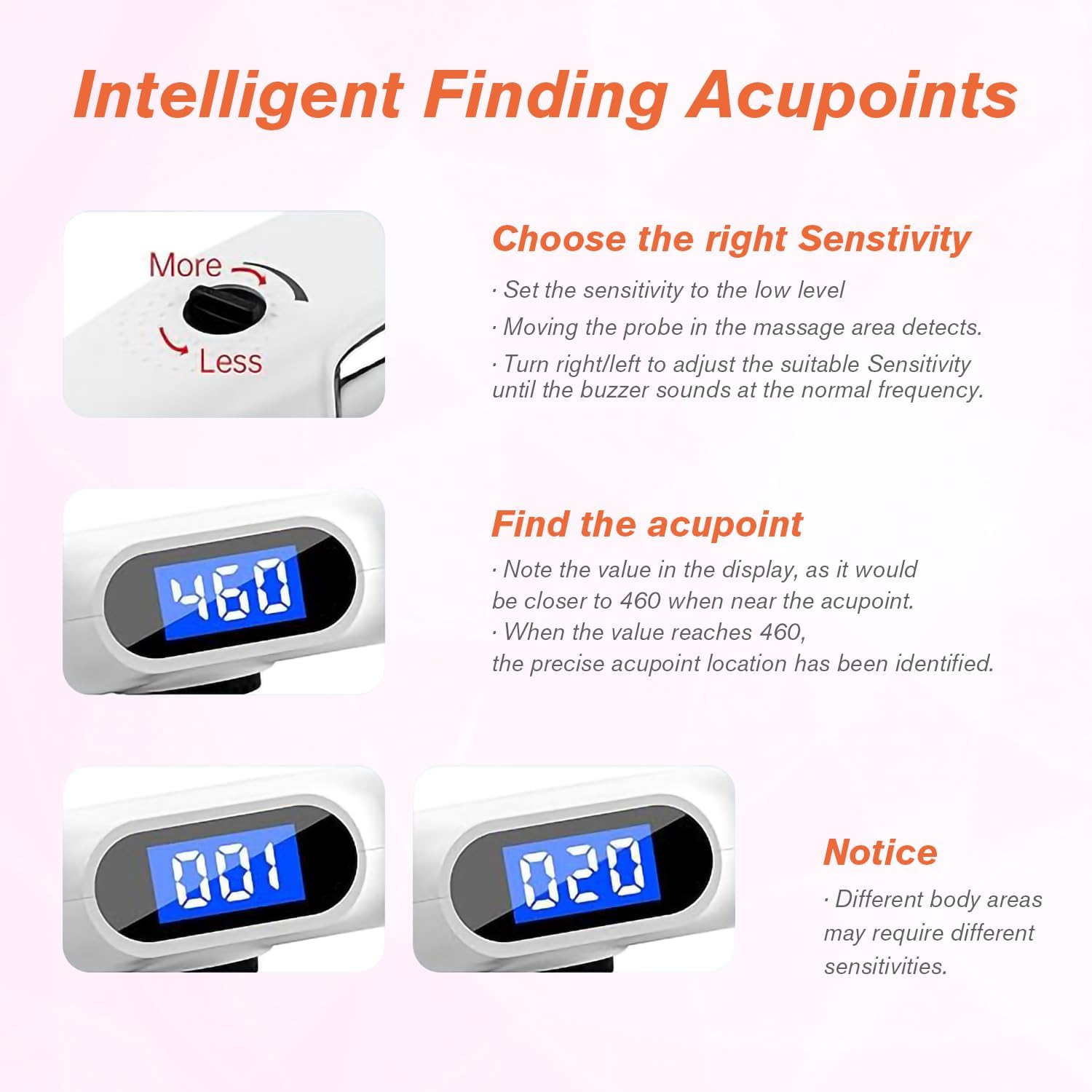
Figure 5: Intelligent Acupoint Detection
5.4 Valg af tilstande
The device offers 3 unique modes, each with different Hertz frequencies for varying depths of stimulation. Press the Mode knap for at bladre gennem dem:
- Mode 1 (Continuous Wave): 50Hz, designed to reach deeper tissue. Display shows "50H".
- Mode 2 (Intermittent Wave): 10Hz, designed for slightly deeper layers. Display shows "10H".
- Mode 3 (Ripple Wave): 4Hz, designed for the outer layer of skin. Display shows "4H".

Figure 6: Three Micro Wave Modes
5.5 Applying Therapy
- Once an acupoint is located and the desired mode and intensity are set, press and hold the Starte knap.
- Apply the pen to the targeted area for approximately 1 minute.
- Take a 5-second break, then repeat the application. Perform this cycle 3 times per targeted area.
- Do not exceed 2 treatments per area per day.
- For hard-to-reach areas like the back, use the provided conductive bar. Plug it into the conductive bar port, hold it with one hand, and have another person apply the pen. This helps complete the circuit and reduces electric reflux sensation.

Figure 7: Low Frequency Therapy Application
Video 2: Official iVOLCONN video demonstrating the Electronic Acupuncture Pen with 3 Modes and 20 Intensities for Pain Management.
6. Vedligeholdelse
To ensure the longevity and proper functioning of your iVOLCONN Electronic Acupuncture Pen:
- Clean the probes and the device body with a soft, damp klud efter hver brug. Brug ikke slibende rengøringsmidler, og nedsænk ikke enheden i vand.
- Opbevar enheden et køligt, tørt sted, væk fra direkte sollys og ekstreme temperaturer.
- Opbevares utilgængeligt for børn.
7. Fejlfinding
Se følgende almindelige problemer og deres løsninger:
| Problem | Løsning |
|---|---|
| Numerical value on screen always shows "460" or no buzz/value change. | Due to low impedance of your skin, adjust the sensitivity button (turn right to increase, left to decrease). Ensure skin is not too dry; use conductive liquid or cream. |
| No physiotherapy feeling or unobvious physiotherapy feeling. | The Start button must be pressed and held during therapy. Adjust the Intensity/Switch knob to increase the intensity. |
| Can't detect acupuncture points in some parts of the body. | Because of the stratum corneum and high impedance of the skin, you can perform physiotherapy in accordance with the health-care acupoint map provided in the manual. |
| What is the contact rod for? | For too high impulse intensity, insert the contact rod and hold it with one hand to decrease electric reflux feeling, and use it for physiotherapy with the other hand. |

Figure 8: Needleless and Painless Therapy
8. Specifikationer
- Produktdimensioner: 9 x 1.3 x 1.8 tommer
- Varens vægt: 12.31 ounce
- Fabrikant: iVolconn
- ASIN: B0F2H9LNTQ
- Intensitetsniveauer: 20 justerbare niveauer
- Tilstande: 3 (Continuous Wave 50Hz, Intermittent Wave 10Hz, Ripple Wave 4Hz)
- Strømkilde: Genopladelig
9. Vigtige sikkerhedsoplysninger
Statements regarding dietary supplements have not been evaluated by the FDA and are not intended to diagnose, treat, cure, or prevent any disease or health condition. Consult with a healthcare professional before using this device, especially if you have pre-existing medical conditions, are pregnant, or have a pacemaker.
10. Garanti og support
iVOLCONN provides a 12-month service for related quality issues. For any questions or support, please do not hesitate to contact us. We are committed to providing 100% satisfaction after the sale.