
Indledning
Thank you for choosing the Billboard Soul Advance True Wireless Stereo (TWS) Earbuds. These earbuds are designed to provide a superior audio experience with Active Noise Cancellation (ANC), Environmental Noise Cancellation (ENC), and a comfortable, splash-resistant design. This manual will guide you through the setup, operation, and maintenance of your new earbuds.
Sikkerhedsoplysninger
- Do not expose the earbuds or charging case to extreme temperatures or direct sunlight for extended periods.
- Undgå at tabe enheden eller bruge for meget kraft på den.
- Keep the earbuds and charging case away from water and liquids, except for light splashes as per IPX4 rating. Do not submerge.
- Forsøg ikke at skille produktet ad eller ændre det. Dette vil ugyldiggøre garantien.
- Brug kun det medfølgende opladningskabel eller et tilsvarende certificeret kabel.
- Listening at high volumes for prolonged periods can cause hearing damage. Adjust volume to a safe level.
Pakkens indhold
- Billboard Soul Advance TWS Earbuds (Left and Right)
- Opladningsetui
- USB opladningskabel
- Brugermanual
Produkt overview
Familiarize yourself with the components of your Billboard Soul Advance TWS Earbuds and charging case.
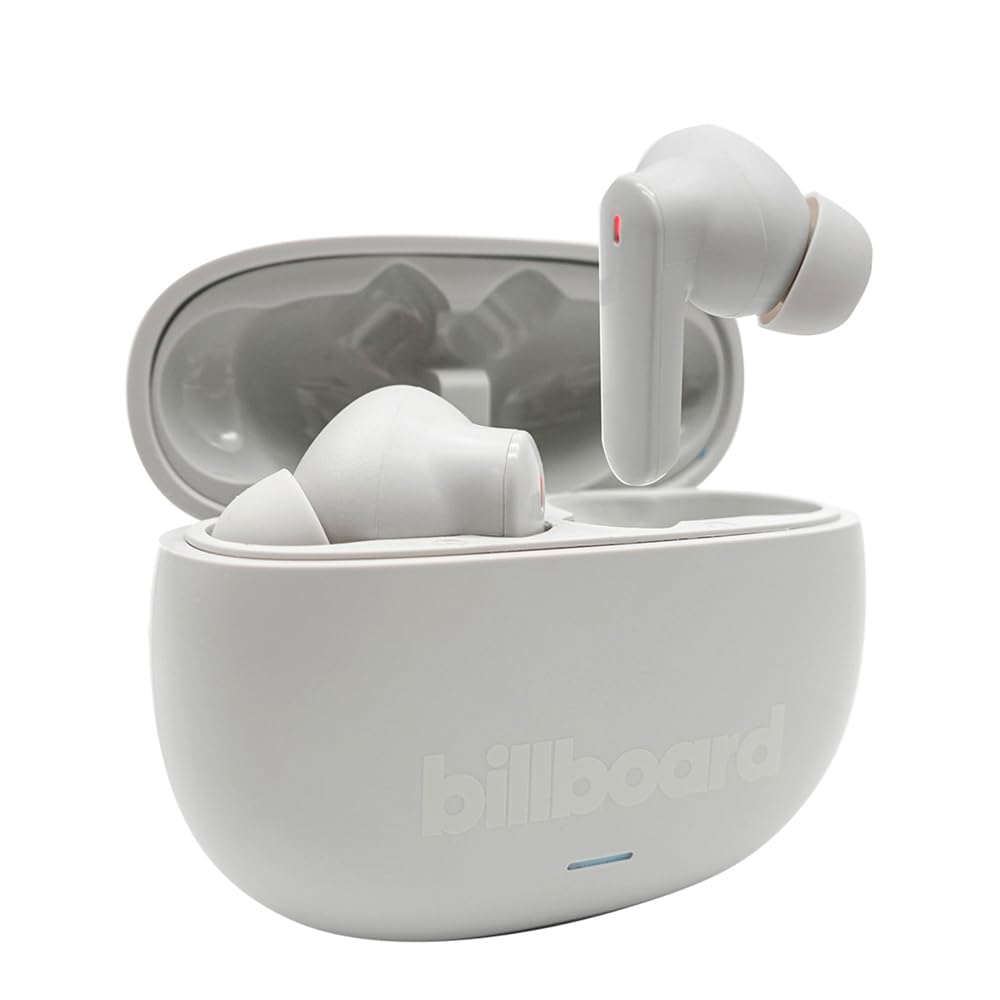
Image: The Billboard Soul Advance TWS Earbuds resting inside their open charging case. The earbuds are grey with red indicator lights visible, and the case is also grey with the 'billboard' logo embossed on the front.

Image: The Billboard Soul Advance TWS Earbuds charging case in a closed position. The case is grey with the 'billboard' logo embossed on the front and a small indicator light at the bottom.
Image: A person holding a single Billboard Soul Advance TWS earbud and the open charging case, demonstrating the compact size and design.
Opsætning
1. Opladning af øretelefoner og etuiet
Oplad ørepropperne og opladningsetuiet helt inden første brug.
- Placer ørepropperne i opladningsetuiet. Sørg for, at de sidder korrekt i deres respektive holdere.
- Tilslut USB-opladerkablet til opladningsporten på etuiet og til en USB-strømkilde (f.eks. computer, vægadapter).
- The indicator light on the case will show charging status. Once fully charged, the indicator will change or turn off. A full charge takes approximately 5 hours for the case and earbuds.
2. Parring med en enhed
To connect your earbuds to a smartphone or other Bluetooth-enabled device:
- Åbn opladningsetuiet. Ørepropperne går automatisk i parringstilstand, hvilket angives med blinkende lys på ørepropperne.
- Gå til Bluetooth-indstillingerne på din enhed, og sørg for, at Bluetooth er aktiveret.
- Søg efter available devices and select "Billboard Soul Advance" from the list.
- Når der er tilsluttet, holder indikatorlamperne på ørepuderne op med at blinke.
- Ørepropperne genopretter automatisk forbindelse til den sidst parrede enhed, når de tages ud af etuiet, hvis Bluetooth er aktiveret på enheden.
Drift
Tryk på kontrolelementer
The earbuds feature touch-sensitive controls on their outer surface. Specific functions may vary slightly by device or app.
| Handling | Fungere |
|---|---|
| Enkelt tryk (venstre/højre) | Afspil/Sæt musik på pause, Besvar/Afslut opkald |
| Dobbelttryk (højre) | Næste nummer |
| Dobbelttryk (venstre) | Forrige nummer |
| Tredobbelt tryk (venstre/højre) | Aktiver Voice Assistant |
| Langt tryk (venstre/højre) | Skift ANC/Transparenstilstand |
| Incoming Call Long Press | Afvis opkald |
Aktiv støjreduktion (ANC) og støjreduktion fra omgivelserne (ENC)
The Soul Advance earbuds feature both ANC and ENC for an optimized listening and calling experience.
- Aktiv støjreduktion (ANC): Reduces external ambient noise, allowing for a more immersive audio experience. Activate/deactivate by long-pressing an earbud.
- Environmental Noise Cancellation (ENC): Utilizes 4 built-in microphones to filter out background noise during calls, ensuring clearer conversations for both you and the listener. This feature is active automatically during calls.

Image: A graphic illustrating the concept of Ultra ANC (Active Noise Cancellation), showing sound waves being blocked by headphones, emphasizing a quiet listening experience.
Opretholdelse
Rensning
- Tør forsigtigt ørepropperne og opladningsetuiet af med en blød, tør og fnugfri klud.
- Brug ikke slibende rengøringsmidler, alkohol eller kemiske opløsningsmidler.
- Sørg for, at opladningskontakterne på både ørepropper og etuiet er rene og tørre for optimal opladning.
Opbevaring
Når ørepropperne ikke er i brug, skal de opbevares i deres opladningsetui for at beskytte dem og holde dem opladede.
Fejlfinding
| Problem | Løsning |
|---|---|
| Øretelefoner parrer ikke | Sørg for, at ørepropperne er opladet. Sluk og tænd for din enheds Bluetooth. Glem enheden i Bluetooth-indstillingerne, og par den igen. |
| Kun én øretelefon virker | Place both earbuds back in the case, close it, then open again. Ensure both are charged. |
| Ingen lyd | Tjek enhedens lydstyrke. Sørg for, at øretelefonerne er tilsluttet. Prøv at afspille en anden lyd. |
| Opladningsproblemer | Ensure charging cable is securely connected. Clean charging contacts. Try a different USB port or cable. |
Specifikationer
- Modelnavn: Soul Advance
- Forbindelse teknologi: Trådløs
- Inkluderede komponenter: Opladning Station
- Specifikke anvendelser: Outdoor activities, Sports
- Opladningstid: Cirka 5 timer
- Kompatible enheder: Phones, Tablets
- Vandmodstandsniveau: IPX4 (stænksikker)
- Gennemsnitlig batterilevetid: 27 timer (med opladningsetui)
- Øreplacering: In-Ear
- Formfaktor: In-Ear
- Støjkontrol: Aktiv støjreduktion

Image: A graphic highlighting long battery life, showing headphones with '40H' and earbuds with '42H*' (battery + case), indicating extended usage times.
Officielle produktvideoer
Video: Product demonstration video (0:49 duration).
Video: Product feature overview (0:44 duration).
Video: Additional product details (0:44 duration).
Video: Short product highlight (0:24 duration).
Video: Product feature showcase (0:24 duration).
Video: Detailed product review/demonstration (1:57 duration).
Video: Quick product overview (0:34 duration).
Video: Comprehensive product guide (2:00 duration).
Garanti og support
Your Billboard Soul Advance TWS Earbuds come with a standard manufacturer's warranty. For detailed warranty information, please refer to the warranty card included in your package or visit the official Billboard website. For technical support or customer service, please contact the retailer or manufacturer directly.
For returns, a 30-day free return policy is available from the purchase date.