
1. Introduktion
Thank you for choosing the Husky 2200 Lumens Hybrid Power Dimmable Lantern. This manual provides important information regarding the safe operation, setup, and maintenance of your lantern. Please read this manual thoroughly before using the product and retain it for future reference.
This lantern features a heavy-duty design and offers versatile power options, including an integrated rechargeable lithium-ion battery and the ability to use 6 AA alkaline batteries. It provides 7 light modes, including high, medium, low, eco, warm light, red, and red flashing, catering to various lighting needs.

Image 1.1: The Husky 2200 Lumens Hybrid Power Dimmable Lantern, showcasing its design and a table detailing lumen output and runtimes for different power sources and modes.
2. Sikkerhedsoplysninger
- Læs alle instruktioner: Before operating the lantern, read and understand all instructions and safety warnings in this manual.
- Batterisikkerhed:
- Bland ikke gamle og nye batterier.
- Bland ikke alkaliske, standard (kul-zink) eller genopladelige (nikkel-cadmium) batterier.
- Sørg for, at batterierne er isat med korrekt polaritet (+ og -).
- Remove batteries if the lantern will not be used for an extended period.
- Bortskaf batterier korrekt i henhold til lokale regler.
- Opladning: Only use the provided USB charging cable or a certified equivalent. Do not attempt to charge non-rechargeable batteries.
- Øjenbeskyttelse: Do not stare directly into the light source. The high lumen output can cause temporary vision impairment.
- Vandtæthed: The lantern is water resistant, not waterproof. Do not submerge it in water. Protect the USB port cover when not in use to maintain water resistance.
- Børn: Holde utilgængeligt for børn. Dette er ikke et legetøj.
- Varme: Do not expose the lantern to extreme temperatures or open flames.
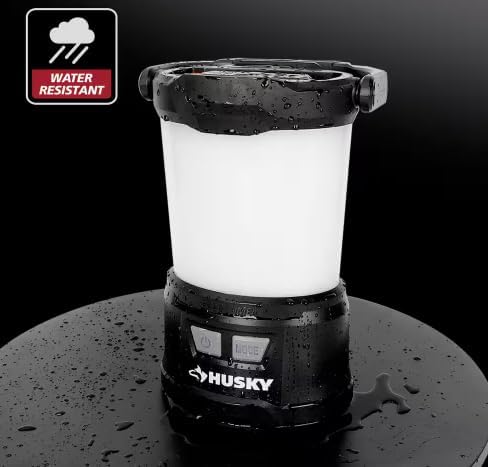
Image 2.1: The lantern demonstrating its water-resistant capabilities, with water droplets visible on its surface.
3. Pakkens indhold
Ensure all items are present and in good condition upon opening the package. If any items are missing or damaged, please contact customer support.
- Husky 2200 Lumens Hybrid Power Dimmable Lantern
- USB opladningskabel
4. Produktfunktioner
- Hybrid effekt: Operates with an integrated rechargeable lithium-ion battery or 6 AA alkaline batteries (not included).
- 7 lystilstande: High, Medium, Low, Eco, Warm Light, Red, and Red Flashing for diverse lighting needs.
- Dæmpbar funktion: Adjust brightness by holding the Mode button.
- USB-udgang: Built-in USB port allows charging of other devices.
- Hukommelsesfunktion: Recalls the last used mode if left on for 10 seconds.
- Holdbart design: Heavy-duty construction with an integrated carabiner and handle for easy transport and storage.
- Vandtæt: Designet til at modstå stænk og let regn.
5. Opsætning
5.1. Battery Installation (AA Alkaline Batteries)
The lantern can be powered by 6 AA alkaline batteries (not included) in addition to its integrated rechargeable battery. To install AA batteries:
- Locate the battery compartment cover on the bottom of the lantern.
- Drej dækslet mod uret for at låse det op og fjerne det.
- Insert 6 AA alkaline batteries, ensuring correct polarity (+ and -) as indicated inside the compartment.
- Sæt dækslet på igen, og drej det med uret for at låse det sikkert.

Billede 5.1: View of the lantern's base with the battery compartment open, illustrating where to insert the 6 AA alkaline batteries.
5.2. Charging the Integrated Lithium-Ion Battery
The lantern features an integrated rechargeable lithium-ion battery. Before first use, fully charge the lantern.
- Locate the USB-C input/output port on the side of the lantern, usually protected by a rubber cover.
- Åbn gummidækslet.
- Connect the provided USB charging cable to the USB-C input port on the lantern.
- Tilslut den anden ende af USB-kablet til en standard USB-strømkilde (f.eks. en vægadapter, computerens USB-port eller powerbank).
- The indicator light will show charging status (refer to Section 5.3 for indicator light details).
- Once fully charged, disconnect the cable and close the rubber cover to maintain water resistance.

Billede 5.2: En detaljeret view of the USB-C port on the lantern, showing a charging cable connected.
5.3. Indikatorlys
The lantern has an indicator light near the power button to show battery status and charging status:
- Grøn: Fully charged or sufficient battery level.
- Orange: Medium batteriniveau.
- Rød: Lavt batteriniveau.
- Rød blinkende: Indicates the battery needs charging (when in use) or is currently charging (when connected to power).

Image 5.3: Visual representation of the indicator light colors and their corresponding battery and charging statuses.
6. Betjeningsvejledning
6.1. Tænd/sluk
Tryk på Power-knap once to turn the lantern on. Press it again to turn the lantern off.
6.2. Valg af lystilstande
With the lantern on, press the Mode knap repeatedly to cycle through the 7 available light modes:
- High Light (2200 Lumens)
- Medium Light (1000 Lumens)
- Low Light (500 Lumens)
- Eco Light (30 Lumens)
- Varmt Lys
- Rødt Lys
- Rød Blinker
The lantern features a memory function. If a mode is left on for 10 seconds, the lantern will remember this mode and turn on in the same mode the next time it is activated.

Image 6.1: Visual demonstration of the seven distinct light modes offered by the lantern, including their appearance and intensity.
6.3. Dæmpningsfunktion
To dim the light in any of the white light modes (High, Medium, Low, Eco), press and hold the Mode knap. The brightness will gradually decrease or increase. Release the button when the desired brightness is reached.
6.4. USB-udgang (Powerbank-funktion)
The lantern can be used as a power bank to charge other USB-powered devices.
- Open the rubber cover protecting the USB-C port.
- Connect your device's charging cable to the USB-C output port on the lantern.
- Lanternen vil begynde at oplade din enhed.
- Once charging is complete, disconnect the cable and close the rubber cover.
Note: Using the USB output will consume the lantern's battery power and reduce its run time for illumination.
7. Vedligeholdelse
7.1. Rensning
- Tør lanternen af med en blød, damp klæde.
- Brug ikke slibende rengøringsmidler eller opløsningsmidler, da de kan beskadige overfladen.
- Ensure the USB port cover is closed before cleaning to prevent water ingress.
7.2. Opbevaring
- Opbevar lanternen på et køligt, tørt sted væk fra direkte sollys og ekstreme temperaturer.
- If storing for an extended period, remove any AA alkaline batteries to prevent leakage.
- For the integrated lithium-ion battery, it is recommended to charge it every 3-6 months to maintain battery health.
8. Fejlfinding
| Problem | Mulig årsag | Løsning |
|---|---|---|
| Lanterne tænder ikke. |
|
|
| Lanterne oplader ikke. |
|
|
| USB output not charging other devices. |
|
|
9. Specifikationer
| Feature | Detalje |
|---|---|
| Modelnummer | 91390 |
| Lysudbytte (maks.) | 2200 lumen |
| Strømkilde | Integrated Rechargeable Lithium-Ion Battery, 6 AA Alkaline Batteries (not included) |
| Batteribeskrivelse | Lithium-Ion, Alkaline |
| Run Time (High Mode) | 4 Hours (with Li-ion + AA batteries) |
| Produktdimensioner | 5.9 cm L x 7.3 cm B x 10.5 cm H |
| Varens vægt | 2.65 pund |
| Monteringstype | Bordplademontering |
| Vandmodstandsniveau | Vandtæt |
| Lyskildetype | Lysdiode (LED) |
| Inkluderede komponenter | Ladekabel |
| Farve | Hvid/sort |
| Materiale | Plast |
10. Garanti og support
For warranty information, please refer to the documentation provided at the time of purchase or contact the retailer where the product was acquired. Husky products typically come with a manufacturer's warranty covering defects in materials and workmanship.
If you encounter any issues or have questions not covered in this manual, please contact Husky customer support or the retailer for assistance. Keep your purchase receipt as proof of purchase for warranty claims.
Fabrikant: Husky