
1. Produktet er slutview
The Temank 6500W Split-Phase Solar Inverter is a versatile power solution designed for off-grid backup and self-use applications. It features a built-in 140A MPPT controller and supports both split-phase and single-phase pure sine wave output. This inverter can deliver 120V and 240V simultaneously and offers parallel operation capabilities, allowing expansion up to 39kW with up to 6 units. It is compatible with various battery types, including AGM, Gel, Lead-acid, Lithium-ion, and LiFePO4, and supports batteryless operation.

Billede 1.1: Forside view of the Temank 6500W Split-Phase Solar Inverter, showcasing its display and robust casing.
Nøglefunktioner:
- Split-Phase and Single-Phase Output: Supports 120V/240V output from a single unit.
- Parallel drift: Expandable up to 6 units for a total of 39kW.
- Integreret MPPT-controller: Dual 140A (70*2) MPPT controller with 99.9% efficiency.
- Bredt PV-indgangsområde: Max. PV Input Power 10kW (5000W*2), Max. PV Input Voltage 550Vdc.
- Batterikompatibilitet: Compatible with AGM, Gel, Lead-acid, Lithium-ion, and LiFePO4 batteries, including batteryless operation.
- Flere opladningstilstande: Offers PV only, Mains first, PV first, and Mains + PV charging modes.
- Omfattende beskyttelse: Includes short circuit, over-current, over-under voltage, overload, backfill, and over-temperature protection.
- Smart overvågning: Supports CAN, USB, and RS485 communication, with optional Wi-Fi/GPRS module for app monitoring.
2. Specifikationer
This section details the technical specifications of the 6500W Split-Phase Solar Inverter.

Image 2.1: Detailed solar panel specifications and wiring diagram for the inverter.
| Feature | Detalje |
|---|---|
| Nominel udgangseffekt | 6500W (kontinuerlig), 13000W (bølge) |
| Nominel output Voltage | 120/240 V AC (splitfase/enkeltfase) |
| Skift tid | 10 ms |
| Maks. PV-indgangseffekt | 10KW (5000W*2) |
| Maks. PV Input Voltage | 550V jævnstrøm |
| Maks. PV-indgangsstrøm | 18A per MPPT (Dual MPPT) |
| PV startvolumentage | > 150V |
| PV ledningsstørrelse | 12~10AWG |
| Battery Nominal DC Voltage | 48V DC |
| Maksimal opladningsstrøm | 140A |
| Kommunikationsgrænseflader | CAN, USB, RS485 |
| Pakkedimensioner | 23.23 x 16.54 x 5.51 tommer |
| Varens vægt | 41.6 pund |
3. Opsætning og installation
3.1 Sikkerhedsforanstaltninger
- Sørg for, at alle strømkilder er afbrudt før installation eller vedligeholdelse.
- Only qualified personnel should perform electrical installations.
- Do not connect the positive or negative terminal of the solar panel to the ground.
- This inverter is compatible only with PV module types of single crystalline and polycrystalline.
3.2 Forbindelsesdiagrammer
The inverter supports both split-phase and single-phase configurations. Refer to the diagrams below for proper wiring.
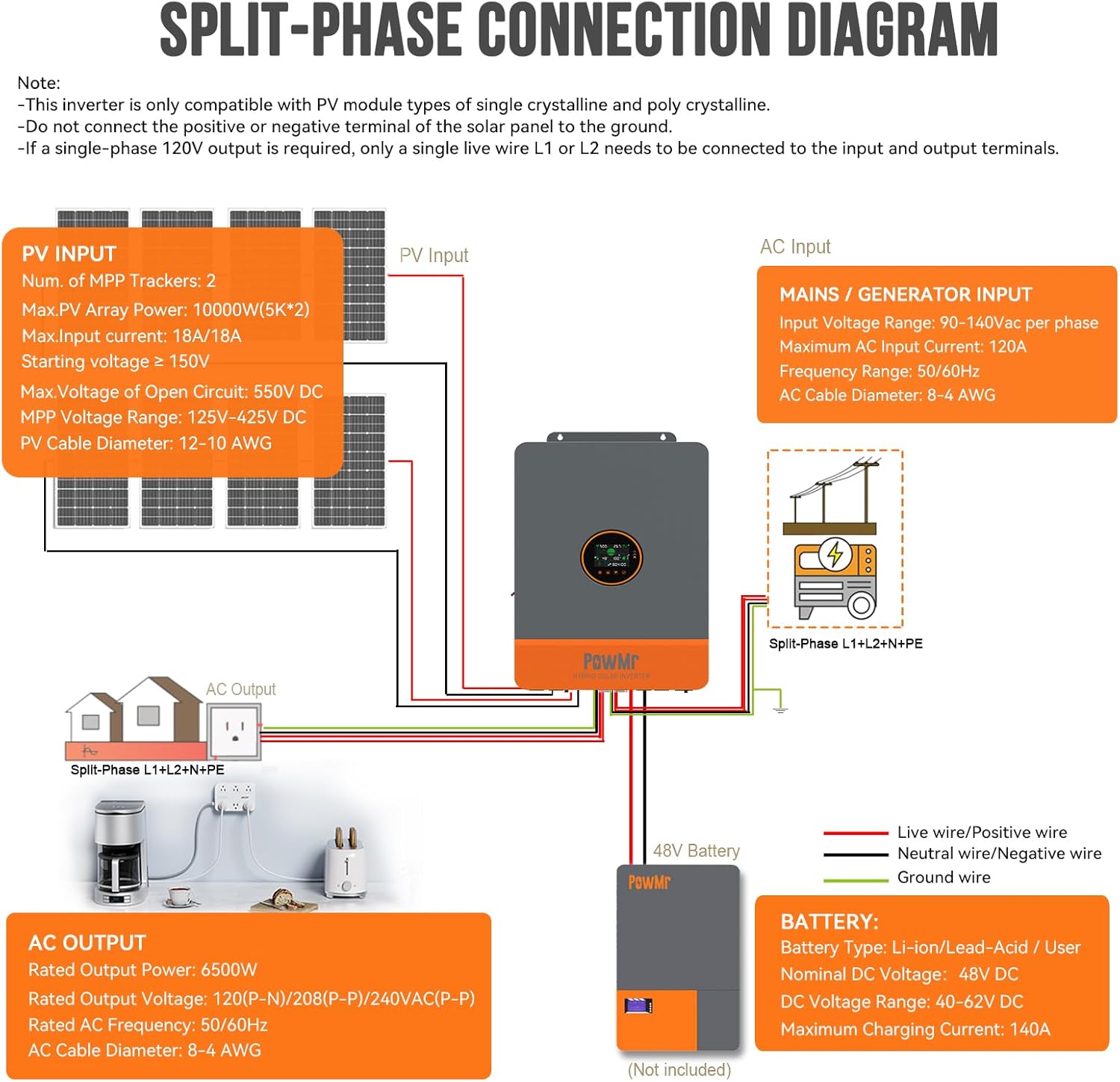
Image 3.1: Wiring diagram for split-phase operation (L1+L2+N+PE) showing PV input, AC input, AC output, and battery connections.

Image 3.2: Wiring diagram for single-phase operation (L1+N+PE) showing PV input, AC input, AC output, and battery connections.
For single-phase 120V output, only a single live wire (L1 or L2) needs to be connected to the input and output terminals.
3.3 Parallel drift
The inverter supports parallel operation for increased power output, allowing up to 6 units to be connected for a maximum of 39kW. This configuration enables flexible system expansion.

Image 3.3: Various parallel configurations for the inverter, including two, three, and six units.
3.4 Battery Connection and Compatibility
The inverter is compatible with a range of 48V batteries and supports batteryless operation, where loads can be powered directly from PV or AC without a battery connected.

Image 3.4: Illustration of the inverter's compatibility with various 48V battery types and its batteryless operation capability.
For Lithium-ion batteries, the inverter includes a dual activation function. If the Li-ion battery is dormant, access to mains or photovoltaic power supply can trigger its activation.
4. Betjeningsvejledning
4.1 LCD-skærm og overvågning
The inverter features an LCD HD display screen for real-time monitoring of photovoltaic system operating data. This allows users to view critical information such as power input, output, battery status, and operational modes.

Billede 4.1: Eks.amples of data displayed on the inverter's LCD screen, including PV input, AC output, and battery charge levels.
4.2 opladningstilstande
The inverter offers four selectable charging modes to optimize power management:

Image 4.2: Visual representation of the four charging modes and their priorities.
- Solar First: Priority is given to charging by PV. Mains charging will start only when PV has failed.
- Hovedretter først: Priority is given to charging by Mains Power. Charging with PV power will start only when the Mains has failed.
- Hybridopladning: Hybrid charging of PV and Mains Power. Priority is given to MPPT charging, and supplementary Mains Power is used if PV energy is insufficient. If PV energy is sufficient, Mains Power charging will stop.
- Kun solenergi: Kun PV-opladning startes; der finder ingen netopladning sted.
4.3 Indlæs outputtilstande
The inverter provides four output modes to manage power delivery to loads:

Image 4.3: Visual representation of the four load output modes and their priorities.
- Solar First: PV and battery will power the load. Switches to Mains Power when PV fails.
- Hovedretter først: Switches to inverter power supply only when Mains Power has failed.
- Inverter først: Skifter kun til strømnettet, når batteriet er underopladettage.
- Hybridudgang: In utility bypass state, when no battery is connected or when the battery is full, the load power is supplied by the PV and the utility together if the hybrid function is enabled, and surplus PV energy is fed back to the grid if the grid connection function is enabled.
4.4 ECO Mode and High-Wattage Udgang
The inverter features an ECO mode for power saving, which reduces no-load loss. When enabled, if the load is below 50W, the inverter output is delayed for 5 minutes and then turned off. To resume output, press the "ON" button after the hull switch is in the "OFF" state.

Image 4.4: Illustration of high-wattage output for demanding appliances and the functionality of ECO mode.
4.5 Sectional Charging/Discharge Function (Peak-Valley Electricity Tariff)
With time slot control, you can set the priority of using mains and battery power according to the time slot, in conjunction with local peak and valley electricity tariffs.

Image 4.5: Explanation of sectional charging and discharge functions, allowing users to set priorities based on electricity tariffs.
- Sectional Charging Function: When enabled, the power supply mode changes to BT1ST, enabling mains power charging only during the set charging period or when the battery is discharged. Users can freely set three definable periods for mains charging within 00:00 to 23:59.
- Sectional Discharge Function: When enabled, the power supply mode changes to AC1ST, and the system switches to battery inverter power supply only during the set discharge period or when mains power is off. Users can freely set three definable periods for battery discharge within 00:00 to 23:59.
5. Vedligeholdelse
Regular maintenance ensures optimal performance and longevity of your solar inverter.
- Rensning: Rengør inverterens yderside og ventilationsåbninger med jævne mellemrum for at forhindre støvophobning, som kan påvirke kølingen. Brug en tør, blød klud.
- Tilslutningstjek: Regularly inspect all electrical connections (PV, battery, AC input/output) for tightness and signs of corrosion. Loose connections can lead to overheating or system malfunction.
- Miljøforhold: Ensure the inverter is operating within its specified temperature and humidity ranges. Avoid exposing it to direct sunlight, rain, or excessive moisture.
- Firmwareopdateringer: Tjek producentens website or SmartESS app for any available firmware updates to ensure your inverter has the latest features and bug fixes.
6. Fejlfinding
This section provides guidance on common issues you might encounter with your inverter.
6.1 Fejlkoder og indikatorer
Refer to the inverter's LCD display for any error codes or warning indicators. Consult the full product manual (if available from the manufacturer) for a comprehensive list of codes and their meanings.
6.2 Almindelige problemer og løsninger
- Ingen strømudgang:
- Check if the AC input breaker is tripped.
- Verify battery connections and charge level.
- Sørg for PV input voltage is above the starting voltage (>150V).
- Check for any overload conditions on the output.
- Inverteren oplader ikke batterier:
- Confirm PV panels are receiving sufficient sunlight and are connected correctly.
- Check the selected charging mode (e.g., 'Only Solar' requires PV).
- Bekræft batteri voltage og sundhed.
- Overbelastningsbeskyttelse udløst:
- Reducer den samlede belastning, der er tilsluttet inverteren.
- Kontroller for kortslutninger i belastningsledningerne.
- Communication Issues (SmartESS App):
- Ensure the optional Wi-Fi/GPRS module is correctly installed and powered.
- Verify network connectivity for the module and your smartphone.
- Confirm the app is updated to the latest version.
Hvis problemerne fortsætter efter at have forsøgt disse løsninger, bedes du kontakte kundesupport.
7. Monitoring and Control (SmartESS App)
The Temank 6500W Solar Inverter can be monitored and controlled remotely via the SmartESS App. This requires an optional Wi-Fi/GPRS data acquisition module, which needs to be purchased separately.

Image 7.1: Screenshot showing the SmartESS App interface for monitoring solar energy data and inverter status.
7.1 App download
The SmartESS App is available for download on both the App Store (for iOS devices) and Google Play (for Android devices).
- Til iOS: Søg efter "SmartESS" in the Apple App Store.
- Til Android: Søg efter "SmartESS" in the Google Play Store.
The Wi-Fi/GPRS data acquisition module typically includes a QR code (e.g., Q2721100111238) for easy setup and connection with the app.
8. Garanti og support
8.1 Produktgaranti
Please refer to the warranty card included with your product or contact Temank customer service for detailed warranty information. Standard warranty terms typically cover manufacturing defects for a specified period from the date of purchase.
8.2 Kundesupport
For technical assistance, troubleshooting, or warranty claims, please contact Temank customer support through their official website or the contact information provided in your product packaging. When contacting support, please have your product model number (POW-SunSmart 6.5KP-1) and purchase details readily available.