
1. Introduktion
This manual provides essential information for the safe and efficient use of your paitanry Android Tablet 10 Inch. Designed for children and family use, this tablet combines robust features with parental control options to ensure a secure and engaging digital experience. Please read this manual thoroughly before operating the device.

Image: paitanry 10.1 inch Android 15 Kids Tablet with children enjoying the device.
2. Hvad er der i æsken
Upon opening your paitanry Android Tablet package, you should find the following items:
- 1x Kids Tablet (Pink EVA Case)
- 1x oplader
- 1x Type-C ladekabel
- 1x OTG-adapter
- 1x brugermanual
Video: Unboxing the paitanry Kids Tablet, showing included accessories.
3. Opsætning
3.1 Indledende tænding
- Remove the protective film from the screen, starting at the corner.
- Tryk og hold tænd/sluk-knappen nede, indtil skærmen tændes.
- If the tablet does not power on, charge it for 2 hours and then try again.
- Wait for 1-3 minutes during initial startup until instructions for setting the language appear.
- Complete setup by following on-screen instructions. Your device is ready to use!
3.2 Wi-Fi-forbindelse
Sådan opretter du forbindelse til et Wi-Fi-netværk:
- Gå til Indstillinger > Netværk og internet > Wi-Fi.
- Slå Wi-Fi til/fra On.
- Vælg det ønskede netværk fra listen.
- Indtast adgangskoden, hvis du bliver bedt om det, og tryk på Forbinde.
3.3 Google Kids Space & Parental Controls Setup
The tablet comes pre-installed with Google Kids Space. To set it up:
- Follow the on-screen prompts to create a Google account for your child or add an existing one.
- Utilize Google Family Link to manage screen time, filter content, and set learning goals.

Image: Google Kids Space interface on the paitanry tablet.
Video: Overståetview of the paitanry Kids Tablet features, including Google Kids Space.
4. Betjeningsvejledning
4.1 Grundlæggende funktioner
- Power knap: Press and hold to power on/off. Short press to sleep/wake.
- Lydstyrkeknapper: Juster lydstyrken.
- Hovedtelefonstik: Tilslut 3.5 mm hovedtelefoner.
- USB-C-port: Til opladning og dataoverførsel.
- MicroSD -kortplads: Insert a MicroSD card for expandable storage.

Image: Diagram illustrating the location of ports and buttons on the tablet.
4.2 Navigation
The tablet uses standard Android touch gestures:
- Tryk på: Vælg et element, eller åbn en app.
- Stryg: Rul gennem sider eller lister.
- At klemme: Zoom ind eller ud.
4.3 Kamerabrug
The tablet features front and rear cameras. To use:
- Tryk på Kamera app-ikon.
- Skift mellem for- og bagkameraer efter behov.
- Tryk på udløserknappen for at tage billeder eller starte/stoppe videooptagelse.
5. Funktioner
- Operativsystem: Android 15 for a stable and efficient user experience.
- Processor: High-performance Octa-Core A523 CPU.
- Vise: 10.1-inch fully laminated 1280x800 HD screen with wide viewing angles. Features anti-blue light design and automatic brightness adjustment for eye protection.
- Hukommelse og opbevaring: 8GB RAM (4GB+4GB) and 64GB ROM. Expandable up to 1TB with a MicroSD card (sold separately).
- Forbindelse: Dual-Band WiFi 6 (2.4GHz + 5GHz) for smooth online activities.
- Batteri: 5000mAh long-lasting battery, providing 8-10 hours of continuous use.
- Beskyttelsesetui: Durable EVA case with anti-drop corners and a built-in stand for hands-free viewing.

Billede: Visuelt overview of the tablet's key features.

Image: Close-up of the 10.1-inch HD IPS display with eye protection features.
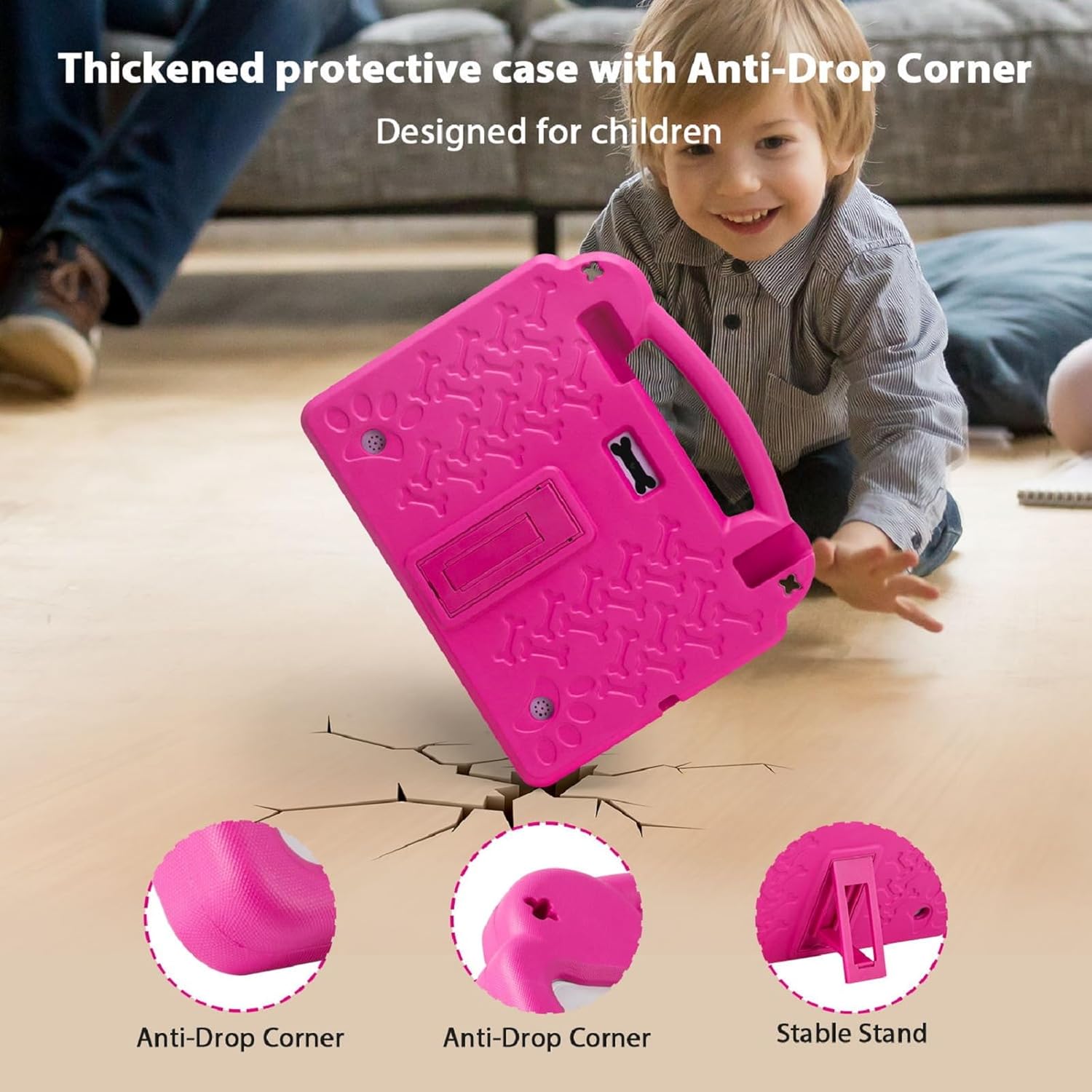
Image: The thickened protective EVA case highlighting anti-drop corners and the stable stand.

Image: Illustration of the 5000mAh battery capacity and usage times.
6. Vedligeholdelse
6.1 Rengøring
- Brug en blød, fnugfri klud til at rengøre skærmen. Undgå slibende materialer.
- For the case, a damp cloth with mild soap can be used, then wipe dry.
6.2 Pleje af batterier
- Undgå at udsætte tabletten for ekstreme temperaturer.
- Lad ikke batteriet aflades helt ofte.
- Use the provided charger for optimal battery life.
6.3 Softwareopdateringer
Søg regelmæssigt efter og installer softwareopdateringer for at sikre optimal ydeevne og sikkerhed. Gå til Indstillinger > System > Systemopdatering.
7. Fejlfinding
7.1 Tabletten tænder ikke
- Ensure the tablet is fully charged. Connect the charger and wait for at least 15 minutes before attempting to power on again.
- Tryk og hold tænd/sluk-knappen nede i 10-15 sekunder for at udføre en tvungen genstart.
7.2 Langsom ydeevne
- Luk unødvendige baggrundsapplikationer.
- Ryd cachedata for ofte brugte apps.
- Ensure sufficient storage space is available. Delete old files or transfer them to expandable storage.
- Genstart tabletten regelmæssigt.
7.3 Problemer med Wi-Fi-forbindelse
- Kontroller, om Wi-Fi er aktiveret i Indstillinger.
- Genstart din Wi-Fi-router.
- Glem netværket, og genopret forbindelsen ved at indtaste adgangskoden igen.
- Sørg for, at tabletten er inden for Wi-Fi-signalets rækkevidde.
8. Specifikationer
| Feature | Specifikation |
|---|---|
| Stående skærm displaystørrelse | 10.1 tommer |
| Skærmopløsning | 1280 x 800 pixels |
| Max skærmopløsning | 1280*800 pixel |
| Processor | 2.4 GHz Octa-Core A523 |
| Chipset brand | ARM (Allwinner) |
| VÆDDER | 8 GB (4 GB + 4 GB) |
| Flashhukommelsesstørrelse (ROM) | 64 GB |
| Udvidelig opbevaring | Op til 1 TB med MicroSD-kort (sælges separat) |
| Trådløs type | 802.11ax (Dual-Band WiFi 6: 2.4G+5G) |
| Bluetooth | 4.2 |
| Gennemsnitlig batterilevetid | 5-10 Hours (5000mAh) |
| Operativsystem | Android |
| Varens vægt | 2.42 pund |
| Produktdimensioner | 10.5 x 1.1 x 8.9 tommer |
| Farve | Lyserød |
| Bag Webcam opløsning | 5 MP |
| Front Webcam opløsning | 2 MP |
9. Garanti og support
Your paitanry Android Tablet 10 Inch comes with a one-year free replacement warranty covering all quality-related issues from the date of purchase. Please inspect the package upon arrival and contact our professional after-sales team immediately if anything is missing or damaged.
For any questions regarding setup, daily use, or technical support, please contact our customer service team. We are dedicated to providing peace of mind for parents and endless fun for kids.
Contact information for support can typically be found on the product packaging or the official paitanry webwebsted.