Indledning
Thank you for choosing the Generic Dual-Headset Wireless Earbuds. This manual provides comprehensive instructions to help you set up, operate, maintain, and troubleshoot your new earbuds, ensuring an optimal audio experience. Please read this manual carefully before use and retain it for future reference.
Produkt overview
The J40 Dual-Headset Wireless Earbuds are designed for versatile use, offering high-quality audio and convenient features. Key features include:
- Trådløs Bluetooth-forbindelse: Enjoy freedom with advanced Bluetooth for seamless operation.
- Touch Control: Intuitive touch controls for managing audio and calls.
- Deep Bass & Crystal-Clear Sound: Immersive audio with powerful bass and a high-quality condenser microphone for clear calls.
- Universal kompatibilitet: Compatible with iPhone, Android, and all Bluetooth-enabled devices.
- Langtidsholdbart batteri: Rechargeable Lithium-Polymer battery with USB-C fast charging for extended playtime.
- LED Display Charging Case: The charging case features an LED display to show battery status.
- Lydisolering: Designed to provide an immersive listening experience.
- Ikke vandtæt: Please note these earbuds are not waterproof.
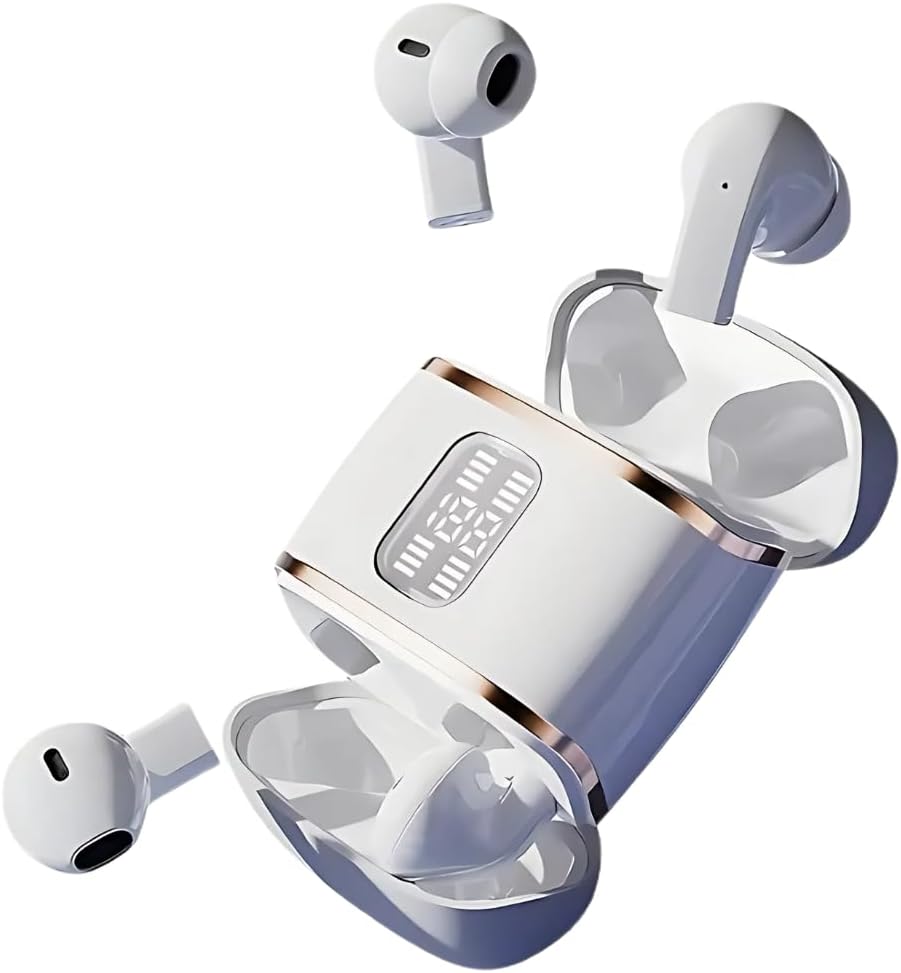
Figure 1: The J40 Dual-Headset Wireless Earbuds with their charging case, showcasing the LED display on the case.

Figure 2: A couple wearing the J40 earbuds, highlighting their design for shared listening experiences.

Figure 3: The J40 earbuds and charging case, emphasizing the strong endurance of up to 40 hours of listening time.
Opsætning
1. Opladning af øretelefoner og etuiet
Before first use, fully charge the earbuds and the charging case. Connect the provided USB-C cable to the charging port on the case and a power source. The LED display on the case will indicate the charging status. Ensure both earbuds are placed correctly in the case for them to charge.
2. Bluetooth-parring
- Sørg for, at ørepropperne er opladet og taget ud af opladningsetuiet. De vil automatisk gå i parringstilstand.
- Aktiver Bluetooth på din enhed (smartphone, tablet osv.).
- Søg efter "Dobles J40" or "J40" in the list of available Bluetooth devices.
- Select the device name to connect. Once connected, you will hear a confirmation tone.
For detailed app-based setup and binding, refer to the AI User Manual steps shown below:

Figure 4: Step-by-step guide for using the AI app, including QR code scanning, headset pairing, and device binding. Note: One code binds one headset and cannot be changed.
Betjeningsvejledning
Tryk på kontrolelementer
The J40 earbuds feature intuitive touch controls on each earbud. Specific functions may vary slightly based on your device and app settings, but common controls include:
- Afspil/pause: Et enkelt tryk på begge øretelefoner.
- Næste nummer: Dobbelttryk på den højre øreprop.
- Forrige nummer: Dobbelttryk på den venstre øreprop.
- Besvar/afslut opkald: Et enkelt tryk på begge øretelefoner.
- Afvis opkald: Langt tryk på en af øretelefonerne.
- Aktiver stemmeassistent: Tryk tre gange på en af øretelefonerne.
AI-dialogtilstand
The earbuds support an AI Dialogue Mode, enhancing communication and interaction. This feature is particularly useful for high-definition calls and real-time translation functionalities when used with the dedicated app.

Figure 5: A user experiencing high-definition calls with the J40 earbuds, similar to face-to-face chat quality.

Figure 6: Individuals engaging in conversation, demonstrating the use of AI Dialogue Mode for enhanced communication.
The J40 earbuds are versatile for various scenarios:

Figure 7: Depiction of the earbuds' utility in multiple scenarios, including overseas travel, work, learning, and sports.
Opretholdelse
- Rensning: Regularly clean the earbuds and charging case with a soft, dry, lint-free cloth. Do not use abrasive cleaners or immerse them in water.
- Batteripleje: To prolong battery life, avoid fully discharging the earbuds and case frequently. Store them with some charge if not used for extended periods.
- Opbevaring: Opbevar ørepropperne i deres opladningsetui, når de ikke er i brug, for at beskytte dem mod støv og skader. Opbevar dem et køligt og tørt sted væk fra ekstreme temperaturer.
- Vandtæthed: These earbuds are NOT waterproof. Avoid exposure to water, sweat, or high humidity.
Fejlfinding
| Problem | Mulig årsag | Løsning |
|---|---|---|
| Øretelefoner parrer ikke | Low battery; out of range; not in pairing mode; previously paired to another device. | Charge earbuds; ensure device Bluetooth is on and within range; put earbuds back in case and remove to re-enter pairing mode; disconnect from other devices. |
| Ingen lyd eller lav lydstyrke | Volume too low on device; earbuds not properly seated; connection issue. | Increase device volume; ensure earbuds are securely in ears; re-pair earbuds. |
| Ladeetui oplader ikke | Cable issue; power source issue; dirty charging port. | Try a different USB-C cable; try a different power adapter/port; clean charging port gently. |
| Intermitterende forbindelse | Interference; distance from device; obstacles. | Move closer to your device; avoid strong electromagnetic interference; ensure no large obstacles between earbuds and device. |
Specifikationer
| Modelnavn | Dobles J40 |
| Varemodelnummer | J40 |
| Forbindelsesteknologi | Trådløs (Bluetooth) |
| Øreplacering | In Ear |
| Formfaktor | In Ear |
| Kontroltype | App-styring / Touch-styring |
| Støjkontrol | Aktiv støjreduktion |
| Materiale | Plast |
| Farve | Hvid |
| Vandmodstandsniveau | Ikke vandafvisende |
| Inkluderede komponenter | Kabel (USB-C) |
| Fabrikant | NEW SENYANG |
| ASIN | B0F1DXCK86 |

Figure 8: Internal components of the earbud, illustrating the high rebound ring diaphragm for enhanced sound.

Figure 9: Visual representation of audio dynamic compensation, designed to restore 99% of the on-site listening sense.
Garanti & Support
For garantioplysninger og teknisk support henvises til produktemballagen eller kontakt producenten direkte. Gem din købskvittering som købsbevis.


