
Indledning
Tak for købetasing the Sigma 50mm F2 DG Contemporary lens. This manual provides essential information for the safe and effective use of your new lens. Please read it thoroughly before using the product and keep it for future reference.
Sikkerhedsforanstaltninger
- Do not look at the sun or other strong light sources through the lens, as this can cause permanent vision damage.
- Hold objektivet væk fra direkte sollys, når det ikke er i brug, for at undgå brandfare.
- Avoid exposing the lens to extreme temperatures, humidity, or dust.
- Forsøg ikke at skille linsen ad eller ændre den. Reparationer bør kun udføres af autoriseret servicepersonale.
- Opbevares utilgængeligt for børn.
Pakkens indhold
Bekræft at alle varer er til stede i din pakke:
- Sigma 50mm F2 DG Contemporary Lens
- Lens Hood (LH633-02S)
- Frontlinsedæksel
- Bageste objektivdæksel
- Instruktionsmanual (dette dokument)
Dele af objektivet
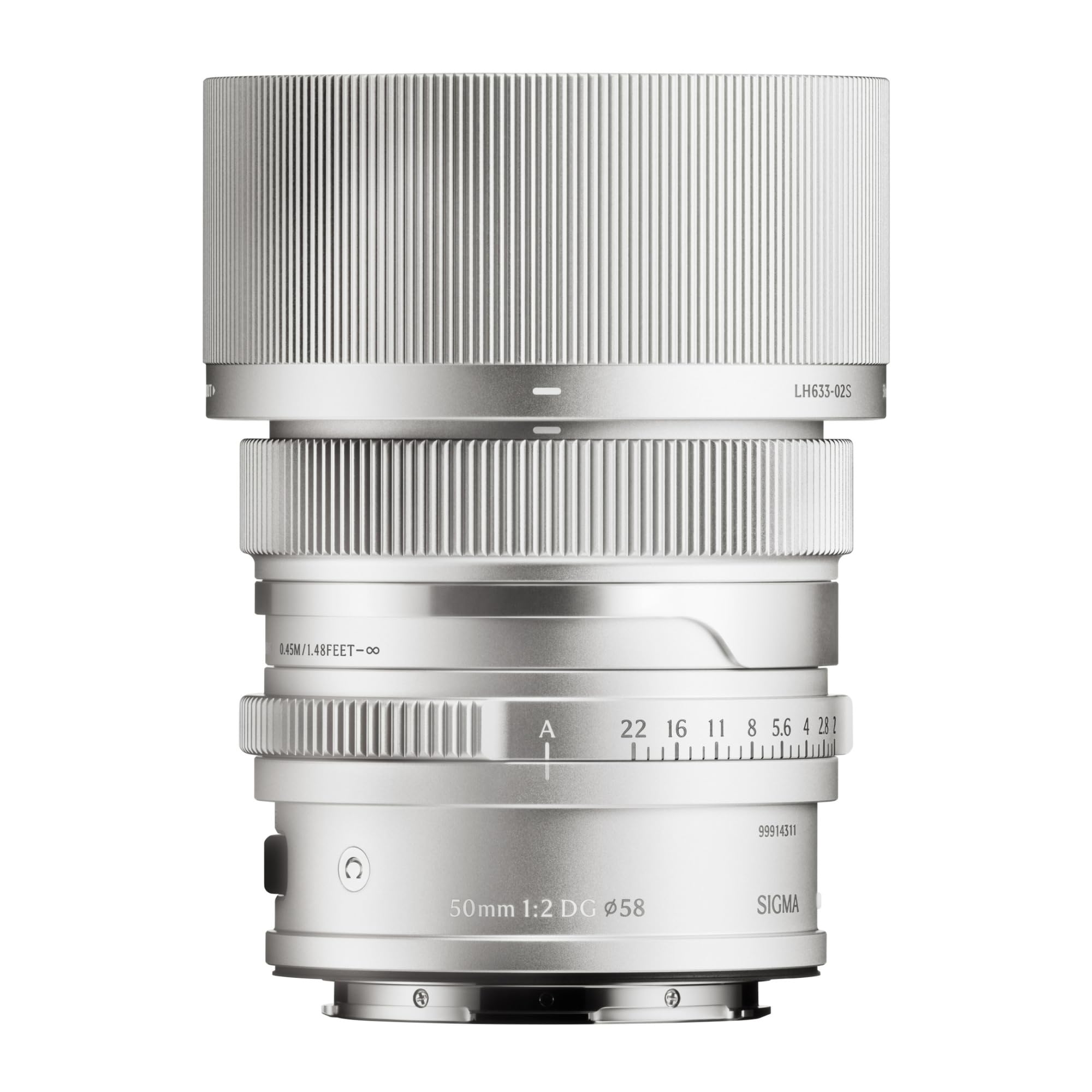
This image displays the Sigma 50mm F2 DG Contemporary lens, a prime lens designed for L-mount cameras. It features a sleek silver finish and a compact design, suitable for various photographic applications.
The Sigma 50mm F2 DG Contemporary lens features several key components:
- Fokusring: Bruges til manuel fokusering.
- Blændering: Allows direct control over the lens aperture.
- Objektivmontering: Connects the lens to the camera body (L-Mount).
- Lens Hood Attachment Point: Where the dedicated lens hood is secured.

The image shows the LH633-02S lens hood, a cylindrical accessory with a ribbed exterior, designed to attach to the Sigma 50mm F2 DG Contemporary lens. It helps to prevent stray light from entering the lens, reducing flare and ghosting, and offers protection to the front element.
Opsætning
Fastgøring af objektivet
- Sørg for, at både kameraet og objektivet er slukket.
- Fjern det bagerste objektivdæksel fra objektivet og kamerahusdækslet fra kameraet.
- Align the mounting index on the lens with the mounting index on the camera body.
- Sæt objektivet i kamerafatningen, og drej det med uret, indtil det klikker på plads. Tving ikke objektivet.
Attaching the Lens Hood (LH633-02S)
- Juster den røde prik på modlysblænden med den røde prik på forsiden af objektivet.
- Drej modlysblænden med uret, indtil den låses sikkert på plads.
- To remove, press the release button on the lens hood and rotate counter-clockwise.
Drift
Fokusering
This lens supports both autofocus (AF) and manual focus (MF).
- Autofokus: Set your camera's focus mode to AF. The lens will automatically focus when the shutter button is half-pressed.
- Manuel fokus: Set your camera's focus mode to MF. Rotate the focus ring on the lens to adjust focus manually. Use your camera's focus peaking or magnification features for precise focusing.
Blændekontrol
The lens features an aperture ring for direct control over the aperture setting. You can also control the aperture through your camera body, depending on your camera's settings and mode.
Kompatible kameraer
This lens is designed for L-Mount cameras, including models such as Leica SL, Leica TL2, and Leica CL.
Opretholdelse
Rengøring af linsen
- Brug en blæsebørste til at fjerne støv fra linsens overflade.
- For smudges or fingerprints, use a clean, soft microfiber cloth specifically designed for optical lenses. Apply a small amount of lens cleaning solution to the cloth, not directly to the lens.
- Never use abrasive materials, solvents, or harsh chemicals to clean the lens.
Opbevaring
- Når de ikke er i brug, skal både det forreste og det bageste objektivdæksel monteres.
- Store the lens in a cool, dry place, away from direct sunlight and high humidity.
- If storing for an extended period, consider using a desiccant to prevent mold growth.
Fejlfinding
- Objektivet genkendes ikke af kameraet: Ensure the lens is securely attached to the camera body. Power off and restart the camera. Check for any firmware updates for both the lens and camera.
- Autofokus virker ikke: Verify the camera's focus mode is set to AF. Ensure there is sufficient light and contrast in the scene for the autofocus system to operate effectively.
- Billederne er slørede: Check that the lens is properly focused. Ensure the shutter speed is fast enough to prevent camera shake, especially in low light. Clean the lens elements if smudges are present.
- Lens hood difficult to attach/remove: Ensure proper alignment of the red dots. Do not force the hood; it should click into place smoothly.
Specifikationer
| Modelnavn | 31S969 |
| Brændvidde | 50 mm |
| Maksimal blænde | F2 |
| Minimum blænde | F2 |
| Linsetype | Prime linse |
| Kompatible monteringer | Leica L |
| Fokus Type | Autofokus |
| Billedstabilisering | No image stabilization |
| Vandmodstandsniveau | Ikke vandafvisende |
| Varens vægt | 2 pund |
Garanti og support
Garantioplysninger
Dette produkt leveres med en 9 års garanti. Please retain your proof of purchase for warranty claims. The warranty covers manufacturing defects under normal use. It does not cover damage caused by misuse, accidents, unauthorized repairs, or normal wear and tear.
Kundesupport
For technical assistance, service, or warranty inquiries, please contact Sigma customer support through their official website or the retailer where you purchased the product. Have your model number (31S969) and proof of purchase ready when contacting support.