
Indledning
Thank you for choosing the Belkin Portable 20,000 mAh Power Bank. This device is designed to provide reliable and fast charging for your mobile devices, featuring an integrated USB-C cable and 30W Power Delivery. Its compact and lightweight design makes it ideal for travel, ensuring your devices stay powered wherever you go. This manual provides essential information on how to set up, operate, maintain, and troubleshoot your power bank.

Image: The Belkin Portable 20,000 mAh Power Bank in blue, showcasing dens elegante design.
Nøglefunktioner
- Integreret USB-C-kabel: For convenient charging on the go.
- 30W strømforsyning: Enables fast charging for smartphones, tablets, and even some laptops like the MacBook Air.
- 20,000 mAh Kapacitet: Provides up to 87 hours of additional battery life for an iPhone 16 Pro, charging 0-50% in approximately 25 minutes.
- Samtidig opladning: Charge up to three devices concurrently using the integrated USB-C cable, USB-C port, and USB-A port, with a shared output of 30W.
- LED-indikator: Displays the power bank's charging status.
- Pass-through-opladning: Charge your devices while the power bank itself is being recharged.
- Lightweight and Travel-Friendly: Weighing less than 395 grams, it meets aviation safety standards for carry-on luggage.
- Bæredygtigt design: Made from 72% post-consumer recycled materials with 100% plastic-free packaging.
Opsætning
Første opladning af powerbanken
Before first use, fully charge your Belkin Power Bank. Connect the power bank to a wall charger using a compatible USB-C cable (not included for recharging the power bank itself, only the integrated cable is for output). The LED indicators will show the charging progress. A full charge typically takes up to 12 hours.

Image: The power bank connected to a wall outlet for recharging, simultaneously charging a smartphone via its integrated cable. This illustrates pass-through charging.
Betjeningsvejledning
Opladning af dine enheder
- Brug af det integrerede USB-C-kabel: Extend the integrated USB-C cable from the power bank and connect it directly to your USB-C compatible device.
- Brug af USB-C-porten: Connect your device's USB-C charging cable to the power bank's USB-C output port.
- Brug af USB-A-porten: Connect your device's USB-A charging cable to the power bank's USB-A output port.

Image: The Belkin power bank connected to an iPhone via its integrated USB-C cable, demonstrating seamless high-speed charging.
Opladning af flere enheder
The power bank supports charging up to three devices simultaneously with a combined output of 30W. You can use the integrated USB-C cable, the USB-C port, and the USB-A port at the same time.
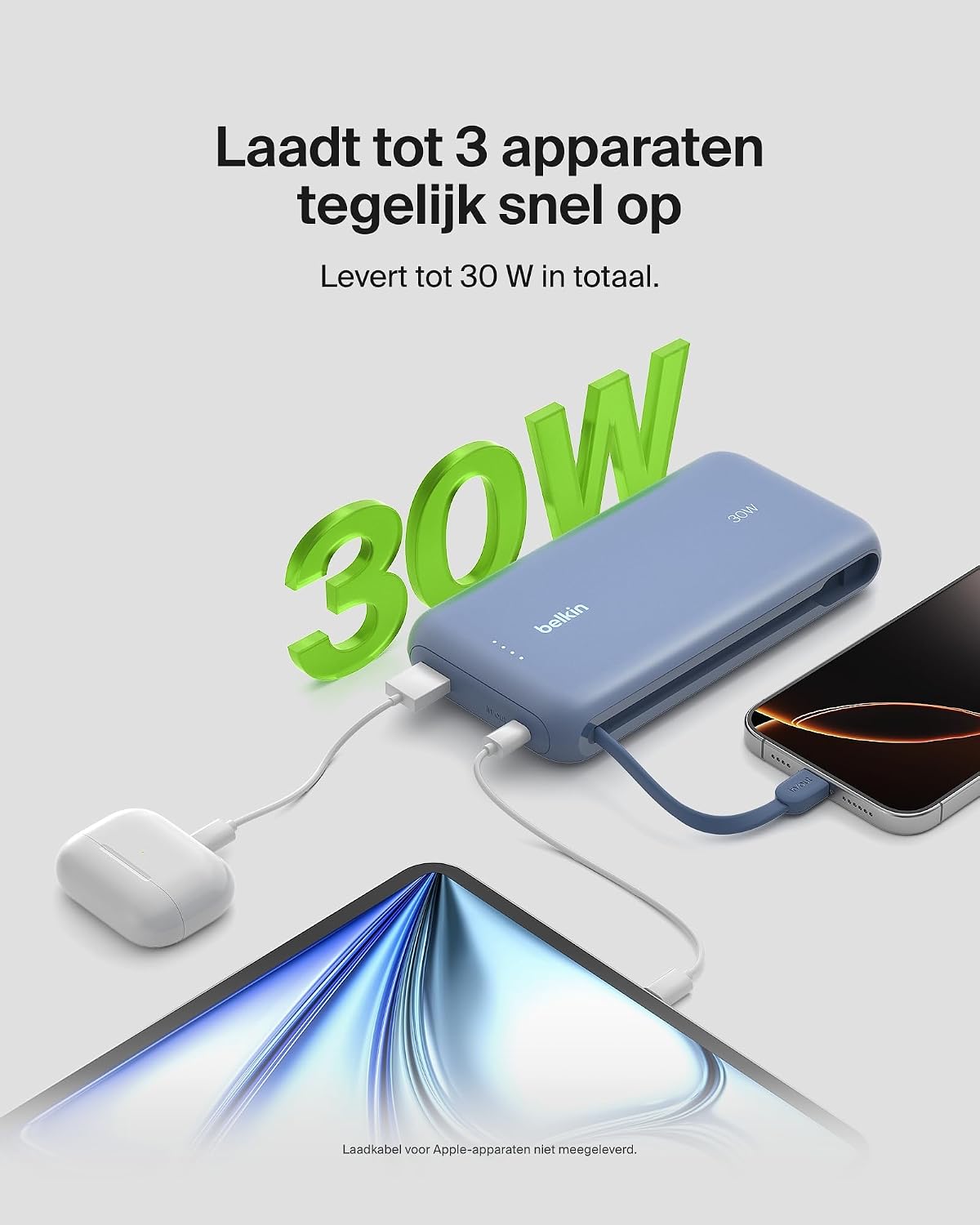
Image: The power bank simultaneously charging a smartphone, a tablet, and wireless earbuds, illustrating its capability to charge up to three devices with a total output of 30W.
LED batteristatusindikator
The power bank features LED lights that indicate the remaining battery level and charging status. Refer to the table below for interpretation:
| LED-status | Mening |
|---|---|
| Alle lysdioder faste | Fuldt opladet |
| LEDs blinking sequentially | Opladning i gang |
| Fewer LEDs solid | Resterende batterikapacitet |
Opretholdelse
- Rensning: Brug en blød, tør klud til at rengøre powerbanken. Undgå at bruge skrappe kemikalier eller slibende materialer.
- Opbevaring: Opbevar powerbanken et køligt, tørt sted væk fra direkte sollys og ekstreme temperaturer.
- Batteripleje: For at forlænge batteriets levetid, undgå at aflade powerbanken helt regelmæssigt. Genoplad den, når batteriniveauet er lavt.
- Integrated Cable Care: When not in use, ensure the integrated USB-C cable is properly stowed to prevent damage.
Fejlfinding
Fælles problemer og løsninger
- Enheden oplader ikke:
- Ensure the power bank is charged. Check the LED indicators.
- Kontroller, at opladningskablet er korrekt tilsluttet til både powerbanken og din enhed.
- Prøv et andet opladningskabel eller en anden port på powerbanken.
- Bekræft, at din enhed er kompatibel med powerbankens opladningsspecifikationer.
- Langsom opladning:
- Ensure your device supports fast charging (Power Delivery) to utilize the 30W output.
- If charging multiple devices, the total 30W output is shared, which may result in slower charging for individual devices.
- Check if the cable used supports fast charging.
- Powerbanken oplades ikke:
- Ensure the wall adapter and cable used for recharging the power bank are functional and properly connected.
- Prøv en anden vægadapter eller et andet kabel.
Belkin SmartProtect Safety Features
The Belkin Power Bank is equipped with SmartProtect technology, which includes multiple safety features to protect your devices and the power bank itself:
- Overopladningsbeskyttelse
- Overstrømsbeskyttelse
- Overmandsbeskyttelse
- Kortslutningsbeskyttelse
- Output Overvoltage Beskyttelse
- Output High/Low Temperature Protection
- Input High/Low Temperature Protection
- Beskyttelse mod signalinterferens
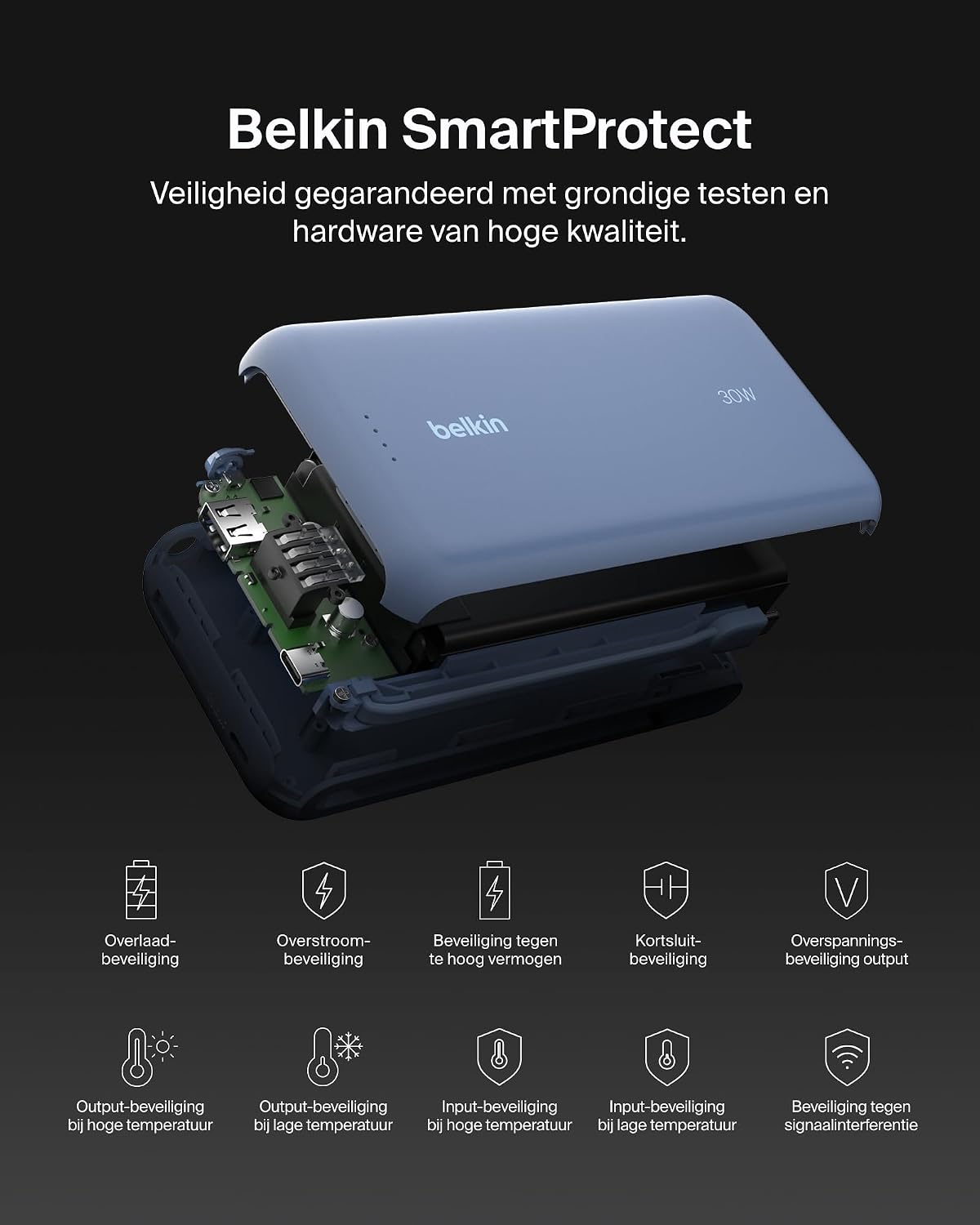
Billede: En eksploderet view of the Belkin Power Bank, highlighting its internal components and the comprehensive Belkin SmartProtect safety features, including protection against overcharge, overcurrent, and short-circuits.
Specifikationer
| Feature | Detalje |
|---|---|
| Modelnummer | BPB024hqBL |
| Batterikapacitet | 20,000 mAh |
| Udgangseffekt | Up to 30W Power Delivery (shared) |
| Connector Type | Integrated USB-C cable, 1x USB-C port, 1x USB-A port |
| Voltage | 5 volt |
| Ampslette | 3 Ampere |
| Opladningstid (PowerBank) | Ca. 12 timer |
| Produktdimensioner | 15.4 x 7.62 x 2.51 cm |
| Varens vægt | 395 gram |
| Battericellesammensætning | Lithium-ion |
| Kompatible enheder | Apple iPhone 16 series, iPhone 15 series, iPhone 14 series, iPhone 13 series, Samsung Galaxy S22/S23/S24/S25 series, iPad Pro, iPad Air, iPad, iPad Mini, and other USB-C/USB-A compatible devices. |
Garanti og support
Garantioplysninger
This Belkin Portable Power Bank comes with a 2 års producentgaranti. Additionally, it includes a Connected Equipment Warranty, providing peace of mind for your connected devices. Please retain your proof of purchase for warranty claims.
Kundesupport
For further assistance, technical support, or warranty inquiries, please visit the official Belkin support webwebsted eller kontakt deres kundeservice. Du kan finde mere information på www.belkin.com/support.