
1. Introduktion
This manual provides detailed instructions for the installation, setup, and operation of your ASD 20-Inch Smart RGBW Flush Mount Ceiling Light. This LED lighting fixture combines a modern design with advanced smart features, offering a versatile lighting solution for various indoor spaces. It features RGBW color-changing capabilities, dimming, and control via a remote or a smartphone app, with compatibility for Alexa and Google Assistant.
2. Sikkerhedsoplysninger
Læs venligst alle instruktioner omhyggeligt inden installation og brug. Gem denne manual til senere brug.
- Elektrisk sikkerhed: Always turn off power at the circuit breaker before installing, servicing, or cleaning the fixture. Consult a qualified electrician if you are unsure about electrical wiring.
- Installation: Ensure the mounting surface can support the weight of the fixture. Follow all local electrical codes and ordinances.
- Håndtering: Do not handle the fixture with wet hands. Avoid direct eye exposure to the light source when illuminated.
- Miljø: Denne lampe er klassificeret til damp locations but is intended for indoor use only. Do not expose to direct water spray or submersion.
- Rensning: Brug en blød, tør klud til rengøring. Brug ikke skrappe kemikalier eller slibende rengøringsmidler.
3. Pakkens indhold
Kontroller, at alle komponenter er til stede, før installationen påbegyndes:
- ASD 20-Inch Smart RGBW Flush Mount Ceiling Light Fixture (2 units)
- Fjernbetjening (1 enhed)
- Monteringsudstyr (skruer, trådmøtrikker)
- Instruktionsmanual
4. Produktspecifikationer
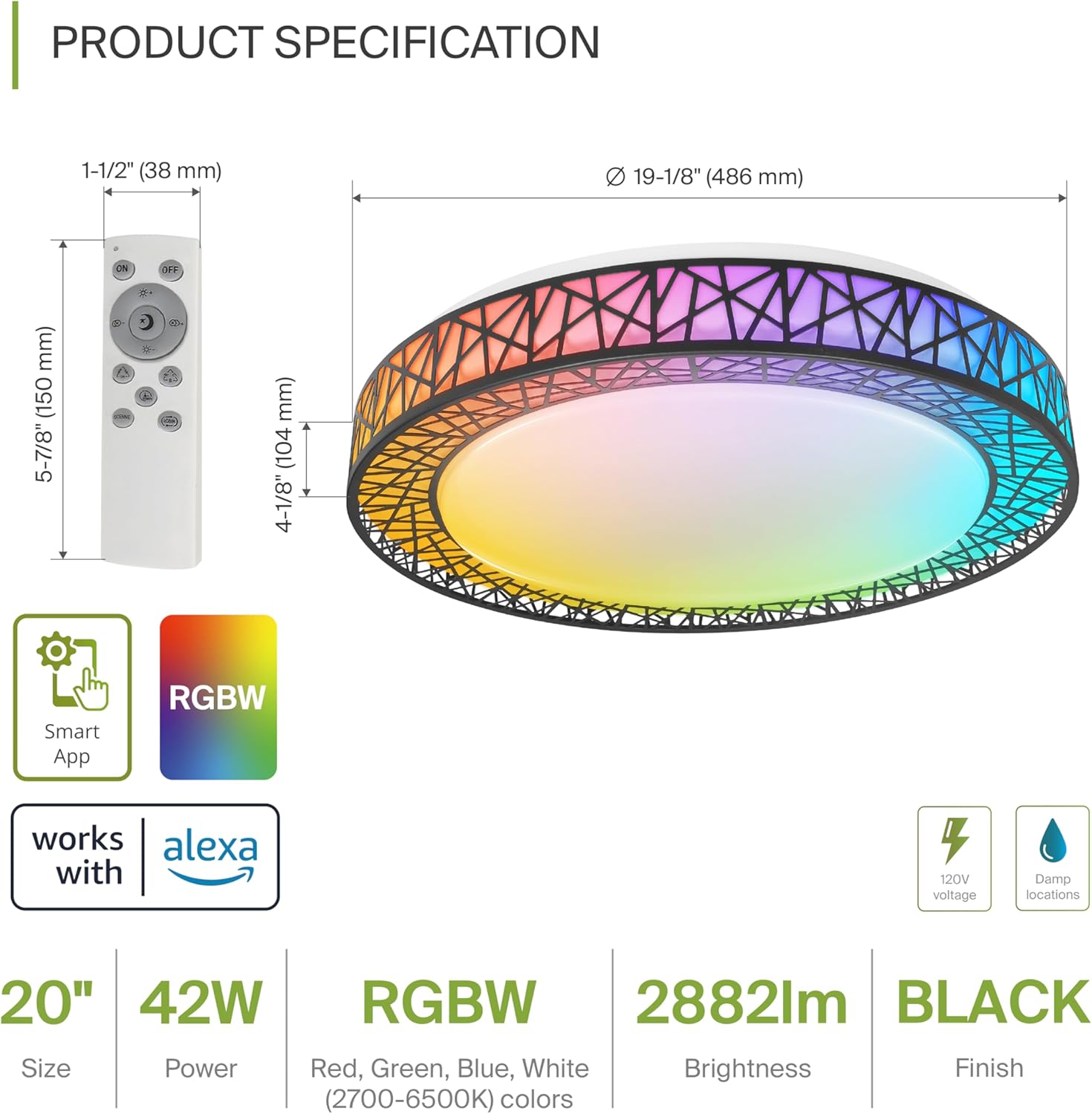
Product Specification Diagram: Dimensions, remote control, and key features.
| Feature | Detalje |
|---|---|
| Mærke | ASD |
| Modelnavn | LOFT |
| Modelnummer | A-LFM20D42SRGBW-B-2p |
| Farve | 20" | Black | RGBW |
| Materiale | Acrylic, Alloy Steel |
| Produktdimensioner | 19.1 cm L x 19.1 cm B x 4.1 cm H |
| Strømkilde | Hardwired |
| Wattage | 42 watt |
| Voltage | 120 volt |
| Lysstyrke | 2579 lumen (maks.) |
| Farvetemperatur | 2700-6500K (CCT justerbar) |
| Særlige funktioner | RGBW, Remote Control, Smart App, Dimmable |
| Kontrolmetode | Remote, Voice (Alexa, Google Assistant) |
| Indendørs/Udendørs brug | Indendørs |
| Vandmodstandsniveau | Vandafvisende (Damp Bedømte steder) |
| Gennemsnitligt liv | 50,000 timer |
| Certificering | ETL opført |
5. Installationsvejledning
Før start skal du sørge for, at strømmen er afbrudt ved afbryderen.

Installation Diagram: Visual guide for mounting the light fixture.
- Forbered armaturet: Remove the lens from the light fixture by rotating it clockwise.
- Monter beslaget: Attach the two screws to the outlet box on your ceiling.
- Ledningsforbindelser: Connect the wires: Black to Black, White to White, and Ground to Ground. Secure these connections with wire nuts.
- Sikre armaturet: Carefully tuck all wires back into the outlet box. Attach the light fixture to the mounting bracket.
- Reattach the Lens: Rotate the lens counter-clockwise to secure it to the fixture.
Når den er installeret, skal strømmen til afbryderen genoprettes.
6. Smart Feature Setup
6.1. ASD SMART App Control
The ASD Smart RGBW Flush Mount Ceiling Light can be controlled via the ASD SMART App on your smartphone (Wi-Fi internet connection required).
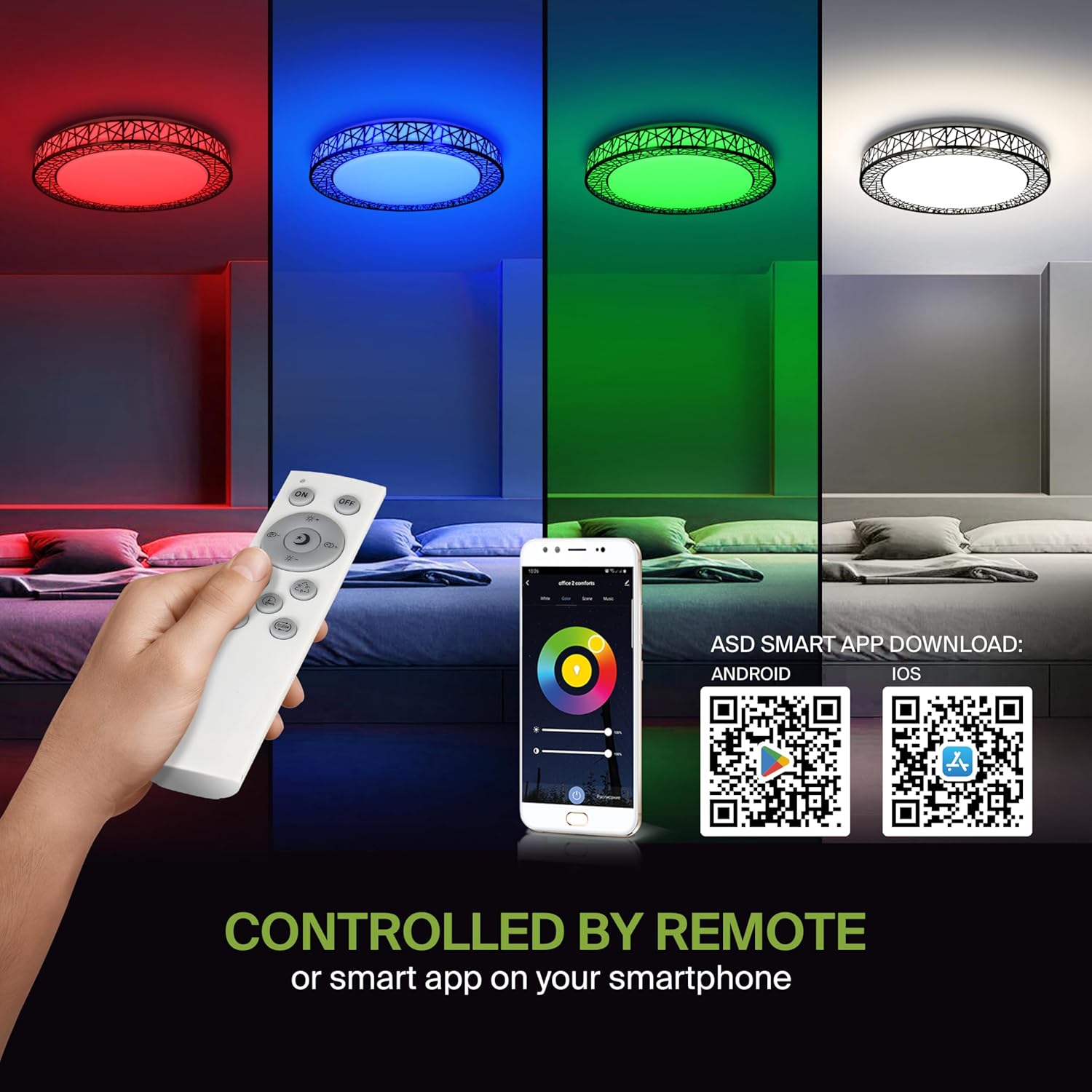
Remote control and ASD SMART App interface with QR codes for download.
- Download appen: Scan the QR code provided in the product images or search for "ASD SMART" in the Apple App Store (til iOS) eller Google Play Butik (til Android).
- Registrer/Log ind: Følg instruktionerne i appen for at oprette en konto eller logge ind.
- Tilføj enhed: In the app, select the option to add a new device. Follow the pairing instructions to connect your ceiling light to the app via Wi-Fi.
6.2. Stemmestyring (Alexa og Google Assistant)
The fixture is compatible with Amazon Alexa and Google Assistant for convenient voice control.

Voice control compatibility with Alexa and Google Assistant.
- Tilknyt konto: Open your Alexa or Google Home app. Navigate to the 'Skills' or 'Works with Google' section.
- Søg efter ASD SMART: Søg efter the "ASD SMART" skill/service and enable it.
- Forbinde: Link your ASD SMART account with your Alexa or Google Home account.
- Opdag enheder: Ask Alexa or Google Assistant to discover new devices, or manually initiate device discovery in their respective apps.
7. Betjeningsvejledning
7.1. Betjening af fjernbetjening
Use the included remote control to manage your light fixture's functions.
Remote control for easy access to light functions.
- Tænd/sluk: Tryk på tænd/sluk-knappen for at tænde eller slukke lyset.
- Justering af lysstyrke: Use the brightness buttons to increase or decrease the light intensity (smoothly dimmable).
- Color Selection (RGBW): Press the dedicated color buttons (Red, Green, Blue, White) or use the color wheel/mode buttons to cycle through 16.7 million colors.
- Farvetemperatur (CCT): Adjust the white light color temperature between 2700K (warm white) and 6500K (cool white).
- Scenetilstande: Select pre-programmed lighting patterns or scenes.
7.2. App-kontrolfunktion
The ASD SMART App offers comprehensive control over your light fixture.
- Full Color Spectrum: Access the full 16.7 million RGBW color palette.
- Præcis dæmpning: Adjust brightness levels with fine control.
- Planlægning: Set schedules for the light to turn on/off or change modes at specific times.
- Gruppering: Group multiple ASD smart lights to control them simultaneously.
- Brugerdefinerede scener: Create and save your own custom lighting scenes.
7.3. Voice Command Examples
After linking your device to Alexa or Google Assistant, use commands such as:
- "Alexa, tænd for [Lysnavn]."
- "Hey Google, set [Light Name] to blue."
- "Alexa, dim the [Light Name] to 50%."
- "Hey Google, make the [Light Name] warmer."
8. Vedligeholdelse
To ensure the longevity and optimal performance of your ASD Smart RGBW Flush Mount Ceiling Light, follow these maintenance guidelines:
- Rensning: Sørg for, at strømmen til armaturet er slukket, inden rengøring. Brug en blød, tør eller let fugtetamp cloth to wipe the surface. Avoid using abrasive cleaners, solvents, or harsh chemicals, as these can damage the finish or electrical components.
- Inspektion: Periodically check the fixture for any signs of damage, loose connections, or wear. If any issues are found, turn off the power and consult a qualified electrician.
- Udskiftning af pære: This fixture uses integrated LED technology and does not require bulb replacement. The LEDs are designed for a long lifespan.
9. Fejlfinding
If you encounter issues with your ASD Smart RGBW Flush Mount Ceiling Light, refer to the following common solutions:
| Problem | Mulig årsag | Løsning |
|---|---|---|
| Lyset tænder ikke | Ingen strøm, løse ledninger, defekt kontakt | Kontroller afbryderen. Sørg for, at alle ledningsforbindelser er sikre. Test vægkontakten. |
| Fjernbetjening virker ikke | Dead batteries, remote out of range, pairing issue | Replace remote batteries. Ensure remote is within operating range. Re-pair the remote with the light (refer to app instructions for pairing). |
| App kontrol virker ikke | No Wi-Fi connection, incorrect app pairing, outdated app | Verify Wi-Fi connectivity. Ensure the light is correctly paired in the ASD SMART App. Update the app to the latest version. |
| Stemmestyring svarer ikke | Account not linked, device not discovered, incorrect commands | Ensure ASD SMART account is linked to Alexa/Google Assistant. Redo device discovery. Use correct voice commands. |
| Lyset flimrer eller dæmpes uventet | Unstable power supply, loose wiring, incompatible dimmer (if applicable) | Check power supply stability. Verify wiring. This light is dimmable via remote/app; external dimmers may cause issues. |
10. Garantioplysninger
ASD tilbyder en 5 års begrænset garanti for dette produkt. Denne garanti dækker materiale- og fabrikationsfejl under normal brug. Gem venligst din købsbevis til garantikrav. For detaljerede garantivilkår og -betingelser henvises til den officielle ASD webwebsted eller kontakt kundesupport.
11. Kundesupport
If you have any questions, require technical assistance, or need to make a warranty claim, please contact ASD customer support through the following channels:
- Webwebsted: Visit the official ASD Lighting webwebsted for ofte stillede spørgsmål og supportressourcer.
- E-mail: Refer to your product packaging or the ASD webhjemmeside for kundeservice e-mailadresser.
- Telefon: Refer to your product packaging or the ASD webhjemmeside for kundeservice telefonnumre.
Please have your model number (A-LFM20D42SRGBW-B-2p) and purchase date ready when contacting support.