
1. Produktet er slutview
The ShanWan Q38 is a versatile wireless Bluetooth controller designed for a wide range of gaming platforms. It features advanced controls such as Hall Effect joysticks and micro-switch buttons for enhanced precision and responsiveness.

Billede 1.1: Top-down view of the ShanWan Q38 Wireless Bluetooth Controller, showcasing dens kompakte design og knaplayout.
2. Pakkens indhold
Sørg venligst for, at alle varer er til stede i pakken:
- ShanWan Q38 Wireless Bluetooth Controller
- USB opladningskabel
- Brugervejledning (dette dokument)
- 1 AAA Battery (pre-installed or included separately)
3. Opsætning og tilslutning
3.1 Opladning af controlleren
Before initial use, ensure the controller is sufficiently charged. Connect the provided USB charging cable to the controller's charging port and to a USB power source (e.g., computer, USB wall adapter). The LED indicator will show charging status.
3.2 Kompatibilitet
The ShanWan Q38 controller is compatible with the following platforms:
- Nintendo Switch / Switch 2 (firmware upgrade may be required for Switch 2)
- Steam dæk
- PC (Windows)
- Android devices (phones, tablets)
- iPhone
- iPad
- macOS devices
- PS4 (as indicated by mode switch, specific compatibility may vary)

Image 3.1: The ShanWan Q38 controller demonstrating compatibility with multiple gaming platforms.
3.3 Tilslutning via Bluetooth
Sådan tilslutter du controlleren til din enhed:
- Tænd: Press and hold the Home button on the controller until the indicator lights begin to flash.
- Vælg tilstand: Use the mode switch located on the top edge of the controller to select the appropriate mode for your device:
- X Mode: For Mobile & Computer (Android, PC, macOS, iOS).
- S-tilstand: For Nintendo Switch.
- P-tilstand: For PS4 (if compatible).
- Parring: On your device, navigate to the Bluetooth settings and search for available devices. Select "ShanWan Q38" (or similar) from the list to pair.
- Bekræftelse: Once successfully paired, the indicator light on the controller will become solid.
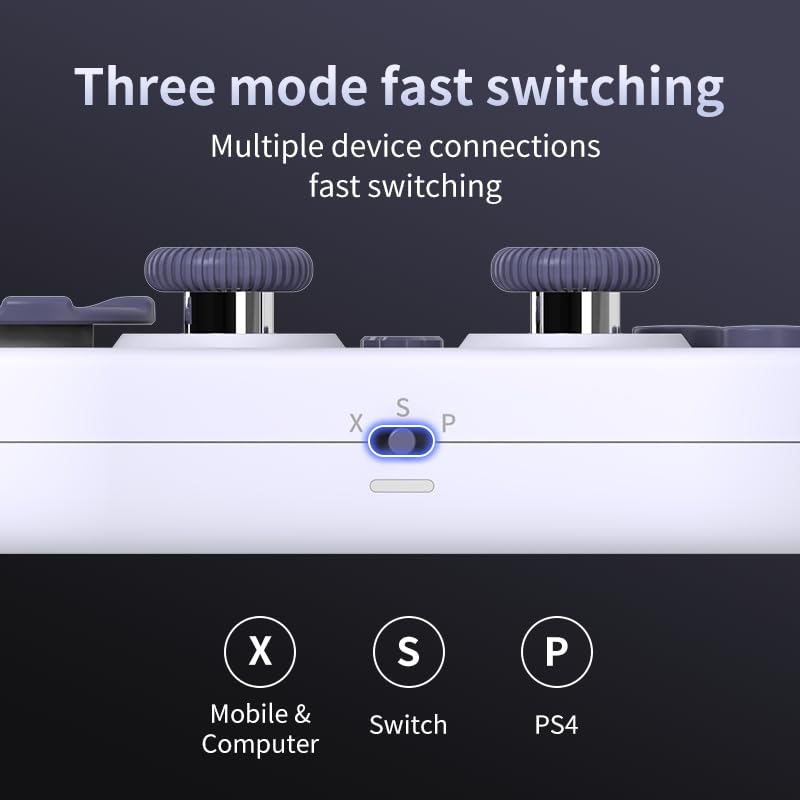
Image 3.2: Detail of the three-mode fast switching selector on the controller.
3.4 Customization and Calibration
For advanced customization, including button remapping and macro functions, download the official "gamepad space" application. This application also allows for controller calibration to ensure optimal performance.
4. Betjening af controlleren
4.1 Nøglefunktioner
- Hall-effekt joysticks: Provides high precision and sensitivity. The joystick height is adjustable between 5mm and 8mm for personalized comfort.
- Composite Micro-Switch Buttons: These buttons offer a tactile response similar to mechanical keyboards, providing quick and precise input.
- Mechanical Triggers: Designed for fast response times.
- Dual Micro Motors: Provides dual vibration feedback for an immersive gaming experience.
- Somatosensory Gyroscope: Equipped with a 6-axis gyroscope for motion control in supported games.

Image 4.1: Detail of the adjustable Hall Effect joysticks.

Image 4.2: Close-up of the composite micro-switch action buttons.

Image 4.3: Diagram illustrating the internal components of the composite micro-keypad.

Image 4.4: Visual representation of the controller's gyroscope functionality.
4.2 Spiloplevelse
The compact design allows for portability, making it suitable for gaming on the go with devices like the Nintendo Switch or smartphones.

Image 4.5: Controller in use with a Nintendo Switch.

Image 4.6: Controller paired with a smartphone for mobile gaming.
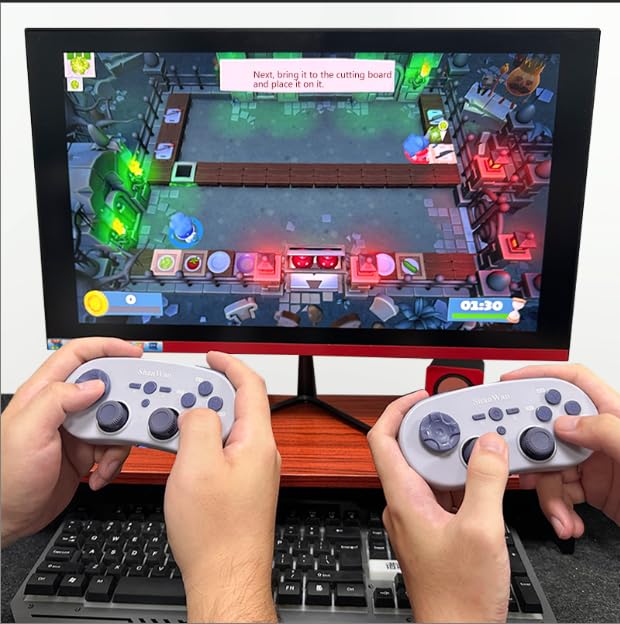
Image 4.7: Two controllers in use for multiplayer gaming on a PC.
5. Vedligeholdelse
To ensure the longevity and optimal performance of your ShanWan Q38 controller, follow these maintenance guidelines:
- Rensning: Brug en blød, tør klud til at tørre controlleren af. Ved genstridigt snavs, tør den let.amp En klud kan bruges, men sørg for, at der ikke kommer fugt ind i enheden. Undgå skrappe kemikalier eller slibende rengøringsmidler.
- Opbevaring: Opbevar controlleren et køligt, tørt sted væk fra direkte sollys og ekstreme temperaturer.
- Batteripleje: If using replaceable AAA batteries, remove them if the controller will not be used for an extended period to prevent leakage.
- Undgå dråber: Beskyt controlleren mod fysiske stød og fald, som kan beskadige de interne komponenter.
6. Fejlfinding
If you encounter issues with your ShanWan Q38 controller, refer to the following common problems and solutions:
- Controller Does Not Power On:
- Ensure the battery is correctly inserted and has sufficient charge. Replace AAA batteries if necessary.
- Connect the controller to a power source using the USB cable to confirm if it charges.
- Difficulty Connecting via Bluetooth:
- Ensure the controller is in the correct mode (X, S, or P) for your device.
- Sluk og tænd for din enheds Bluetooth.
- Glem enheden i dine Bluetooth-indstillinger, og prøv at parre den igen.
- Sørg for, at controlleren er inden for din enheds effektive rækkevidde.
- Buttons or Joysticks Not Responding Correctly:
- Calibrate the controller using the "gamepad space" application.
- Kontrollér for eventuelle fysiske forhindringer eller snavs omkring knapperne eller joystickene.
- Ensure the controller's firmware is up to date, especially for Switch 2 compatibility.
- Tilfældige afbrydelser:
- Sørg for, at der ikke er stærke trådløse forstyrrelser i nærheden.
- Keep the controller close to the connected device.
- Re-pair the controller if disconnections are frequent.
7. Specifikationer
| Feature | Detalje |
|---|---|
| Modelnummer | Q38 |
| Fabrikant | ShanWan |
| Forbindelse | Bluetooth trådløs |
| Kompatibilitet | Switch/Switch 2, Steam Deck, PC, Android, iPhone, iPad, macOS, PS4 |
| Joystick-type | Hall Effect, Adjustable Height (5mm-8mm) |
| Knaptype | Composite Micro-Switch |
| Vibration | Dual Micro Motors |
| Bevægelseskontrol | 6-akse Gyroskop |
| Pakkedimensioner | 5.63 x 4.53 x 1.54 tommer |
| Varens vægt | 4.6 ounce |
| Batterier | 1 AAA batteri påkrævet (medfølger) |

Image 7.1: Physical dimensions of the ShanWan Q38 controller.
8. Garanti og support
For warranty information and customer support, please refer to the official ShanWan webwebstedet eller kontakt den forhandler, hvor du købte produktet. Gem din købsbevis til garantikrav.