
Edifier ed-mr5-black-au
Edifier MR5 Active Studio Speakers
Brugermanual
Produkt overview
The Edifier MR5 Active Studio Speakers are designed for professional audio monitoring, offering high-resolution sound reproduction with versatile connectivity options. Featuring a 3-way design, tri-amped crossover, and 110W of power, these speakers deliver accurate and balanced audio for mixing, mastering, and audiophile listening.

Billede: Forside view of the Edifier MR5 Active Studio Speakers, showcasing their sleek black design and copper-accented drivers.
Nøglefunktioner
- Hi-Res Studio Quality: The active monitor speaker reproduces every detail without distortion, thanks to its 24-bit/96 kHz ADC, tri-amplified crossover, and 110W power amplifiers. It meets Hi-Res Audio/Wireless specifications for reliable reference reproduction.
- Omfattende tilslutningsmuligheder: Bluetooth V6.0 with LDAC wirelessly transmits music in studio resolution. Balanced XLR and TRS inputs, along with RCA and AUX, provide lossless signal paths for interfaces, mixers, and turntables, ensuring stable levels.
- 3-Way Sound: Separate woofers, tweeters, and internal mids and lows, controlled by an active crossover, ensure optimal mixing, mastering, and audiophile enjoyment for natural vocals, contoured bass, and a wide stereo panorama.
- Direkte kontrol: The front multi-function knob, headphone jack, and AUX input allow instant switching between recording and editing. Rear sound potentiometers adapt the monitor speakers to room acoustics and personal preferences.
- Studio-Grade Aesthetics: The low-resonance cabinet, with a patented acoustic design and noble copper accents, is available in 2 color variants. It features 2 side bass-reflex ports for bass diffusion from the internal woofer.

Image: A visual representation highlighting the Hi-Res Audio, Hi-Res Wireless, LDAC, and 24bit/96kHz capabilities of the Edifier MR5 speakers, emphasizing crystal-clear audio.

Image: An illustration detailing the versatile connectivity options of the Edifier MR5, including RCA & AUX inputs, Balanced XLR & TRS inputs, and a Headphone Output.

Image: A cutaway diagram illustrating the 3-way sound reproduction system of the Edifier MR5, showing the 5-inch long-throw woofer, 1-inch silk dome tweeter, and 3.75-inch mid driver.

Image: Edifier MR5 speakers positioned on a media console in a living room setting, demonstrating their ability to deliver expansive room-filling sound for home entertainment.
Opsætning
1. Udpakning og inspektion
Carefully remove the speakers and all accessories from the packaging. Inspect for any signs of damage during transit. Retain the packaging for future transport or storage.
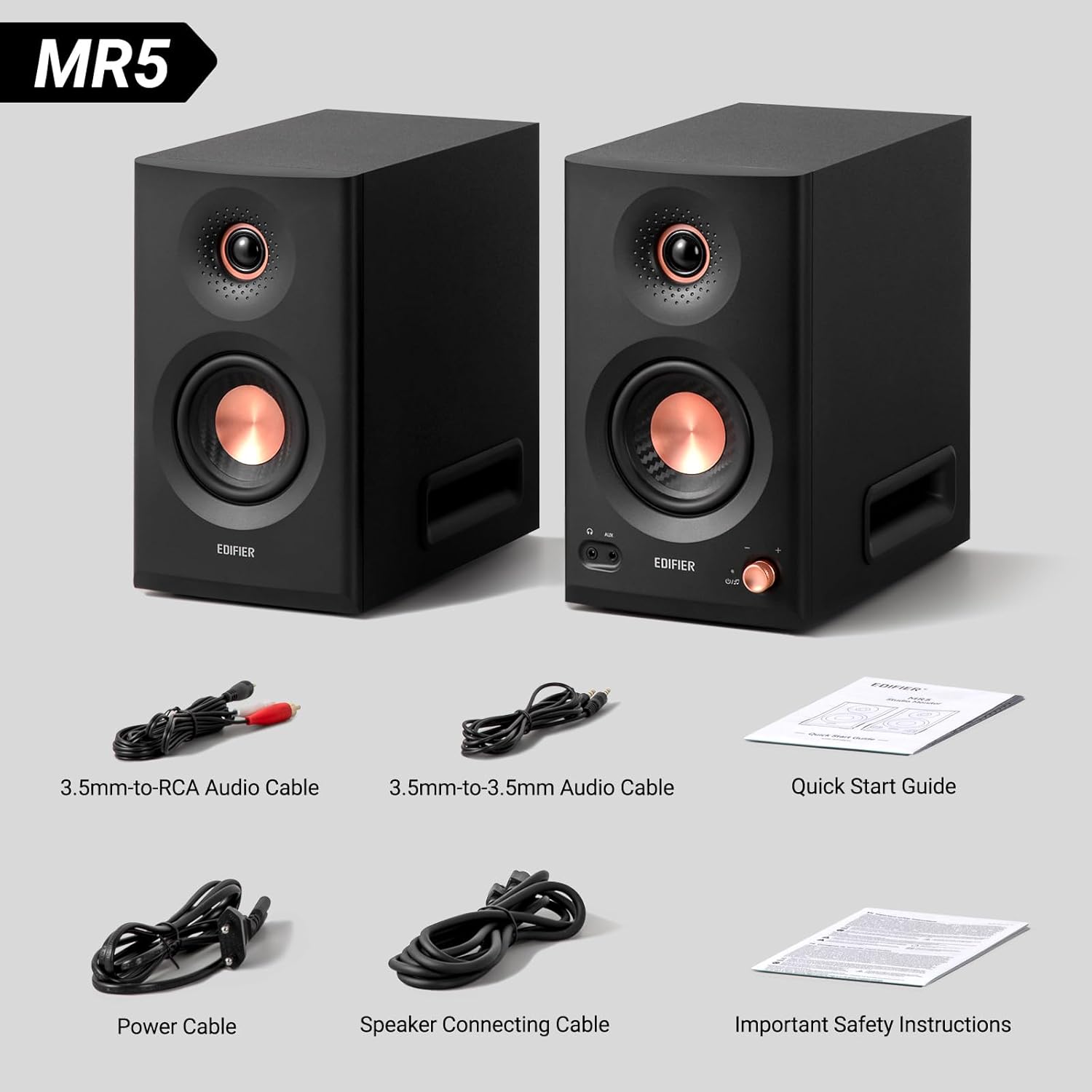
Image: The Edifier MR5 speakers displayed alongside their included accessories: 3.5mm-to-RCA Audio Cable, 3.5mm-to-3.5mm Audio Cable, Quick Start Guide, Power Cable, Speaker Connecting Cable, and Important Safety Instructions.
2. Højttalerplacering
For optimal sound, place the speakers on a stable, flat surface, ideally at ear level when seated. Ensure there is adequate space around the speakers for proper bass reflex port operation (located on the sides). Position them symmetrically to your listening position to create an accurate stereo image.
3. Tilslutning af strøm
- Connect the provided power cable to the power input on the back of the active speaker (the one with controls).
- Sæt den anden ende af strømkablet i en passende stikkontakt.
- Ensure the power switch on the active speaker is in the "Off" position before connecting.
4. Tilslutning af lydkilder
MR5-højttalerne tilbyder flere inputmuligheder:
- XLR/TRS Balanced Inputs: For professional audio interfaces, mixers, or other balanced sources. Use XLR or 1/4-inch TRS cables.
- RCA-indgange: For consumer audio devices like CD players, turntables (with a pre-amp), or sound cards. Use RCA cables.
- AUX-indgang (3.5 mm): For connecting portable devices like smartphones or tablets. Use a 3.5mm audio cable.
- Bluetooth: For wireless connection from Bluetooth-enabled devices.
Connect the passive speaker to the active speaker using the dedicated speaker connecting cable provided.
Betjeningsvejledning
1. Tænd/sluk
Locate the power switch on the rear panel of the active speaker. Flip it to the "On" position to power on the speakers. Flip it to "Off" to power down.
2. Kontroller på frontpanelet
- Multifunktionsknap: This knob controls volume. Pressing it can cycle through input modes (XLR, TRS, RCA, AUX, Bluetooth).
- Hovedtelefonudgang: Plug in your headphones here for private listening. The speaker output will mute automatically when headphones are connected.
- AUX-indgang: A convenient 3.5mm input for quick connection of portable devices.
3. Rear Panel Controls (EQ Adjustment)
On the rear panel of the active speaker, you will find potentiometers for adjusting the sound to your room acoustics and personal preference. These typically include controls for treble and bass, allowing you to fine-tune the frequency response.
4. Bluetooth-parring
- Switch the input mode to Bluetooth using the multi-function knob. The Bluetooth indicator light will flash.
- On your device (smartphone, tablet, computer), enable Bluetooth and search for "Edifier MR5".
- Select "Edifier MR5" to pair. Once connected, the Bluetooth indicator light will be solid.
- The MR5 supports multipoint connectivity, allowing two devices to be connected simultaneously for easy source switching.

Image: Edifier MR5 speakers set up on a desk, demonstrating seamless Bluetooth V6.0 multipoint connectivity with both a smartphone and a desktop computer, allowing for easy switching between audio sources.
5. ConneX App (If Applicable)
For advanced control and customization, download the Edifier ConneX app from your device's app store. The app may offer additional EQ settings, input management, and firmware updates. Refer to the app's instructions for detailed usage.
Opretholdelse
Rensning
Wipe the speaker cabinets with a soft, dry cloth. Do not use liquid cleaners or abrasive chemicals, as they may damage the finish or internal components. Avoid touching the speaker drivers directly.
Opbevaring
If storing the speakers for an extended period, disconnect them from power and store them in a cool, dry place, ideally in their original packaging to protect them from dust and physical damage.
Fejlfinding
| Problem | Mulig årsag | Løsning |
|---|---|---|
| Ingen lyd fra højttalere. |
|
|
| Forvrænget eller uklar lyd. |
|
|
| Problemer med Bluetooth-forbindelse. |
|
|
Specifikationer
| Modelnavn | MR5 |
| Maksimal højttalerudgangseffekt | 110 watt |
| Frekvensrespons | 46 Hz |
| Forbindelsesteknologi | XLR, TRS, RCA, AUX, Bluetooth |
| Lydudgangstilstand | Stereoanlæg |
| Højttaler type | Boghylde |
| Anbefalede anvendelser | For music player, For computer |
| Kompatible enheder | Smartphone, laptop, computer, home cinema, game console |
| Produktmål (L x B x H) | 28 x 15.9 x 26.4 cm |
| Varens vægt | 12.49 kilo |
| Komponenter inkluderet | Power cable, Quick start guide |
| Farve | Sort |
| Fabrikant | Edifier |
| ASIN | B0F19CY9X2 |
| Modelnummer | ed-mr5-black-au |
Garanti og support
Garantioplysninger
Edifier products typically come with a limited warranty covering manufacturing defects. Please refer to the warranty card included in your product packaging or visit the official Edifier webwebstedet for specifikke garantivilkår og -betingelser, der gælder for din region. Gem din købsbevis til garantikrav.
Kundesupport
For technical assistance, troubleshooting beyond this manual, or warranty service, please contact Edifier customer support. You can usually find contact information (phone, email, or support portal) on the official Edifier webwebsted (www.edifier.com).
Ask a question about this manual
Ask about setup, troubleshooting, compatibility, parts, safety, or missing instructions. Manuals+ will review the question and use this page’s manual context to help answer it.