
Aiworth LD629
Aiworth LD629 Digital Voice Recorder User Manual
Model: LD629
1. Introduktion
This manual provides detailed instructions for the operation and maintenance of your Aiworth LD629 Digital Voice Activated Recorder. Please read this manual thoroughly before using the device to ensure proper function and to maximize its capabilities.
Pakkeindhold:
- Aiworth LD629 Digital Voice Recorder
- Tripod Stand
- Line-in kabel
- USB-kabel (USB-C)
- 128 GB hukommelseskort (forudinstalleret)
- Eftersalgsservicekort

Image: The Aiworth LD629 Digital Voice Recorder shown with its accessories, including the tripod stand, USB cable, and memory card.
2. Sikkerhedsoplysninger
- Udsæt ikke enheden for ekstreme temperaturer, direkte sollys eller høj luftfugtighed.
- Undgå at tabe eller udsætte enheden for kraftige stød.
- Hold enheden væk fra vand og andre væsker.
- Forsøg ikke selv at skille enheden ad eller reparere den. Kontakt kvalificeret servicepersonale.
- Brug kun de medfølgende eller anbefalede opladningskabler og tilbehør.
- Bortskaf enheden og dens batteri på en ansvarlig måde i henhold til lokale regler.
3. Produktet er slutview
The Aiworth LD629 features a user-friendly design with all primary operation buttons located on the front. It includes dual sensitive microphones for high-quality audio capture and a built-in speaker for playback.

Image: A detailed diagram illustrating the various ports and buttons on the Aiworth LD629 Digital Voice Recorder, including the dual mics, earphone jack, TF card slot, USB-C port, and control buttons.
Nøglefunktioner:
- 1536Kbps PCM High-Quality Recording
- Dual Sensitive Microphones
- 128GB Internal Memory (via pre-installed TF card)
- 1000mAh Rechargeable Battery (up to 60 hours continuous recording)
- Stemmeaktiveret optagelse (VOR)
- Startkodebeskyttelse
- Variable Play Speed (16 levels)
- AB-gentagelsesfunktion
- Line-in optagelse
- Timed Automatic Recording
- Overvågning i realtid
- Tripod Stand Compatibility (standard 1/4" screw)
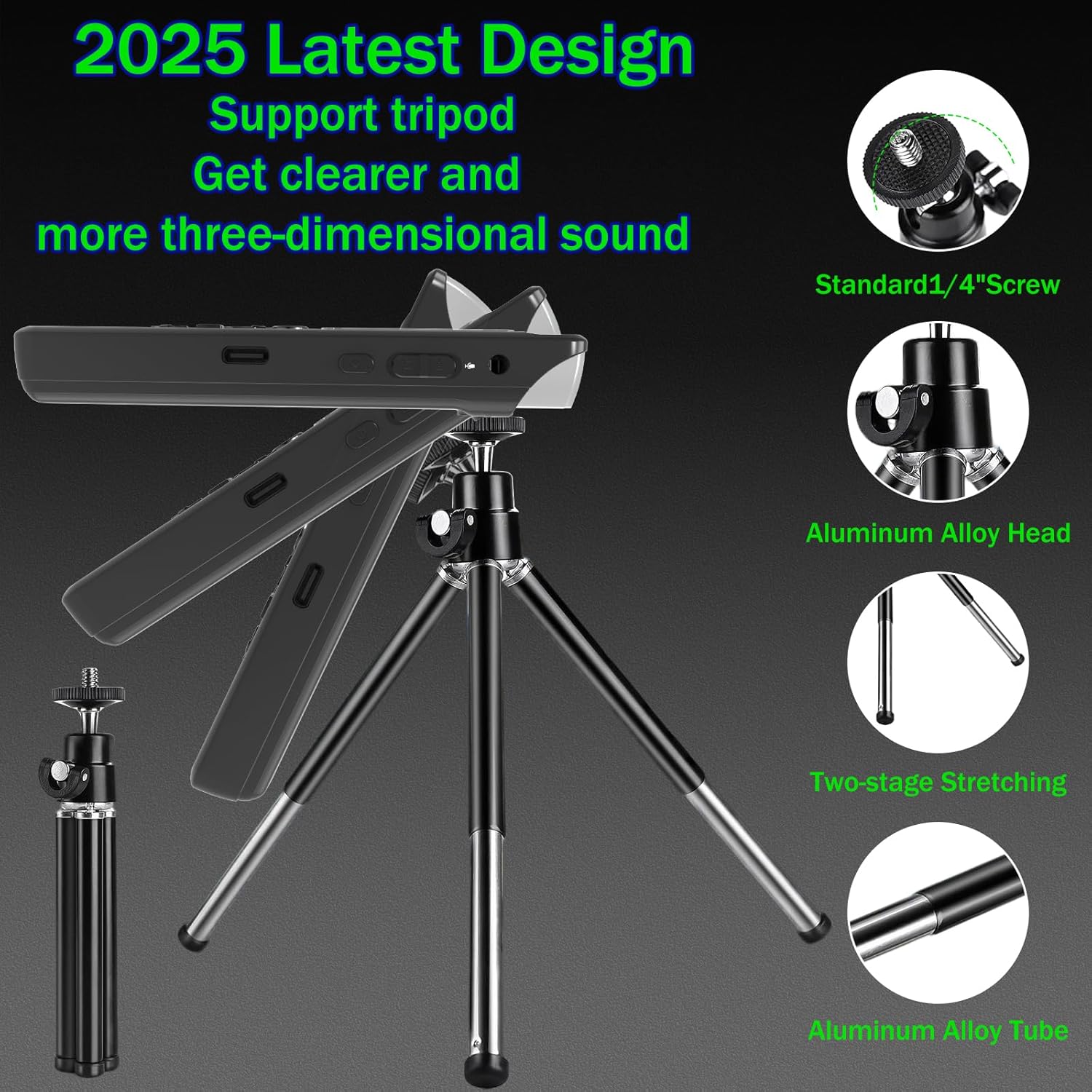
Image: The Aiworth LD629 Digital Voice Recorder shown attached to its included tripod stand, highlighting its stability and adjustable angles for optimal recording.
4. Opsætning
4.1. Første opladning
Before first use, fully charge the device. Connect the included USB cable to the recorder's USB-C port and the other end to a USB power adapter (not included) or a computer's USB port. The battery indicator on the screen will show charging status. A full charge typically takes approximately 2-3 hours.

Image: The Aiworth LD629 Digital Voice Recorder displaying its 128GB memory capacity and a visual representation of its 1000mAh battery, indicating up to 60 hours of continuous recording.
4.2. Tænd/sluk
- Sådan tænder du: Tryk på tænd/sluk-knappen, og hold den nede, indtil skærmen lyser.
- To power off: Press and hold the Power button until the screen turns off.
4.3. Indstilling af dato og klokkeslæt
It is recommended to set the correct date and time for accurate file management. Refer to the on-screen menu for "System Settings" to adjust these parameters.
5. Betjening
5.1. Grundlæggende optagelse
- Sørg for, at enheden er tændt.
- Tryk på REC button to start recording. The recording indicator will appear on the screen.
- Tryk på for at sætte optagelsen på pause Afspil/pause knap. Tryk igen for at genoptage.
- For at stoppe optagelsen og gemme file, tryk på STOP knap.
The device supports 1536Kbps PCM recording with dual sensitive microphones, capturing clear audio from up to 60 feet away.

Image: The Aiworth LD629 Digital Voice Recorder's screen displaying recording in progress, with visual cues indicating its effective recording range of up to 60 feet using dual sensitive microphones.
5.2. Stemmeaktiveret optagelse (VOR)
When VOR is enabled, the recorder will automatically start recording when sound is detected (above 60dB) and pause/save when silent. This conserves memory and battery life.
- Navigate to the "Recording Settings" menu.
- Select "VOR Mode" and set it to "ON".
- Adjust the VOR sensitivity level as needed.
- Trykke REC to enter VOR standby mode. The device will begin recording when sound is detected.

Image: The Aiworth LD629 Digital Voice Recorder illustrating its voice-activated recording feature, showing how it automatically starts recording when sound exceeds 60dB and saves when silent.
5.3. Afspilning
- From the main menu, select "Recordings" or "Music" to browse files.
- Brug navigationsknapperne til at vælge en file.
- Tryk på Afspil/pause knappen for at starte afspilning.
- Brug Volumen +/- buttons to adjust playback volume.
- Brug Forrige/Næste knapper til at springe spor over.
Variable Play Speed:
During playback, you can adjust the speed across 16 levels. This allows for faster review or slower, more detailed listening.

Image: A visual representation of the variable play speed function, explaining how users can adjust playback speed across 16 levels for faster review or detailed listening.
AB-gentagelsesfunktion:
Denne funktion giver dig mulighed for at loope et bestemt segment af en lydfil file.
- Tryk på under afspilning AB Gentag button at the desired starting point (A).
- Tryk på AB Gentag button again at the desired ending point (B). The segment between A and B will loop.
- Tryk på AB Gentag button a third time to exit the loop.

Image: A diagram explaining the A-B loop playback function, showing how to set start and end points to repeatedly play a specific audio segment.
5.4. Adgangskodebeskyttelse
The device supports a 3-digit power-on password for security, offering 8000 combinations. After three incorrect attempts, the device will automatically shut down.
- Navigate to "System Settings" and select "Password Protection".
- Enable the feature and set your desired 3-digit password.
- Remember your password, as there is no external reset pinhole.

Image: The Aiworth LD629 Digital Voice Recorder displaying its password input screen, illustrating the 3-digit password protection feature to secure recorded files.
5.5. Connecting to Computer/Phone (OTG)
Connect the recorder to a computer using the provided USB cable to transfer files. The device will appear as a removable disk. For phone connectivity via OTG, ensure your phone supports OTG functionality and use an appropriate adapter (not included).
5.6. Line-in Recording
The device supports direct recording from external audio sources like computers, radios, or other players using the line-in cable.
- Connect one end of the line-in cable to the audio output of the external device and the other end to the recorder's line-in jack.
- Start afspilning på den eksterne enhed.
- Tryk på REC button on the recorder to begin recording the audio input.

Image: A diagram demonstrating the line-in recording capability, showing how the recorder can be connected to external devices like computers or radios to directly record their audio output.
5.7. Timed Automatic Recording
You can schedule the recorder to start and stop recording automatically at specific times.
- Access the "Timed Recording" option in the settings menu.
- Set the desired start time and stop time.
- Ensure the device is powered on and in standby mode for the timed recording to activate.

Image: A diagram explaining the timed automatic recording feature, showing how to set specific start and stop times for automated recording and saving.
5.8. Overvågning i realtid
Connect headphones to the earphone jack to monitor the audio being recorded in real-time.

Image: A diagram illustrating the real-time monitoring function, showing how users can connect headphones to listen to the audio being recorded as it happens.
6. Vedligeholdelse
- Rengør enheden med en blød, tør klud. Brug ikke flydende rengøringsmidler eller aerosoler.
- Opbevar enheden på et køligt, tørt sted, når det ikke er i brug.
- Sikkerhedskopier regelmæssigt vigtige optagelser til en computer eller et cloud-lager.
- Undgå at udsætte enheden for stærke magnetiske felter.
7. Fejlfinding
| Problem | Mulig årsag/løsning |
|---|---|
| Enheden tænder ikke. | Batteriet er muligvis afladet. Oplad enheden helt. |
| Kan ikke optage. | Memory full: Delete old fileeller overføre dem til en computer. Device is locked: Check if the key lock function is enabled. |
| Dårlig optagekvalitet. | Microphones obstructed: Ensure microphones are clear. Distance from source: Move closer to the audio source. High background noise: Use noise reduction settings if available, or record in a quieter environment. |
| Kan ikke oprette forbindelse til computer. | Faulty USB cable: Try a different USB cable. Driver issue: Ensure your computer's USB drivers are up to date. Incorrect mode: Ensure the recorder is in data transfer mode if prompted. |
| Glemt adgangskode. | There is no external reset pinhole. If you forget your password, contact Aiworth customer support for assistance. |
8. Specifikationer
| Feature | Detalje |
|---|---|
| Modelnummer | LD629 |
| Hukommelseslagringskapacitet | 128 GB |
| Digital optagelsestid | Op til 9280 timer |
| Batterilevetid (optagelse) | Op til 60 timer (kontinuerlig) |
| Batteritype | 1000mAh Rechargeable (1 C battery included) |
| Optagelsesformat | WAV (PCM up to 1536Kbps) |
| Mikrofon formfaktor | Indbyggede dobbelte mikrofoner |
| Hardware-interface | USB 3.0 Type C |
| Kompatible enheder | Smartphone (via OTG), PC |
| Varens vægt | 8.4 ounce |
| Pakkedimensioner | 5.71 x 4.72 x 1.26 tommer |
| Fabrikant | Aiworth |
| Oprindelsesland | Kina |
9. Garanti og support
Your Aiworth LD629 Digital Voice Recorder comes with a standard manufacturer's warranty. Please refer to the "After-sales Service Card" included in your package for specific warranty terms and conditions.
For technical support, troubleshooting assistance, or warranty claims, please contact Aiworth customer service through their official channels. You can often find contact information on the manufacturer's website or the service card.
Visit the official Aiworth Store on Amazon for more information: Aiworth Store
Ask a question about this manual
Ask about setup, troubleshooting, compatibility, parts, safety, or missing instructions. Manuals+ will review the question and use this page’s manual context to help answer it.