
1. Introduktion
This manual provides essential information for the safe and efficient operation of your Machenike Machcreator N17A laptop. Please read this manual thoroughly before using the device and retain it for future reference.
2. Pakkens indhold
Bekræft at alle varer er til stede i pakken:
- Machenike Machcreator N17A bærbar
- Strømadapter
- Brugervejledning (dette dokument)
3. Produktet er slutview
The Machenike Machcreator N17A is a 17.3-inch laptop designed for daily computing tasks. It features an Intel N100 Processor, 8GB DDR5 RAM, and a 256GB PCIe SSD for responsive performance. The 17.3" Full HD 120Hz display provides clear visuals, and the laptop runs on Windows 11 Home.
3.1. Bærbar computerkomponenter

Figur 3.1: Forside view of the Machenike Machcreator N17A laptop.
This image shows the overall design of the Machenike Machcreator N17A laptop, highlighting its large 17.3-inch display and sleek chassis.

Figure 3.2: The 17.3-inch Full HD 120Hz display.
En detaljeret view of the laptop's 17.3-inch Full HD display, emphasizing its narrow bezels and 120Hz refresh rate for smooth visuals.

Figur 3.3: Baggrundsbelyst tastatur og touchpad.
This image highlights the backlit keyboard and the spacious touchpad, designed for comfortable typing and navigation.
3.2. Porte og stik
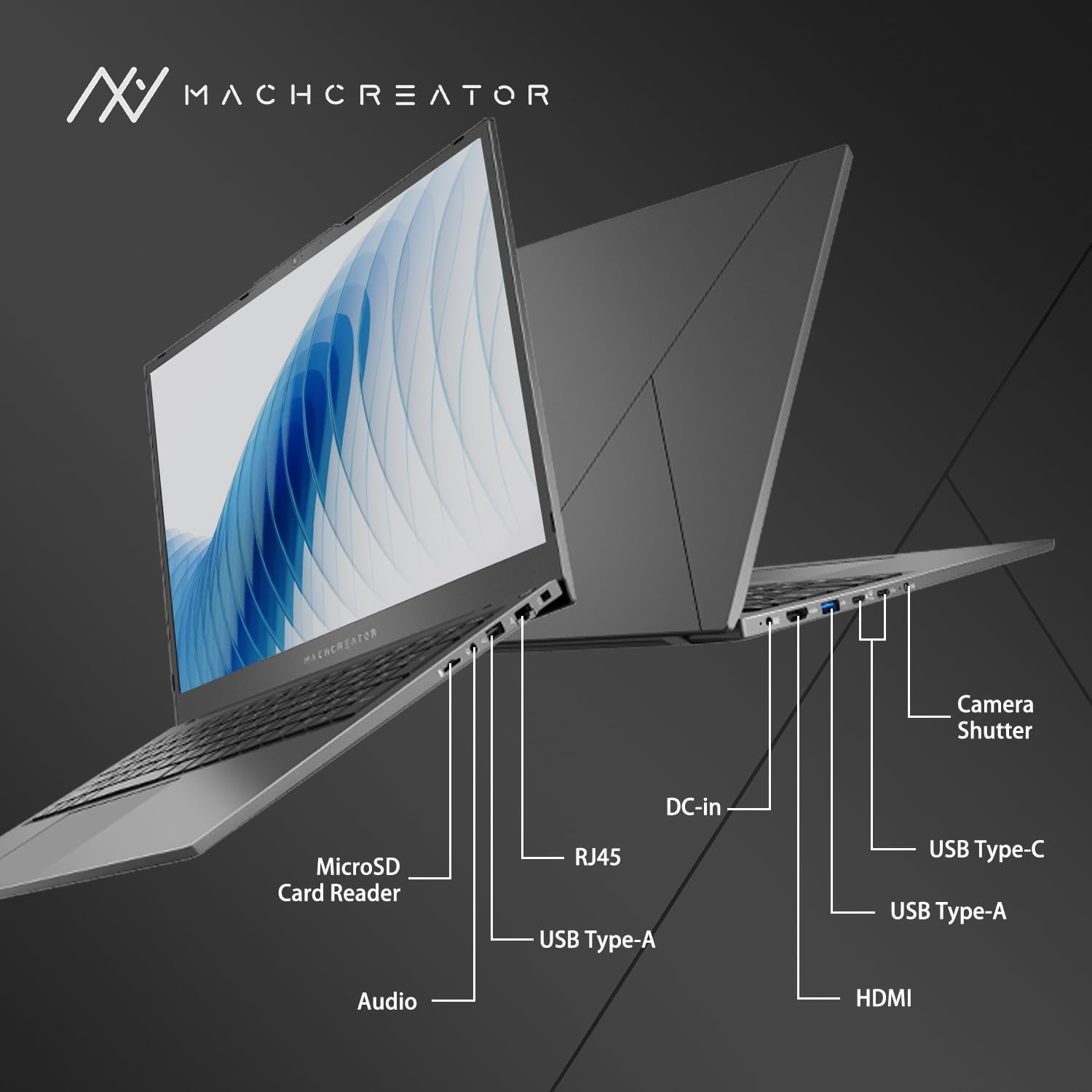
Figur 3.4: Side view with port labels.
An illustration detailing the various input/output ports available on the laptop, including USB, HDMI, and the SD card reader.
- MicroSD-kortlæser: For reading and writing data to MicroSD cards.
- DC-in: Connect the power adapter for charging and power supply.
- Thunderbolt 4 (x2): High-speed data transfer, video output, and power delivery.
- USB 2.0 Type-A (x2): Tilslut USB-enheder.
- HDMI: Tilslut til eksterne skærme eller projektorer.
- RJ45: Ethernet-port til kablet netværksforbindelse.
- Lydstik: Tilslut hovedtelefoner eller eksterne højttalere.
4. Opsætning
4.1. Første opstart
- Pak den bærbare computer og alt tilbehør ud af kassen.
- Tilslut strømadapteren til DC-in-porten på den bærbare computer og derefter til en stikkontakt.
- Åbn den bærbare computers låg.
- Tryk på tænd/sluk-knappen på tastaturet for at tænde den bærbare computer.
- Følg instruktionerne på skærmen for at fuldføre installationsprocessen for Windows 11 Home. Dette inkluderer valg af region, sprog og opsætning af din brugerkonto.
4.2. Tilslutning til Wi-Fi
- During the Windows setup, you will be prompted to connect to a Wi-Fi network. Select your desired network from the list.
- Enter the Wi-Fi password if prompted and click "Connect".
- If you skip this step, you can connect later via Windows Settings: Go to Starte > Indstillinger > Netværk og internet > Wi-Fi.
5. Betjeningsvejledning
5.1. Brug af tastatur og touchpad
The laptop features a full-size keyboard with a numeric keypad and a large touchpad. The keyboard is backlit, which can be activated or adjusted using the function keys (e.g., Fn + F5).
Figur 5.1: Tastatur- og touchpad-layout.
This image illustrates the keyboard and touchpad, showing the key layout and the size of the touchpad for user interaction.
5.2. Tilslutning af eksterne enheder
Brug de tilgængelige porte til at tilslutte eksterne enheder:
- USB-enheder: Plug USB drives, mice, or keyboards into the USB Type-A or Thunderbolt 4 (USB-C) ports.
- Eksternt display: Connect an external monitor or TV using the HDMI port or one of the Thunderbolt 4 ports (with an appropriate adapter, if needed).
- SD-kort: Insert a MicroSD card into the MicroSD Card Reader slot to access its contents.
- Kablet netværk: Connect an Ethernet cable to the RJ45 port for a stable wired internet connection.
5.3. Adjusting the Display Angle
The laptop screen can be adjusted up to a 170-degree angle, providing flexibility for various viewing positions, presentations, or collaborative work.
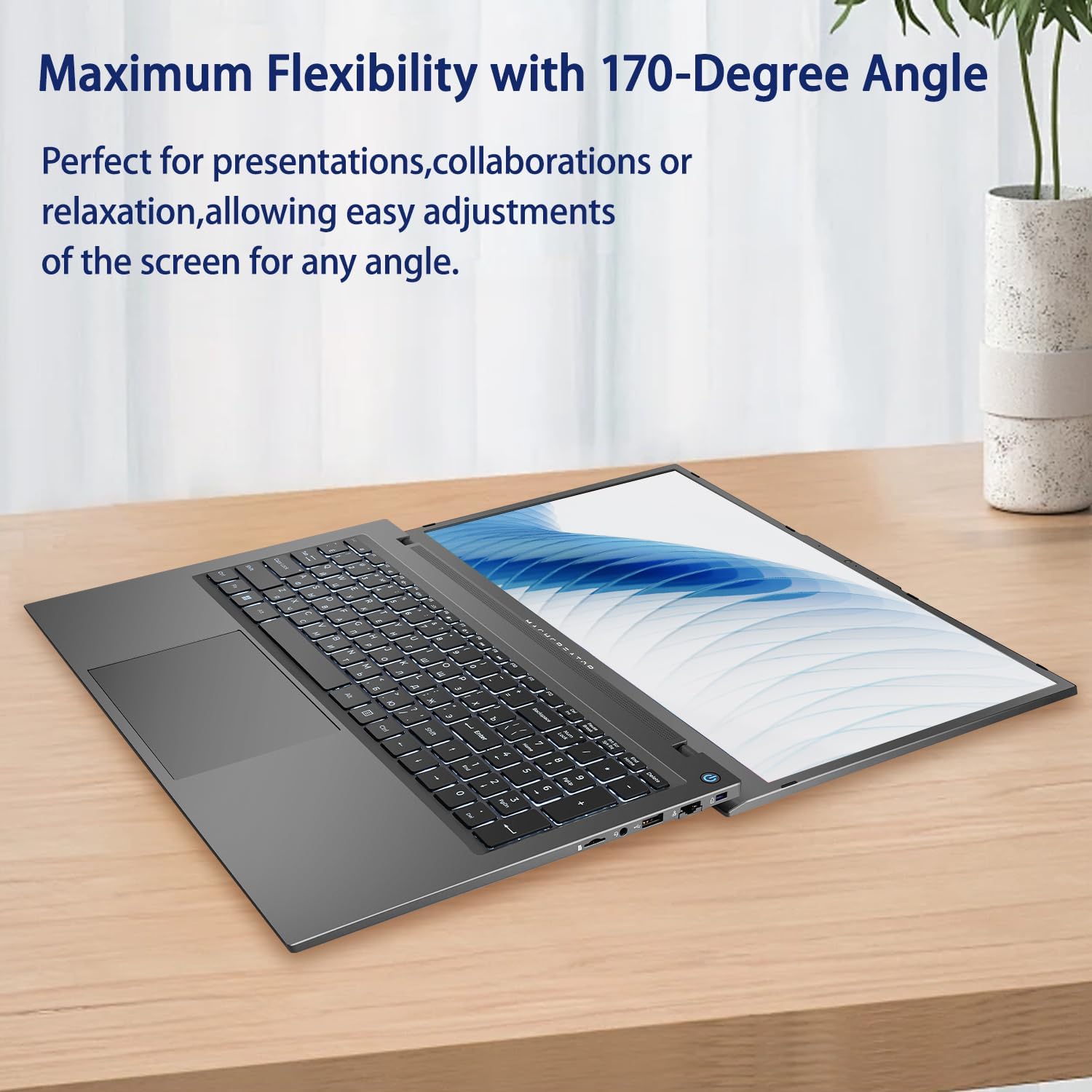
Figure 5.2: Laptop display at 170-degree angle.
This image demonstrates the laptop's ability to open its screen to a wide 170-degree angle, useful for various viewscenarier.
5.4. Opladning af den bærbare computer
Connect the provided power adapter to the DC-in port. The laptop also supports fast charging via its USB-C (Thunderbolt 4) ports with a compatible USB-C Power Delivery charger.
6. Vedligeholdelse
6.1. Rensning
- Brug en blød, fnugfri klud til at rengøre skærmen. Tør let ved genstridige mærker.ampRengør kluden med vand eller en skærmrengøringsopløsning.
- Wipe the keyboard and chassis with a soft, dry cloth. Avoid using harsh chemicals or abrasive materials.
- Sørg for, at den bærbare computer er slukket og frakoblet stikket, inden rengøring.
6.2. Batteripleje
- Undgå at aflade batteriet helt ofte.
- Udsæt ikke den bærbare computer for ekstreme temperaturer.
- If storing the laptop for an extended period, charge the battery to approximately 50-70% before turning it off.
6.3. Softwareopdateringer
Regularly update your Windows operating system and drivers to ensure optimal performance and security. Go to Starte > Indstillinger > Windows Update for at søge efter opdateringer.
7. Fejlfinding
| Problem | Mulig løsning |
|---|---|
| Den bærbare computer tænder ikke. |
|
| Ingen Wi-Fi-forbindelse. |
|
| Skærmen er blank eller flimrer. |
|
| Tastaturets baggrundsbelysning virker ikke |
|
8. Specifikationer
| Feature | Detalje |
|---|---|
| Modelnavn | Machenike Machcreator N17A |
| Processor | Intel N100 (4 Cores, up to 3.4 GHz) |
| VÆDDER | 8 GB DDR5 (4800 MHz) |
| Opbevaring | 256 GB PCIe SSD |
| Grafik | Intel UHD-grafik (integreret) |
| Vise | 17.3" FHD (1920x1080) IPS, 120Hz |
| Operativsystem | Windows 11 Home |
| Havne | 2x Thunderbolt 4, 2x USB 2.0 Type-A, 1x HDMI, 1x RJ45, 1x MicroSD Card Reader, 1x Audio Jack, 1x DC-in |
| Trådløs forbindelse | Wi-Fi (802.11n) |
| Særlige funktioner | Baggrundsbelyst tastatur, numerisk tastatur |
| Dimensioner (LxBxH) | 15.6 x 10.32 x 1.02 tommer |
| Vægt | 5.78 lbs |
| Farve | Grå |
9. Garanti og support
For warranty information and technical support, please refer to the documentation provided with your purchase or visit the official Machenike webwebsted. Gem din købsbevis til garantikrav.
Online ressourcer:
- Machenike officiel Webwebsted: www.machenike.com (Bemærk: Dette er en pladsholder URL, please refer to your product's specific warranty card for the correct support contact.)
10. Produktdemonstrationsvideo
Video 10.1: Machcreator N17A Laptop Overview.
Denne video giver et visuelt overblikview of the Machenike Machcreator N17A laptop, showcasing its design, key features, and various ports. It demonstrates the unboxing experience, the backlit keyboard, and the available connectivity options.