1. Introduktion
Thank you for choosing the Generic Life Smart Digital Door Lock M2. This advanced smart lock offers multiple secure access methods and remote management capabilities, designed to enhance the security and convenience of your home or office. Please read this manual carefully before installation and operation to ensure proper use and optimal performance.

Image 1.1: Generic Life Smart Digital Door Lock M2 Overview
This image displays the complete Generic Life Smart Digital Door Lock M2. On the right is the exterior unit, featuring a numeric keypad, a fingerprint sensor at the top, and an IC card reader symbol. On the left is the interior unit, which houses the battery compartment and the manual lock/unlock knob.
2. Nøglefunktioner
- Five Access Methods: Unlock your door using fingerprint recognition, custom passcodes, IC cards, mechanical backup keys, or remotely via a smart home assistant (Wi-Fi connectivity required).
- Fully Automatic Latch: Equipped with an aluminum alloy deadbolt and a fully automatic motor for secure locking.
- Hurtig fingeraftryksgenkendelse: Advanced sensor provides 0.3-second fingerprint recognition with up to 100 fingerprint capacity.
- Fjernstyring: Manage access control from anywhere via the associated mobile application (Android/iOS), including creating temporary or scheduled codes for guests.
- Low Battery Alarm & Emergency Power: Features a low battery alarm indicator and a USB emergency power port for temporary power supply.
- Holdbar konstruktion: Made from aluminum material with a matt black, powder-coated finish.
3. Opsætning og installation
3.1 Pakkens indhold
Før installationen påbegyndes, skal du kontrollere, at alle komponenter er til stede:
- Exterior Lock Unit
- Interior Lock Unit
- Mortise/Latch Assembly
- Installationsvejledning
- IC-kort (antallet kan variere)
- Mechanical Keys (quantity may vary)
- Assembling Kits (screws, spindle, etc.)
3.2 Batteriinstallation
The lock requires 4x AAA batteries (not included). Ensure you use high-quality alkaline batteries for optimal performance and longevity.
- Locate the battery compartment on the interior lock unit.
- Slide or lift the battery cover to open it.
- Insert 4x AAA batteries, observing the correct polarity (+/-) as indicated inside the compartment.
- Luk batteridækslet forsvarligt.

Image 3.1: Battery Installation
This image illustrates the process of installing four AAA batteries into the interior unit of the smart lock. The battery compartment is clearly visible with the cover removed, showing the correct orientation for battery placement.
3.3 Fysisk installation
Refer to the included 'Installation Guide' for detailed, step-by-step instructions on physically installing the lock on your door. This process typically involves:
- Forberedelse af døren (boring af huller om nødvendigt).
- Installing the mortise/latch assembly.
- Montering af udvendige og indvendige låseenheder.
- Tilslutning af interne kabler.
- Testing the mechanical operation.
3.4 App-parring og indledende opsætning
To utilize the smart features, download the compatible mobile application (available for Android and iOS devices). The lock supports Bluetooth, Wi-Fi, Zigbee, and Matter connectivity protocols.
- Download the recommended smart lock application from your device's app store.
- Opret en konto og log ind.
- Follow the in-app instructions to add a new device. This usually involves activating Bluetooth on your phone and bringing it close to the lock.
- Once paired via Bluetooth, configure Wi-Fi settings within the app to enable remote access.
- Set up an administrator passcode and register initial fingerprints/IC cards as prompted by the app.
4. Betjeningsvejledning
4.1 Lås op med fingeraftryk
The lock can store up to 100 unique fingerprints.
- To register fingerprints: Access the 'Fingerprint Management' section in the mobile app or follow the administrator menu instructions on the lock's keypad.
- To unlock: Place your registered finger flat on the fingerprint sensor. The lock will unlock in approximately 0.3 seconds if the fingerprint is recognized.

Image 4.1: Fingerprint Unlock
This image demonstrates the fingerprint unlock feature. A finger is shown interacting with the circular fingerprint sensor at the top of the exterior lock unit. Accompanying text highlights the speed, accuracy, and capacity of the fingerprint recognition system.
4.2 Lås op med adgangskode
You can set up multiple user passcodes, including a virtual password feature for enhanced security.
- To set passcodes: Use the mobile app or the lock's administrator menu to create and manage passcodes.
- To unlock: Enter your registered passcode on the keypad, followed by the '#' key.
- Virtual Passcode: To prevent others from guessing your code, you can enter random digits before or after your actual passcode. For example, if your passcode is '123456', you can enter '987123456098#' to unlock.

Image 4.2: Virtual Passcode Unlock
This image illustrates the virtual password feature. The smart lock's keypad is shown with a sequence of numbers being entered. A green box highlights the correct password '865677' embedded within a longer string of digits, demonstrating how random numbers can be added before and after the actual code for security.
4.3 IC Card Unlock
The lock supports unlocking with registered IC cards.
- To register IC cards: Use the mobile app or the lock's administrator menu to add new IC cards.
- To unlock: Present a registered IC card to the card reader area on the lock's keypad.
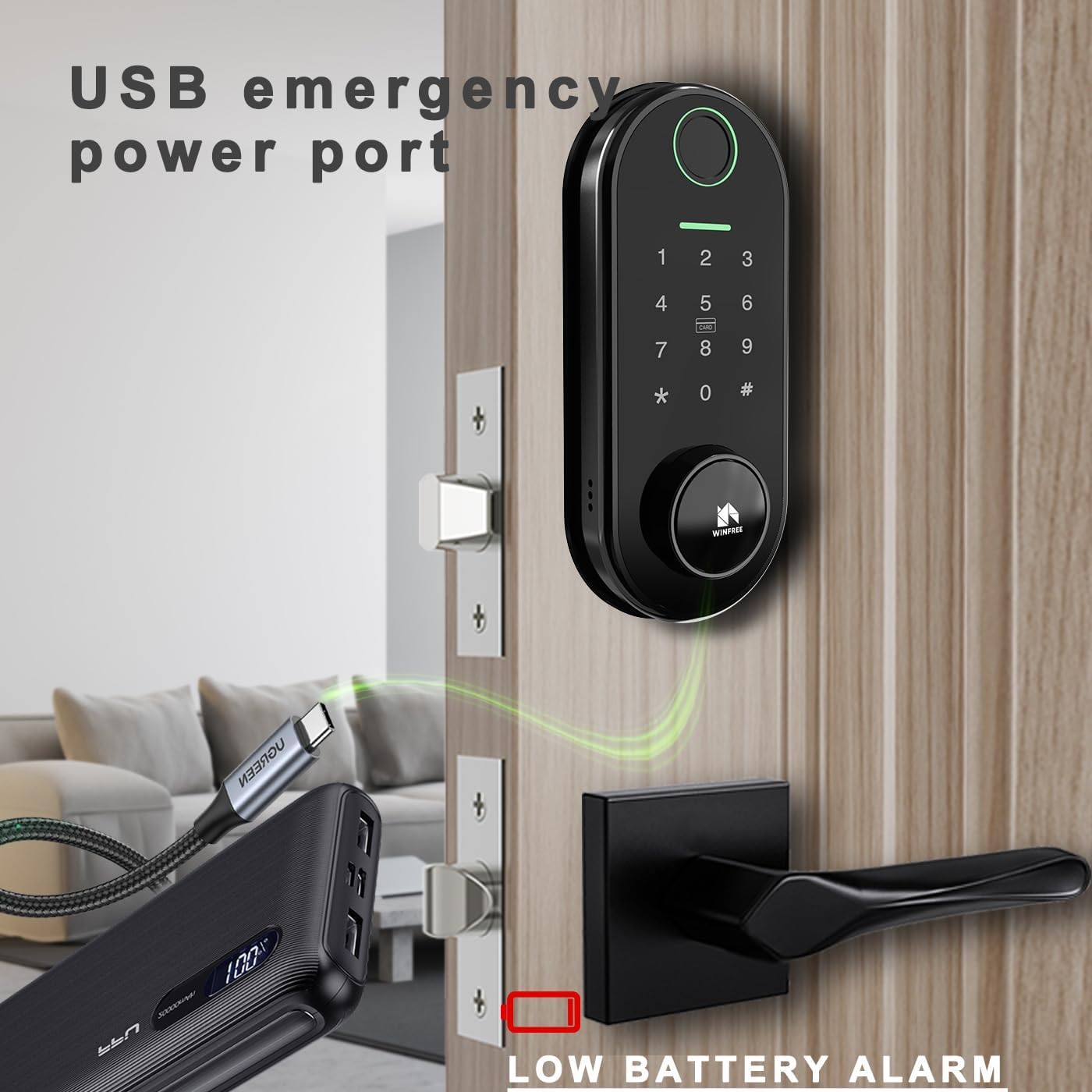
Image 4.3: IC Card Unlock
This image shows a hand holding a small, rectangular IC card labeled 'SMART LOCK' near the keypad of the smart door lock. The card is positioned over the area marked 'CARD', demonstrating the method for unlocking the door using an IC card.
4.4 Mobile App Unlock & Management
The mobile application provides comprehensive control and monitoring features.
- Fjernoplåsning: Unlock the door from anywhere with an internet connection (requires Wi-Fi gateway setup).
- Midlertidige adgangskoder: Generer engangs- eller tidsbegrænsede adgangskoder til gæster eller tjenesteudbydere.
- Unlock History: View en log over alle låse- og oplåsningshændelser, inklusive metode og bruger.
- Brugeradministration: Add, modify, or delete users, fingerprints, passcodes, and IC cards.
- Access Schedules: Set specific times or days when certain users can access the lock.
4.5 Mekanisk nøgleoplåsning
In case of battery depletion or electronic malfunction, mechanical keys provide emergency access.
- Locate the keyhole, typically concealed on the exterior unit.
- Sæt den mekaniske nøgle i, og drej den for at låse døren op.

Image 4.4: Mechanical Key and USB Emergency Power
This image shows two emergency access methods for the smart lock. A mechanical key is inserted into a discreet keyhole on the bottom of the exterior unit, providing a traditional unlock option. Additionally, a USB cable is connected to the emergency power port, indicating a way to temporarily power the lock if batteries are depleted.
5. Vedligeholdelse
5.1 Udskiftning af batteri
The lock will provide a low battery alarm when power is critically low. Replace all four AAA batteries promptly to ensure continuous operation. Refer to Section 3.2 for battery installation instructions. The typical battery life is approximately 9 months under normal usage.
5.2 Rengøring
For at bevare din låss udseende og funktionalitet:
- Tør de udvendige overflader af med en blød, tør klud.
- Undgå at bruge slibende rengøringsmidler, opløsningsmidler eller barske kemikalier, da disse kan beskadige overfladen og de elektroniske komponenter.
- Hold fingeraftrykssensoren og tastaturet rene og fri for snavs for optimal ydeevne.
6. Fejlfinding
| Problem | Mulig årsag | Løsning |
|---|---|---|
| Lås reagerer ikke. | Batterierne er brugt op. | Replace batteries (Section 3.2) or use USB emergency power (Section 4.5). |
| Fingeraftryk ikke genkendt. | Fingeren er snavset/våd, sensoren er snavset, eller fingeraftrykket er ikke korrekt registreret. | Ensure finger and sensor are clean and dry. Re-register fingerprint if necessary. |
| Adgangskoden virker ikke. | Incorrect passcode entered, or passcode expired (for temporary codes). | Verify the passcode. Check app for temporary code validity. |
| Fjernoplåsning virker ikke. | No Wi-Fi connection, or Wi-Fi gateway not properly configured. | Check Wi-Fi router and gateway connection. Ensure lock is connected to Wi-Fi in the app. |
| Låsen laver usædvanlige lyde. | Obstruction in the door frame or latch mechanism. | Inspect the door frame and latch for any obstructions. Ensure proper alignment during installation. |
7. Specifikationer
- Mærke: Generisk
- Modelnavn: LIFE_M2
- Materiale: Aluminium
- Farve: Matt sort
- Udfør type: Pulverlakeret
- Låsetype: Combination Lock, Latch
- Emnemål (L x B x H): 6.8 x 2.5 x 1 tommer
- Varens vægt: 4.4 pund
- Strømkilde: 4x AAA batterier (medfølger ikke)
- Forbindelsesprotokoller: Bluetooth, Wi-Fi, Zigbee, Matter
- Kontrolmetoder: App, Remote, Touchpad
- Controller type: Android, iOS
- Særlige funktioner: Auto-Lock, Fingerprint Unlock, Passcode Unlock, IC Card Unlock, Mechanical Key Unlock, Low Battery Alarm, USB Emergency Power Port, Remote Access Control.
- Anbefalede anvendelser: Hotel room door lock, Service apartment door lock, Residential and Commercial office door lock.
8. Garanti og support
For garantioplysninger og teknisk support henvises til den dokumentation, der blev leveret ved køb, eller kontakt sælgeren direkte. Gem din købskvittering som købsbevis.