
TOA Electronics BG-2060
TOA Electronics BG-2060 Mixer Amplivligere brugervejledning
Model: BG-2060 | Brand: TOA Electronics
1. Introduktion
This manual provides detailed instructions for the safe and efficient operation of the TOA Electronics BG-2060 5-Input Mixer Amplifier. The BG-2060 is designed for background music and general announcement applications, suitable for various commercial environments such as bars, retail stores, and banquet rooms. It features multiple inputs, flexible output options, and robust controls for optimal audio management.
2. Sikkerhedsoplysninger
Læs venligst disse sikkerhedsinstruktioner omhyggeligt, inden du bruger enheden. Gem denne manual til senere brug.
- Strømkilde: Connect the unit only to the specified power supply (120 V AC, 60 Hz).
- Ventilation: Sørg for tilstrækkelig ventilation. Bloker ikke ventilationsåbningerne.
- Fugtighed: Udsæt ikke enheden for regn eller fugt for at forhindre brand eller elektrisk stød.
- Service: Overlad al service til kvalificeret servicepersonale. Forsøg ikke selv at servicere dette produkt.
- Placering: Placer enheden på en stabil, plan overflade. Undgå at placere den i nærheden af varmekilder eller i direkte sollys.
- Jording: Sørg for korrekt jording for at forhindre elektrisk stød.
3. Pakkens indhold
Bekræft, at alle nedenstående varer er inkluderet i pakken:
- TOA Electronics BG-2060 Mixer Amplivligere
- 5x Volume control cover YA-920
- 4x Removable terminal plug (2 pins)
- 2x Removable terminal plug (3 pins)
- 1x Removable terminal plug (4 pins)
- 1x Removable terminal plug (5 pins)
- Brugervejledning (dette dokument)
4. Produktet er slutview
4.1 Frontpanel

Figur 4.1: Betjeningselementer på frontpanelet
This image displays the front panel of the TOA BG-2060 Mixer Amplifier. Key features visible include five input volume knobs (Mic, Line 1/Tel, Line 2, Line 3, Module), Bass and Treble tone controls, Signal, Peak, and Power LED indicators, and the main power switch. The overall design is a sleek black chassis.
- Input Volume Controls (MIC, LINE 1/TEL, LINE 2, LINE 3, MODULE): Adjust the volume level for each corresponding input channel.
- BAS kontrol: Adjusts the low-frequency response of the audio output.
- DISKANT-kontrol: Justerer lydudgangens højfrekvensrespons.
- SIGNAL LED: Lyser, når der er et lydsignal.
- PEAK LED: Illuminates when the output signal is clipping or nearing distortion.
- STRØM-LED: Indicates the power status of the unit (blue when ON).
- Afbryderen: Tænder eller slukker for enheden.
4.2 Bagpanel
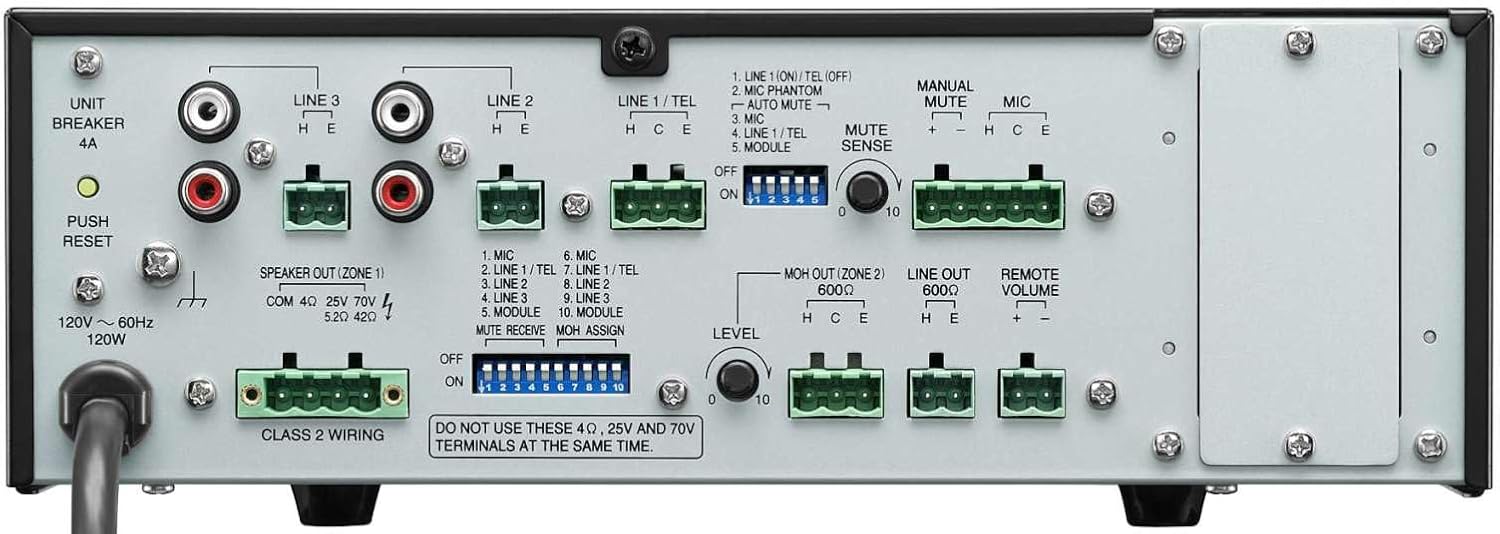
Figur 4.2: Tilslutninger på bagpanelet
This image shows the rear panel of the TOA BG-2060 Mixer Amplifier, detailing its connectivity options. Visible are the power input, speaker outputs (4 Ohms, 25V, 70V), various input terminals (Mic, Line 1/Tel, Line 2, Line 3, Module), MOH output, Line output, Remote Volume control, and DIP switches for configuration.
- Strømindgang: Tilslutning af netledning.
- UNIT BREAKER: Resettable circuit breaker.
- Speaker Output (ZONE 1): Terminals for connecting speakers (4 Ohms, 25V, or 70V). Note: Do not use 4 Ohms, 25V, and 70V terminals at the same time.
- Indgangsterminaler:
- MIC: Balanced input for microphones, with +24V DC phantom power option.
- LINE 1/TEL: Selectable input for line-level devices or telephone paging.
- LINE 2, LINE 3: Unbalanced inputs for line-level devices (e.g., CD players, media players).
- MODUL: Input for optional modules.
- MOH OUT (ZONE 2): Music On Hold output, also assignable as a second zone output.
- LINE OUT: Unbalanced line-level output for connecting to external ampløftere eller optageapparater.
- FJERNBETJENINGSLYDSTYRKE: Terminals for connecting an optional remote volume control.
- DIP-switche: Configure various settings such as phantom power, input sensitivity, muting functions, and MOH assignment.
5. Opsætning
Follow these steps for initial setup of your BG-2060 Mixer Amplivligere.
- Sluk: Ensure the unit's power switch is in the OFF position and the power cord is disconnected.
- Højttalerforbindelse: Connect your speakers to the appropriate speaker output terminals (4 Ohms, 25V, or 70V) on the rear panel. Ensure correct polarity. Do not connect speakers to multiple output types simultaneously.
- Tilslutning af inputenhed: Connect your audio sources (microphones, music players, etc.) to the desired input terminals (MIC, LINE 1/TEL, LINE 2, LINE 3, MODULE) using appropriate cables and terminal plugs.
- DIP-switchkonfiguration: Refer to the rear panel diagram and the detailed instructions in the full manual for setting the DIP switches according to your specific needs (e.g., phantom power for microphones, mute settings).
- Valgfri tilslutninger: If using, connect to the MOH OUT, LINE OUT, or REMOTE VOLUME terminals.
- Strømtilslutning: Once all connections are secure, plug the power cord into a suitable AC outlet.
6. Betjening
Operating the BG-2060 is straightforward.
- Tænd: Turn the POWER switch on the front panel to the ON position. The POWER LED will illuminate blue.
- Input Volume Adjustment: Slowly turn up the volume knob for the input channel you wish to use (MIC, LINE 1/TEL, etc.).
- Master Volume Justering: Adjust the master volume control (if applicable, or use individual input volumes) to achieve the desired overall output level.
- Tone Control: Use the BASS and TREBLE controls to fine-tune the audio's low and high frequencies to your preference.
- Overvågning: Observe the SIGNAL and PEAK LEDs. The SIGNAL LED indicates audio presence. If the PEAK LED illuminates frequently or stays lit, reduce the input volume to prevent distortion.
- Muting funktion: If configured via DIP switches, utilize the manual or automatic mute functions as needed for paging or announcements.
7. Vedligeholdelse
Proper maintenance ensures the longevity and optimal performance of your mixer amplivligere.
- Rensning: Tør enheden af med en blød, tør klud. Brug ikke slibende rengøringsmidler, voks eller opløsningsmidler.
- Ventilation: Kontrollér regelmæssigt, at ventilationsåbningerne er fri for støv og snavs.
- Forbindelser: Sørg for, at alle kabelforbindelser er sikre og fri for korrosion.
- Opbevaring: Hvis enheden opbevares i længere tid, skal den afbrydes fra strømmen og opbevares et køligt og tørt sted.
8. Fejlfinding
Se tabellen nedenfor for almindelige problemer og deres løsninger.
| Problem | Mulig årsag | Løsning |
|---|---|---|
| Ingen strøm | Power cord disconnected; Unit breaker tripped; Power outlet issue. | Check power cord connection; Press UNIT BREAKER button on rear panel; Test power outlet with another device. |
| Ingen lydudgang | Input volume too low; Speaker connections incorrect; Mute function active; Incorrect input selected. | Increase input and master volumes; Verify speaker wiring and impedance; Check DIP switch settings for mute; Ensure correct input source is active. |
| Forvrænget lyd | Input signal too high (PEAK LED on); Incorrect impedance matching; Faulty cable. | Reduce input volume; Ensure speaker impedance matches amplifier output; Replace cables. |
| Brummende eller summende lyd | Ground loop; Loose connections; Interference from other electronics. | Ensure proper grounding; Check all cable connections; Move unit away from other electronic devices. |
9. Specifikationer
| Feature | Detalje |
|---|---|
| Strømkilde | 120 V AC, 60 Hz |
| Nominel output | 60W |
| Indgange | Mic: -60 dB, 600 Ohms, balanced; Line 1/TEL: -10 dB/-20 dB, 10 kOhms, balanced; Line 2, 3: -10 dB, 10 kOhms, unbalanced; Modules |
| Udgange | Speaker: 4 Ohms, 25 V (10 Ohms), 70 V (83 Ohms), balanced; MOH: 0 dB, 600 Ohms, balanced; Line: 0 dB, 600 Ohms, unbalanced |
| Udgangsregulering | 2 dB or less, no load to full load (1 kHz) |
| Fantomkraft | On/Off switch for Mic, +24 V DC |
| Tonekontrol | Bass: +/- 10 dB at 100 Hz; Treble: +/- 10 dB at 10 kHz |
| muting | Manual mute/Automatic mute |
| Indikatorer | Power LED, Signalniveau LED, Peak LED |
| Dimensioner (BxHxD) | 10.39 x 3.71 x 10.52 tommer |
| Vægt | 11.68 pund |
10. Garanti og support
For warranty information and technical support, please refer to the documentation provided with your purchase or visit the official TOA Electronics webwebsted.
Ask a question about this manual
Ask about setup, troubleshooting, compatibility, parts, safety, or missing instructions. Manuals+ will review the question and use this page’s manual context to help answer it.